Minecraft version
Back to mods 
CurseForge · Minecraft mod
Smooth FreeCam
A smooth spectator-style freecam. Fly the camera freely while your player stays frozen, then glide back into gameplay with a smooth transition.
Choose a version Pick your version below, then grab the matching file.
Quick answer
Which Smooth FreeCam release should I use?
Latest stable file smooth_freecam-1.0
Game version 26.3
Loader NeoForge
Smooth FreeCam smooth_freecam-1.0 targets 26.3 with NeoForge. The project page does not say whether this file belongs on the client, dedicated server, or both. No extra mods listed for this file.
Where it goes
Is Smooth FreeCam required on the client, server, or both?
The project page does not say whether this file belongs on the client, dedicated server, or both.
Client Source doesn’t say
Dedicated server Source doesn’t say
Loader for this release NeoForge
Required install it here Optional supported, not mandatory Not supported do not install here Source doesn’t say do not assume
The source does not explicitly classify this release as client-only or server-only.
What else does Smooth FreeCam smooth_freecam-1.0 need?
smooth_freecam-1.0. Change the file and its required mods may change too.
This file does not list any required mods. Do not add a library just because a different file uses it.
This file does not list any required or optional mods.
Before you install it
Add Smooth FreeCam without breaking your instance.
Built for Smooth FreeCam smooth_freecam-1.0. Pick another file and the loader, install side or required mods may change.
- 01
Stick to this file
Use smooth_freecam-1.0. It targets 26.3 with NeoForge; another release may have different loader, side or dependency requirements.
- 02
Bring the mods it needs
This file does not list any required mods. Do not add a library just because a different file uses it.
- 03
Put it on the correct side
The project page does not say whether this file belongs on the client, dedicated server, or both.
- 04
Pick the file you checked
Use the “Get this file” button beside smooth_freecam-1.0. It opens that exact file at the source.
About this project
What does Smooth FreeCam add?
Smooth Freecam
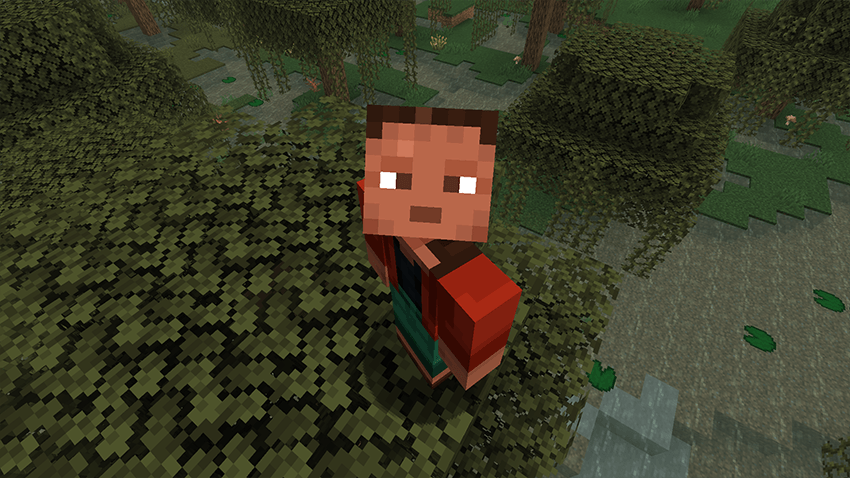
Detach your camera and fly freely around the world. while your player stays frozen in place. When you're done, the view smoothly glides back into your body instead of snapping instantly.
Perfect for cinematic shots, base tours, scouting terrain, or just exploring from a better angle.
Features
- Smooth freecam flight with acceleration and glide (spectator-like feel)
- Your player stays frozen at their original position while you fly the camera
- Smooth ease-in/out return when exiting freecam
- Adjustable speed with the mouse scroll wheel
- Sprint to boost freecam speed
- HUD is hidden while freecam is active
- Fully configurable movement feel via config
Controls
- Toggle Freecam — F6 (default, remappable in Controls)
- Move — WASD
- Up / Down — Jump / Sneak
- Look — Mouse
- Speed Boost — Sprint
- Change Speed — Mouse Scroll Wheel
- Press Number 1 while you are in freecam you can lock the cam and move the player
Update 1.1

Configuration
All options are available in the Forge config:
moveSpeed — Base freecam speed
sprintMultiplier — Speed boost while sprinting
acceleration — How quickly the camera reaches target speed
friction — How quickly the camera slows down when you stop
transitionTicks — Duration of the smooth return to gameplayNotes
Client-side freecam experience
Freecam cannot be toggled while dead, riding a vehicle, or with a GUI open
Project description from CurseForge.
Pick your setup
Smooth FreeCam by Minecraft version and loader
Choose the version and loader you play, then open the matching release.
Minecraft version
26.2
3 loader buildsMinecraft version
26.1.2
2 loader buildsMinecraft version
26.1.1
2 loader buildsMinecraft version
26.1
2 loader buildsMinecraft version
1.21.5
1 loader buildMinecraft version
1.21.4
1 loader buildMinecraft version
1.21.3
1 loader buildMinecraft version
1.21.2
1 loader buildMinecraft version
1.21.1
2 loader buildsMinecraft version
1.20.1
2 loader buildsMinecraft version
1.20
1 loader buildShowing the newest 12 of 13 game versions. Older files are in the list below.
Check the dependencies, then try the file in a copied instance before changing a world you care about.
Recent files
Smooth FreeCam versions and loaders
smooth_freecam-1.0
smooth_freecam-neoforge-1.0.0.jar
29 Sept 2026
Client Source doesn’t say Server Source doesn’t say Dependencies No extras listed Listed on Release listing
Check the 26.3 · NeoForge setup NeoForge26.3 release
smooth_freecam-1.0
smooth_freecam-fabric-1.0.0.jar
29 Sept 2026
Client Source doesn’t say Server Source doesn’t say Dependencies No extras listed Listed on Release listing
Check the 26.3 · Fabric setup Fabric26.3 release
smooth_freecam-1.0
smooth_freecam-forge-1.0.0.jar
29 Sept 2026
Client Source doesn’t say Server Source doesn’t say Dependencies No extras listed Listed on Release listing
Check the 26.3 · Forge setup Forge26.3 release
smooth_freecam-1.1
smooth_freecam-1.0.jar
14 Sept 2026
Client Source doesn’t say Server Source doesn’t say Dependencies No extras listed Listed on Release listing
Check the 1.21.1 · NeoForge setup 1.21.1NeoForge release
smooth_freecam-1.1
smooth_freecam-1.0.jar
14 Sept 2026
Client Source doesn’t say Server Source doesn’t say Dependencies No extras listed Listed on Release listing
Check the 1.21.1 · Fabric setup Fabric1.21.1 release
smooth_freecam-1.0
smooth_freecam-1.0.jar
12 Sept 2026
Client Source doesn’t say Server Source doesn’t say Dependencies No extras listed Listed on Release listing
Check the 1.20.1 · Fabric setup Fabric1.20.1 release
smooth_freecam-1.1
smooth_freecam-1.0.jar
7 Sept 2026
Client Source doesn’t say Server Source doesn’t say Dependencies No extras listed Listed on Release listing
Check the 26.2 · NeoForge setup NeoForge26.126.1.126.1.2 release
smooth_freecam-1.1
smooth_freecam-1.0.jar
7 Sept 2026
Client Source doesn’t say Server Source doesn’t say Dependencies No extras listed Listed on Release listing
Check the 26.2 · Fabric setup Fabric26.126.1.126.1.2 release
smooth_freecam-1.1
smooth_freecam-1.0.jar
7 Sept 2026
Client Source doesn’t say Server Source doesn’t say Dependencies No extras listed Listed on Release listing
Check the 26.2 · Forge setup Forge26.2 release
smooth_freecam-1.2
smooth_freecam-1.0.jar
3 Sept 2026
Client Source doesn’t say Server Source doesn’t say Dependencies No extras listed Listed on Release listing
Check the 1.20.1 · Forge setup 1.20.1Forge release
smooth_freecam-1.1
smooth_freecam-1.0.jar
10 Aug 2026
Client Source doesn’t say Server Source doesn’t say Dependencies No extras listed Listed on Release listing
Check the 1.19.2 · Forge setup Forge1.19.2 release
smooth_freecam-1.1
smooth_freecam-1.0.jar
10 Aug 2026
Client Source doesn’t say Server Source doesn’t say Dependencies No extras listed Listed on Release listing
Check the 1.20.1 · Forge setup 1.20.1Forge release
Looking for an older file? The official CurseForge project page is in Resources.
 mod
mod CurseForge + Modrinth · Minecraft
Icarus
Adds a bunch of colourful and unique wings that can be worn in the Trinkets/Curios Cape slot.
 mod
mod CurseForge · Minecraft
soulslike magic
this mod contains miracles and is inspired by dark souls/soulborne miracles
 mod
mod CurseForge · Minecraft
BSP RANKUP
An automatic ranking system designed to work with Luckperms and Forge