Minecraft version
Back to mods 
CurseForge · Minecraft mod
FootFall
Adds realistic footprints to minecraft
Choose a version Pick your version below, then grab the matching file.
Quick answer
Which FootFall release should I use?
Latest stable file Footfall 1.0.0
Game version 1.21.1
Loader NeoForge
Footfall 1.0.0 targets 1.21.1 with NeoForge. The project page does not say whether this file belongs on the client, dedicated server, or both. No extra mods listed for this file.
Where it goes
Is FootFall required on the client, server, or both?
The project page does not say whether this file belongs on the client, dedicated server, or both.
Client Source doesn’t say
Dedicated server Source doesn’t say
Loader for this release NeoForge
Required install it here Optional supported, not mandatory Not supported do not install here Source doesn’t say do not assume
The source does not explicitly classify this release as client-only or server-only.
What else does Footfall 1.0.0 need?
Footfall 1.0.0. Change the file and its required mods may change too.
This file does not list any required mods. Do not add a library just because a different file uses it.
This file does not list any required or optional mods.
Before you install it
Add FootFall without breaking your instance.
Built for Footfall 1.0.0. Pick another file and the loader, install side or required mods may change.
- 01
Stick to this file
Use Footfall 1.0.0. It targets 1.21.1 with NeoForge; another release may have different loader, side or dependency requirements.
- 02
Bring the mods it needs
This file does not list any required mods. Do not add a library just because a different file uses it.
- 03
Put it on the correct side
The project page does not say whether this file belongs on the client, dedicated server, or both.
- 04
Pick the file you checked
Use the “Get this file” button beside Footfall 1.0.0. It opens that exact file at the source.
About this project
What does FootFall add?
FootFall
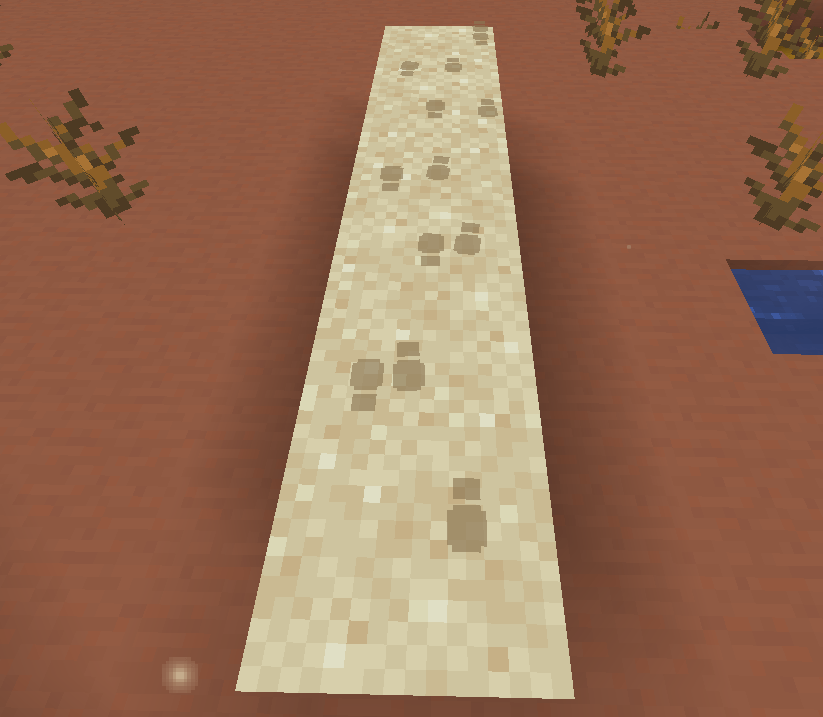
Footprints pressed into snow, sand, mud, gravel and dirt as you walk: left, right, turned the way you were heading, fading out behind you. Animals, monsters and other players near you leave tracks as well. Client side only.

Support me and get early access on my Patreon.
Who leaves tracks
- You, other players and any mob up to 1.8 blocks wide within 32 blocks, mobs from other mods included.
- Players leave boot soles, everything else leaves paw pads.
- Size and spacing follow the body: a chicken leaves small prints close together, a horse large ones far apart.
- Sneaking leaves no prints ("Quiet sneaking", on by default).
Ground
- Nine kinds of ground take a print: snow, sand, red sand, mud, gravel, dirt, podzol, mycelium and dirt paths.
- Each presses its own colour: blue-grey in snow, red in red sand.
- A print is shaded by the light where it was pressed: dim in a dark cave, darker at night.
- Each step kicks up a small puff in the colour of the ground.
Settings
- A print lasts 45 seconds (5 to 180). At most 600 exist at once (50 to 2000), and the oldest go first.
- Switches for your own prints, creature prints, quiet sneaking and step puffs. Print opacity is 70 percent by default.
/footfall ringstamps a test circle of prints around you,/footfall clearwipes them all.- On 1.21.1 and 26.2 the settings are a Footfall page in Sodium's video settings.
config/footfall.jsonworks on every build.
Requirements
Minecraft 1.20.1 (Forge or Fabric, Java 17), 1.21.1 (NeoForge or Fabric, Java 21) or 26.2 (NeoForge or Fabric, Java 25). Fabric needs Fabric API. Client only: it works on any server, and under Sodium and Iris shader packs. Sodium is optional.
This mod has been abandoned. It works fine, but it will not receive updates.

Related mods

NeoForge 1.21.1 and 26.2, Forge 1.20.1, Fabric 1.20.1, 1.21.1 and 26.2. Client only. Free to use in modpacks.
Project description from CurseForge.
Pick your setup
FootFall by Minecraft version and loader
Choose the version and loader you play, then open the matching release.
Minecraft version
1.21.1
2 loader buildsMinecraft version
1.20.1
2 loader buildsCheck the dependencies, then try the file in a copied instance before changing a world you care about.
Recent files
FootFall versions and loaders
Footfall 1.0.0 (Forge 1.20.1) - ResourcePackInfo fix
footfall-forge-1.20.1.jar
3 Aug 2026
Client Source doesn’t say Server Source doesn’t say Dependencies No extras listed Listed on Release listing
Check the 1.20.1 · Forge setup 1.20.1Forge beta
Footfall 1.0.0 (NeoForge 26.2)
footfall-neoforge-26.2.jar
19 Jul 2026
Client Source doesn’t say Server Source doesn’t say Dependencies No extras listed Listed on Release listing
Check the 26.2 · NeoForge setup NeoForge26.2 beta
Footfall 1.0.0 (Fabric 26.2)
footfall-fabric-26.2.jar
19 Jul 2026
Client Source doesn’t say Server Source doesn’t say Dependencies No extras listed Listed on Release listing
Check the 26.2 · Fabric setup Fabric26.2 beta
Footfall 1.0.0 (Forge 1.20.1)
footfall-forge-1.20.1.jar
19 Jul 2026
Client Source doesn’t say Server Source doesn’t say Dependencies No extras listed Listed on Release listing
Check the 1.20.1 · Forge setup 1.20.1Forge beta
Footfall 1.0.0 (Fabric 1.20.1)
footfall-fabric-1.20.1.jar
19 Jul 2026
Client Source doesn’t say Server Source doesn’t say Dependencies No extras listed Listed on Release listing
Check the 1.20.1 · Fabric setup Fabric1.20.1 beta
Footfall 1.0.0 (Fabric 1.21.1)
footfall-fabric-1.21.1.jar
19 Jul 2026
Client Source doesn’t say Server Source doesn’t say Dependencies No extras listed Listed on Release listing
Check the 1.21.1 · Fabric setup Fabric1.21.1 beta
Footfall 1.0.0
footfall-neoforge-1.21.1.jar
19 Jul 2026
Client Source doesn’t say Server Source doesn’t say Dependencies No extras listed Listed on Release listing
Check the 1.21.1 · NeoForge setup 1.21.1NeoForge release
Looking for an older file? The official CurseForge project page is in Resources.
 mod
CurseForge · Minecraft
Cinematic Interactions: Modded Stations
An add-on for Cinematic Interactions: work Farmer's Delight pots, Cultural Delights ovens and vats, Tide's angling table and more by hand, in the world, instead of in a GUI.
 mod
CurseForge · Minecraft
Realistic Night Vision Goggles
This Mod makes nights and caves properly dark and adds night vision goggles that work like real ones.
 mod
CurseForge + Modrinth · Minecraft
Fowl Play
Adding more birds to your Minecraft world!