TrafficCraft Needed by TrafficCraft: Traffic light countdown 1.1.2-1.21.1-neoforge
requiredMatching file found Matched file: trafficcraft-neoforge-1.21.1-1.1.3
CurseForge · Minecraft mod
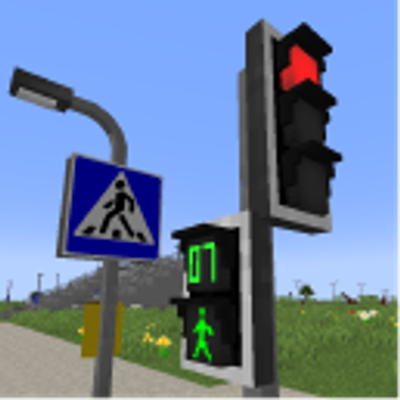
Client-side addon for TrafficCraft by MrJulsen. Adds a countdown timer overlay to traffic lights. Three-section lights show the timer on the yellow segment, two-section lights show it on the currently unlit segment, single-section lights are skipped.
Quick answer
TrafficCraft: Traffic light countdown 1.1.2-1.21.1-neoforge targets 1.21.1 with NeoForge. The project page does not say whether this file belongs on the client, dedicated server, or both. All 3 required mods have matching files.
Where it goes
The project page does not say whether this file belongs on the client, dedicated server, or both.
The source does not explicitly classify this release as client-only or server-only.
1.1.2-1.21.1-neoforge. Change the file and its required mods may change too.
Install TrafficCraft, DragonLib, Architectury API first. We found matching files for this game-version and loader setup.
We only count dependency files that match this setup. A file for another loader does not fill the gap.
Before you install it
Built for TrafficCraft: Traffic light countdown 1.1.2-1.21.1-neoforge. Pick another file and the loader, install side or required mods may change.
Use 1.1.2-1.21.1-neoforge. It targets 1.21.1 with NeoForge; another release may have different loader, side or dependency requirements.
Install TrafficCraft, DragonLib, Architectury API first. We found matching files for this game-version and loader setup.
The project page does not say whether this file belongs on the client, dedicated server, or both.
Use the “Get this file” button beside 1.1.2-1.21.1-neoforge. It opens that exact file at the source.
About this project
A client-side Fabric addon for TrafficCraft by MrJulsen. Adds a countdown timer overlay on traffic lights — just like real-world traffic signals with countdown displays.
This mod renders a 7-segment digital countdown directly on the traffic light itself, showing how many seconds remain until the next phase change. It reads the schedule of each traffic light (or observes it, if controlled remotely) and displays the timer on the appropriate segment:
The digits are color-coded to match the currently active signal (red or green), and are hidden entirely during yellow transition phases, since they're too short to be useful.
-- -- when the game is paused, blinks 99 for overly long phasesYou must have all of the following installed:
Project description from CurseForge.
Pick your setup
Choose the version and loader you play, then open the matching release.
Check the dependencies, then try the file in a copied instance before changing a world you care about.
Recent files
tlcountdown-neoforge-1.21.1-1.1.2.jar
27 Nov 2026
tlcountdown-fabric-1.21.1-1.1.2.jar
27 Nov 2026
tlcountdown-forge-1.20.1-1.1.2.jar
27 Nov 2026
tlcountdown-fabric-1.20.1-1.1.2.jar
27 Nov 2026
tlcountdown-neoforge-1.21.1-1.1.1.jar
16 Aug 2026
tlcountdown-fabric-1.21.1-1.1.1.jar
13 Aug 2026
tlcountdown-forge-1.20.1-1.1.1.jar
22 Jul 2026
tlcountdown-fabric-1.20.1-1.1.1.jar
22 Jul 2026
tlcountdown-fabric-1.20.1-1.1.0.jar
22 Jul 2026
tlcountdown-forge-1.20.1-1.1.0.jar
22 Jul 2026
trafficcraft-traffic-light-countdown-1.0.0.jar
20 Jul 2026
Looking for an older file? The official CurseForge project page is in Resources.
 mod
Library for YACL which adds new ways to customize a config menu for developers
 mod
Client-side addon for TrafficCraft by MrJulsen. Adds a countdown timer overlay to traffic lights. Three-section lights show the timer on the yellow segment, two-section lights show it on the currently unlit segment, single-section lights are skipped.
 mod
More building shapes for Biomes O' Plenty woods, stones and gems, with slabs, vertical placement, steps, corners, stairs and walls. Requires Sky's Building Pieces.