Minecraft version
Back to mods 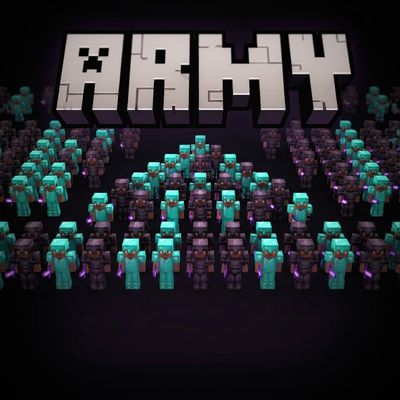
CurseForge · Minecraft mod
WraithArmy
Wraitharmy adds lag-free AI PvP bots to the game that operate natively on Minecraft's core engine without relying on server-heavy background commands. These relentless bots fast Auto-Totem and Nethpot reflexes.
Choose a version Pick your version below, then grab the matching file.
Quick answer
Which WraithArmy release should I use?
Latest stable file Wraitharmy_v-1.0.1_mc-26.2.jar
Game version 26.2
Loader Fabric
Wraitharmy_v-1.0.1_mc-26.2.jar targets 26.2 with Fabric. The project page does not say whether this file belongs on the client, dedicated server, or both. No extra mods listed for this file.
Where it goes
Is WraithArmy required on the client, server, or both?
The project page does not say whether this file belongs on the client, dedicated server, or both.
Client Source doesn’t say
Dedicated server Source doesn’t say
Loader for this release Fabric
Required install it here Optional supported, not mandatory Not supported do not install here Source doesn’t say do not assume
The source does not explicitly classify this release as client-only or server-only.
What else does Wraitharmy_v-1.0.1_mc-26.2.jar need?
Wraitharmy_v-1.0.1_mc-26.2.jar. Change the file and its required mods may change too.
This file does not list any required mods. Do not add a library just because a different file uses it.
This file does not list any required or optional mods.
Before you install it
Add WraithArmy without breaking your instance.
Built for Wraitharmy_v-1.0.1_mc-26.2.jar. Pick another file and the loader, install side or required mods may change.
- 01
Stick to this file
Use Wraitharmy_v-1.0.1_mc-26.2.jar. It targets 26.2 with Fabric; another release may have different loader, side or dependency requirements.
- 02
Bring the mods it needs
This file does not list any required mods. Do not add a library just because a different file uses it.
- 03
Put it on the correct side
The project page does not say whether this file belongs on the client, dedicated server, or both.
- 04
Pick the file you checked
Use the “Get this file” button beside Wraitharmy_v-1.0.1_mc-26.2.jar. It opens that exact file at the source.
About this project
What does WraithArmy add?
🤖 WraithArmy
The Ultimate Cinematic AI & PvP Combat Engine for Fabric 1.21.11
Welcome to Neon Wraiths, an advanced military AI framework built not just for hardcore PvP training, but engineered specifically for creating massive, cinematic combat experiences in Minecraft. Whether you want to simulate epic battlefield clashes, test out tactical formations, or fight against God-level AI, this mod gives you absolute control over an intelligent army of bots.
Currently, the engine is hyper-optimized for the Nethpot (Netherite + Potions) meta, allowing bots to fight with real-player logic, strafing, and inventory management.
📊 AI Difficulty Tiers
The bots are divided into 4 specific tiers, each with its own dedicated command prefix for quick battlefield management:
lt (Low Tier): Basic grunts, slower reaction times, perfect for large-scale cinematic hordes.
mt (Medium Tier): Capable fighters with balanced pathfinding and combat logic.
ht (High Tier): God-level AI. Frame-perfect reactions, flawless spacing, and relentless Nethpot management.
sl (Solo): Specialized tier for spawning a single, highly focused duelist.
💻 Neon Wraiths: Command Reference Guide Below is the complete list of commands to control your AI army.
🔑 Key Parameters (Used in commands)
Before using the commands, here are the variables you can choose from:
<tier>: lt (Low), mt (Medium), ht (High), sl (Solo)
<pvp_mode>: nethpot
<armor>: diamond, netherite
<formation>: circle, grid, line, random, spearhead, square, wall
1️⃣ Tier-Specific Commands
Use these commands to control a specific group of bots. Just replace <tier> with lt, mt, ht, or sl.
Spawn Bots:
/<tier> spawn <count> <pvp_mode> <armor> <formation>
**Example: **
/lt spawn 10 nethpot diamond grid (Spawns 10 Low-Tier bots in a grid formation).
Combat & Targeting:
/<tier> attack <player_name> — Sends this specific tier to attack a target.
/<tier> follow <player_name> — Makes this tier act as bodyguards for a player.
/<tier> passive — Forces this tier to stop attacking and become peaceful.
/<tier> stop — Instantly freezes all bots in this tier.
Change Formation (Mid-Battle):
/<tier> formation <formation> — Reorganizes alive bots into a new formation.
2️⃣ Global Army Commands (Master Controls)
Need to control the entire battlefield at once? Use the /wraith prefix to command every active bot simultaneously, regardless of their tier.
/wraith attack <player_name> — Orders ALL active bots to hunt down a specific player.
/wraith follow <player_name> — Orders ALL bots to rally and follow a specific player.
/wraith tp — Instantly teleports every active bot to your current location.
/wraith stop — The master freeze switch. Halts all actions and movement for every single bot.
3️⃣ Custom Named Bots (For Cinematics & Roleplay)
Want to spawn a bot with a specific player's name tag? Use this specialized master spawn command.
/wraith spawn <player_name> <tier> <pvp_mode> <count> <armor> <formation>
Examples:
/wraith spawn Dream ht nethpot 1 netherite circle
/wraith spawn TargetAlpha mt nethpot 5 diamond wall
_Requires: Fabric API | Version: Minecraft 1.21.11 | Author: ESTEEM_
Project description from CurseForge.
Pick your setup
WraithArmy by Minecraft version and loader
Choose the version and loader you play, then open the matching release.
Minecraft version
1.21.11
1 loader buildCheck the dependencies, then try the file in a copied instance before changing a world you care about.
Recent files
WraithArmy versions and loaders
Wraitharmy_v-1.0.1_mc-26.2.jar
Wraitharmy_v-1.1_mc-26.2.jar
22 Aug 2026
Client Source doesn’t say Server Source doesn’t say Dependencies No extras listed Listed on Release listing
Check the 26.2 · Fabric setup Fabric26.2 release
Wraitharmy_v-1.0.0_mc-1.21.11.jar
Wraitharmy_v-1.0_mc-1.21.11.jar
20 Jul 2026
Client Source doesn’t say Server Source doesn’t say Dependencies No extras listed Listed on Release listing
Check the 1.21.11 · Fabric setup Fabric1.21.11 release
Looking for an older file? The official CurseForge project page is in Resources.
 mod
mod CurseForge + Modrinth · Minecraft
Jungdab's Turrets
Adds various turrets that can be customized with a simple targeting system and upgrade chips.
mod
Modrinth · Minecraft
TotemWarner
Warns you about if you have no totem in offhand.
 mod
mod Modrinth · Minecraft
Universal Enchants
Better enchantments! Use them on all tools and weapons. Infinity crossbow, or looting trident anyone?