Minecraft version
Back to mods 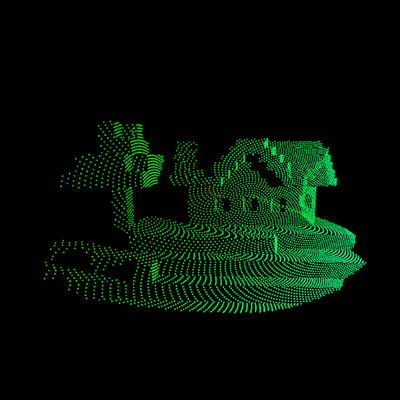
CurseForge · Minecraft mod
YCK's LIDAR
Lidar transforms Minecraft into a world of darkness where handheld scanners reveal terrain and entities as private point clouds. Upgrade through four scanner tiers to unlock longer range, highlighting modes, scan memory, and automatic scanning.
Choose a version Pick your version below, then grab the matching file.
Quick answer
Which YCK's LIDAR release should I use?
Latest stable file LIDAR - Fabric 1.21.1 - 1.3.2
Game version 1.21.1
Loader Fabric
YCK's LIDAR LIDAR - Fabric 1.21.1 - 1.3.2 targets 1.21.1 with Fabric. The project page does not say whether this file belongs on the client, dedicated server, or both. No extra mods listed for this file.
Where it goes
Is YCK's LIDAR required on the client, server, or both?
The project page does not say whether this file belongs on the client, dedicated server, or both.
Client Source doesn’t say
Dedicated server Source doesn’t say
Loader for this release Fabric
Required install it here Optional supported, not mandatory Not supported do not install here Source doesn’t say do not assume
The source does not explicitly classify this release as client-only or server-only.
What else does YCK's LIDAR LIDAR - Fabric 1.21.1 - 1.3.2 need?
LIDAR - Fabric 1.21.1 - 1.3.2. Change the file and its required mods may change too.
This file does not list any required mods. Do not add a library just because a different file uses it.
This file does not list any required or optional mods.
Before you install it
Add YCK's LIDAR without breaking your instance.
Built for YCK's LIDAR LIDAR - Fabric 1.21.1 - 1.3.2. Pick another file and the loader, install side or required mods may change.
- 01
Stick to this file
Use LIDAR - Fabric 1.21.1 - 1.3.2. It targets 1.21.1 with Fabric; another release may have different loader, side or dependency requirements.
- 02
Bring the mods it needs
This file does not list any required mods. Do not add a library just because a different file uses it.
- 03
Put it on the correct side
The project page does not say whether this file belongs on the client, dedicated server, or both.
- 04
Pick the file you checked
Use the “Get this file” button beside LIDAR - Fabric 1.21.1 - 1.3.2. It opens that exact file at the source.
About this project
What does YCK's LIDAR add?
Lidar
Explore Minecraft in complete darkness by painting the world with Lidar point-cloud scans. Start with just a simple scanner and upgrade until you can restore the light.
(Playing with subtitles enabled and sound turned on is highly advised)
Features
- Reveal terrain by right-clicking with a scanner.
- Detect mobs, players, dropped items, and XP orbs.
- Highlight entities in purple and ores in yellow.
- Detect liquids and important blocks such as chests, furnaces, portals, and spawners.
- Configure scan distance, field of view, ray density, and memory behavior.
- Store previous scans or automatically remove older results.
- Use the Horizon Scanner for silent automatic scanning.
- Press G to open the Lidar Control Array.
Scanner Progression
| Tier | Scanner | Range | Main Unlocks |
|---|---|---|---|
| 1 | Pulse | 15 blocks | Basic surface and entity scanning |
| 2 | Spectrum | 20 blocks | Purple entity highlighting and yellow ores |
| 3 | Biosphere | 42 blocks | Distance colors, liquids, important blocks, and optimized memory |
| 4 | Horizon | 60 blocks | Adjustable FOV and automatic scanning |
Light and Darkness
Consume The Sun to permanently restore normal Minecraft rendering. Use The Black Hole to return to the Lidar darkness experience.
Multiplayer Friendly
Scan points, settings, and scan memory remain entirely on your client. Your scans are never transmitted to or displayed for other players.
(This mod is not affiliated with any other mod or creator)
Project description from CurseForge.
Pick your setup
YCK's LIDAR by Minecraft version and loader
Choose the version and loader you play, then open the matching release.
Check the dependencies, then try the file in a copied instance before changing a world you care about.
Recent files
YCK's LIDAR versions and loaders
LIDAR - Fabric 1.21.1 - 1.3.2
lidar-fabric-1.21.1-1.3.2.jar
21 Jul 2026
Client Source doesn’t say Server Source doesn’t say Dependencies No extras listed Listed on Release listing
Check the 1.21.1 · Fabric setup Fabric1.21.1 release
LIDAR - NeoForge 1.21.1 - 1.3.2
lidar-neoforge-1.21.1-1.3.2.jar
21 Jul 2026
Client Source doesn’t say Server Source doesn’t say Dependencies No extras listed Listed on Release listing
Check the 1.21.1 · NeoForge setup 1.21.1NeoForge release
LIDAR - Fabric 1.21.1 - 1.2.3
lidar-fabric-1.21.1-1.2.3.jar
20 Jul 2026
Client Source doesn’t say Server Source doesn’t say Dependencies No extras listed Listed on Release listing
Check the 1.21.1 · Fabric setup Fabric1.21.1 beta
Looking for an older file? The official CurseForge project page is in Resources.
 mod
CurseForge + Modrinth · Minecraft
Adventure Item Names
Unique names for weapons, tools, armour and items found throughout your world.
 mod
CurseForge · Minecraft
Neural Exosuit
A modular sci-fi exosuit that deploys from a neural band, with per-skin helmet visors, a full HUD, jetpack, shield, Aegis hearts, grapple and FE-powered upgrade chips.
 mod
CurseForge · Minecraft
Andromeda Origins
13 fantasy Origins with unique powers, strengths, and weaknesses, built for Andromeda MC.