Minecraft version
Back to mods 
CurseForge · Minecraft mod
Dark early loading
Change the neo-forge loading screen darker
Choose a version Pick your version below, then grab the matching file.
Quick answer
Which Dark early loading release matches 1.21.2?
Best match for your filters EarlyLoading-2.2-neoforge
Game version 1.21, 1.21.4, 1.21.1
Loader NeoForge
Dark early loading EarlyLoading-2.2-neoforge targets 1.21, 1.21.4, 1.21.1 with NeoForge. The project page does not say whether this file belongs on the client, dedicated server, or both. No extra mods listed for this file.
Where it goes
Is Dark early loading required on the client, server, or both?
The project page does not say whether this file belongs on the client, dedicated server, or both.
Client Source doesn’t say
Dedicated server Source doesn’t say
Loader for this release NeoForge
Required install it here Optional supported, not mandatory Not supported do not install here Source doesn’t say do not assume
The source does not explicitly classify this release as client-only or server-only.
What else does Dark early loading EarlyLoading-2.2-neoforge need?
EarlyLoading-2.2-neoforge on 1.21.2. Every mod below is checked against that same setup.
This file does not list any required mods. Do not add a library just because a different file uses it.
This file does not list any required or optional mods.
Before you install it
Add Dark early loading without breaking your instance.
Built for Dark early loading EarlyLoading-2.2-neoforge on 1.21.2. Pick another file and the loader, install side or required mods may change.
- 01
Stick to this file
Use EarlyLoading-2.2-neoforge. It targets 1.21, 1.21.4, 1.21.1 with NeoForge; another release may have different loader, side or dependency requirements.
- 02
Bring the mods it needs
This file does not list any required mods. Do not add a library just because a different file uses it.
- 03
Put it on the correct side
The project page does not say whether this file belongs on the client, dedicated server, or both.
- 04
Pick the file you checked
Use the “Get this file” button beside EarlyLoading-2.2-neoforge. It opens that exact file at the source.
About this project
What does Dark early loading add?
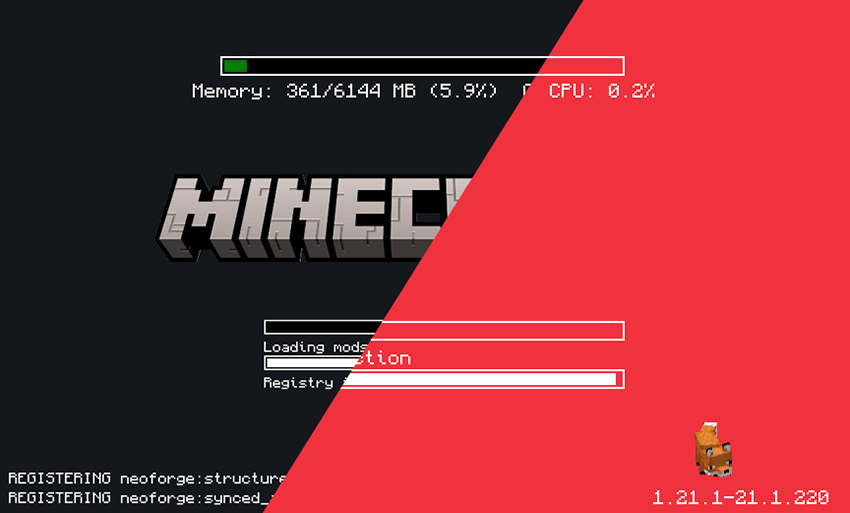
All code authorship belongs to Lukáš Kaňka; I was not involved in any way in the development of this mod.
My participation is limited to modifying the compiled JAR file to alter visual aspects to my liking. If there are any problems with the programming, performance, or errors, I recommend going to the original author's website, from where I obtained the file I'm sharing here.
https://www.curseforge.com/minecraft/mc-mods/simple-custom-early-loading
Since my contribution was visual, I can alter only what the config file and my graphics files allow.

This mod allows the customization of Neoforge's early loading screen.
As the original mod allows all the options mentioned by its author.
Features:
- add and position custom images (see supported image formats)
- toggle and change the position of the progress bar
- toggle performance bar
- toggle NeoForge's fox
- toggle bottom left log
- toggle NeoForge's version (bottom right)

Installation
- Just leave it in to the mods folder.
- when you run minecraft, you'll see an alert windows said something like "you didn't change manually the config file. do you wanna make it automatically?" press yes, and run minecraft again.
- now you can see loading screen darker.
If you wish to make the modifications manually, follow the author's steps.
- place the jar in the mods folder
- modify the
config/fml.tomlfile
# Early window provider
earlyWindowProvider = "SimpleCustomEarlyLoading"
# ... Other options ...
# Optionally set the window to be maximized
earlyWindowMaximized = true

Some options that I left
If you want to change something, like background, or logo, maybe hiding things in the corners…
- Go to the config folder.
- Look for
simple-custom-early-loading(here you can change everything that appears on screen). - If you want the simple logo, look for the line that says
"image": "logoplain.png"
- logoplain.png - is simple
- logof.png - is the game's most recent logo
- loading.apng - is an animation of the word "loading"
If you want to change the background, look for the line "image": "plaindark.png"
- plaindark.png - is the default dark version
- plaindark2.png - is a version with decorative corners
- stellarview.png - is a screenshot of the Minecraft sky using a mod the author used
If you want to use custom images, you can create a folder inside the config/simple-custom-early-loading ,put yours images there, and go to modify the simple-custom-early-loading.json file.
Project description from CurseForge.
Pick your setup
Dark early loading by Minecraft version and loader
Choose the version and loader you play, then open the matching release.
Minecraft version
1.21.3
1 loader buildMinecraft version
1.21.2
1 loader buildMinecraft version
1.21.1
1 loader buildMinecraft version
1.21
1 loader buildCheck the dependencies, then try the file in a copied instance before changing a world you care about.
Recent files
Dark early loading versions and loaders
EarlyLoading-2.2-neoforge
SimpleCustomEarlyLoading-2.2-neoforge.jar
21 Jul 2026
Client Source doesn’t say Server Source doesn’t say Dependencies No extras listed Listed on Release listing
Check the 1.21.2 · NeoForge setup 1.211.21.41.21.11.21.3 release
Looking for an older file? The official CurseForge project page is in Resources.
 mod
CurseForge + Modrinth · Minecraft
BadOptimizations
Optimization mod that focuses on things other than rendering
 mod
CurseForge + Modrinth · Minecraft
Optimized Block Entities [OBE]
A client-side optimization mod to make block entities render faster
 mod
CurseForge + Modrinth · Minecraft
TAM Ecliptic Seasons Bridge
Bridge mod for TrueAdaptiveMusic that adds compatibility with EclipticSeasons