Minecraft version
Back to mods 
CurseForge · Minecraft mod
Chat Resizer
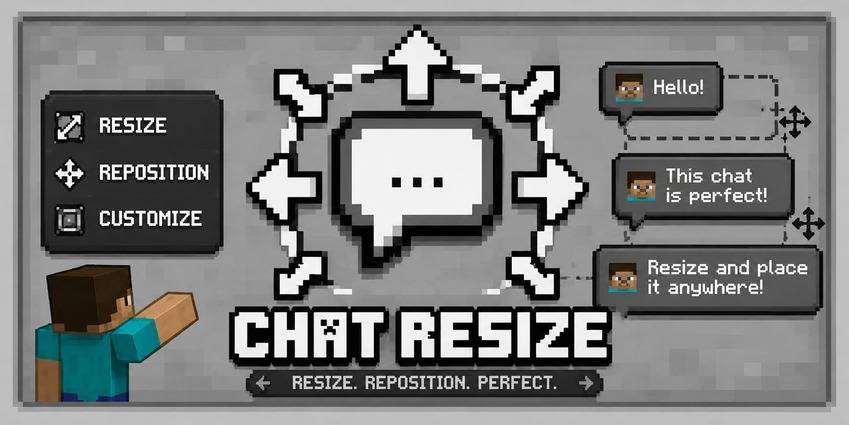
Take full control of your chat resize, reposition, and customize with live preview.
Choose a version Pick your version below, then grab the matching file.
Quick answer
Which Chat Resizer release should I use?
Latest stable file Chat Resizer 1.1.0 (Fabric 26.3)
Game version 26.3
Loader Fabric
Chat Resizer 1.1.0 (Fabric 26.3) targets 26.3 with Fabric. The project page does not say whether this file belongs on the client, dedicated server, or both. No extra mods listed for this file.
Where it goes
Is Chat Resizer required on the client, server, or both?
The project page does not say whether this file belongs on the client, dedicated server, or both.
Client Source doesn’t say
Dedicated server Source doesn’t say
Loader for this release Fabric
Required install it here Optional supported, not mandatory Not supported do not install here Source doesn’t say do not assume
The source does not explicitly classify this release as client-only or server-only.
What else does Chat Resizer 1.1.0 (Fabric 26.3) need?
Chat Resizer 1.1.0 (Fabric 26.3). Change the file and its required mods may change too.
This file does not list any required mods. Do not add a library just because a different file uses it.
This file does not list any required or optional mods.
Before you install it
Add Chat Resizer without breaking your instance.
Built for Chat Resizer 1.1.0 (Fabric 26.3). Pick another file and the loader, install side or required mods may change.
- 01
Stick to this file
Use Chat Resizer 1.1.0 (Fabric 26.3). It targets 26.3 with Fabric; another release may have different loader, side or dependency requirements.
- 02
Bring the mods it needs
This file does not list any required mods. Do not add a library just because a different file uses it.
- 03
Put it on the correct side
The project page does not say whether this file belongs on the client, dedicated server, or both.
- 04
Pick the file you checked
Use the “Get this file” button beside Chat Resizer 1.1.0 (Fabric 26.3). It opens that exact file at the source.
About this project
What does Chat Resizer add?
Chat Resizer
A client-side mod to resize, reposition, and customize your Minecraft chat.
Chat Resizer gives you full control over the in-game chat interface. Adjust scale, position, opacity, and background settings with instant real-time previews.
Features
Scaling Control
- Uniform Scale: Adjust overall chat size while preserving the original aspect ratio.
- X / Y Scale: Stretch or compress horizontal width and vertical height independently.
- Range: Adjust all scales anywhere from 0% to 200%.
Positioning
- X Offset: Shift chat left or right (±300px).
- Y Offset: Shift chat up or down (±300px).
Appearance & Input
- Background Control: Toggle the chat background panel on or off, or adjust transparency from 0% to 100%.
- Typing Bar Support: The chat input box (<kbd>T</kbd>) automatically resizes to match your custom chat width.
- Live Preview: See layout changes instantly in the background while adjusting settings.
Config Screen
Features a two-column config menu with a semi-transparent overlay, letting you see the game in real time while tuning sliders. Includes standard Reset (vanilla defaults), Done (save), and Cancel options.
Highlights
- Client-Side Only: Works on any server without requiring server-side installation.
- Lightweight: Uses minimal mixins with zero impact on frame rates.
- Multi-Loader: Supports Fabric, Forge, and NeoForge standalone with no required dependencies.
Compatibility
| Mod Loader | Status |
|---|---|
| Fabric | Supported |
| Forge | Supported |
| NeoForge | Supported |
How to Use
- Install the mod for your preferred loader.
- Launch Minecraft and join any world or server.
- Open the config menu via Mod Menu (Fabric) or the Mods screen (Forge / NeoForge). You can also set a dedicated hotkey in Options > Controls.
- Adjust sliders to your preferred layout and press Done to save.
Tip: Set Scale to 45% and Y Offset to 120px for a compact chat window that sits right above the hotbar.
Frequently Asked Questions
**Q: How do I access the config in fabric?**You need to get a mod menu installed than access the config of the mod.
Q: Does the server need this mod installed?
No. It is 100% client-side and works on any vanilla server, Realm, or modded server.
Q: Can I put this in my modpack?
Yes. You are free to include Chat Resizer in any public or private modpack on Modrinth, CurseForge, or other launcher platforms.
Q: Does this work with other chat mods?
Yes. Chat Resizer only modifies the scale, position, and background container of the chat overlay. It works alongside formatting, timestamp, and chat history mods.
Q: What if I lose my chat or set bad values?
Open the config screen and click Reset at the bottom left to instantly bring back vanilla defaults.
Modpack Policy
You are welcome to include Chat Resizer in any modpack. No explicit permission is needed.
Bug Reports & Source
Report bugs, request features, or check out the source code on the GitHub repository issue tracker.
License
Distributed under the MIT License.
Created by Xeonz.
Project description from CurseForge.
Pick your setup
Chat Resizer by Minecraft version and loader
Choose the version and loader you play, then open the matching release.
Minecraft version
26.2
3 loader buildsMinecraft version
26.1.2
3 loader buildsMinecraft version
26.1.1
3 loader buildsMinecraft version
26.1
3 loader buildsMinecraft version
1.21.11
3 loader buildsCheck the dependencies, then try the file in a copied instance before changing a world you care about.
Recent files
Chat Resizer versions and loaders
Chat Resizer 1.1.0 (Fabric 26.3)
ChatResizer-mc26.3-v1.1.0-fabric.jar
17 Oct 2026
Client Source doesn’t say Server Source doesn’t say Dependencies No extras listed Listed on Release listing
Check the 26.3 · Fabric setup Fabric26.3 release
Chat Resizer 1.1.0 (Forge 26.3)
ChatResizer-mc26.3-v1.1.0-forge.jar
17 Oct 2026
Client Source doesn’t say Server Source doesn’t say Dependencies No extras listed Listed on Release listing
Check the 26.3 · Forge setup Forge26.3 release
Chat Resizer 1.1.0 (NeoForge 26.3)
ChatResizer-mc26.3-v1.1.0-neoforge.jar
17 Oct 2026
Client Source doesn’t say Server Source doesn’t say Dependencies No extras listed Listed on Release listing
Check the 26.3 · NeoForge setup NeoForge26.3 release
ChatResizer-mc1.21.11-v1.0.1-fabric.jar
22 Jul 2026
Client Source doesn’t say Server Source doesn’t say Dependencies No extras listed Listed on Release listing
Check the 1.21.11 · Fabric setup Fabric1.21.11 release
ChatResizer-mc1.21.11-v1.0.1-forge.jar
22 Jul 2026
Client Source doesn’t say Server Source doesn’t say Dependencies No extras listed Listed on Release listing
Check the 1.21.11 · Forge setup Forge1.21.11 release
ChatResizer-mc1.21.11-v1.0.1-neoforge.jar
22 Jul 2026
Client Source doesn’t say Server Source doesn’t say Dependencies No extras listed Listed on Release listing
Check the 1.21.11 · NeoForge setup NeoForge1.21.11 release
ChatResizer-mc26.1.x-v1.0.1-fabric.jar
21 Jul 2026
Client Source doesn’t say Server Source doesn’t say Dependencies No extras listed Listed on Release listing
Check the 26.1.2 · Fabric setup Fabric26.126.1.126.1.2 release
ChatResizer-mc26.1.x-v1.0.1-forge.jar
21 Jul 2026
Client Source doesn’t say Server Source doesn’t say Dependencies No extras listed Listed on Release listing
Check the 26.1.2 · Forge setup Forge26.126.1.126.1.2 release
ChatResizer-mc26.1.x-v1.0.1-neoforge.jar
21 Jul 2026
Client Source doesn’t say Server Source doesn’t say Dependencies No extras listed Listed on Release listing
Check the 26.1.2 · NeoForge setup NeoForge26.126.1.126.1.2 release
ChatResizer-mc26.2-v1.0.0-fabric.jar
21 Jul 2026
Client Source doesn’t say Server Source doesn’t say Dependencies No extras listed Listed on Release listing
Check the 26.2 · Fabric setup Fabric26.2 release
ChatResizer-mc26.2-v1.0.0-forge.jar
21 Jul 2026
Client Source doesn’t say Server Source doesn’t say Dependencies No extras listed Listed on Release listing
Check the 26.2 · Forge setup Forge26.2 release
ChatResizer-mc26.2-v1.0.0-neoforge.jar
21 Jul 2026
Client Source doesn’t say Server Source doesn’t say Dependencies No extras listed Listed on Release listing
Check the 26.2 · NeoForge setup NeoForge26.2 release
Looking for an older file? The official CurseForge project page is in Resources.
 mod
mod CurseForge · Minecraft
Mo' Enchantments Loot Compat
Makes Mo' Enchantments available in the enchanting table and loot, not only villager trades.
 mod
mod CurseForge · Minecraft
Inventory Damaged
Mod adds animations for destroying or removing the inventory when mob attacks the player.
 mod
mod CurseForge · Minecraft
StackAnvil Bedrock Addon for ViaFabricPlus
Experimental Bedrock Edition support for ViaFabricPlus, with Friends, Realms, skins, and StackAnvil patches.