Minecraft version
Back to mods 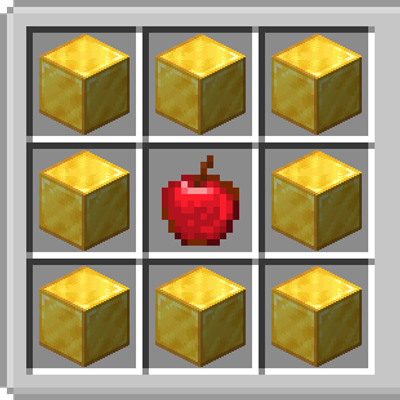
CurseForge · Minecraft mod
old recipes
Brings back classic and forgotten crafting recipes from older versions of Minecraft, updated for Fabric 26.1.2.
Choose a version Pick your version below, then grab the matching file.
Quick answer
Which old recipes release should I use?
Latest stable file OldRecipes-Forge-26.2-1.0.1-FIXED.jar
Game version 26.2
Loader Forge
old recipes OldRecipes-Forge-26.2-1.0.1-FIXED.jar targets 26.2 with Forge. The project page does not say whether this file belongs on the client, dedicated server, or both. No extra mods listed for this file.
Where it goes
Is old recipes required on the client, server, or both?
The project page does not say whether this file belongs on the client, dedicated server, or both.
Client Source doesn’t say
Dedicated server Source doesn’t say
Loader for this release Forge
Required install it here Optional supported, not mandatory Not supported do not install here Source doesn’t say do not assume
The source does not explicitly classify this release as client-only or server-only.
What else does old recipes OldRecipes-Forge-26.2-1.0.1-FIXED.jar need?
OldRecipes-Forge-26.2-1.0.1-FIXED.jar. Change the file and its required mods may change too.
This file does not list any required mods. Do not add a library just because a different file uses it.
This file does not list any required or optional mods.
Before you install it
Add old recipes without breaking your instance.
Built for old recipes OldRecipes-Forge-26.2-1.0.1-FIXED.jar. Pick another file and the loader, install side or required mods may change.
- 01
Stick to this file
Use OldRecipes-Forge-26.2-1.0.1-FIXED.jar. It targets 26.2 with Forge; another release may have different loader, side or dependency requirements.
- 02
Bring the mods it needs
This file does not list any required mods. Do not add a library just because a different file uses it.
- 03
Put it on the correct side
The project page does not say whether this file belongs on the client, dedicated server, or both.
- 04
Pick the file you checked
Use the “Get this file” button beside OldRecipes-Forge-26.2-1.0.1-FIXED.jar. It opens that exact file at the source.
About this project
What does old recipes add?
📜 Old Recipes
Bring back many of Minecraft's classic and forgotten crafting recipes!
Old Recipes restores crafting and smelting recipes from Minecraft's history, allowing you to experience many of the recipes that were removed or changed over the years while playing on modern Fabric 26.1.2.
Whether you're a longtime Minecraft player or simply want more crafting options, this mod lets you relive pieces of Minecraft's past.
📖 Restored Recipes 🍎 Golden Apple (Beta 1.9 Pre-release)
Craft a Golden Apple using:
🍎 1 Apple 🟡 8 Gold Nuggets ✨ Enchanted Golden Apple (Beta 1.9 – 1.8)
Craft an Enchanted Golden Apple using:
🍎 1 Apple 🟨 8 Gold Blocks ⛵ Old Boat Recipe (Before 1.9)
Craft a Boat using:
🪵 5 Wooden Planks 🪓 1 Wooden Shovel ⛓️ Chainmail Armor (Classic Recipe)
Craft all four Chainmail armor pieces using Blaze Powder.
Helmet Chestplate Leggings Boots 🪨 Stonecutter (1.14 Snapshot Recipe)
Craft a Stonecutter using:
4 Cobblestone 🌐 Cobweb Recipe
Craft:
Cobweb from String String from Cobweb 🟤 Cocoa Beans (Before Cocoa Pods)
Craft Cocoa Beans using:
Red Dye Yellow Dye Ink Sac 🐴 Saddle Recipe
Craft a Saddle instead of only finding one in loot.
🪢 Lead Recipe
Craft Leads using:
String Slime Ball 🍯 Honeycomb Block
Craft Honeycomb Blocks from Honeycombs.
🍄 Classic Mushroom Smelting
Smelt mushrooms and fungi into dyes:
🔴 Red Mushroom → Red Dye 🟤 Brown Mushroom → Brown Dye 🌺 Crimson Fungus → Pink Dye 🔵 Warped Fungus → Light Blue Dye 🍎 Apple to Arrow
A fun recipe inspired by Minecraft's early development:
Apple → Arrow ❤️ Why This Mod?
Minecraft has changed a lot over the years, and many recipes have been removed, replaced, or forgotten.
This mod brings many of those classic recipes back so you can enjoy them again in modern Minecraft.
⚠️ Version Support Notice
As of this release, my new standalone mods are moving to Fabric 26.1.2.
What this means: ✅ All new standalone mods will be released for Fabric 26.1.2. ❌ I will not be backporting this mod or my future standalone mods to Minecraft 1.20.1. ✅ My Minecraft 1.20.1 modpacks are NOT discontinued and may continue to receive updates.
This change only affects my standalone mods, not my existing 1.20.1 modpacks.
Project description from CurseForge.
Pick your setup
old recipes by Minecraft version and loader
Choose the version and loader you play, then open the matching release.
Minecraft version
26.1.2
2 loader buildsMinecraft version
1.21.11
1 loader buildMinecraft version
1.20.1
1 loader buildCheck the dependencies, then try the file in a copied instance before changing a world you care about.
Recent files
old recipes versions and loaders
OldRecipes-Forge-26.2-1.0.1-FIXED.jar
8 Sept 2026
Client Source doesn’t say Server Source doesn’t say Dependencies No extras listed Listed on Release listing
Check the 26.2 · Forge setup Forge26.2 release
OldRecipes-Forge-26.1.2-1.0.1-FIXED.jar
8 Sept 2026
Client Source doesn’t say Server Source doesn’t say Dependencies No extras listed Listed on Release listing
Check the 26.1.2 · Forge setup Forge26.1.2 release
OldRecipes-Forge-1.21.11-1.0.1-FIXED.jar
8 Sept 2026
Client Source doesn’t say Server Source doesn’t say Dependencies No extras listed Listed on Release listing
Check the 1.21.11 · Forge setup Forge1.21.11 release
old_recipes-1.0.0-forge-1.20.1.jar
6 Aug 2026
Client Source doesn’t say Server Source doesn’t say Dependencies No extras listed Listed on Release listing
Check the 1.20.1 · Forge setup 1.20.1Forge release
old_recipes-1.0.0-fabric-26.1.2.jar
23 Jul 2026
Client Source doesn’t say Server Source doesn’t say Dependencies No extras listed Listed on Release listing
Check the 26.1.2 · Fabric setup Fabric26.1.2 release
Looking for an older file? The official CurseForge project page is in Resources.
 mod
mod CurseForge · Minecraft
Caerula Arbor
Adapted from Mitsuki and Caerula Arbor from Arknights, which adds varieties of water mobs invading the Land.
 mod
mod CurseForge · Minecraft
DropHalloween
This Halloween mod adds simple decorations.
 mod
mod CurseForge · Minecraft
KitchenDecoration
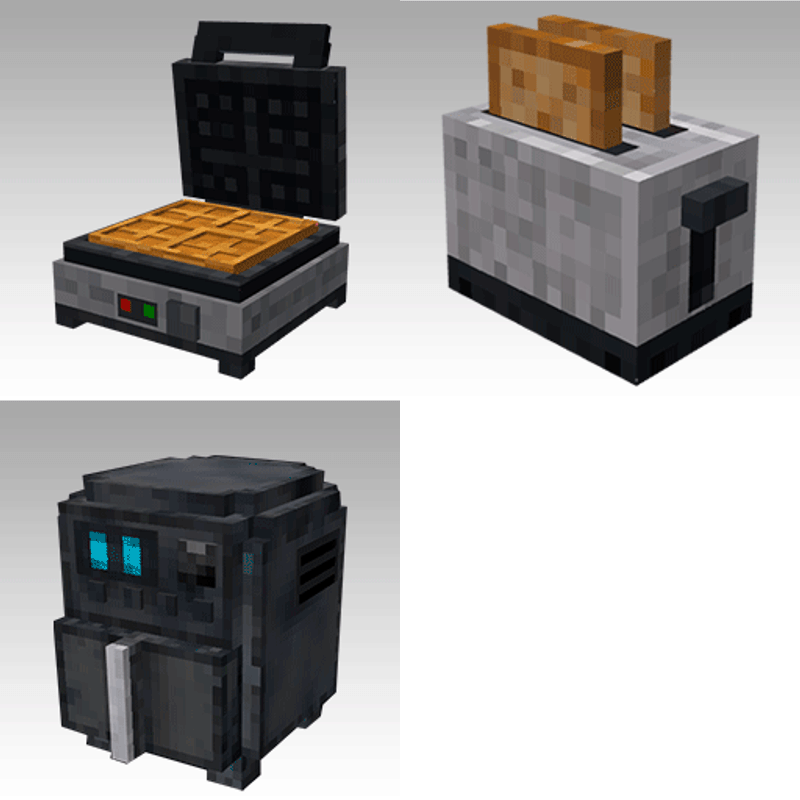
Add a variety of kitchen appliances🍳