Minecraft version
Back to mods 
CurseForge · Minecraft mod
EquipmentQuality
Equipment Quality - Minecraft Fabric Mod
Choose a version Pick your version below, then grab the matching file.
Quick answer
Which EquipmentQuality release matches Fabric?
Best match for your filters EquipmentQuality 1.21.11 FabricColor Table Rework - per-entry value-to-color mapping
Game version 1.20.1
Loader Fabric
EquipmentQuality 1.21.11 FabricColor Table Rework - per-entry value-to-color mapping targets 1.20.1 with Fabric. The project page does not say whether it belongs on the client. The project page does not say whether it belongs on the dedicated server. No extra mods listed for this file.
Where it goes
Is EquipmentQuality required on the client, server, or both?
The project page does not say whether it belongs on the client. The project page does not say whether it belongs on the dedicated server.
Client Source doesn’t say
Dedicated server Source doesn’t say
Loader for this release Fabric
Required install it here Optional supported, not mandatory Not supported do not install here Source doesn’t say do not assume
The source does not explicitly classify this release as client-only or server-only.
What else does EquipmentQuality 1.21.11 FabricColor Table Rework - per-entry value-to-color mapping need?
EquipmentQuality 1.21.11 FabricColor Table Rework - per-entry value-to-color mapping on Fabric. Every mod below is checked against that same setup.
This file does not list any required mods. Do not add a library just because a different file uses it.
This file does not list any required or optional mods.
Before you install it
Add EquipmentQuality without breaking your instance.
Built for EquipmentQuality 1.21.11 FabricColor Table Rework - per-entry value-to-color mapping on Fabric. Pick another file and the loader, install side or required mods may change.
- 01
Stick to this file
Use EquipmentQuality 1.21.11 FabricColor Table Rework - per-entry value-to-color mapping. It targets 1.20.1 with Fabric; another release may have different loader, side or dependency requirements.
- 02
Bring the mods it needs
This file does not list any required mods. Do not add a library just because a different file uses it.
- 03
Put it on the correct side
The project page does not say whether it belongs on the client. The project page does not say whether it belongs on the dedicated server.
- 04
Pick the file you checked
Use the “Get this file” button beside EquipmentQuality 1.21.11 FabricColor Table Rework - per-entry value-to-color mapping. It opens that exact file at the source.
About this project
What does EquipmentQuality add?
English Version (Top/First)
Equipment Quality
Adds an equipment quality system to Minecraft, giving your weapons and armor unique qualities and affixes.
Features
7 Quality Tiers — Poor → Common → Uncommon → Rare → Epic → Legendary → Mythic. The higher the quality, the better the attributes.
Rich Affix System — Dozens of affixes including Weapon Damage, Critical Hit Rate, Critical Hit Damage, Armor Bonus, Health Bonus, Thorns, Dodge, Shield Block, Shield Bash, and more.
Forge Table — Use experience to enhance equipment, reroll affixes, and reset quality through star upgrades (no experience levels required).
Visual Damage Indicators — Damage and healing are displayed as floating numbers. Critical hits feature a special gold ✧ icon.
Shield Effects — Exclusive affixes for shields including Block, Bash, Cooldown, and Reflection.
Mod Compatibility — Automatically generates qualities for all qualifying items without requiring additional configuration.
Commands
Command Description
/eqc <target> <quality> [affixJSON] Sets the quality and affixes for the item in the target's hand.
/give <target> <item> <amount> [q:<quality>:{affixes}] Gives an item with specific quality and affixes.
/eq Opens the Forge Table.
Quality Colors
§7 Poor · §f Common · §a Uncommon · §9 Rare · §5 Epic · §6 Legendary · §d Mythic
Author
CNNRS Server Admin
License
MIT License
中文版本 (Chinese Version)
(放在英文下方,用分隔符隔开即可)
装备品质 (Equipment Quality)
为 Minecraft 添加装备品质系统,让你的武器和护甲拥有独一无二的品质与词条。
特性
7 个品质等级 — 劣质 → 普通 → 优秀 → 精良 → 史诗 → 传说 → 神话,品质越高属性越好
丰富词条系统 — 武器伤害、暴击率、暴击伤害、护甲加成、生命加成、荆棘、闪避、盾牌格挡、盾击等数十种词条
锻造台 — 投入经验强化装备、洗练词条、升星重置品质,不需要经验等级
可视化伤害数字 — 伤害和治疗以浮动数字显示,暴击有特殊金✧标识
盾牌特效 — 格挡、盾击、冷却、反射等专属词条
适配其他模组 — 自动为所有符合条件的物品生成品质,无需额外配置
命令
命令 说明
/eqc <目标> <品质> [词条JSON] 为目标手上的物品设置品质和词条
/give <目标> <物品> <数量> [q:<品质>:{词条}] 给予带品质的物品
/eq 打开锻造台
品质颜色
§7 劣质 · §f 普通 · §a 优秀 · §9 精良 · §5 史诗 · §6 传说 · §d 神话
作者
CNNRS服主
许可
MIT License
Project description from CurseForge.
Pick your setup
EquipmentQuality by Minecraft version and loader
Choose the version and loader you play, then open the matching release.
Check the dependencies, then try the file in a copied instance before changing a world you care about.
Recent files
EquipmentQuality versions and loaders
EquipmentQuality 1.21.11 FabricColor Table Rework - per-entry value-to-color mapping
eq-2.0.1+1.21.11.jar
1 Aug 2026
Client Source doesn’t say Server Source doesn’t say Dependencies No extras listed Listed on Release listing
Check the 1.20.1 · Fabric setup Fabric1.20.1 release
EquipmentQuality 1.21.10 FabricColor Table Rework - per-entry value-to-color mapping
eq-2.0.1+1.21.10.jar
1 Aug 2026
Client Source doesn’t say Server Source doesn’t say Dependencies No extras listed Listed on Release listing
Check the 1.20.1 · Fabric setup Fabric1.20.1 release
EquipmentQuality 1.21.9 FabricColor Table Rework - per-entry value-to-color mapping
eq-2.0.1+1.21.9.jar
1 Aug 2026
Client Source doesn’t say Server Source doesn’t say Dependencies No extras listed Listed on Release listing
Check the 1.20.1 · Fabric setup Fabric1.20.1 release
EquipmentQuality 1.21.8 FabricColor Table Rework - per-entry value-to-color mapping
eq-2.0.1+1.21.8.jar
1 Aug 2026
Client Source doesn’t say Server Source doesn’t say Dependencies No extras listed Listed on Release listing
Check the 1.20.1 · Fabric setup Fabric1.20.1 release
EquipmentQuality 1.21.7 FabricColor Table Rework - per-entry value-to-color mapping
eq-2.0.1+1.21.7.jar
1 Aug 2026
Client Source doesn’t say Server Source doesn’t say Dependencies No extras listed Listed on Release listing
Check the 1.20.1 · Fabric setup Fabric1.20.1 release
EquipmentQuality 1.21.6 FabricColor Table Rework - per-entry value-to-color mapping
eq-2.0.1+1.21.6.jar
1 Aug 2026
Client Source doesn’t say Server Source doesn’t say Dependencies No extras listed Listed on Release listing
Check the 1.20.1 · Fabric setup Fabric1.20.1 release
EquipmentQuality 1.21.5 FabricColor Table Rework - per-entry value-to-color mapping
eq-2.0.1+1.21.5.jar
1 Aug 2026
Client Source doesn’t say Server Source doesn’t say Dependencies No extras listed Listed on Release listing
Check the 1.20.1 · Fabric setup Fabric1.20.1 release
EquipmentQuality 1.21.3 FabricColor Table Rework - per-entry value-to-color mapping
eq-2.0.1+1.21.3.jar
1 Aug 2026
Client Source doesn’t say Server Source doesn’t say Dependencies No extras listed Listed on Release listing
Check the 1.20.1 · Fabric setup Fabric1.20.1 release
EquipmentQuality 1.21.2 FabricColor Table Rework - per-entry value-to-color mapping
eq-2.0.1+1.21.2.jar
1 Aug 2026
Client Source doesn’t say Server Source doesn’t say Dependencies No extras listed Listed on Release listing
Check the 1.20.1 · Fabric setup Fabric1.20.1 release
EquipmentQuality 1.21.1 FabricColor Table Rework - per-entry value-to-color mapping
eq-2.0.1+1.21.1.jar
1 Aug 2026
Client Source doesn’t say Server Source doesn’t say Dependencies No extras listed Listed on Release listing
Check the 1.20.1 · Fabric setup Fabric1.20.1 release
EquipmentQuality 1.21 FabricColor Table Rework - per-entry value-to-color mapping
eq-2.0.1+1.21.jar
1 Aug 2026
Client Source doesn’t say Server Source doesn’t say Dependencies No extras listed Listed on Release listing
Check the 1.20.1 · Fabric setup Fabric1.20.1 release
EquipmentQuality 1.20.6 FabricColor Table Rework - per-entry value-to-color mapping
eq-2.0.1+1.20.6.jar
1 Aug 2026
Client Source doesn’t say Server Source doesn’t say Dependencies No extras listed Listed on Release listing
Check the 1.20.1 · Fabric setup Fabric1.20.1 release
Looking for an older file? The official CurseForge project page is in Resources.
 mod
mod CurseForge · Minecraft
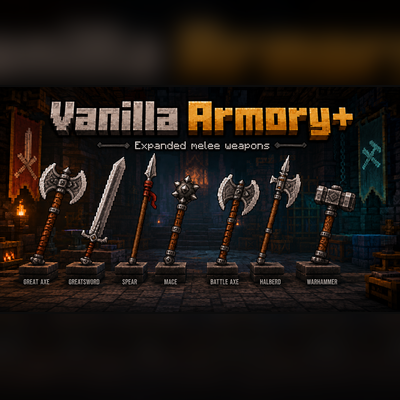
Vanilla Armory+
A mod bringing 7 new melee weapons into the game.
 mod
mod CurseForge · Minecraft
Good Dog-Armor
This mod adds new dog armor—complete with powerful power-ups. Make your dog unstoppable now!
 mod
mod CurseForge · Minecraft
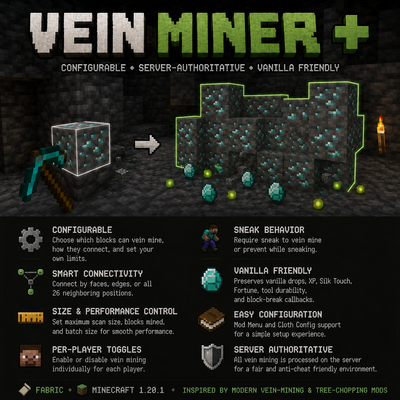
Vein Miner Plus
A mod I created to quickly mine veins of ore, and dig clay & gravel!