Minecraft version
Back to mods 
CurseForge · Minecraft mod
Patchwork: Simulated Factories
A mod to virtualize your factories
Choose a version Pick your version below, then grab the matching file.
Quick answer
Which Patchwork: Simulated Factories release should I use?
Latest stable file patchwork-0.1.6.jar
Game version 26.1.2
Loader NeoForge
Patchwork: Simulated Factories patchwork-0.1.6.jar targets 26.1.2 with NeoForge. The project page does not say whether this file belongs on the client, dedicated server, or both. No extra mods listed for this file.
Where it goes
Is Patchwork: Simulated Factories required on the client, server, or both?
The project page does not say whether this file belongs on the client, dedicated server, or both.
Client Source doesn’t say
Dedicated server Source doesn’t say
Loader for this release NeoForge
Required install it here Optional supported, not mandatory Not supported do not install here Source doesn’t say do not assume
The source does not explicitly classify this release as client-only or server-only.
What else does Patchwork: Simulated Factories patchwork-0.1.6.jar need?
patchwork-0.1.6.jar. Change the file and its required mods may change too.
This file does not list any required mods. Do not add a library just because a different file uses it.
This file does not list any required or optional mods.
Before you install it
Add Patchwork: Simulated Factories without breaking your instance.
Built for Patchwork: Simulated Factories patchwork-0.1.6.jar. Pick another file and the loader, install side or required mods may change.
- 01
Stick to this file
Use patchwork-0.1.6.jar. It targets 26.1.2 with NeoForge; another release may have different loader, side or dependency requirements.
- 02
Bring the mods it needs
This file does not list any required mods. Do not add a library just because a different file uses it.
- 03
Put it on the correct side
The project page does not say whether this file belongs on the client, dedicated server, or both.
- 04
Pick the file you checked
Use the “Get this file” button beside patchwork-0.1.6.jar. It opens that exact file at the source.
About this project
What does Patchwork: Simulated Factories add?
Patchwork adds a way to manage block interactions in a clear and flexible way using a data-driven node graph editor built right into the mod.
Using Patchwork, you can create an SF Network (Simulated Factory) of blocks, (such as machines), and virtually route their behavior. You can even interact with their GUIs fully remotely from within the Patchwork editor. You have the choice of connecting physically placed blocks to your network using an SF Interface, or alternatively to upload the blocks into the editor, allowing the SF Network to fully manage it for you without you having to place it anywhere.
Patchwork is sort of like a data-driven mix of AE2 and Compact Machines.
Getting started
To get started you need a mod that provides a power source, as Patchwork doesn't provide this.
All SF networks require at least five things;
- An SF Controller, to accept power into the network
- A power source for the SF Controller
- An SF Drive, to store the storage modules
- Virtual Storage Modules, to store the configurations
- and finally, an SF Terminal, to edit the configuration. Technically doesn't have to be present for the network to function once you've configured it, but it probably doesn't make sense to remove it ever, so effectively this is always required.
There are currently three storage tiers. The abilities of each tier are provided below.
| Tier | Max patches | Max virtualized blocks |
|---|---|---|
| 1 | 1 | 4 |
| 2 | 2 | 16 |
| 3 | 8 | 64 |
You can, however, add an unlimited amount of SF Interfaces to a network, regardless of storage.
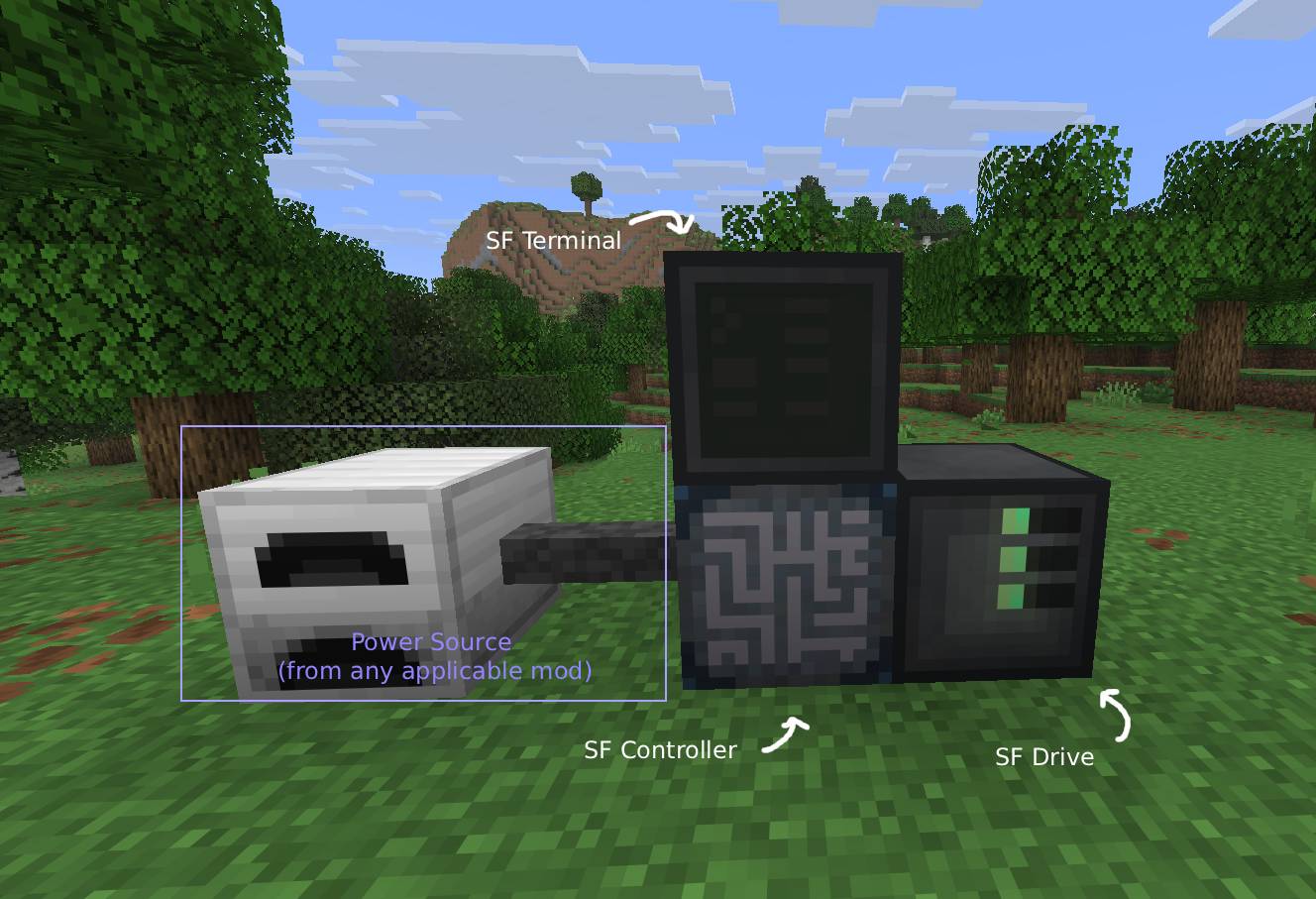
Once the storage has been placed into the SF Drive, feel free to open the SF Terminal and click the plus button. You can then shift click a block from your inventory to upload it to the system, and then open the "Virtual" tab on the right to drag them into the editor. You can now manage the block virtually! By clicking on the magnifying glass on a node, you can open it's GUI remotely and interact with it if necessary. By double clicking on a node, you can rename it, as well as manually modify the nodes inputs and outputs. Make sure you press CTRL+S (or the Save Button) on the top left to save your changes before you close the editor! As soon as you have saved, the SF Controller will begin executing the graph.
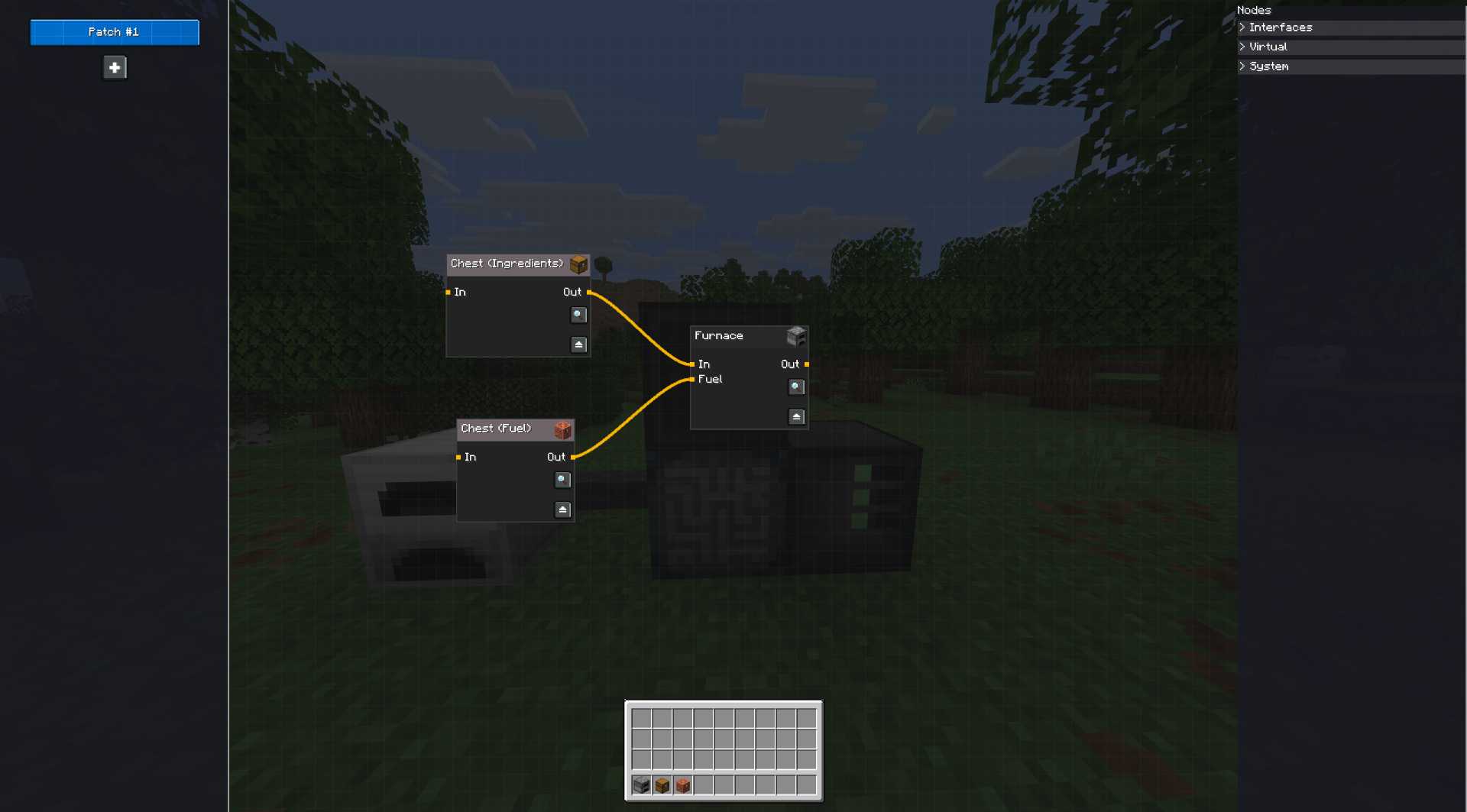
SF Interfaces
Alternatively, instead of virtualizing nodes, you can use SF Cables and SF Interfaces to manually plug a block into the network and configure it that way. Those appear under the "Interfaces" tab, but otherwise work just the same as virtualized blocks. This is how you get resources in and out of the world and into the network. Do keep in mind that SF Interfaces and ME Interfaces do not function the same way. An SF Interface is more akin to an ME Storage Bus than an ME Interface. SF Networks provide no inventories on their own to the network, and as such cannot expose directly an inventory to other blocks in the world. You must bring your own item storage and either virtualize it by uploading it into the editor, or attaching it with the SF Interface, thus allowing you to route the storage.
Mod Compatibility
SF Controllers should accept power from any block that can provide it using NeoForge's EnergyHandler capability. The mod also has explicit support for Mekanism and will automatically configure most Mekanism machines that are attached to the network, meaning you shouldn't have to bother with any block configurations other than adding upgrades or enabling Auto-sort.
Usage rights
You may distribute this mod in modpacks without asking me for permission as long as I remain credited; the mod itself already contains the author details so as long as that remains present you can just distribute it as is.
Project description from CurseForge.
Pick your setup
Patchwork: Simulated Factories by Minecraft version and loader
Choose the version and loader you play, then open the matching release.
Check the dependencies, then try the file in a copied instance before changing a world you care about.
Recent files
Patchwork: Simulated Factories versions and loaders
patchwork-0.1.6.jar
28 Jul 2026
Client Source doesn’t say Server Source doesn’t say Dependencies No extras listed Listed on Release listing
Check the 26.1.2 · NeoForge setup NeoForge26.1.2 release
patchwork-0.1.5.jar
27 Jul 2026
Client Source doesn’t say Server Source doesn’t say Dependencies No extras listed Listed on Release listing
Check the 26.1.2 · NeoForge setup NeoForge26.1.2 alpha
patchwork-0.1.4.jar
25 Jul 2026
Client Source doesn’t say Server Source doesn’t say Dependencies No extras listed Listed on Release listing
Check the 26.1.2 · NeoForge setup NeoForge26.1.2 alpha
Looking for an older file? The official CurseForge project page is in Resources.
 mod
mod CurseForge + Modrinth · Minecraft
BBL Dimensional Resources
Obtaining Resources from other planets using a Interdimensional Laser
 mod
mod CurseForge + Modrinth · Minecraft
Integrated Mining
Adds compatibility between several mining-related mods
 mod
mod CurseForge + Modrinth · Minecraft
LocalizedWeather
A Fabric mod that replaces Minecraft's global weather with localized weather zones. Each 256×256 block region gets its own weather, rain, snow, and thunderstorms happen independently across the world with biome-aware rules, smooth transitions, and blocky