Minecraft version
Back to mods 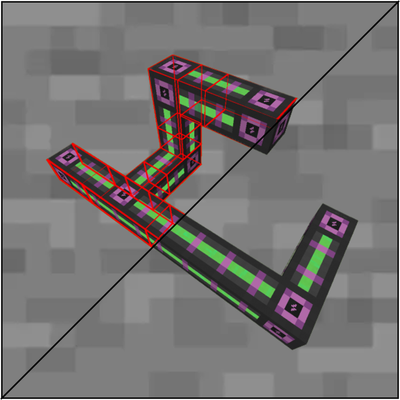
CurseForge · Minecraft mod
Pipe Highlighter
Effortlessly trace buried pipes and cables through walls with customizable X-Ray wireframes.
Choose a version Pick your version below, then grab the matching file.
Quick answer
Which Pipe Highlighter release should I use?
Latest stable file pipehighlighter-1.20.1-1.0.0.jar
Game version 1.20.1
Loader Forge
Pipe Highlighter pipehighlighter-1.20.1-1.0.0.jar targets 1.20.1 with Forge. The project page does not say whether this file belongs on the client, dedicated server, or both. No extra mods listed for this file.
Where it goes
Is Pipe Highlighter required on the client, server, or both?
The project page does not say whether this file belongs on the client, dedicated server, or both.
Client Source doesn’t say
Dedicated server Source doesn’t say
Loader for this release Forge
Required install it here Optional supported, not mandatory Not supported do not install here Source doesn’t say do not assume
The source does not explicitly classify this release as client-only or server-only.
What else does Pipe Highlighter pipehighlighter-1.20.1-1.0.0.jar need?
pipehighlighter-1.20.1-1.0.0.jar. Change the file and its required mods may change too.
This file does not list any required mods. Do not add a library just because a different file uses it.
This file does not list any required or optional mods.
Before you install it
Add Pipe Highlighter without breaking your instance.
Built for Pipe Highlighter pipehighlighter-1.20.1-1.0.0.jar. Pick another file and the loader, install side or required mods may change.
- 01
Stick to this file
Use pipehighlighter-1.20.1-1.0.0.jar. It targets 1.20.1 with Forge; another release may have different loader, side or dependency requirements.
- 02
Bring the mods it needs
This file does not list any required mods. Do not add a library just because a different file uses it.
- 03
Put it on the correct side
The project page does not say whether this file belongs on the client, dedicated server, or both.
- 04
Pick the file you checked
Use the “Get this file” button beside pipehighlighter-1.20.1-1.0.0.jar. It opens that exact file at the source.
About this project
What does Pipe Highlighter add?
Pipe Highlighter
Pipe Highlighter is a client-side utility mod for Minecraft 1.20.1 (Forge) that helps you easily locate and trace pipe networks, cables, and conduits through walls and terrain!
✨ Features
X-Ray Vision / Wall Penetration: Highlights pipe lines clearly, even if they are buried inside solid blocks or behind structures.
Accurate Shape Rendering: Accurately traces the actual multi-connection shape (
VoxelShape) of the block instead of showing simple 1x1x1 solid cubes.In-Game Toggle: Turn the highlight on/off at any time with a single keypress (Default key:
H, configurable in keybindings).Highly Configurable:
Custom Pipe Keywords: Easily add or remove target block IDs/keywords via the config file (e.g.,
pipe,cable,duct,conduit,tube). Supports pipes from Mekanism, Pipez, Create, Thermal Series, and more!Line Thickness: Adjust the highlight line width (1.0 to 10.0) in the config to match your preference.
Purely Client-Side: Works seamlessly on multiplayer servers without needing the mod to be installed on the server side!
⚙️ Configuration
After launching the game once, you can find the config file located at .minecraft/config/pipehighlighter-client.toml.
[general]
    # List of keywords or registry IDs to highlight
    keywords = ["pipe", "cable", "duct", "conduit", "tube"]

    # Highlight line thickness (Default: 3.0, Range: 1.0 - 10.0)
    lineWidth = 3.0
🎮 Controls
HKey: Toggle Pipe Highlighting ON / OFF
(You can rebind this key under Options -> Controls -> Key Binds -> Pipe Highlighter)
📦 Modpacks
Feel free to include this mod in any public or private modpacks!
Project description from CurseForge.
Pick your setup
Pipe Highlighter by Minecraft version and loader
Choose the version and loader you play, then open the matching release.
Check the dependencies, then try the file in a copied instance before changing a world you care about.
Recent files
Pipe Highlighter versions and loaders
pipehighlighter-1.20.1-1.0.0.jar
26 Jul 2026
Client Source doesn’t say Server Source doesn’t say Dependencies No extras listed Listed on Release listing
Check the 1.20.1 · Forge setup 1.20.1Forge release
Looking for an older file? The official CurseForge project page is in Resources.
 mod
Modrinth · Minecraft
Immersive Geology
An add-on for Immersive Engineering that implements many new ores and multi-block machines, the core of this mod is to implement real world ore processing in a fun way.
 mod
CurseForge · Minecraft
RPG Waypoints Map Addon
Map addon for RPG Waypoints and Compass, supporting custom map images!
 mod
CurseForge · Minecraft
RPG Compass and Waypoints
A customizable compass and waypoints mod