swem-addendum Optional for SwemCull — SWEM Horse Performance Fix SwemCull 1.21.1 (v1.0.4)
optionalMatching file found Matched file: swemaddendum-neoforge-1.0.0.jar

CurseForge · Minecraft mod
Massive FPS boost for SWEM horses — up to 3x with horses still visible. Client-side, no server needed.
Quick answer
SwemCull — SWEM Horse Performance Fix SwemCull 1.21.1 (v1.0.4) targets 1.21.1 with NeoForge. The project page does not say whether this file belongs on the client, dedicated server, or both. All 1 required mods have matching files.
Where it goes
The project page does not say whether this file belongs on the client, dedicated server, or both.
The source does not explicitly classify this release as client-only or server-only.
SwemCull 1.21.1 (v1.0.4). Change the file and its required mods may change too.
Install GeckoLib first. We found matching files for this game-version and loader setup. 2 come through another mod in the chain.
2 extra mods were pulled in by other dependencies. Indented rows show who needs each one. We only count dependency files that match this setup. A file for another loader does not fill the gap.
Before you install it
Built for SwemCull — SWEM Horse Performance Fix SwemCull 1.21.1 (v1.0.4). Pick another file and the loader, install side or required mods may change.
Use SwemCull 1.21.1 (v1.0.4). It targets 1.21.1 with NeoForge; another release may have different loader, side or dependency requirements.
Install GeckoLib first. We found matching files for this game-version and loader setup. 2 come through another mod in the chain.
The project page does not say whether this file belongs on the client, dedicated server, or both.
Use the “Get this file” button beside SwemCull 1.21.1 (v1.0.4). It opens that exact file at the source.
About this project
SwemCull is a client-side Minecraft performance mod that fixes the frame drops caused by SWEM (Star Worm Equestrian Mod) horses. If your FPS falls apart near a stable, a paddock, or any decent-sized herd, that is the problem this solves.
SWEM draws every horse at full detail no matter where it is — five blocks away or sixty, in front of you or behind a solid wall. SwemCull stops that work from happening for horses you can't actually see, and reduces it for horses too far away for the detail to matter.
It works with SWEM, SWEM Lite and SWEM Addendum, on NeoForge 1.21.1 and Forge or NeoForge 1.20.1. It is client-side only, so it never needs to be installed on the server and works on any multiplayer server you join.
Get up to 2.5× more FPS while keeping every horse visible.
If the horses are behind you or behind a wall, performance can improve by up to 24×.
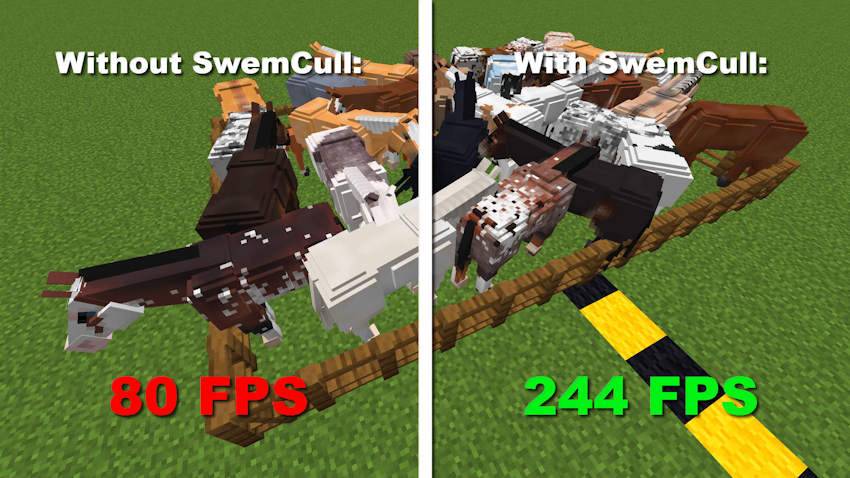
Minecraft 1.21.1 · NeoForge · 1440p · RX 6600 · Ryzen 5 5600
Each SWEM horse is a GeckoLib model with 179 separate bones, and SWEM redraws all of them every frame regardless of how far away the horse is or whether anything is in the way. Thirty horses in a stable means the game does that thirty times per frame.
The result is that distance makes no difference at all. Whether the horses are standing right in front of you, 60 blocks away, behind your camera, or completely hidden behind a barn, they cost the same amount of performance.
| Horse Location | Vanilla | Balanced ⭐ | Extreme |
|---|---|---|---|
| Inside the herd | 77 FPS | 117 FPS | 127 FPS |
| 20 blocks away | 77 FPS | 118 FPS | 180 FPS |
| 40 blocks away | 77 FPS | 186 FPS | 1800 FPS* |
| 60 blocks away | 77 FPS | 188 FPS | 1800 FPS* |
| Behind a wall or off-screen | 77 FPS | 1800 FPS* | 1800 FPS* |
*Horses are culled and no longer rendered.
Test setup: 32 horses on a clean instance with only SWEM, GeckoLib, Player Animation Library, and SwemCull installed. Measured with the mod’s own /swemcull advanced benchmark, which takes a baseline reading at both ends of the run and discards the result if the machine drifts.
With the Balanced preset, every horse in the first four rows is still fully visible. The biggest improvement comes when horses are outside your view or hidden behind solid blocks — they stop affecting your FPS almost entirely.
First, SwemCull restores Minecraft's normal frustum culling, which SWEM disables for its horses. This prevents horses outside your view from being rendered at all.
It then adds occlusion culling, meaning horses hidden behind solid blocks aren't rendered either. In large stables or crowded barns, this is where most of the gain comes from — walls, stall doors and buildings hide a lot of horses that were previously being drawn in full.
Even when every horse is visible, SwemCull still improves performance. It replaces several expensive per-bone rendering operations with cached versions, producing the exact same visuals while doing far less work each frame. That part helps whether you are standing in the middle of a herd or looking at a single horse.
Choose the balance between visual quality and performance with a single command, such as /swemcull preset balanced.
| Preset | Tack | Mane/Tail | Cull Distance | Best For |
|---|---|---|---|---|
| quality | 48 | Never | Never | Maximum visual quality |
| light | 34 | 50 | 92 | Small FPS boost with almost no visible changes |
| balanced ⭐ | 24 | 36 | 80 | Recommended for most players |
| aggressive | 14 | 22 | 56 | Large stables |
| extreme | 6 | 10 | 36 | Maximum performance |
Small cosmetic details are reduced first because they're barely visible at long distances but still cost performance. Horses themselves remain visible much longer, avoiding noticeable pop-in.
🛡️ Armor, blankets, leg wraps, and wings are never hidden, so horses still look complete even from far away.
| Command | What it does |
|---|---|
/swemcull |
Shows the current status |
/swemcull preset |
Switches preset |
/swemcull adaptive <fps> |
Automatically maintains your target FPS |
/swemcull overlay |
Displays live FPS, frame timing, and horse counts |
/swemcull toggle |
Enables or disables the mod |
/swemcull advanced benchmark |
easures off / balanced / extreme automatically, about 35 seconds |
/swemcull advanced |
Adjusts individual distances and advanced options |
On NeoForge 1.21.1, every setting is also available through the Mods menu. You can still edit config/swemcull-client.toml manually if you prefer.
SwemCull is client-side only, works in multiplayer, is safe for existing worlds, and changes nothing about gameplay. It runs alongside Sodium, Embeddium, Iris, Oculus, EntityCulling, ModernFix, and FerriteCore, and supports SWEM Addendum’s breeds.
| Minecraft | Loader |
|---|---|
| 1.21.1 | NeoForge |
| 1.20.1 | Forge & NeoForge |
| Mod | Notes |
|---|---|
| SWEM or SWEM Lite | SwemCull automatically detects which one is installed |
| GeckoLib | Required by SWEM |
| Player Animation Library | Required by SWEM, but not listed as a dependency |
Note: On NeoForge 1.20.1, use the Forge version of Player Animation Library. There is no NeoForge build, but the Forge version works correctly.
Why is SWEM so laggy?
Each SWEM horse is a GeckoLib model with 179 separate bones, and SWEM redraws every one of them each frame no matter where the horse is. The cost scales with how many horses are loaded, so a stable or a breeding setup drops your framerate far more than the same number of vanilla mobs would. SwemCull removes the parts of that work you would never have seen.
How do I improve FPS in SWEM?
Install SwemCull and run /swemcull preset balanced. In testing that took 77 FPS to 117 standing inside a herd of 32 horses, and to 188 from 60 blocks away, with every horse still fully visible. Horses behind walls or outside your view stop costing anything at all. If you need more, /swemcull preset aggressive pulls the distances in further.
Does the server need this?
No. SwemCull is a client-side mod. It only changes how horses are drawn on your own machine, so it works on any multiplayer server without the server having it installed.
Does SwemCull work with SWEM Lite?
Yes. SwemCull detects which build you have and applies the same optimizations to either. SWEM Lite uses the same GeckoLib renderer and the same horse model as full SWEM, so it has the same bottleneck and benefits the same way.
Will horses look different?
Not nearby. At longer distances, cosmetic details such as tack, mane, and tail are gradually simplified. Armor, blankets, and wings are always shown, so a distant horse still looks dressed rather than bare.
Does it still improve performance when I'm looking directly at the horses?
Yes. Culling only helps for horses you can't see, but SwemCull also caches SWEM's most expensive per-bone rendering work. That part applies to every horse on screen, which is why standing inside a herd still gains around 55% framerate.
Does SwemCull work with SWEM Addendum?
Yes, as of 1.0.3. Every one of Addendum’s breeds gets the same treatment as SWEM’s own horses, including the culling, the distance detail steps and the per-bone caching. Addendum adds a lot of horses to a world, which is exactly the situation this mod is built for. If you use Addendum, run 1.0.4 or newer. Every earlier version had at least one bug that only appeared in that combination — most recently, with a coat pack installed, two horses of the same breed in the same tack could end up sharing a coat. Reported by one of Addendum’s own managers, and fixed in 1.0.4.
Doesn't EntityCulling already hide horses behind walls?
Not for SWEM horses. EntityCulling skips any entity that has opted out of culling, and SWEM's horses do exactly that — so EntityCulling has never hidden them, even in packs that already include it. SwemCull handles SWEM horses itself, and the two work alongside each other without any issues.
Horses pop in and out as I move around.
Increase the culling distance with /swemcull advanced cull 92, or switch to /swemcull preset light.
Horses appear late when I walk around a corner.
Disable wall culling with /swemcull advanced occlusion off. All other optimizations will continue to work.
My SWEM Addendum horses are solid black.
That is a missing texture pack, not SwemCull. Addendum ships the breed models but no coat textures — those come from a separate community resource pack, linked from Addendum’s own page. You can confirm it in one command: /swemcull toggle turns this mod off instantly, and if the horses are still black, it was never us.
Adaptive mode lowers my quality when there are no horses around.
Fixed in 1.0.3. Adaptive mode now checks how many horses are actually on screen before it changes anything, gives the detail back when there are barely any, waits a few seconds after you join a world, and ignores frames while the game is paused or in the background.
Adaptive mode keeps lowering my quality even though my FPS is fine.
Fixed in 1.0.4. If you cap your frame rate or leave VSync on — which is the default — older versions read that steady 60 as the game struggling and kept stripping horses down, permanently. It now recognises a frame rate limit and leaves your settings alone.
Does it work with shaders?
Yes. SwemCull has been tested with Iris, Sodium, EntityCulling, ModernFix, and other popular performance mods.
Is it safe?
Yes. SwemCull only changes how horses are rendered. It never modifies AI, world data, entities, or servers.
Made by ItzAdoman • Licensed under LGPL-3.0 • Does not include SWEM or GeckoLib source code.
Project description from CurseForge.
Pick your setup
Choose the version and loader you play, then open the matching release.
Check the dependencies, then try the file in a copied instance before changing a world you care about.
Recent files
swemcull-1.21.1-1.0.4.jar
2 Aug 2026
swemcull-1.20.1-1.0.4.jar
2 Aug 2026
swemcull-1.21.1-1.0.3.jar
29 Jul 2026
swemcull-1.20.1-1.0.3.jar
29 Jul 2026
swemcull-1.21.1-1.0.2.jar
28 Jul 2026
swemcull-1.20.1-1.0.2.jar
28 Jul 2026
swemcull-1.21.1-1.0.1.jar
27 Jul 2026
swemcull-1.20.1-1.0.1.jar
27 Jul 2026
swemcull-1.21.1-1.0.0.jar
26 Jul 2026
swemcull-1.20.1-1.0.0.jar
26 Jul 2026
Looking for an older file? The official CurseForge project page is in Resources.
 mod
modDon’t mess with the server Play Minecraft with your friends in 2 clicks
 mod
modA mod adding many configurable features to EMI!
 mod
modThe World Will Soon Be Destroyed....