Minecraft version
Back to mods 
CurseForge · Minecraft mod
Mbt's mobs
Adds 8 animated statues with custom sounds & animations. – Built for mob battles and creative testing. Includes a STRONG removal tool.
Choose a version Pick your version below, then grab the matching file.
Quick answer
Which Mbt's mobs release should I use?
Latest stable file Mbt_mobs-1.2.0.0.1_publish_ver.jar
Game version 1.20.1
Loader Forge
Mbt's mobs Mbt_mobs-1.2.0.0.1_publish_ver.jar targets 1.20.1 with Forge. The project page does not say whether this file belongs on the client, dedicated server, or both. No extra mods listed for this file.
Where it goes
Is Mbt's mobs required on the client, server, or both?
The project page does not say whether this file belongs on the client, dedicated server, or both.
Client Source doesn’t say
Dedicated server Source doesn’t say
Loader for this release Forge
Required install it here Optional supported, not mandatory Not supported do not install here Source doesn’t say do not assume
The source does not explicitly classify this release as client-only or server-only.
What else does Mbt's mobs Mbt_mobs-1.2.0.0.1_publish_ver.jar need?
Mbt_mobs-1.2.0.0.1_publish_ver.jar. Change the file and its required mods may change too.
This file does not list any required mods. Do not add a library just because a different file uses it.
This file does not list any required or optional mods.
Before you install it
Add Mbt's mobs without breaking your instance.
Built for Mbt's mobs Mbt_mobs-1.2.0.0.1_publish_ver.jar. Pick another file and the loader, install side or required mods may change.
- 01
Stick to this file
Use Mbt_mobs-1.2.0.0.1_publish_ver.jar. It targets 1.20.1 with Forge; another release may have different loader, side or dependency requirements.
- 02
Bring the mods it needs
This file does not list any required mods. Do not add a library just because a different file uses it.
- 03
Put it on the correct side
The project page does not say whether this file belongs on the client, dedicated server, or both.
- 04
Pick the file you checked
Use the “Get this file” button beside Mbt_mobs-1.2.0.0.1_publish_ver.jar. It opens that exact file at the source.
About this project
What does Mbt's mobs add?
Mbt's Statues adds 8 living statues made of different materials to your game, all with fully custom animations and sounds.
What to expect:
- Wide difficulty range. Lower‑tier statues (wood, stone) feel close to vanilla mobs. Higher‑tier ones possess unique combat traits that make them nearly impossible to defeat with ordinary methods.
- Fair cleanup. The mod includes a POWERFUL removal tool that can erase any statue instantly, no matter how strong.
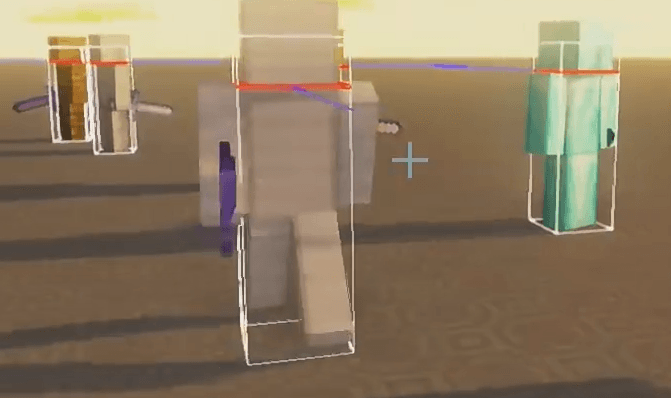
Important: This mod is not designed for normal survival gameplay. Encounters with advanced statues will feel unfair by design. Use it in creative mode, custom mob arenas, or when you specifically want to test overpowered mobs against each other.
Summary:
8 material statues + 1 meme creature. Low‑end fights to “why won’t it die” challenges. You can delete them all — there’s a tool for that. Think of it as a mob‑battle playground, not a survival add‑on.
This mod is proprietary software. Unauthorized modification, decompilation,
reverse engineering, or redistribution of this mod (in whole or in part) is
strictly prohibited without prior written permission from the copyright holder.

If you wish to include this mod in a modpack, or use itin any other public content, please contact the author for permission at
wchylpiper@gmail.com.
Project description from CurseForge.
Pick your setup
Mbt's mobs by Minecraft version and loader
Choose the version and loader you play, then open the matching release.
Check the dependencies, then try the file in a copied instance before changing a world you care about.
Recent files
Mbt's mobs versions and loaders
Mbt_mobs-1.2.0.0.1_publish_ver.jar
13 Aug 2026
Client Source doesn’t say Server Source doesn’t say Dependencies No extras listed Listed on Release listing
Check the 1.20.1 · Forge setup 1.20.1Forge release
Mbt_mobs-1.1.1.1.0_publish_ver.jar
4 Aug 2026
Client Source doesn’t say Server Source doesn’t say Dependencies No extras listed Listed on Release listing
Check the 1.20.1 · Forge setup 1.20.1Forge release
Mbt_mobs-1.1.0.1.0_publish_ver.jar
2 Aug 2026
Client Source doesn’t say Server Source doesn’t say Dependencies No extras listed Listed on Release listing
Check the 1.20.1 · Forge setup 1.20.1Forge release
Mbt_mobs-1.0.1.0.0_publish_ver.jar
28 Jul 2026
Client Source doesn’t say Server Source doesn’t say Dependencies No extras listed Listed on Release listing
Check the 1.20.1 · Forge setup 1.20.1Forge release
Mbt_mobs-1.0.0.0.0_publish_ver.jar
27 Jul 2026
Client Source doesn’t say Server Source doesn’t say Dependencies No extras listed Listed on Release listing
Check the 1.20.1 · Forge setup 1.20.1Forge release
Looking for an older file? The official CurseForge project page is in Resources.