FermiumBooter Needed by Brilliant Text-1.0.2.jar
requiredMatching file found Matched file: `FermiumBooter-1.4.1.jar (Fix)

CurseForge · Minecraft mod
A Library for Minecraft 1.12.2 that allows you to give your text more flare.
Quick answer
Brilliant Text-1.0.2.jar targets 1.12.2 with Forge. The project page does not say whether this file belongs on the client, dedicated server, or both. All 1 required mods have matching files.
Where it goes
The project page does not say whether this file belongs on the client, dedicated server, or both.
The source does not explicitly classify this release as client-only or server-only.
Brilliant Text-1.0.2.jar on 1.12.2. Every mod below is checked against that same setup.
Install FermiumBooter first. We found matching files for this game-version and loader setup.
We only count dependency files that match this setup. A file for another loader does not fill the gap.
Before you install it
Built for Brilliant Text-1.0.2.jar on 1.12.2. Pick another file and the loader, install side or required mods may change.
Use Brilliant Text-1.0.2.jar. It targets 1.12.2 with Forge; another release may have different loader, side or dependency requirements.
Install FermiumBooter first. We found matching files for this game-version and loader setup.
The project page does not say whether this file belongs on the client, dedicated server, or both.
Use the “Get this file” button beside Brilliant Text-1.0.2.jar. It opens that exact file at the source.
About this project
A Library for Minecraft 1.12.2 that allows you to give your text more flare. Inspired by similar looking tooltips that exist in Terraria. This mod pairs well with the Legendary Tooltips mod.
Out-of-the-box the library provides multiple formatting codes you can use like vanilla formatting codes. You can also define custom shaders / effects, for more information visit the GitHub page.
When applying the custom formatting, the text dropShadow will be ignored and not drawn.
§h: Makes the text look blue, resembling diamonds
Example: §hDiamond Item
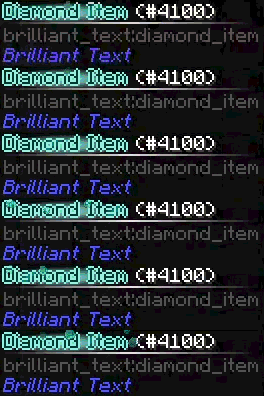
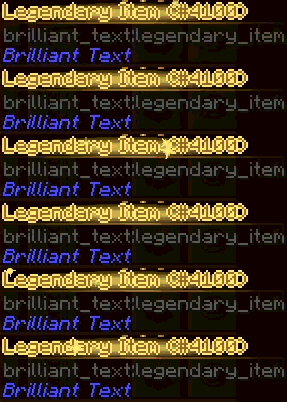
§g: Makes the text look shiny and goldenExample:
§gLegendary Item
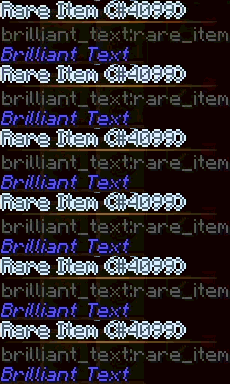
§s: Makes the text look silverExample:
§sRare Item
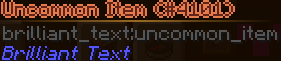
§qUncommon Item: Makes the text look bronzeExample:
§qUncommon Item
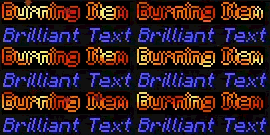
§v: Make the text look like it's on fireExample:
§vBurning Item
For more information on how to implement custom colors visit the GitHub page
Project description from CurseForge.
Pick your setup
Choose the version and loader you play, then open the matching release.
Check the dependencies, then try the file in a copied instance before changing a world you care about.
Recent files
4 Aug 2026
4 Aug 2026
3 Aug 2026
1 Aug 2026
29 Jul 2026
27 Jul 2026
Looking for an older file? The official CurseForge project page is in Resources.