Minecraft version
Back to mods 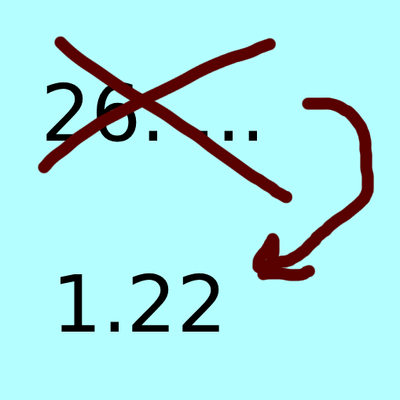
CurseForge · Minecraft mod
Version Name Changer
This Projects changes the version name from 26.1 to 1.22 or your own choice. its for people which dont like the new version numbering system or want to make the version their own!
Choose a version Pick your version below, then grab the matching file.
Quick answer
Which Version Name Changer release matches 26.1?
Best match for your filters versionnamechange-2.0.0-26.1-26.3.jar
Game version 26.1, 26.1.1, 26.1.2
Loader Fabric
Version Name Changer versionnamechange-2.0.0-26.1-26.3.jar targets 26.1, 26.1.1, 26.1.2 with Fabric. The project page does not say whether this file belongs on the client, dedicated server, or both. No extra mods listed for this file.
Where it goes
Is Version Name Changer required on the client, server, or both?
The project page does not say whether this file belongs on the client, dedicated server, or both.
Client Source doesn’t say
Dedicated server Source doesn’t say
Loader for this release Fabric
Required install it here Optional supported, not mandatory Not supported do not install here Source doesn’t say do not assume
The source does not explicitly classify this release as client-only or server-only.
What else does Version Name Changer versionnamechange-2.0.0-26.1-26.3.jar need?
versionnamechange-2.0.0-26.1-26.3.jar on 26.1. Every mod below is checked against that same setup.
This file does not list any required mods. Do not add a library just because a different file uses it.
This file does not list any required or optional mods.
Before you install it
Add Version Name Changer without breaking your instance.
Built for Version Name Changer versionnamechange-2.0.0-26.1-26.3.jar on 26.1. Pick another file and the loader, install side or required mods may change.
- 01
Stick to this file
Use versionnamechange-2.0.0-26.1-26.3.jar. It targets 26.1, 26.1.1, 26.1.2 with Fabric; another release may have different loader, side or dependency requirements.
- 02
Bring the mods it needs
This file does not list any required mods. Do not add a library just because a different file uses it.
- 03
Put it on the correct side
The project page does not say whether this file belongs on the client, dedicated server, or both.
- 04
Pick the file you checked
Use the “Get this file” button beside versionnamechange-2.0.0-26.1-26.3.jar. It opens that exact file at the source.
About this project
What does Version Name Changer add?
I'm being honest. I don't like the new Version numbering system. So i decided to make a client sided mod which fixes it for me. thats right now 1.22 exists(but you can also make the name something like hardcore or i dont wanna do this anymore just as an input). the numbering system i came up with is that the 26.1 version is 1.22, 26.1.1 is 1.22.1 26.1.2 is 1.22.2 and 26.2 is 1.22.3 and so on will it go. as soon as we reach 27.1 it will go up so that would be 1.23. i hope you like this little but fine mod. you can use 1.0.0 to 1.2.0 in 26.1 to 26.1.2 but i don't recommend it!
Project description from CurseForge.
Pick your setup
Version Name Changer by Minecraft version and loader
Choose the version and loader you play, then open the matching release.
Minecraft version
26.2
1 loader buildMinecraft version
26.1.2
1 loader buildMinecraft version
26.1.1
1 loader buildMinecraft version
26.1
1 loader buildCheck the dependencies, then try the file in a copied instance before changing a world you care about.
Recent files
Version Name Changer versions and loaders
versionnamechange-2.0.0-26.1-26.3.jar
10 Oct 2026
Client Source doesn’t say Server Source doesn’t say Dependencies No extras listed Listed on Release listing
Check the 26.1 · Fabric setup Fabric26.126.1.126.1.2 release
versionnamechange-2.0.0-26.1-26.2.jar
16 Sept 2026
Client Source doesn’t say Server Source doesn’t say Dependencies No extras listed Listed on Release listing
Check the 26.1 · Fabric setup Fabric26.126.1.126.1.2 release
versionnamechange-1.0.0.jar
28 Jul 2026
Client Source doesn’t say Server Source doesn’t say Dependencies No extras listed Listed on Release listing
Check the 26.1 · Fabric setup Fabric26.1 release
Looking for an older file? The official CurseForge project page is in Resources.
 mod
CurseForge + Modrinth · Minecraft
Better Creeper Consent
Make creepers ask for permission before blowing up everything around you!
 mod
CurseForge · Minecraft
Fontrast
Adds numerous ways to customize the look of text
 mod
CurseForge · Minecraft
Music Player [PORT]
Play music from many sources like youtube, soundcloud or radio livestreams