Minecraft version
Back to mods 
CurseForge · Minecraft mod
PeterWolf's Planes
dds a fully‑steerable biplane to Minecraft, bringing a lightweight, vintage‑style aviation experience to the game.
Choose a version Pick your version below, then grab the matching file.
Quick answer
Which PeterWolf's Planes release should I use?
Latest stable file Peter Wolf's Planes (Fabric 1.21.11) 1.3.0+1.20.1
Game version 1.20.1
Loader NeoForge
PeterWolf's Planes Peter Wolf's Planes (Fabric 1.21.11) 1.3.0+1.20.1 targets 1.20.1 with NeoForge. The project page does not say whether this file belongs on the client, dedicated server, or both. No extra mods listed for this file.
Where it goes
Is PeterWolf's Planes required on the client, server, or both?
The project page does not say whether this file belongs on the client, dedicated server, or both.
Client Source doesn’t say
Dedicated server Source doesn’t say
Loader for this release NeoForge
Required install it here Optional supported, not mandatory Not supported do not install here Source doesn’t say do not assume
The source does not explicitly classify this release as client-only or server-only.
What else does PeterWolf's Planes Peter Wolf's Planes (Fabric 1.21.11) 1.3.0+1.20.1 need?
Peter Wolf's Planes (Fabric 1.21.11) 1.3.0+1.20.1. Change the file and its required mods may change too.
This file does not list any required mods. Do not add a library just because a different file uses it.
This file does not list any required or optional mods.
Before you install it
Add PeterWolf's Planes without breaking your instance.
Built for PeterWolf's Planes Peter Wolf's Planes (Fabric 1.21.11) 1.3.0+1.20.1. Pick another file and the loader, install side or required mods may change.
- 01
Stick to this file
Use Peter Wolf's Planes (Fabric 1.21.11) 1.3.0+1.20.1. It targets 1.20.1 with NeoForge; another release may have different loader, side or dependency requirements.
- 02
Bring the mods it needs
This file does not list any required mods. Do not add a library just because a different file uses it.
- 03
Put it on the correct side
The project page does not say whether this file belongs on the client, dedicated server, or both.
- 04
Pick the file you checked
Use the “Get this file” button beside Peter Wolf's Planes (Fabric 1.21.11) 1.3.0+1.20.1. It opens that exact file at the source.
About this project
What does PeterWolf's Planes add?
PeterWolf’s Planes

Overview
Peter Wolf’s Planes adds a fully‑steerable biplane to Minecraft, bringing a lightweight, vintage‑style aviation experience to the game. The mod introduces realistic flight physics, speed‑dependent control surfaces, a functional HUD, and a polished visual presentation (custom icon and ModMenu banner).
Features
- Steerable Biplane Entity – Fly a biplane that responds to mouse look (pitch & roll) and keyboard A/D for yaw/rudder.
- Speed‑Dependent Controls – Control surface effectiveness scales with forward speed; at a standstill the plane is unresponsive, and responsiveness ramps up linearly as you accelerate.
- Aerodynamic Lift Tuning – Lift is calibrated to overcome gravity at roughly 35 km/h (≈ 0.486 blocks/tick), providing a smooth take‑off and realistic stall behavior.
- Improved Gliding Physics – Reduced drag at low throttle and enhanced lift allow graceful glides and energy exchange (climbing slows the plane, diving speeds it up).
- Larger Landing‑Gear Wheels – Wheels are now 4 × 10 × 10 blocks, with custom textures for a sturdier ground stance and better visual appeal.
- Cockpit HUD – A glass‑morphic overlay shows current speed (m/s & km/h), altitude, vertical speed (color‑coded), and throttle/brake status.
⚔️ Dogfight Combat Mode (v1.1.0)
While piloting, press V to arm combat mode (shown on the HUD as Combat: ARMED).
| Control | Action |
|---|---|
| V | Toggle combat mode (ARMED / SAFE) |
| Left Mouse Button | Fire twin machine guns (rapid dual tracers along the nose) |
| B | Drop a lit TNT bomb (consumes 1× TNT; free in Creative) |
Combat details
- Machine guns fire dual streams from the wing roots with plane-relative muzzle velocity — no ammo required.
- Bombs inherit most of the plane's velocity, fall under gravity with a short fuse, and explode on the ground (or mid-air when the fuse runs out).
- Occupied aircraft can be damaged by projectiles and explosions. The HUD shows airframe integrity; at 0 HP the plane is destroyed and passengers are ejected.
- Your own munitions will not damage the plane you are piloting.
- Keybinds are remappable under Controls → Peter Wolf's Planes.
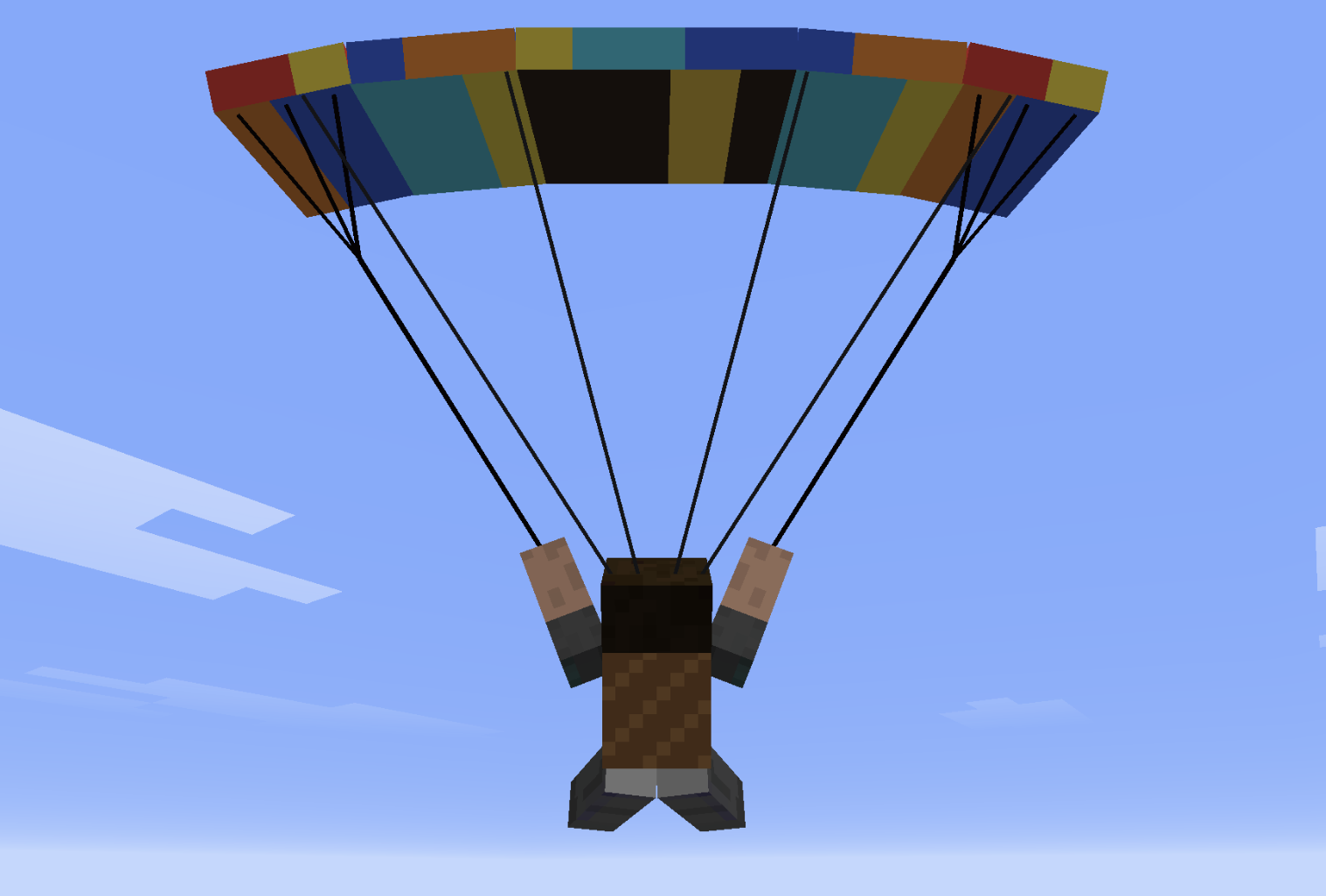
🪂 Paraglider & other features
- Paraglider Backpack (chest slot): deploy in free-fall for controlled descent with bank turns, flares, double-W dive, and spiral dives.
- Squadron Horn + Villager Pilot: recruit AI wingmen into a V-formation.
- Tail push: approach the tail of an empty plane and hold Shift + Right-Click to wheelbarrow-push it on the ground.
- Worldgen runway structures with loot.
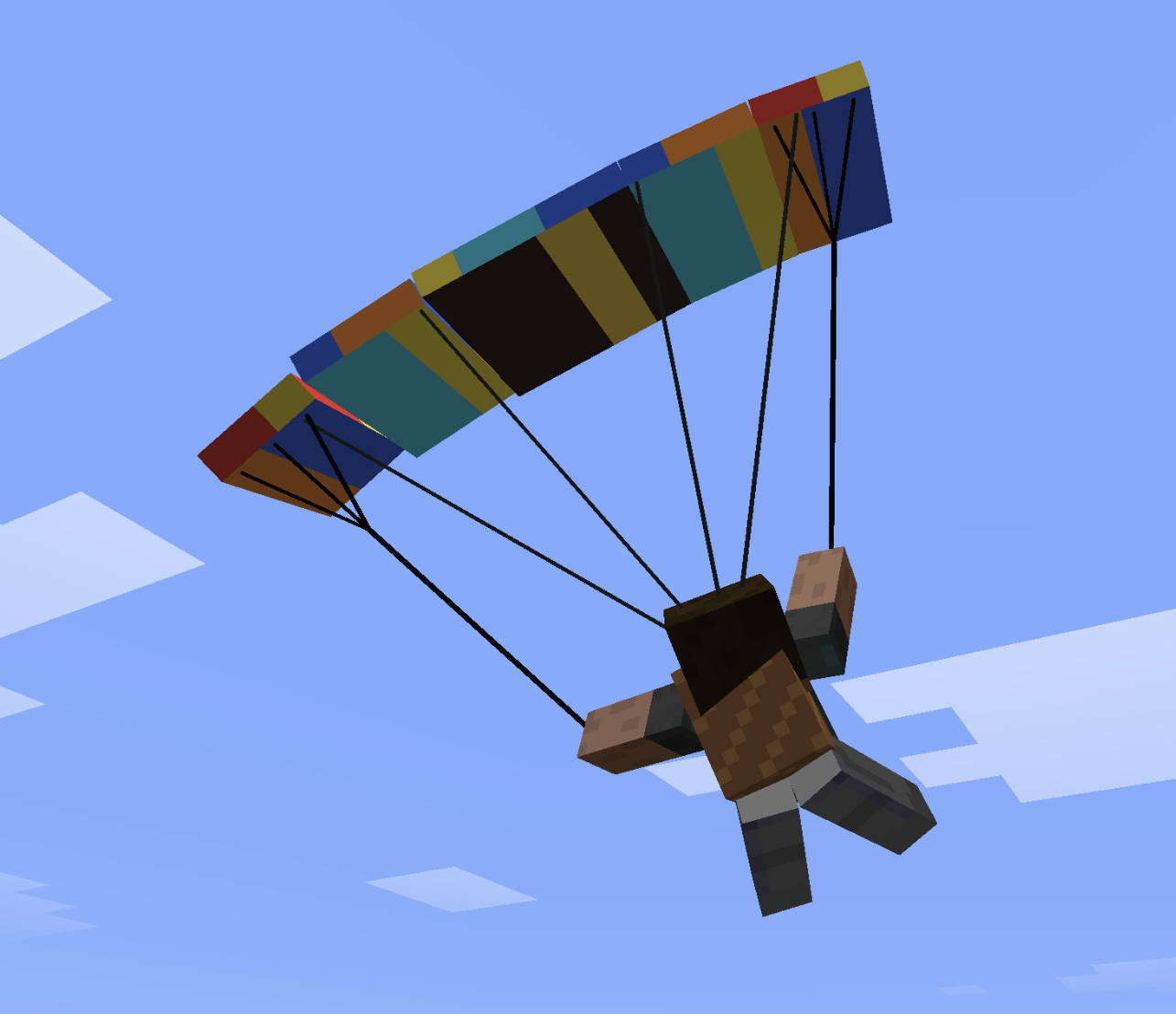
Paraglider Controls
The paraglider uses simple, intuitive flight controls.
- Steer left or right to pull the corresponding brake line and turn.
- Double-tap the left or right steering key to enter a fast descending spiral.
- Double-tap S to search for rising air currents above slopes.
- Push forward to gain speed.
- Pull back to slow down and flare before landing.
🚁 Helicopter — Quick Flight Guide
🎮 Controls
- W (Hold): Lift off / Climb
- S (Hold): Descend / Land
- Release W / S: Auto-Altitude Hold (maintains exact altitude)
- Mouse Forward / Back: Pitch nose down (fly forward) / Pitch up (brake / fly back)
- Mouse Left / Right: Bank left / right (strafe sideways)
- A / D: Rotate tail / heading (yaw)
- Aim at Horizon: Auto-stabilizes into a stationary hover
🛑 Ground, Takeoff & Landing
- On the Ground:
- Controls are locked — moving the mouse won't tilt the helicopter or slide.
- A / D still rotate the helicopter on the spot to align before takeoff.
- Takeoff:
- Hold W to lift off vertically.
- The moment skids leave the ground, your cursor automatically centers to the horizon for a smooth, stable start.
- Landing:
- Hold S to descend. Upon touching the ground, the helicopter auto-levels and controls lock into parked mode.
⌨️ Commands & Crafting
- Toggle Altitude Mode:
/helialt(switches between Simple Auto-Hold and Realistic collective) - Crafting (3×3 Table):
- Top:
Iron Ingot|Iron Bars|Iron Ingot - Mid:
Iron Ingot|Minecart|Iron Ingot - Bot:
Iron Bars|Redstone|Iron Bars
- Top:
🛫 Aircraft
| Aircraft | Notes |
|---|---|
| Biplane | Classic starter plane |
| Large Biplane | Bigger airframe |
| Large Twin-Engine Biplane | Twin-engine hauler (furnace “engines”) |
| Red Baron's Triplane | Nimble WWI-style triplane |
| Water Plane | Seaplane with floats (needs a boat in the recipe) |
| Monoplane | Fast single-wing fighter (~2× top speed) |
All craft use key-controlled throttle and rudder with mouse look for pitch/bank, plus a glassmorphic cockpit HUD (speed, altitude, V/S, throttle). Press H in the cockpit to cycle full / mini / top-right HUD.
🛠️ Crafting recipes (survival)
Craft in a Crafting Table. Shapes are 3×3. All recipes now support any planks (#minecraft:planks), any wool (#minecraft:wool), and any boat (#minecraft:boats), and automatically unlock in your Recipe Book!
Biplane (plane)
W P W
I I I
  S
- W any wool · P any planks · I iron ingot · S stick
Large Biplane
W P W
I I I
P S P
- W white wool · P oak planks · I iron ingot · S stick
Large Twin-Engine Biplane
I F I
W P W
I S I
- I iron ingot · F furnace · W white wool · P oak planks · S stick
Red Baron's Triplane
R G R
I I I
  S
- R red wool · G gold ingot · I iron ingot · S stick
Water Plane
  B
W P W
I I I
- B oak boat · W white wool · P oak planks · I iron ingot
Monoplane (fast fighter)
I D I
W P W
  S
- I iron ingot · D diamond · W white wool · P oak planks · S stick
Paraglider Backpack (chest armor)
L P L
S W S
L   L
- L leather · P phantom membrane · S string · W white wool
Helicopter (helicopter)
I B I
I P I
S   S
- I iron ingot · B iron bars · P any planks · S stick
Squadron Horn
  G
I N I
  I
- G gold ingot · I iron ingot · N note block
🕹️ Flight Sensitivity & Commands
Customize flight control response to your preference:
/planes sensitivityor/planesensitivity— view current flight sensitivity./planes sensitivity <value>— set overall flight sensitivity (default is 0.80 for smooth, non-twitchy flight; try0.5for ultra-smooth or1.2for agile dogfighting)./planes sensitivity pitch <value>— tune elevator/pitch responsiveness./planes sensitivity roll <value>— tune bank/aileron roll responsiveness./planes sensitivity yaw <value>— tune rudder/yaw turn responsiveness./planes sensitivity reset— restore defaults.
Villager Pilot Spawn Egg is creative / loot / starter-kit only (not craftable).
⚔️ Dogfight Combat Mode
While piloting, press V to arm combat mode (HUD: Combat: ARMED).
| Control | Action |
|---|---|
| V | Toggle combat mode (ARMED / SAFE) |
| Left Mouse Button | Fire twin machine guns |
| B | Drop a lit TNT bomb (1× TNT; free in Creative) |
- Machine guns: dual tracers along the nose, free ammo.
- Bombs inherit plane velocity; short fuse.
- Occupied airframes take projectile/explosion damage (HUD airframe HP).
- Hard landings damage the airframe from sink rate (flare gently; a smash can wreck the plane and hurt passengers).
- Your own munitions do not damage your plane.
- Keybinds: Controls → Peter Wolf's Planes.
🪂 Paraglider
- Equip Paraglider Backpack in the chest slot.
- Deploys in free-fall (after enough fall distance).
- A/D bank · W dive · S flare · double-W sprint dive · double-A/D spiral · double-S lock minimum sink.
- Ridge lift on large slopes (≥10×10×10 height/length/width).
- H — LIFT HUD while flying the paraglider (climb / sink + ridge strength).
/liftparticles— optional rising-cloud visualization of updrafts.
🪖 Other features
- Squadron Horn + Villager Pilot: V-formation wingmen.
- Tail push: empty plane, approach tail, Shift + Right-Click.
- Worldgen runway structures with loot.
- Starter kit (ops):
/planes kitor/planekit— all aircraft + paraglider. - Optional first-join datapack:
peterwolfs-planes-starter-datapack.zip.
Project description from CurseForge.
Pick your setup
PeterWolf's Planes by Minecraft version and loader
Choose the version and loader you play, then open the matching release.
Minecraft version
26.2
2 loader buildsMinecraft version
1.21.11
2 loader buildsMinecraft version
1.21.1
2 loader buildsMinecraft version
1.20.1
3 loader buildsCheck the dependencies, then try the file in a copied instance before changing a world you care about.
Recent files
PeterWolf's Planes versions and loaders
Peter Wolf's Planes (Fabric 1.21.11) 1.3.0+1.20.1
peterwolfs-planes-neoforge-1.3.0-1.20.1.jar
1 Nov 2026
Client Source doesn’t say Server Source doesn’t say Dependencies No extras listed Listed on Release listing
Check the 1.20.1 · NeoForge setup 1.20.1NeoForge release
Peter Wolf's Planes (NeoForge 1.21.11) 1.3.0+1.21.1
peterwolfs-planes-neoforge-1.3.0-1.21.1.jar
1 Nov 2026
Client Source doesn’t say Server Source doesn’t say Dependencies No extras listed Listed on Release listing
Check the 1.21.1 · NeoForge setup 1.21.1NeoForge release
Peter Wolf's Planes (Fabric 1.21.11) 1.3.0+1.21.1
peterwolfs-planes-1.3.0-1.21.1.jar
1 Nov 2026
Client Source doesn’t say Server Source doesn’t say Dependencies 1 required · 1 unchecked Listed on Release listing
Check the 1.21.1 · Fabric setup Fabric1.21.1 release
Peter Wolf's Planes (Fabric 1.21.11) 1.3.0+1.20.1
peterwolfs-planes-forge-1.3.0-1.20.1.jar
1 Nov 2026
Client Source doesn’t say Server Source doesn’t say Dependencies No extras listed Listed on Release listing
Check the 1.20.1 · Forge setup 1.20.1Forge release
Peter Wolf's Planes (Fabric 1.21.11) 1.3.0+1.20.1
peterwolfs-planes-1.3.0-1.20.1.jar
1 Nov 2026
Client Source doesn’t say Server Source doesn’t say Dependencies 1 required · 1 unchecked Listed on Release listing
Check the 1.20.1 · Fabric setup Fabric1.20.1 release
Peter Wolf's Planes (NeoForge 1.21.11) 1.3.0+1.21.11
peterwolfs-planes-neoforge-1.3.0-1.21.11.jar
1 Nov 2026
Client Source doesn’t say Server Source doesn’t say Dependencies No extras listed Listed on Release listing
Check the 1.21.11 · NeoForge setup NeoForge1.21.11 release
Peter Wolf's Planes (Fabric 1.21.11) 1.3.0+1.21.11
peterwolfs-planes-1.3.0-1.21.11.jar
1 Nov 2026
Client Source doesn’t say Server Source doesn’t say Dependencies 1 required · 1 unchecked Listed on Release listing
Check the 1.21.11 · Fabric setup Fabric1.21.11 release
Peter Wolf's Planes (Fabric 26.2) 1.3.0+26.2
peterwolfs-planes-1.3.0-26.2.jar
1 Nov 2026
Client Source doesn’t say Server Source doesn’t say Dependencies 1 required · 1 unchecked Listed on Release listing
Check the 26.2 · Fabric setup Fabric26.2 release
Peter Wolf's Planes (NeoForge 26.3) 1.3.0+26.3
peterwolfs-planes-neoforge-1.3.0-26.3.jar
1 Nov 2026
Client Source doesn’t say Server Source doesn’t say Dependencies No extras listed Listed on Release listing
Check the 26.3 · NeoForge setup NeoForge26.3 release
Peter Wolf's Planes 1.3.0
peterwolfs-planes-1.3.0.jar
1 Nov 2026
Client Source doesn’t say Server Source doesn’t say Dependencies 1 required · 1 unchecked Listed on Release listing
Check the 26.3 · Fabric setup Fabric26.3 release
peterwolfs-planes-neoforge-1.2.5+26.3.jar
1 Oct 2026
Client Source doesn’t say Server Source doesn’t say Dependencies No extras listed Listed on Release listing
Check the 26.3 · NeoForge setup NeoForge26.3 release
peterwolfs-planes-neoforge-1.2.5+26.2.jar
1 Oct 2026
Client Source doesn’t say Server Source doesn’t say Dependencies No extras listed Listed on Release listing
Check the 26.2 · NeoForge setup NeoForge26.2 release
Looking for an older file? The official CurseForge project page is in Resources.
 mod
mod CurseForge + Modrinth · Minecraft
Biology Dictionary
Discover, highlight, inspect, modify - your vanilla & modded mob encyclopedia
 mod
mod CurseForge · Minecraft
SKY ACES
Dogfight in 30+ flyable jets, WWII warbirds and helicopters, then take warships and submarines to sea. F-22, F-35, Spitfire, Apache, a sailing Nimitz carrier, air refuelling and a campaign. (Formerly known as Fighter Jets Overhaul)
 mod
mod CurseForge · Minecraft
Kronentroll's Graves
A secure and configurable Fabric grave mod with inventory restoration, grave compasses, access sharing, protection, JSON5 configuration and administrative tools.