Minecraft version
Back to mods 
CurseForge · Minecraft mod
peterwolf's Splinecart
Fork of Splinecart with some my new adds
Choose a version Pick your version below, then grab the matching file.
Quick answer
Which peterwolf's Splinecart release should I use?
Latest stable file peterwolfs-Splinecart-neoforge-0.4.8+26.2.jar
Game version 26.2
Loader NeoForge
peterwolf's Splinecart peterwolfs-Splinecart-neoforge-0.4.8+26.2.jar targets 26.2 with NeoForge. The project page does not say whether this file belongs on the client, dedicated server, or both. No extra mods listed for this file.
Where it goes
Is peterwolf's Splinecart required on the client, server, or both?
The project page does not say whether this file belongs on the client, dedicated server, or both.
Client Source doesn’t say
Dedicated server Source doesn’t say
Loader for this release NeoForge
Required install it here Optional supported, not mandatory Not supported do not install here Source doesn’t say do not assume
The source does not explicitly classify this release as client-only or server-only.
What else does peterwolf's Splinecart peterwolfs-Splinecart-neoforge-0.4.8+26.2.jar need?
peterwolfs-Splinecart-neoforge-0.4.8+26.2.jar. Change the file and its required mods may change too.
This file does not list any required mods. Do not add a library just because a different file uses it.
This file does not list any required or optional mods.
Before you install it
Add peterwolf's Splinecart without breaking your instance.
Built for peterwolf's Splinecart peterwolfs-Splinecart-neoforge-0.4.8+26.2.jar. Pick another file and the loader, install side or required mods may change.
- 01
Stick to this file
Use peterwolfs-Splinecart-neoforge-0.4.8+26.2.jar. It targets 26.2 with NeoForge; another release may have different loader, side or dependency requirements.
- 02
Bring the mods it needs
This file does not list any required mods. Do not add a library just because a different file uses it.
- 03
Put it on the correct side
The project page does not say whether this file belongs on the client, dedicated server, or both.
- 04
Pick the file you checked
Use the “Get this file” button beside peterwolfs-Splinecart-neoforge-0.4.8+26.2.jar. It opens that exact file at the source.
About this project
What does peterwolf's Splinecart add?
Fork of Splinecart
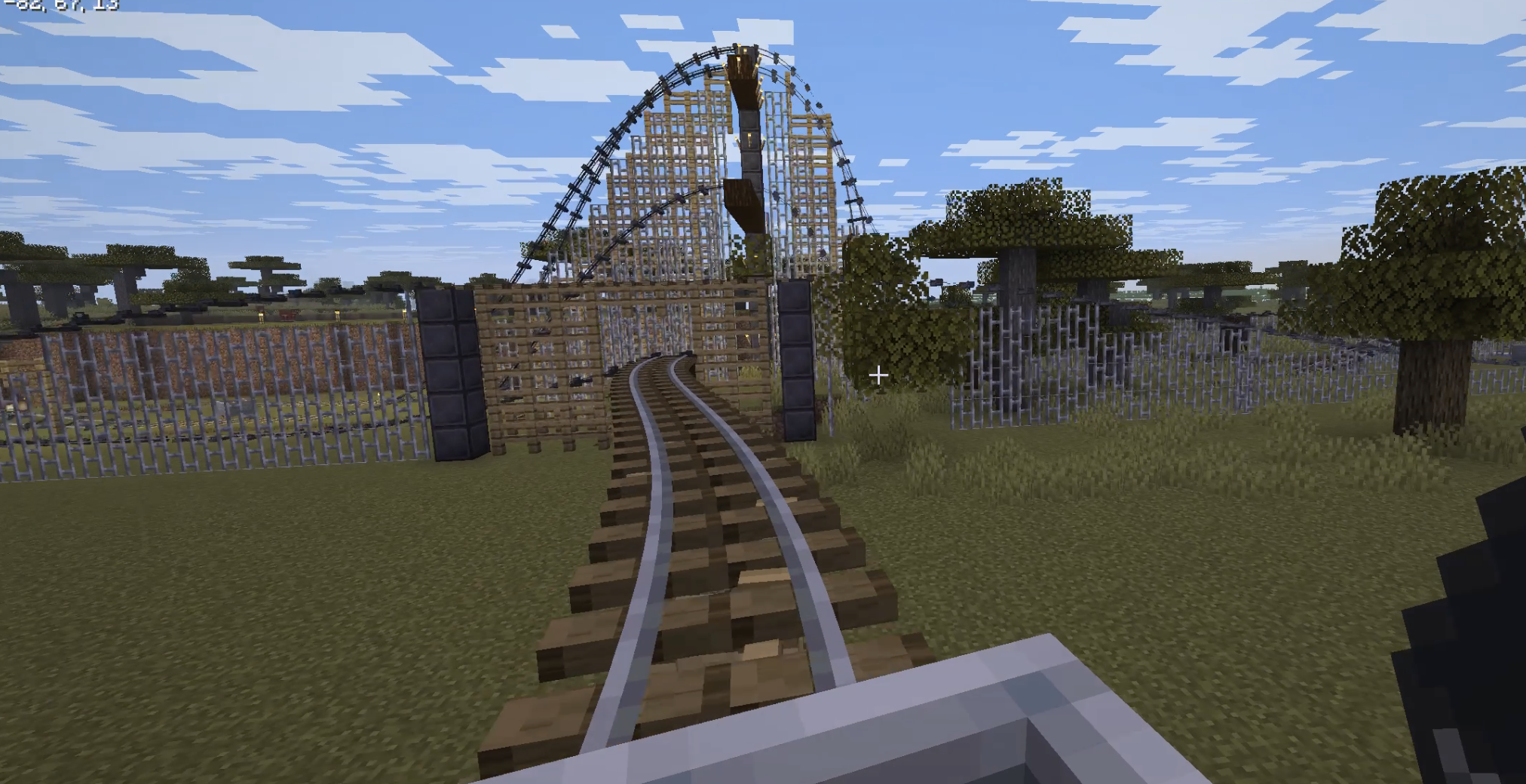
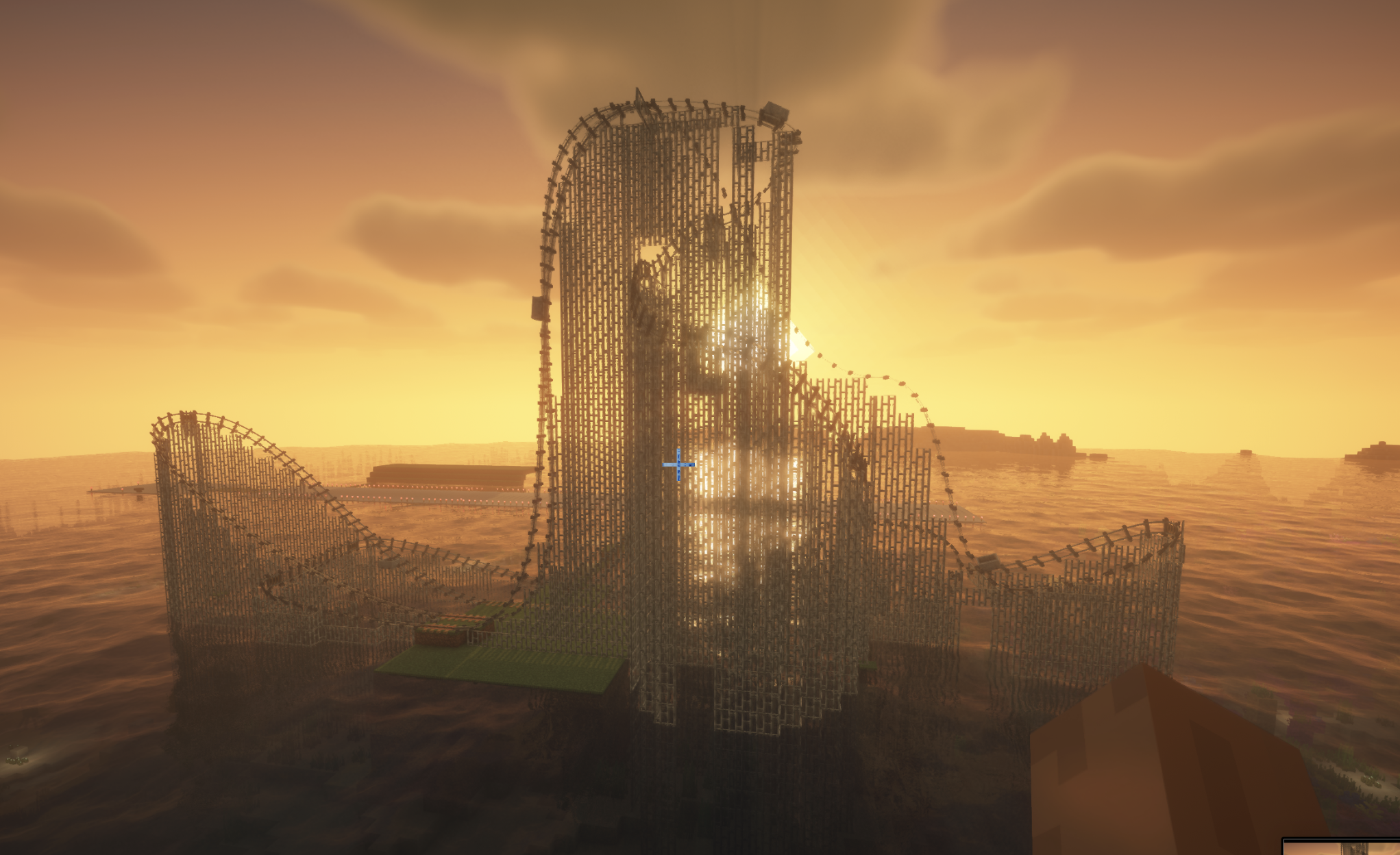
splinecart ported to > 26.1.2
new in my version:
-automatic building of track supports.
All four player-obtainable items have shaped crafting recipes in Survival. The Track Follower is a hidden entity spawned by tracks and is not crafted.
Track Ties Description: Interact to rotate when placed.
Unlocks when you pick up a Stick or any Wooden Slab.
Crafting (makes 8): [Wooden Slab] [Wooden Slab] [Wooden Slab] [Stick] [Wooden Slab] [Wooden Slab] [Wooden Slab]
Any wooden slab works in every slot marked Wooden Slab.
Track Description: Links two Track Ties blocks together.
Unlocks when you pick up a Rail or Iron Block.
Crafting (makes 4): [Iron Block] [Rail] [Iron Block]
Chain Drive Track Description: Track variant that pulls minecarts.
Unlocks when you pick up an Activator Rail, Chain, or Iron Block.
Crafting (makes 4): [Iron Block] [Chain] [Activator Rail] [Chain] [Iron Block]
Magnetic Track Description: Track variant that accelerates or slows minecarts.
Unlocks when you pick up a Powered Rail, Iron Block, or Copper Block.
Crafting (makes 4): [Iron Block] [Copper Block] [Powered Rail] [Copper Block] [Iron Block]
The magnetic track's strength follows the redstone signal powering its Track Ties block.
Quick start
- Craft Track Ties and place them on any face of a block.
- Right-click a tie to rotate it. The dark arrows show the forward direction.
- Place a second tie facing the route you want.
- Craft a Track item, use it on the first tie, then on the second tie.
- Run a vanilla minecart into the first tie to start riding the spline.
Recipe book tab: Redstone.
COMMANDS
Added /splinecart server commands for building spline tracks (build line, build path, and connect) with all three track types. Added per-player support modes (none, wood, metal, auto) via /splinecart supports, applied to both command-built and manually linked tracks. Added configurable support placement: no supports, wooden fences, or iron bars.
** originall description: ** *** **** ***** ****** *********
Originally made for ModFest: Carnival
Getting Started
Place a Track Ties block on any face of another block. Right click the track ties to rotate them. Important: Track ties have a "forward" direction, as indicated by the sequence of dark arrows on the block. This determines which direction outgoing tracks will originate from, and incoming tracks will end in. Place a second Track Ties block in an appropriate orientation, elsewhere. Use a Track item on the first Track Ties block, and then on the second one to create a track connecting them. The order that you click on each track tie block matters. Use vanilla rails to run a minecart into the first track tie block.
Track Types
Track: A regular track that minecarts can travel along Chain Drive Track: A track that always carries minecarts forward. Can be used to move minecarts up steep inclines. Magnetic Track: A speed control track whose strength is controlled by the redstone signal powering its track tie. Can be used for powered launches or braking segments. Does not work well on steep inclines.
Motion Sickness Warning
If you are prone to motion sickness, run the following command before riding a Splinecart track: /splinecartc config rotate_camera false Splinecart features jarring camera rotation (see Gallery for example) that may cause motion sickness or affect photosensitive users. Running the above command prevents the camera from rotating while riding Splinecart tracks to try and reduce this risk. Further ways to reduce motion sickness include enabling third person mode in addition to what is described above. You can re-enable camera rotation with /splinecartc config rotate_camera true.
Project description from CurseForge.
Pick your setup
peterwolf's Splinecart by Minecraft version and loader
Choose the version and loader you play, then open the matching release.
Minecraft version
1.21.11
1 loader buildCheck the dependencies, then try the file in a copied instance before changing a world you care about.
Recent files
peterwolf's Splinecart versions and loaders
peterwolfs-Splinecart-neoforge-0.4.8+26.2.jar
28 Aug 2026
Client Source doesn’t say Server Source doesn’t say Dependencies No extras listed Listed on Release listing
Check the 26.2 · NeoForge setup NeoForge26.2 release
splinecart-0.4.8+1.21.11.jar
28 Aug 2026
Client Source doesn’t say Server Source doesn’t say Dependencies No extras listed Listed on Release listing
Check the 1.21.11 · Fabric setup Fabric1.21.11 release
splinecart-0.4.8+26.2.jar
16 Aug 2026
Client Source doesn’t say Server Source doesn’t say Dependencies No extras listed Listed on Release listing
Check the 26.2 · Fabric setup Fabric26.2 release
splinecart-0.4.6+26.2.jar
28 Jul 2026
Client Source doesn’t say Server Source doesn’t say Dependencies No extras listed Listed on Release listing
Check the 26.2 · Fabric setup Fabric26.2 release
Looking for an older file? The official CurseForge project page is in Resources.
 mod
mod CurseForge + Modrinth · Minecraft
Whoopee
Adds a whoopee cushion
 mod
mod CurseForge + Modrinth · Minecraft
Acoustic Lib
Server-driven audio playback for NeoForge mods!
 mod
mod CurseForge · Minecraft
Traveler Tool Belt
Upgradeable Tool Belt with intuitive quick-swap, Curios API/Trinkets integration and more!