Minecraft version
Back to mods 
CurseForge · Minecraft mod
Anything Duplicator
Usage: Hold the (.) button while mining blocks or select an item in your main hand and press Ctrl + Q. Feature: Duplicate items when dropped and automatically copy blocks when mined so you never run out!
Choose a version Pick your version below, then grab the matching file.
Quick answer
Which Anything Duplicator release matches 1.21.2?
Best match for your filters block-duplicator-1.21.2.jar
Game version 1.21.2
Loader Fabric
Anything Duplicator block-duplicator-1.21.2.jar targets 1.21.2 with Fabric. The project page does not say whether this file belongs on the client, dedicated server, or both. No extra mods listed for this file.
Where it goes
Is Anything Duplicator required on the client, server, or both?
The project page does not say whether this file belongs on the client, dedicated server, or both.
Client Source doesn’t say
Dedicated server Source doesn’t say
Loader for this release Fabric
Required install it here Optional supported, not mandatory Not supported do not install here Source doesn’t say do not assume
The source does not explicitly classify this release as client-only or server-only.
What else does Anything Duplicator block-duplicator-1.21.2.jar need?
block-duplicator-1.21.2.jar on 1.21.2. Every mod below is checked against that same setup.
This file does not list any required mods. Do not add a library just because a different file uses it.
This file does not list any required or optional mods.
Before you install it
Add Anything Duplicator without breaking your instance.
Built for Anything Duplicator block-duplicator-1.21.2.jar on 1.21.2. Pick another file and the loader, install side or required mods may change.
- 01
Stick to this file
Use block-duplicator-1.21.2.jar. It targets 1.21.2 with Fabric; another release may have different loader, side or dependency requirements.
- 02
Bring the mods it needs
This file does not list any required mods. Do not add a library just because a different file uses it.
- 03
Put it on the correct side
The project page does not say whether this file belongs on the client, dedicated server, or both.
- 04
Pick the file you checked
Use the “Get this file” button beside block-duplicator-1.21.2.jar. It opens that exact file at the source.
About this project
What does Anything Duplicator add?
Infinite Drops & Block Duplicator
This mod allows you to infinitely use, drop, and duplicate items and mined blocks in the game without running out of resources.
How to Use:
Step 1: Select the item in your main hand, or hold the (.) button while mining any block.
Step 2: If dropping an item, press Ctrl + Q.
Main Features:
Keep on Drop: When you drop an item from your hand, a copy of it stays safely in your inventory.
Block Mining Duplication: If you hold the (.) button while mining a block, that mined block will also be duplicated automatically.
Never Lose Items: You can use, drop, or mine items and blocks infinitely without ever running out!
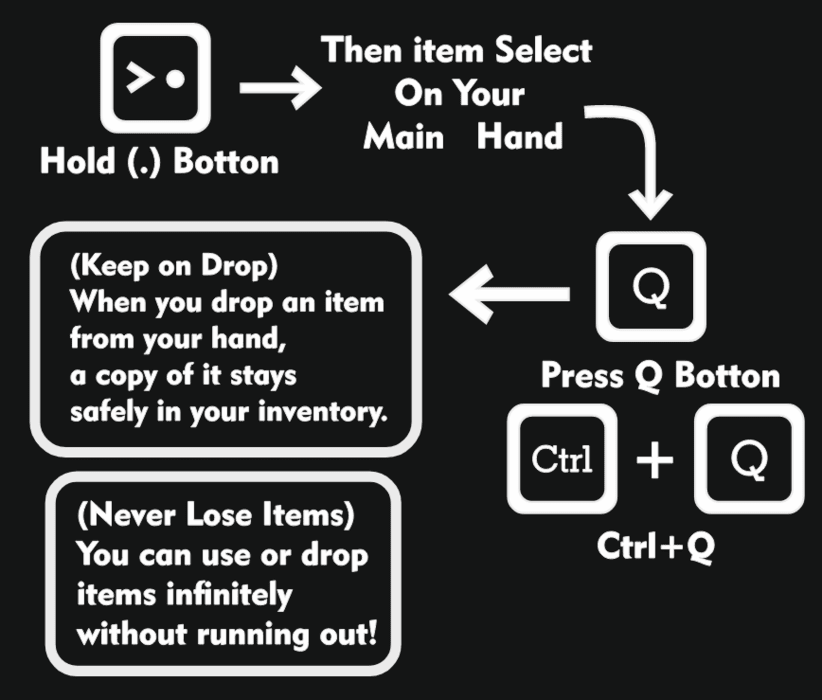
Project description from CurseForge.
Pick your setup
Anything Duplicator by Minecraft version and loader
Choose the version and loader you play, then open the matching release.
Minecraft version
1.21.10
1 loader buildMinecraft version
1.21.9
1 loader buildMinecraft version
1.21.8
1 loader buildMinecraft version
1.21.7
1 loader buildMinecraft version
1.21.5
1 loader buildMinecraft version
1.21.4
1 loader buildMinecraft version
1.21.3
1 loader buildMinecraft version
1.21.2
1 loader buildMinecraft version
1.21.1
1 loader buildMinecraft version
1.21
1 loader buildMinecraft version
1.20.6
1 loader buildShowing the newest 12 of 17 game versions. Older files are in the list below.
Check the dependencies, then try the file in a copied instance before changing a world you care about.
Recent files
Anything Duplicator versions and loaders
block-duplicator-1.21.2.jar
4 Aug 2026
Client Source doesn’t say Server Source doesn’t say Dependencies No extras listed Listed on Release listing
Check the 1.21.2 · Fabric setup Fabric1.21.2 release
Looking for an older file? The official CurseForge project page is in Resources.
 mod
CurseForge + Modrinth · Minecraft
Simple Smithing Overhaul
Improved and rebalanced smithing, item repair and enchantment sources. Fully-featured and vanilla friendly.
 mod
CurseForge · Minecraft
geential
Instant co-op world hosting, friends & invites hub, custom profile switcher, 3D wardrobe studio (wings, capes, emotes, Mojang & .PNG skin importer), and weak-PC performance booster for Minecraft 1.20.1 (Forge & Fabric).
 mod
CurseForge · Minecraft
Chalk Unofficial Fork
Chalk allows you to draw marks for easier navigation in caves or structures, or as decoration