Minecraft version
Back to mods 
CurseForge · Minecraft mod
Create Efficient Visuals
Create factory gauge client-side optimization. based on flywheel
Choose a version Pick your version below, then grab the matching file.
Quick answer
Which Create Efficient Visuals release should I use?
Latest stable file createefficientvisuals-1.21.1-0.2.0.jar
Game version 1.21.1
Loader NeoForge
Create Efficient Visuals createefficientvisuals-1.21.1-0.2.0.jar targets 1.21.1 with NeoForge. The project page does not say whether this file belongs on the client, dedicated server, or both. No extra mods listed for this file.
Where it goes
Is Create Efficient Visuals required on the client, server, or both?
The project page does not say whether this file belongs on the client, dedicated server, or both.
Client Source doesn’t say
Dedicated server Source doesn’t say
Loader for this release NeoForge
Required install it here Optional supported, not mandatory Not supported do not install here Source doesn’t say do not assume
The source does not explicitly classify this release as client-only or server-only.
What else does Create Efficient Visuals createefficientvisuals-1.21.1-0.2.0.jar need?
createefficientvisuals-1.21.1-0.2.0.jar. Change the file and its required mods may change too.
This file does not list any required mods. Do not add a library just because a different file uses it.
This file does not list any required or optional mods.
Before you install it
Add Create Efficient Visuals without breaking your instance.
Built for Create Efficient Visuals createefficientvisuals-1.21.1-0.2.0.jar. Pick another file and the loader, install side or required mods may change.
- 01
Stick to this file
Use createefficientvisuals-1.21.1-0.2.0.jar. It targets 1.21.1 with NeoForge; another release may have different loader, side or dependency requirements.
- 02
Bring the mods it needs
This file does not list any required mods. Do not add a library just because a different file uses it.
- 03
Put it on the correct side
The project page does not say whether this file belongs on the client, dedicated server, or both.
- 04
Pick the file you checked
Use the “Get this file” button beside createefficientvisuals-1.21.1-0.2.0.jar. It opens that exact file at the source.
About this project
What does Create Efficient Visuals add?
This mod does a low-hanging-fruit optimization for Create factory gauge rendering.
Why It was Slow
Factory Gauge is a block entity, and the base mod renderer does vertex transform for gauge paths every frame. this has very high overhead considering the path is mostly unchanged across frames. Existing approaches such as createbetterfps, Flerovium does not change this immediate mode model; This mod utilizes flywheel to provide instancing support.
Limitations
Item may have custom renderer. those item will fallback to slow path.
This mod is client only. it doesn't optimize server ticks.
This mod is ad-hoc, low-hanging fruit optimization for create factory gauge rendering. it doesn't provide a full solution to making your fps better.
This mod optimizes CPU frame time more than GPU frame time. if shader used, improvement may be small.
Evaluation
Evaluated in controlled scenario: superflat world, with a 10x30 wall, each block has 4 gauges. significant improvement in sparkc profiler. result in figure.
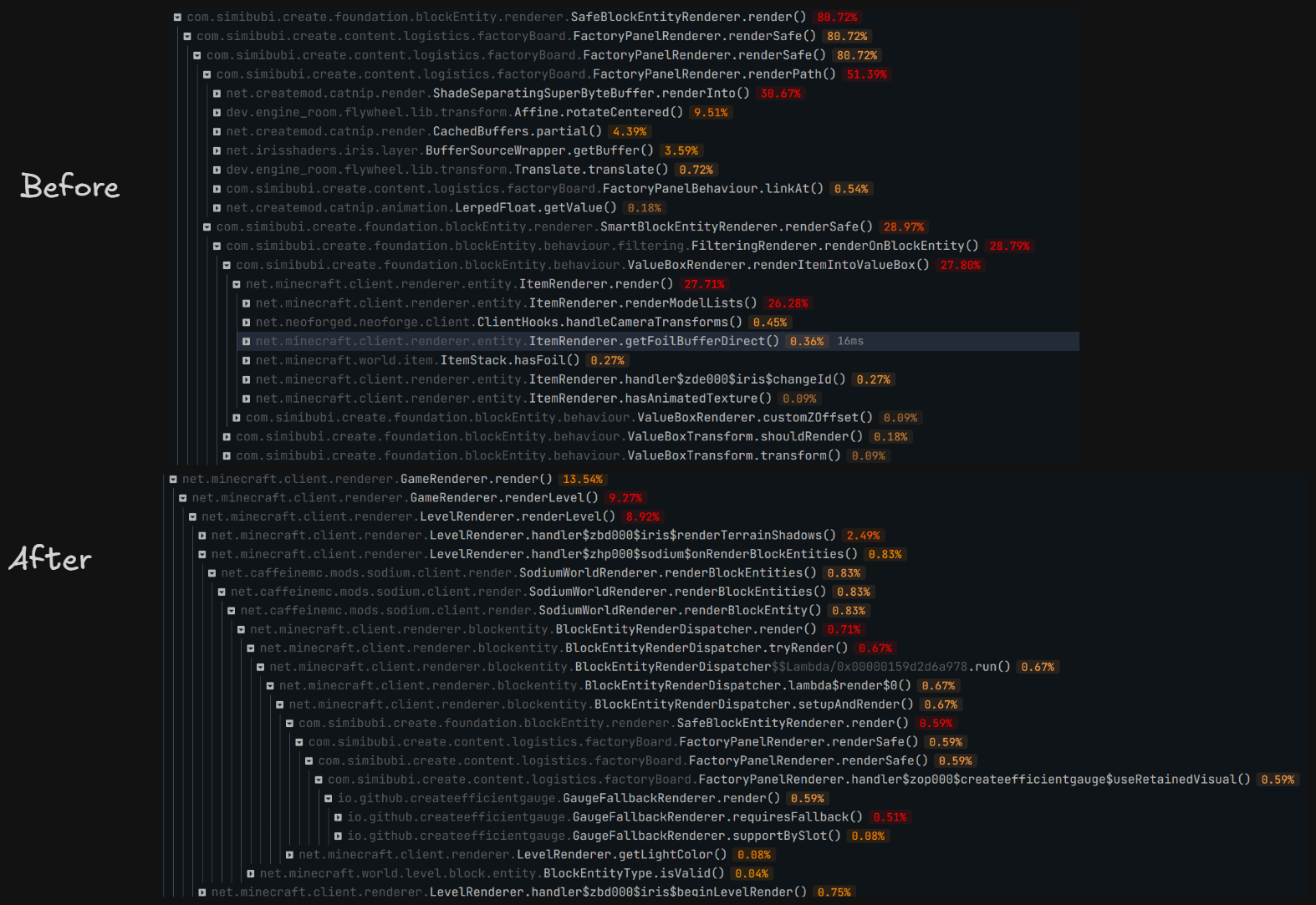
Evaluated in realworld scenario: referencial 80h+ survival world, same spot standing still. VSync off, max frame no limit, sodium: CPU render ahead 1 frame, photon shader ultra preset.after warm up, PresentMon shows (10s interval)
| Metric | Without | With | Change |
|---|---|---|---|
Avg frame interval MsBetweenPresents |
11.291 ms | 10.618 ms | Decreased by 0.673 ms, ~5.96% |
| Corresponding throughput | 88.57 FPS | 94.18 FPS | Increased by ~6.3% |
| p50 frame interval | 10.644 ms | 10.252 ms | Decreased by ~3.7% |
MsGPUTime |
11.290 ms | 10.617 ms | Decreased by 0.673 ms |
MsGPUBusy |
10.802 ms | 10.498 ms | Decreased by 0.304 ms, ~2.8% |
MsGPUWait |
0.489 ms | 0.120 ms | Decreased by 0.369 ms, ~75% |
MsGPULatency |
12.594 ms | 14.526 ms | Increased by 1.932 ms |
MsInPresentAPI |
0.124 ms | 0.109 ms | Both very small |
CPUUtilization reported by PresentMon |
29.10% | 20.16% | Decreased by ~31% |
Project description from CurseForge.
Pick your setup
Create Efficient Visuals by Minecraft version and loader
Choose the version and loader you play, then open the matching release.
Check the dependencies, then try the file in a copied instance before changing a world you care about.
Recent files
Create Efficient Visuals versions and loaders
createefficientvisuals-1.21.1-0.2.0.jar
30 Jul 2026
Client Source doesn’t say Server Source doesn’t say Dependencies No extras listed Listed on Release listing
Check the 1.21.1 · NeoForge setup 1.21.1NeoForge release
Looking for an older file? The official CurseForge project page is in Resources.
 mod
mod CurseForge + Modrinth · Minecraft
Mar Mar's Rotten Planks & Logs
Enhance your ports and coasts with a mossy variant of (almost) every wood type. Build the ruins of a civilization, or a rainy forest, the decision is yours.
 mod
mod CurseForge · Minecraft
Touhou Maid: Steward
Touhou Maid: Steward lets maids manage redstone signals, Create logistics networks, and information transmission for advanced automation like factory control, aircraft navigation, and status broadcasting.
 mod
mod CurseForge · Minecraft
Ars Nouveau's Flavors & Delight
Adding 49+ food made with Ars Nouveau's ingredients in Farmer's Delight style, and mechanics interact with spells