Minecraft version
Back to mods 
CurseForge · Minecraft mod
RLCraft Enchantment Recipes
Craft max-level enchanted books from RLCraft materials instead of grinding villagers.
Choose a version Pick your version below, then grab the matching file.
Quick answer
Which RLCraft Enchantment Recipes release should I use?
Latest stable file RLCraftEnchantRecipes-1.1.3.jar
Game version 1.12.2
Loader Forge
RLCraft Enchantment Recipes RLCraftEnchantRecipes-1.1.3.jar targets 1.12.2 with Forge. The project page does not say whether this file belongs on the client, dedicated server, or both. No extra mods listed for this file.
Where it goes
Is RLCraft Enchantment Recipes required on the client, server, or both?
The project page does not say whether this file belongs on the client, dedicated server, or both.
Client Source doesn’t say
Dedicated server Source doesn’t say
Loader for this release Forge
Required install it here Optional supported, not mandatory Not supported do not install here Source doesn’t say do not assume
The source does not explicitly classify this release as client-only or server-only.
What else does RLCraft Enchantment Recipes RLCraftEnchantRecipes-1.1.3.jar need?
RLCraftEnchantRecipes-1.1.3.jar. Change the file and its required mods may change too.
This file does not list any required mods. Do not add a library just because a different file uses it.
This file does not list any required or optional mods.
Before you install it
Add RLCraft Enchantment Recipes without breaking your instance.
Built for RLCraft Enchantment Recipes RLCraftEnchantRecipes-1.1.3.jar. Pick another file and the loader, install side or required mods may change.
- 01
Stick to this file
Use RLCraftEnchantRecipes-1.1.3.jar. It targets 1.12.2 with Forge; another release may have different loader, side or dependency requirements.
- 02
Bring the mods it needs
This file does not list any required mods. Do not add a library just because a different file uses it.
- 03
Put it on the correct side
The project page does not say whether this file belongs on the client, dedicated server, or both.
- 04
Pick the file you checked
Use the “Get this file” button beside RLCraftEnchantRecipes-1.1.3.jar. It opens that exact file at the source.
About this project
What does RLCraft Enchantment Recipes add?
RLCraft Enchantment Recipes
Stop trading with villagers. Start crafting.
You've killed the dragon. You've got a vault full of glowing gems, dragon bone, sea serpent scales and hydra hearts. And you're still riding across the map checking every village you can find, hoping one of the librarians happens to be selling Protection IV.
This mod fixes that. Every enchantment gets one crafting recipe, at its maximum level, and the ingredients are the things RLCraft actually made you work for.
This mod pairs well with my other mod: RLCraft Villager Tomes, give enchanted books for them to permanently learn!
💬 Join the Discord for bug reports, recipe suggestions and release pings. It's where I'm most responsive.
Supreme Sharpness V. Glowing gems, two Advanced Sharpness V books, black dragon scales and a Dragon's Eye.
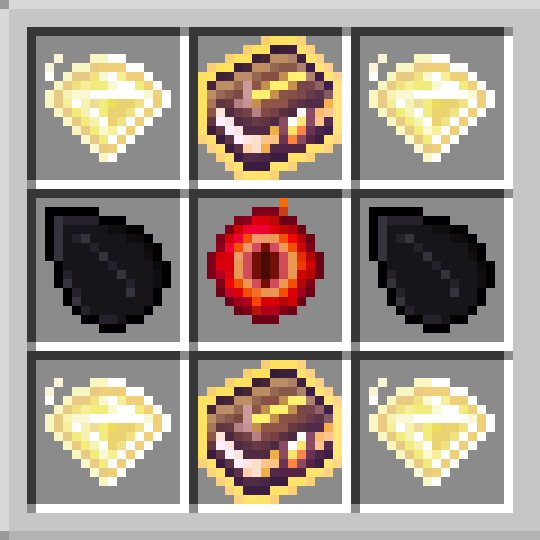
What you get
- 208 new recipes, vanilla and modded alike. Mending, Protection IV, Supreme Sharpness, Ancient Sword Mastery, the Runes, the whole Advanced and Supreme tier.
- Always max level. No stacking, no anvil chains, no wasted XP on a Sharpness II you'll throw away.
- Ingredients that mean something. Recipes are themed to the enchantment: Fire Protection wants blaze rods, Viper wants a hydra heart and a wither skull, Luck of the Sea wants ocean loot. Your rarest drops finally have a use.
- Full JEI integration. Every recipe is self-describing, so look up any enchanted book and the grid is right there.
- Three difficulty settings, so you can price the whole mod up or down with one option.
- Works on RLCraft and RLCraft Dregora.
Nothing here trivialises the game. These are endgame recipes for endgame materials. The point is to turn a slot-machine grind into something you can plan and work toward.
Some recipes
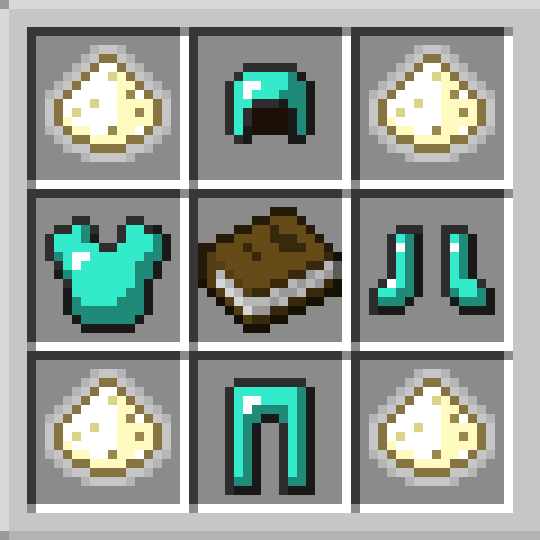 Protection IV. A full diamond armour set around a plain book. |
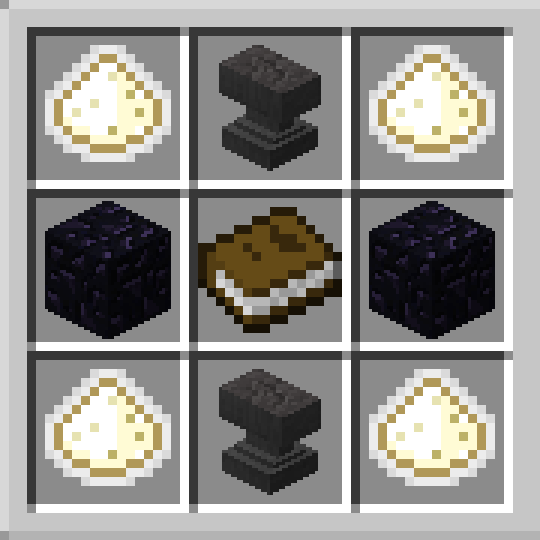 Unbreaking III. Anvils and obsidian around a book, on glowing ingot corners. |
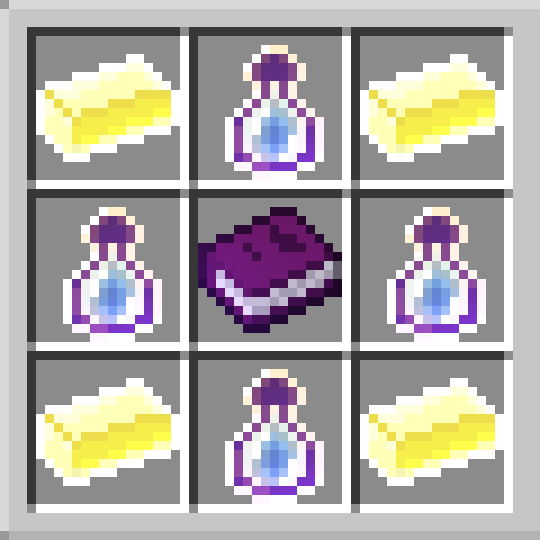 Mending. Glowing ingots, experience bottles and a full XP Tome. |
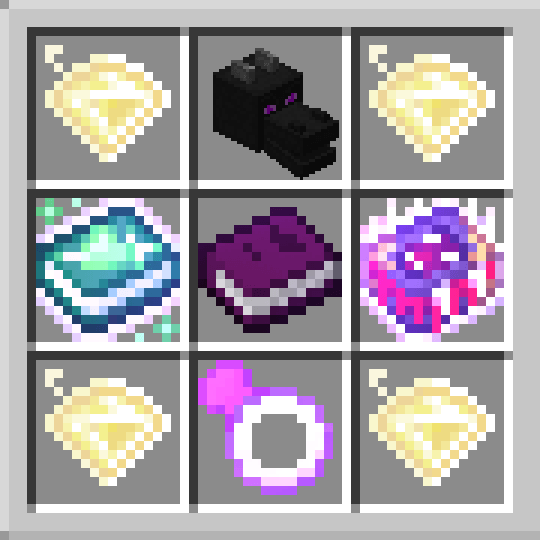 Strengthened Vitality V. An ender dragon head, Lifesteal and Vampirism books, and a Ring of Regeneration. |
Stage 5 Dragon Skull
Upgrades a stage 4 dragon skull to a stage 5. Skull in the centre, dragon bone on the edges, glowing gems in the corners. The dragon type carries over.
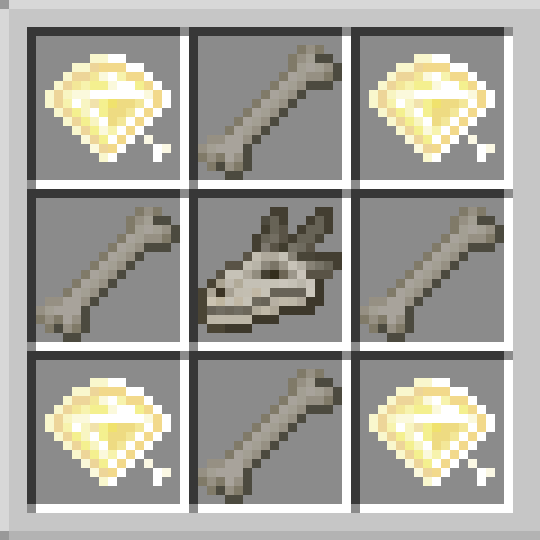
Set ENABLE_DRAGON_HEAD_UPGRADE to false to disable it.
Pack mode
Since 1.1.2 the mod sorts this out itself. PACK_MODE defaults to auto and works out whether you're on RLCraft Dregora or base RLCraft when the game launches, so there's nothing for you to set. Coming from an older version, your config switches itself over the first time you run it.
You can still force it to dregora or rlcraft if you'd rather. Restart after changing it by hand, since recipes are built at startup.
Configuration
Config file: config/rlcraftenchantrecipes.cfg, or in-game via Mods → RLCraft Enchantment Recipes → Config.

CONSUME_XP_BOOK_ON_CRAFT, defaultfalse. By default a full XP Tome is drained, not destroyed: you get the empty tome back, like a bucket. Settrueto consume it outright.DIFFICULTY_MODE,easy/normal/hard. Shifts every recipe's glowing-material cost one step alongglowstone → glowing powder → glowing ingot → glowing gem → glowing gem block. One setting reprices the entire mod.DISABLED_RECIPES, empty by default. A list of recipe IDs to turn off entirely. See below.ENABLE_DRAGON_HEAD_UPGRADE, defaulttrue. See the dragon skull section above.PACK_MODE,auto(default),dregoraorrlcraft. See above.XP_TOME_LEVEL,0to30, default30. How full an XP Tome has to be for the recipes that use one. A fuller tome is always accepted; an emptier one is rejected.
Turning recipes off
If you don't want a particular recipe, add its ID to DISABLED_RECIPES in the config, one per line. Those recipes never register, exactly as if they weren't in the mod.
* works as a wildcard anywhere in an entry, matched against the whole ID:
| Entry | Disables |
|---|---|
supreme_sharpness_v |
That one recipe, exact match |
supreme_* |
Every Supreme tier recipe |
*_v |
Every recipe ending in _v |
*sharpness* |
Every recipe with "sharpness" anywhere in its ID |
An entry with no * has to match an ID exactly. Empty (the default) disables nothing.
To find a recipe's ID, check your log at startup for Registered tome recipe: <id> lines, or read ModRecipes.java in the source.
This doesn't cover the dragon skull upgrade, which has its own toggle.
Restart the game after changing it.
Playing base RLCraft?
You don't have to do anything, the mod spots it on its own. A handful of ingredients swap to things base RLCraft actually has:
| Recipe asks for | You use instead |
|---|---|
| Ice and Fire copper ingot | Silver ingot |
| Ice and Fire hydra heart | Fire or ice dragon heart |
| Ice and Fire hydra fang | Sea serpent fang |
| Spartan Weaponry iron scythe | Iron hoe |
| Curseweave Fabric | That curse's own material (rotten flesh, bone, …) |
| Prismarine block | Prismarine shard |
| Sea lantern | Prismarine crystals |
Ocean materials are stepped down deliberately, since they're harder to come by in base RLCraft.
Ten enchantments don't exist in base RLCraft and simply have no recipe there: Ascetic, Breached Plating, Combat Medic, Extinguish, and the subjects Biology, Chemistry, Geography, History, Mathematics and Physics. In exchange you get Subject English and Subject Science, which only base RLCraft has.
Requirements
- Minecraft 1.12.2, Forge 14.23.5.2847 or newer
- RLCraft Dregora v1.1.2b or RLCraft 2.9.3
- JEI, technically optional but you really want it
No hard dependencies. If something's missing the affected recipe just doesn't register. The game never crashes over it.
Missing recipes?
Check your log for Could not find ... lines. Each one names exactly what the skipped recipe was looking for, which is usually enough to tell you what happened. The log also says which pack was detected and what it matched on, so you can confirm it landed on the right one.
Also check DISABLED_RECIPES if you've used it. A wildcard entry can catch more than you meant: *sharpness* takes out Advanced and Supreme Sharpness too, not only the plain one.
Remember that PACK_MODE, DIFFICULTY_MODE, ENABLE_DRAGON_HEAD_UPGRADE and DISABLED_RECIPES only take effect on launch. Changing them mid-game does nothing until you restart.
Feedback
Feedback and suggestions are welcome, especially on recipe costs and anything that looks mispriced.
- Bug reports: the GitHub issue tracker
- 💬 Join the Discord
- Or leave a comment on this page
If a recipe isn't showing up, include your log. The Could not find ... lines say exactly what was missing.
Source & license
Source: https://github.com/ExiledRadio/RLCraftEnchantRecipes
Licensed MIT, so fork it, modify it or bundle it in your modpack. Just credit me.
Unofficial addon. Not affiliated with or endorsed by the RLCraft or RLCraft Dregora teams. All referenced items, blocks and enchantments belong to their respective mod authors. This mod bundles none of their code or assets.
Project description from CurseForge.
Pick your setup
RLCraft Enchantment Recipes by Minecraft version and loader
Choose the version and loader you play, then open the matching release.
Check the dependencies, then try the file in a copied instance before changing a world you care about.
Recent files
RLCraft Enchantment Recipes versions and loaders
RLCraftEnchantRecipes-1.1.3.jar
29 Aug 2026
Client Source doesn’t say Server Source doesn’t say Dependencies No extras listed Listed on Release listing
Check the 1.12.2 · Forge setup Forge1.12.2 release
RLCraftEnchantRecipes-1.1.2.jar
28 Aug 2026
Client Source doesn’t say Server Source doesn’t say Dependencies No extras listed Listed on Release listing
Check the 1.12.2 · Forge setup Forge1.12.2 release
RLCraftEnchantRecipes-1.1.1.jar
16 Aug 2026
Client Source doesn’t say Server Source doesn’t say Dependencies No extras listed Listed on Release listing
Check the 1.12.2 · Forge setup Forge1.12.2 release
RLCraftEnchantRecipes-1.1.0.jar
1 Aug 2026
Client Source doesn’t say Server Source doesn’t say Dependencies No extras listed Listed on Release listing
Check the 1.12.2 · Forge setup Forge1.12.2 release
RLCraftEnchantRecipes-1.0.1.jar
RLCraftEnchantRecipes-1.0.1.jar
31 Jul 2026
Client Source doesn’t say Server Source doesn’t say Dependencies No extras listed Listed on Release listing
Check the 1.12.2 · Forge setup Forge1.12.2 release
RLCraftEnchantRecipes-1.0.0.jar
30 Jul 2026
Client Source doesn’t say Server Source doesn’t say Dependencies No extras listed Listed on Release listing
Check the 1.12.2 · Forge setup Forge1.12.2 release
Looking for an older file? The official CurseForge project page is in Resources.
 mod
mod CurseForge + Modrinth · Minecraft
Reliable Remover
A lightweight utility for completely removing items via simple JSON configuration.
 mod
mod CurseForge + Modrinth · Minecraft
Genetics: Resequenced
Extract mobs' Genes to gain their powers!
 mod
mod CurseForge · Minecraft
Nuka-Additions
Adds new blocks , structures, and systems to improve survival and modpack compatability.