Minecraft version
Back to mods 
CurseForge · Minecraft mod
Gouge
Slam your pickaxe into a wall mid-fall to slow your descent or lock yourself in place before you hit the ground.
Choose a version Pick your version below, then grab the matching file.
Quick answer
Which Gouge release should I use?
Latest stable file gouge-1.4-mc1.21.4-neoforge.jar
Game version 1.21.4
Loader NeoForge
gouge-1.4-mc1.21.4-neoforge.jar targets 1.21.4 with NeoForge. The project page does not say whether this file belongs on the client, dedicated server, or both. No extra mods listed for this file.
Where it goes
Is Gouge required on the client, server, or both?
The project page does not say whether this file belongs on the client, dedicated server, or both.
Client Source doesn’t say
Dedicated server Source doesn’t say
Loader for this release NeoForge
Required install it here Optional supported, not mandatory Not supported do not install here Source doesn’t say do not assume
The source does not explicitly classify this release as client-only or server-only.
What else does gouge-1.4-mc1.21.4-neoforge.jar need?
gouge-1.4-mc1.21.4-neoforge.jar. Change the file and its required mods may change too.
This file does not list any required mods. Do not add a library just because a different file uses it.
This file does not list any required or optional mods.
Before you install it
Add Gouge without breaking your instance.
Built for gouge-1.4-mc1.21.4-neoforge.jar. Pick another file and the loader, install side or required mods may change.
- 01
Stick to this file
Use gouge-1.4-mc1.21.4-neoforge.jar. It targets 1.21.4 with NeoForge; another release may have different loader, side or dependency requirements.
- 02
Bring the mods it needs
This file does not list any required mods. Do not add a library just because a different file uses it.
- 03
Put it on the correct side
The project page does not say whether this file belongs on the client, dedicated server, or both.
- 04
Pick the file you checked
Use the “Get this file” button beside gouge-1.4-mc1.21.4-neoforge.jar. It opens that exact file at the source.
About this project
What does Gouge add?
Slam your pickaxe into a wall mid-fall and stop yourself before you splat.
What it does
Falling toward a wall? Right-click it with a pickaxe. It bites into the surface and friction does the rest, bleeding off your speed as you scrape down. Harder blocks slow you down more.
Hit stone or obsidian and friction keeps eating your momentum every tick, no input needed, until you stop dead. Once you're stopped you hang there, locked in place, until your grip runs out or your pickaxe can't take any more punishment. When it gives out you slip, and there's a cooldown before you can grab again.
Hit dirt or sand and there's no locking, you just keep sliding, but your landing hits noticeably softer.
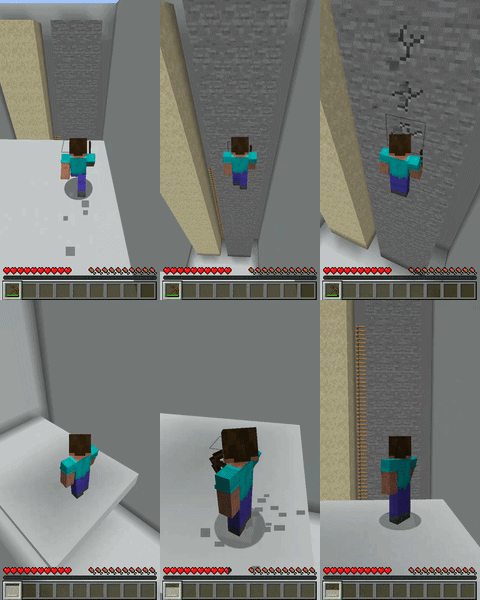
Want off the wall early? Double-tap crouch within half a second. That kicks you off, whether you're hanging or still sliding.
Better pickaxes hang longer and drain slower. Slide into another player fast enough and it hurts them too.
See it in action
Soft blocks cut your fall damage roughly in half
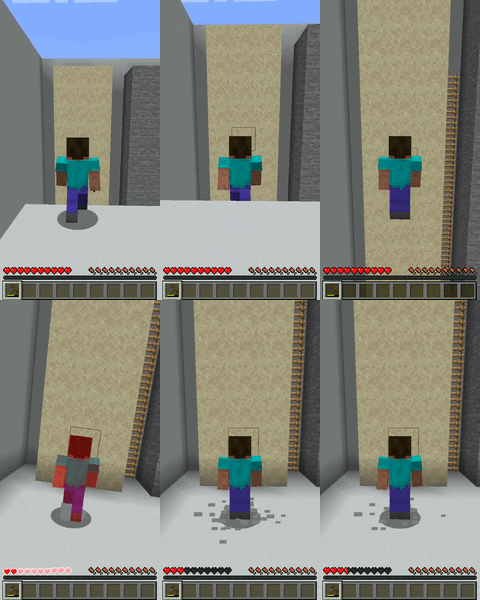
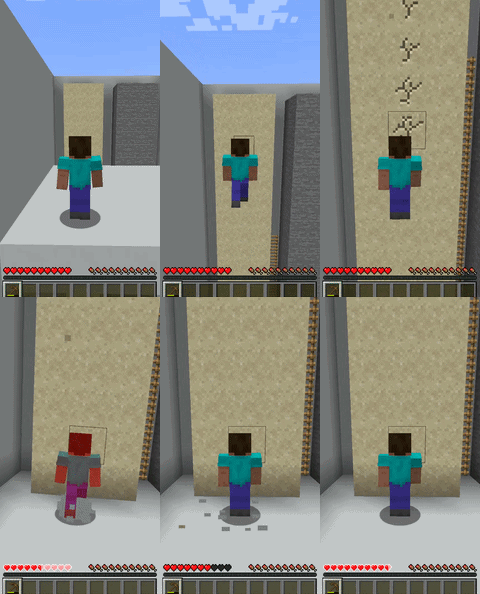
No slide vs sliding on the way down
Hard blocks bleed your speed until you lock in place
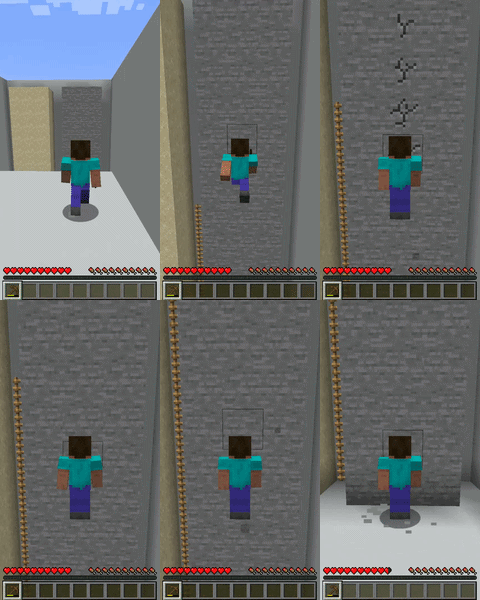
(that fall damage at the end is a skill issue :p)
Double-tap crouch to kick off (Works only on hard blocks)
Enchantments
| Enchantment | What it does |
|---|---|
| Grip I to III | Hang onto the wall longer before you slip |
| Momentum I to III | Cuts the cooldown after you slip |
Enchant pickaxes with these at a table or anvil like anything else.
Compatibility
- Tinkers' Construct (suggested by Elizabeth_Mahiko)
- Mekanism / Mekanism Tools
- Silent Gear
- ParCool (suggested by Brizo)
- Zipline: Rezipped (suggested by greetedsnow)
Thanks to everyone above for flagging compatibility with these mods.
Project description from CurseForge.
Pick your setup
Gouge by Minecraft version and loader
Choose the version and loader you play, then open the matching release.
Minecraft version
1.21.1
3 loader buildsMinecraft version
1.20.4
3 loader buildsMinecraft version
1.20.1
3 loader buildsCheck the dependencies, then try the file in a copied instance before changing a world you care about.
Recent files
Gouge versions and loaders
gouge-1.4-mc1.21.4-neoforge.jar
26 Aug 2026
Client Source doesn’t say Server Source doesn’t say Dependencies No extras listed Listed on Release listing
Check the 1.21.4 · NeoForge setup 1.21.4NeoForge release
gouge-1.4-mc1.21.4-forge.jar
26 Aug 2026
Client Source doesn’t say Server Source doesn’t say Dependencies No extras listed Listed on Release listing
Check the 1.21.4 · Forge setup 1.21.4Forge release
gouge-1.4-mc1.21.4-fabric.jar
26 Aug 2026
Client Source doesn’t say Server Source doesn’t say Dependencies 2 required · 2 unchecked Listed on Release listing
Check the 1.21.4 · Fabric setup Fabric1.21.4 release
gouge-1.4-mc1.21.1-neoforge.jar
26 Aug 2026
Client Source doesn’t say Server Source doesn’t say Dependencies No extras listed Listed on Release listing
Check the 1.21.1 · NeoForge setup 1.21.1NeoForge release
gouge-1.4-mc1.21.1-neoforge.jar
gouge-1.4-mc1.21.1-forge.jar
26 Aug 2026
Client Source doesn’t say Server Source doesn’t say Dependencies No extras listed Listed on Release listing
Check the 1.21.1 · Forge setup Forge1.21.1 release
gouge-1.4-mc1.21.1-fabric.jar
26 Aug 2026
Client Source doesn’t say Server Source doesn’t say Dependencies 2 required · 2 unchecked Listed on Release listing
Check the 1.21.1 · Fabric setup Fabric1.21.1 release
gouge-1.4-mc1.20.4-neoforge.jar
26 Aug 2026
Client Source doesn’t say Server Source doesn’t say Dependencies No extras listed Listed on Release listing
Check the 1.20.4 · NeoForge setup 1.20.4NeoForge release
gouge-1.4-mc1.20.4-forge.jar
26 Aug 2026
Client Source doesn’t say Server Source doesn’t say Dependencies No extras listed Listed on Release listing
Check the 1.20.4 · Forge setup Forge1.20.4 release
gouge-1.4-mc1.20.4-fabric.jar
26 Aug 2026
Client Source doesn’t say Server Source doesn’t say Dependencies 2 required · 2 unchecked Listed on Release listing
Check the 1.20.4 · Fabric setup Fabric1.20.4 release
gouge-1.4-mc1.20.1-neoforge.jar
26 Aug 2026
Client Source doesn’t say Server Source doesn’t say Dependencies No extras listed Listed on Release listing
Check the 1.20.1 · NeoForge setup 1.20.1NeoForge release
gouge-1.4-mc1.20.1-forge.jar
26 Aug 2026
Client Source doesn’t say Server Source doesn’t say Dependencies No extras listed Listed on Release listing
Check the 1.20.1 · Forge setup 1.20.1Forge release
gouge-1.4-mc1.20.1-fabric.jar
26 Aug 2026
Client Source doesn’t say Server Source doesn’t say Dependencies 2 required · 2 unchecked Listed on Release listing
Check the 1.20.1 · Fabric setup Fabric1.20.1 release
Looking for an older file? The official CurseForge project page is in Resources.
 mod
mod CurseForge · Minecraft
Simple Horse QOL
Chested Horses and Dual riding for servers! plus some other purely client side tweaks!
 mod
mod CurseForge · Minecraft
Realms of Reverie
Realms of Reverie Modpack Mod
 mod
mod CurseForge · Minecraft
Catalytic Tweaks
Changes mods behaviour, in a way to optimize them, fix some issues or extends their functionalities, most of them with configurations. Currectly affects Modular Machinery Reborn, SFM keywords colors, KJS in different ways , Pipez and more!