






Minecraft version
Back to mods 
CurseForge · Minecraft mod
e4steam
e4steam is an e4mc fork that lets you play Minecraft with friends over the Steam network.
Choose a version Pick your version below, then grab the matching file.
Quick answer
Which e4steam release matches 26.2?
Best match for your filters [NeoForge 1.20.2-26.2] e4steam 0.3.0
Game version 1.21, 1.20.2, 1.21.8
Loader NeoForge
e4steam [NeoForge 1.20.2-26.2] e4steam 0.3.0 targets 1.21, 1.20.2, 1.21.8 with NeoForge. The project page does not say whether this file belongs on the client, dedicated server, or both. No extra mods listed for this file.
Where it goes
Is e4steam required on the client, server, or both?
The project page does not say whether this file belongs on the client, dedicated server, or both.
Client Source doesn’t say
Dedicated server Source doesn’t say
Loader for this release NeoForge
Required install it here Optional supported, not mandatory Not supported do not install here Source doesn’t say do not assume
The source does not explicitly classify this release as client-only or server-only.
What else does e4steam [NeoForge 1.20.2-26.2] e4steam 0.3.0 need?
[NeoForge 1.20.2-26.2] e4steam 0.3.0 on 26.2. Every mod below is checked against that same setup.
This file does not list any required mods. Do not add a library just because a different file uses it.
This file does not list any required or optional mods.
Before you install it
Add e4steam without breaking your instance.
Built for e4steam [NeoForge 1.20.2-26.2] e4steam 0.3.0 on 26.2. Pick another file and the loader, install side or required mods may change.
- 01
Stick to this file
Use [NeoForge 1.20.2-26.2] e4steam 0.3.0. It targets 1.21, 1.20.2, 1.21.8 with NeoForge; another release may have different loader, side or dependency requirements.
- 02
Bring the mods it needs
This file does not list any required mods. Do not add a library just because a different file uses it.
- 03
Put it on the correct side
The project page does not say whether this file belongs on the client, dedicated server, or both.
- 04
Pick the file you checked
Use the “Get this file” button beside [NeoForge 1.20.2-26.2] e4steam 0.3.0. It opens that exact file at the source.
About this project
What does e4steam add?

e4steam
Play in singleplayer Minecraft worlds with friends through Steam.

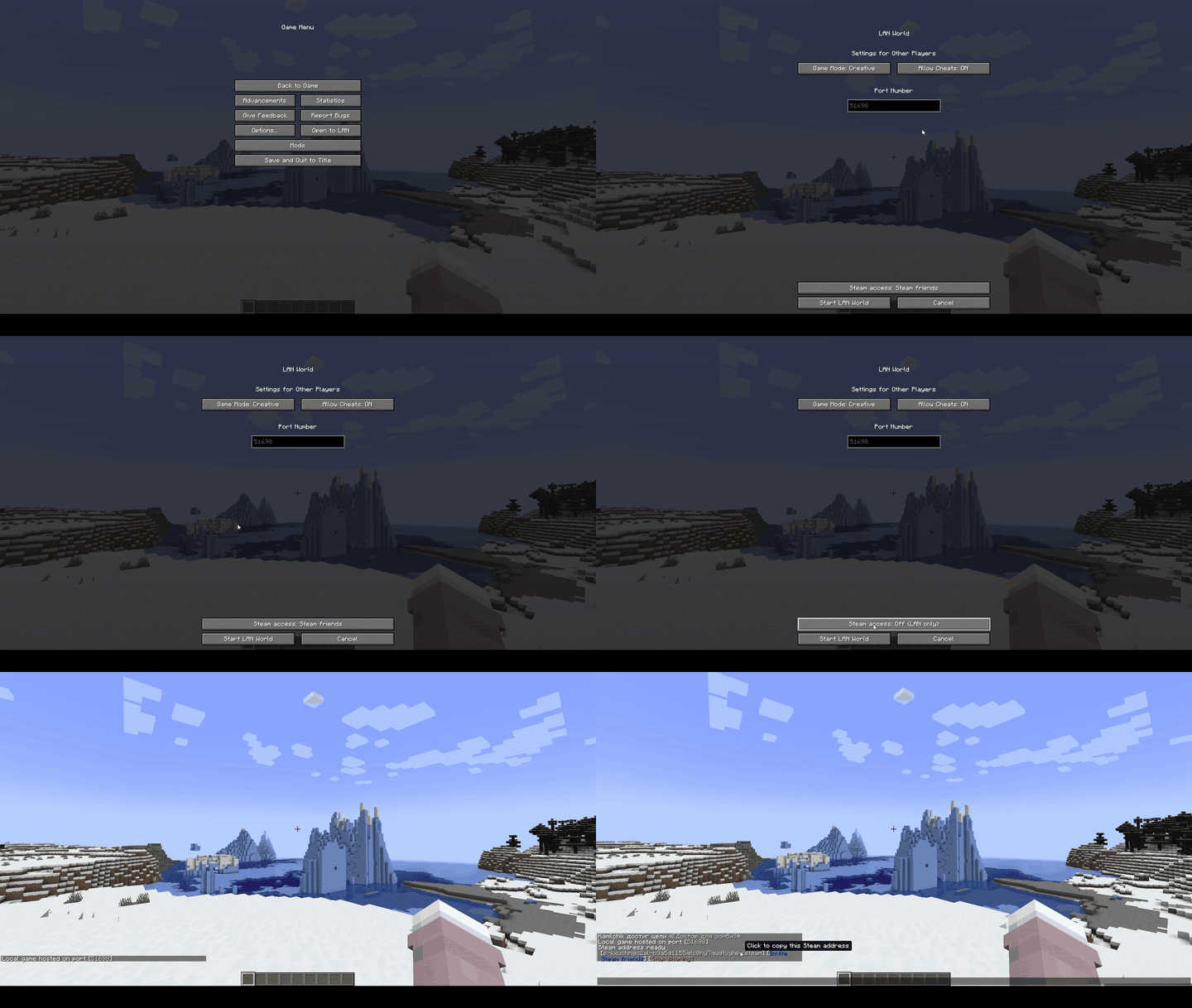
Open Server
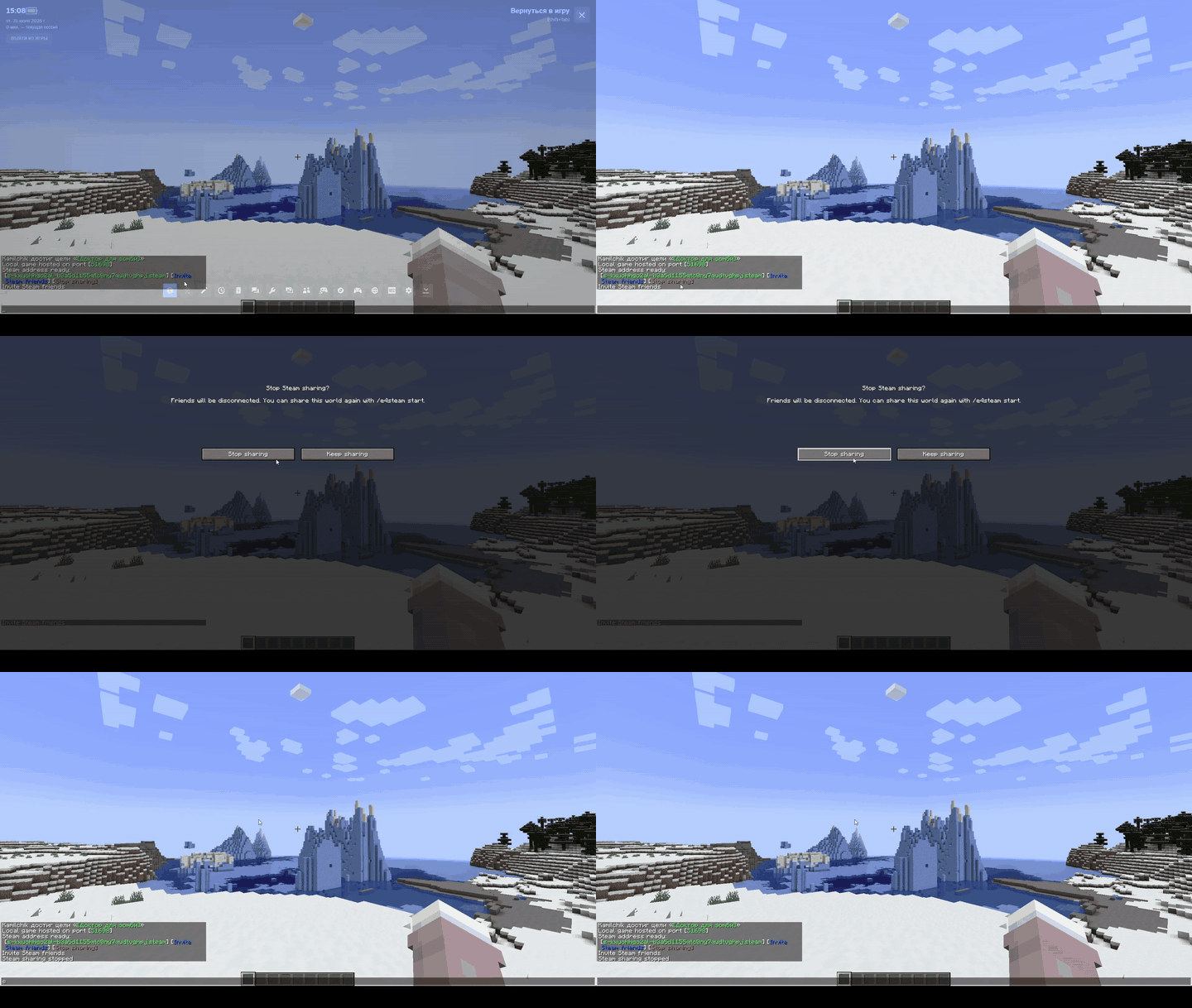
Close Server
English
e4steam 0.3.0 lets you play with friends in your singleplayer Minecraft worlds through Steam—without a dedicated server or router configuration.
Open your world to the network, select Steam Friends or Invite Only, and send an invitation through the Steam overlay. Friends can also join using Minecraft's Direct Connection menu and a short s-...steam address.
Features
- Play together in a regular singleplayer world
- Invite friends through the Steam overlay with Shift + Tab
- Choose between Steam Friends and Invite Only access modes
- Join using a short direct-connection address
- Copy the address, invite friends, or close the connection using colored chat buttons
- Confirm before closing an active connection
- Automatically close the connection when the host leaves the world
- Reopen the connection using
/e4steam start - Use the mod in multiple languages
- Extend the mod with the stable e4steam Addon API 1.0
- Run an optional dedicated server (currently experimental)
Add-ons
| Icon | Add-on | Description |
|---|---|---|
  |
e4steam Friends Minecraft 26.2 · Fabric / NeoForge |
A Minecraft-style Steam friends screen with presence, search, invitations, joining, and join requests. |
Addon API for developers
The stable e4steam Addon API 1.0.0 is published on Maven Central. No custom Maven repository is required:
dependencies {
    compileOnly("io.github.kamilhik:e4steam-api:1.0.0")
}
How to play
- Start Steam and sign in to your account.
- Launch Minecraft and enter a singleplayer world.
- Open the pause menu and select Open to LAN.
- Choose Steam Friends or Invite Only.
- Invite a friend using the blue chat button or the Steam overlay.
Your friend can also copy the provided s-...steam address, open Multiplayer → Direct Connection, and paste it into the server address field.
Steam and e4steam must be running for both the host and every joining player. The Minecraft version, mod loader, and e4steam version must match.
Commands
/e4steam start— reopen the connection/e4steam invite— open the friend invitation interface/e4steam restart— restart the connection/e4steam doctor— check whether Steam and the mod are ready
e4steam 0.3.0 is a full release. Windows x64 is the primary supported platform. Linux x64, macOS, and dedicated servers are currently experimental. Addon API 1.0 is stable. The project is created and maintained by Kamilchik and is a separate, unofficial fork of e4mc.
Русский
e4steam 0.3.0 позволяет играть с друзьями в одиночных мирах Minecraft через Steam — без выделенного сервера и настройки роутера.
Откройте мир для сети, выберите режим «Для друзей Steam» или «Только по приглашению» и отправьте приглашение через оверлей Steam. Друг также может подключиться через меню «Прямое подключение», используя короткий адрес s-...steam.
Возможности
- Игра с друзьями в обычном одиночном мире
- Приглашения через оверлей Steam по сочетанию Shift + Tab
- Режимы доступа «Для друзей Steam» и «Только по приглашению»
- Короткий адрес для прямого подключения
- Цветные кнопки в чате для копирования адреса, приглашения друзей и закрытия соединения
- Подтверждение перед закрытием активного соединения
- Автоматическое закрытие соединения при выходе владельца из мира
- Повторный запуск соединения командой
/e4steam start - Поддержка нескольких языков
- Расширение возможностей мода через стабильный e4steam Addon API 1.0
- Возможность запустить выделенный сервер (пока экспериментально)
Аддоны
| Иконка | Аддон | Описание |
|---|---|---|
|
e4steam Friends Minecraft 26.2 · Fabric / NeoForge |
Экран друзей Steam в стиле Minecraft: статусы, поиск, приглашения, подключение и запросы на вход. |
Addon API для разработчиков
Стабильный e4steam Addon API 1.0.0 опубликован в Maven Central. Сторонний Maven-репозиторий добавлять не нужно:
dependencies {
    compileOnly("io.github.kamilhik:e4steam-api:1.0.0")
}
Как начать игру
- Запустите Steam и войдите в свой аккаунт.
- Запустите Minecraft и зайдите в одиночный мир.
- Откройте меню паузы и нажмите «Открыть для сети».
- Выберите «Для друзей Steam» или «Только по приглашению».
- Пригласите друга через синюю кнопку в чате или оверлей Steam.
Друг также может скопировать полученный адрес s-...steam, открыть «Сетевая игра» → «Прямое подключение» и вставить его в поле адреса сервера.
У владельца мира и всех подключающихся игроков должны быть запущены Steam и e4steam. Версии Minecraft, загрузчика модов и e4steam должны совпадать.
Команды
/e4steam start— повторно открыть соединение/e4steam invite— открыть интерфейс приглашения друзей/e4steam restart— перезапустить соединение/e4steam doctor— проверить готовность Steam и мода
e4steam 0.3.0 — полноценный релиз. Основная поддерживаемая платформа — Windows x64. Linux x64, macOS и выделенные серверы пока имеют экспериментальный статус. Addon API 1.0 стабилен. Проект создан и поддерживается Kamilchik и является отдельным неофициальным форком e4mc.
Project description from CurseForge.
Pick your setup
e4steam by Minecraft version and loader
Choose the version and loader you play, then open the matching release.
Minecraft version
26.1.2
3 loader buildsMinecraft version
26.1.1
3 loader buildsMinecraft version
26.1
3 loader buildsMinecraft version
1.21.11
3 loader buildsMinecraft version
1.21.10
3 loader buildsMinecraft version
1.21.9
3 loader buildsMinecraft version
1.21.8
3 loader buildsMinecraft version
1.21.7
3 loader buildsMinecraft version
1.21.6
3 loader buildsMinecraft version
1.21.5
3 loader buildsMinecraft version
1.21.4
3 loader buildsShowing the newest 12 of 83 game versions. Older files are in the list below.
Check the dependencies, then try the file in a copied instance before changing a world you care about.
Recent files
e4steam versions and loaders
[NeoForge 1.20.2-26.2] e4steam 0.3.0
e4steam-neoforge-mc1.20.2-26.2-v0.3.0.jar
24 Aug 2026
Client Source doesn’t say Server Source doesn’t say Dependencies No extras listed Listed on Release listing
Check the 26.2 · NeoForge setup 1.211.20.21.21.81.20.5 release
[Fabric/Quilt 26.1-26.2] e4steam 0.3.0
e4steam-fabric-quilt-mc26.1-26.2-v0.3.0.jar
24 Aug 2026
Client Source doesn’t say Server Source doesn’t say Dependencies 1 required · 1 unchecked Listed on Release listing
Check the 26.2 · Fabric setup FabricQuilt26.126.1.1 release
[NeoForge 1.20.2-26.2] e4steam 0.2.4
e4steam-neoforge-mc1.20.2-26.2-v0.2.4.jar
9 Aug 2026
Client Source doesn’t say Server Source doesn’t say Dependencies No extras listed Listed on Release listing
Check the 26.2 · NeoForge setup 1.211.20.21.21.81.20.5 release
[Fabric/Quilt 26.1-26.2] e4steam 0.2.4
e4steam-fabric-quilt-mc26.1-26.2-v0.2.4.jar
9 Aug 2026
Client Source doesn’t say Server Source doesn’t say Dependencies No extras listed Listed on Release listing
Check the 26.2 · Fabric setup FabricQuilt26.126.1.1 release
[NeoForge 1.20.2-26.2] e4steam 0.2.3
e4steam-neoforge-mc1.20.2-26.2-v0.2.3.jar
6 Aug 2026
Client Source doesn’t say Server Source doesn’t say Dependencies No extras listed Listed on Release listing
Check the 26.2 · NeoForge setup 1.211.20.21.21.81.20.5 release
[Fabric/Quilt 26.1-26.2] e4steam 0.2.3
e4steam-fabric-quilt-mc26.1-26.2-v0.2.3.jar
6 Aug 2026
Client Source doesn’t say Server Source doesn’t say Dependencies No extras listed Listed on Release listing
Check the 26.2 · Fabric setup FabricQuilt26.126.1.1 release
[NeoForge 1.20.2-26.2] e4steam 0.2.2
e4steam-neoforge-mc1.20.2-26.2-v0.2.2.jar
5 Aug 2026
Client Source doesn’t say Server Source doesn’t say Dependencies No extras listed Listed on Release listing
Check the 26.2 · NeoForge setup 1.211.20.21.21.81.20.5 release
[Fabric/Quilt 26.1-26.2] e4steam 0.2.2
e4steam-fabric-quilt-mc26.1-26.2-v0.2.2.jar
5 Aug 2026
Client Source doesn’t say Server Source doesn’t say Dependencies No extras listed Listed on Release listing
Check the 26.2 · Fabric setup FabricQuilt26.126.1.1 release
[NeoForge 1.20.2-26.2] e4steam 0.2.1
e4steam-neoforge-mc1.20.2-26.2-v0.2.1.jar
3 Aug 2026
Client Source doesn’t say Server Source doesn’t say Dependencies No extras listed Listed on Release listing
Check the 26.2 · NeoForge setup 1.211.20.21.21.81.20.5 release
[Fabric/Quilt 26.1-26.2] e4steam 0.2.1
e4steam-fabric-quilt-mc26.1-26.2-v0.2.1.jar
3 Aug 2026
Client Source doesn’t say Server Source doesn’t say Dependencies No extras listed Listed on Release listing
Check the 26.2 · Fabric setup FabricQuilt26.126.1.1 release
[NeoForge 1.20.2-26.2] e4steam 0.2.0
e4steam-neoforge-mc1.20.2-26.2-v0.2.0.jar
1 Aug 2026
Client Source doesn’t say Server Source doesn’t say Dependencies No extras listed Listed on Release listing
Check the 26.2 · NeoForge setup 1.211.20.21.21.81.20.5 release
[Fabric/Quilt 26.1-26.2] e4steam 0.2.0
e4steam-fabric-quilt-mc26.1-26.2-v0.2.0.jar
1 Aug 2026
Client Source doesn’t say Server Source doesn’t say Dependencies No extras listed Listed on Release listing
Check the 26.2 · Fabric setup FabricQuilt26.126.1.1 release
Looking for an older file? The official CurseForge project page is in Resources.
 mod
mod CurseForge + Modrinth · Minecraft
Just Enough Serverless Recipes (JESR)
Provides vanilla JEI recipes on servers without JEI installed.
 mod
mod CurseForge · Minecraft
SlashLoot
Per-player loot for naturally-generated chests, barrels, shulker boxes, and minecarts — server-side only, requires no client mod.
 mod
mod CurseForge · Minecraft
CheatUtils
This mod includes XRay or block finder, entity highlighting, kill aura, etc