Minecraft version
Back to mods 
CurseForge · Minecraft mod
NeoLoading-Vulkan-Fix
Fixes Vulkan incompatibility with NeoForge in Minecraft 26.2+ by skipping the early loading screen. Client-side only.
Choose a version Pick your version below, then grab the matching file.
Quick answer
Which NeoLoading-Vulkan-Fix release matches 26.2 NeoForge?
Best match for your filters neoloadingvulkanfix-1.0.0.jar
Game version 26.2
Loader NeoForge
NeoLoading-Vulkan-Fix neoloadingvulkanfix-1.0.0.jar targets 26.2 with NeoForge. The project page does not say whether this file belongs on the client, dedicated server, or both. No extra mods listed for this file.
Where it goes
Is NeoLoading-Vulkan-Fix required on the client, server, or both?
The project page does not say whether this file belongs on the client, dedicated server, or both.
Client Source doesn’t say
Dedicated server Source doesn’t say
Loader for this release NeoForge
Required install it here Optional supported, not mandatory Not supported do not install here Source doesn’t say do not assume
The source does not explicitly classify this release as client-only or server-only.
What else does NeoLoading-Vulkan-Fix neoloadingvulkanfix-1.0.0.jar need?
neoloadingvulkanfix-1.0.0.jar on 26.2 NeoForge. Every mod below is checked against that same setup.
This file does not list any required mods. Do not add a library just because a different file uses it.
This file does not list any required or optional mods.
Before you install it
Add NeoLoading-Vulkan-Fix without breaking your instance.
Built for NeoLoading-Vulkan-Fix neoloadingvulkanfix-1.0.0.jar on 26.2 NeoForge. Pick another file and the loader, install side or required mods may change.
- 01
Stick to this file
Use neoloadingvulkanfix-1.0.0.jar. It targets 26.2 with NeoForge; another release may have different loader, side or dependency requirements.
- 02
Bring the mods it needs
This file does not list any required mods. Do not add a library just because a different file uses it.
- 03
Put it on the correct side
The project page does not say whether this file belongs on the client, dedicated server, or both.
- 04
Pick the file you checked
Use the “Get this file” button beside neoloadingvulkanfix-1.0.0.jar. It opens that exact file at the source.
About this project
What does NeoLoading-Vulkan-Fix add?
NeoLoading-Vulkan-Fix is a lightweight client-side mod that fixes crashes and freezes caused by NeoForge's Early Loading Screen when Minecraft is running with the Vulkan graphics backend.
The Problem
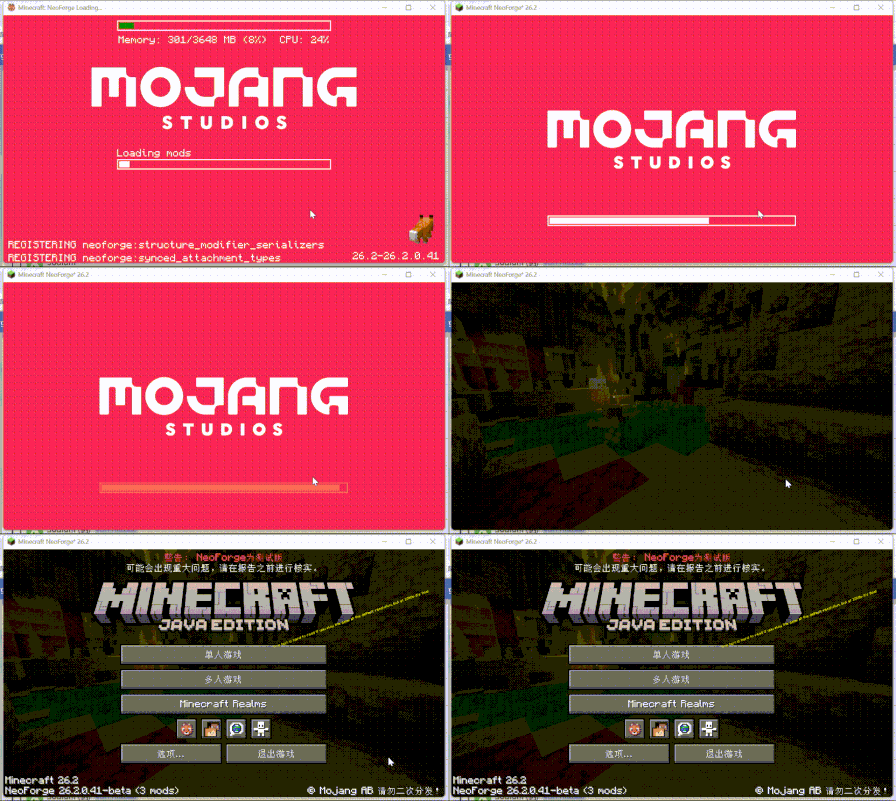
When you switch Minecraft to use the Vulkan rendering backend (via GpuBackend), NeoForge's Early Loading Screen conflicts with Vulkan's window creation flow, causing the game to freeze or crash during startup.
How It Fixes It
This mod uses Mixin injection to address the issue at two key points:
- Detects Vulkan — hooks into
Window.createGlfwWindowto detect when Vulkan is the active backend - Skips the conflicting loading screen — when Vulkan is detected, skips
EarlyLoadingScreenControllerinitialization - Safely cleans up — in
ClientModLoader.finish, uses GLFW native APIs to properly destroy theDisplayWindowinstead of calling the originalclose()method
Compatibility
- Client-side only — no server installation required.
- No gameplay changes — purely a technical fix.
- Not needed if you are using Twilight Forest: Re26 — that mod already includes the same Vulkan fix. Please remove this mod to avoid conflicts.
If you're using Vulkan with NeoForge and experiencing startup crashes, this mod should resolve the issue.
Project description from CurseForge.
Pick your setup
NeoLoading-Vulkan-Fix by Minecraft version and loader
Choose the version and loader you play, then open the matching release.
Check the dependencies, then try the file in a copied instance before changing a world you care about.
Recent files
NeoLoading-Vulkan-Fix versions and loaders
neoloadingvulkanfix-1.0.0.jar
2 Aug 2026
Client Source doesn’t say Server Source doesn’t say Dependencies No extras listed Listed on Release listing
Check the 26.2 · NeoForge setup NeoForge26.2 release
Looking for an older file? The official CurseForge project page is in Resources.
 mod
CurseForge · Minecraft
Add to Creative tab
Automatically restores missing mod items into the vanilla Creative inventory so players can access every item effortlessly.
 mod
CurseForge · Minecraft
XP: RPG Damage Indicator
Real-time damage numbers with 5+ animated styles, fully customizable via resource packs
 mod
CurseForge + Modrinth · Minecraft
ShapeGen
Additional shapes for any block, including modded ones