Minecraft version
Back to mods 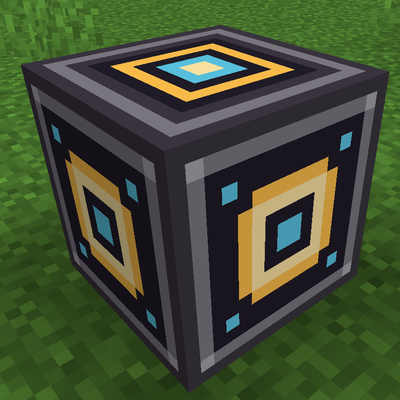
CurseForge · Minecraft mod
Workshop core block
Switch between crafting tables, furnaces, anvils, chests, or other mod's station without having to walk around or close the menu.
Choose a version Pick your version below, then grab the matching file.
Quick answer
Which Workshop core block release matches 1.21 NeoForge?
Best match for your filters workshopcore-1.0.2.jar
Game version 1.21
Loader NeoForge
Workshop core block workshopcore-1.0.2.jar targets 1.21 with NeoForge. The project page does not say whether this file belongs on the client, dedicated server, or both. No extra mods listed for this file.
Where it goes
Is Workshop core block required on the client, server, or both?
The project page does not say whether this file belongs on the client, dedicated server, or both.
Client Source doesn’t say
Dedicated server Source doesn’t say
Loader for this release NeoForge
Required install it here Optional supported, not mandatory Not supported do not install here Source doesn’t say do not assume
The source does not explicitly classify this release as client-only or server-only.
What else does Workshop core block workshopcore-1.0.2.jar need?
workshopcore-1.0.2.jar on 1.21 NeoForge. Every mod below is checked against that same setup.
This file does not list any required mods. Do not add a library just because a different file uses it.
This file does not list any required or optional mods.
Before you install it
Add Workshop core block without breaking your instance.
Built for Workshop core block workshopcore-1.0.2.jar on 1.21 NeoForge. Pick another file and the loader, install side or required mods may change.
- 01
Stick to this file
Use workshopcore-1.0.2.jar. It targets 1.21 with NeoForge; another release may have different loader, side or dependency requirements.
- 02
Bring the mods it needs
This file does not list any required mods. Do not add a library just because a different file uses it.
- 03
Put it on the correct side
The project page does not say whether this file belongs on the client, dedicated server, or both.
- 04
Pick the file you checked
Use the “Get this file” button beside workshopcore-1.0.2.jar. It opens that exact file at the source.
About this project
What does Workshop core block add?
This mod add a new block:
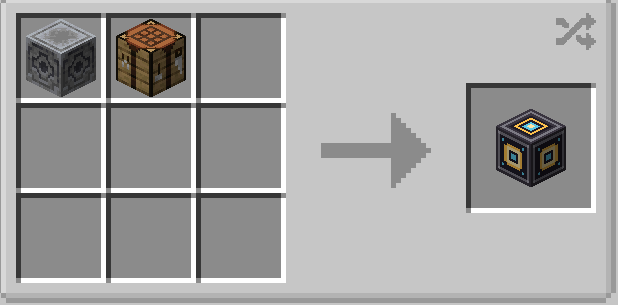
Craft a Workshop Core from a lodestone and a crafting table. It has the same hardness as a block of iron and needs a stone pickaxe.
Place it and right-click to open its settings screen:
Area — set the XYZ size and corner offset, like a structure block. The world stays visible while you type, and the area is outlined live (cyan = area, gold = the core, green = stations found, red = stations that fell outside). The outline lingers for a few seconds after you close the screen, then disappears. "Centre on core" places the core in the middle of the area.
Categories — toggle Crafting / Smelting / Enchanting & Repair / Storage / Logistics / Other.
Blocks — toggle individual entries, with a count of how many are in the area.
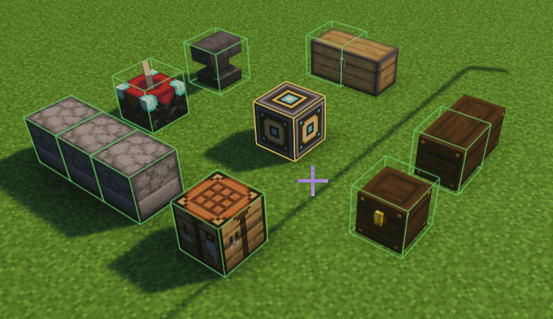
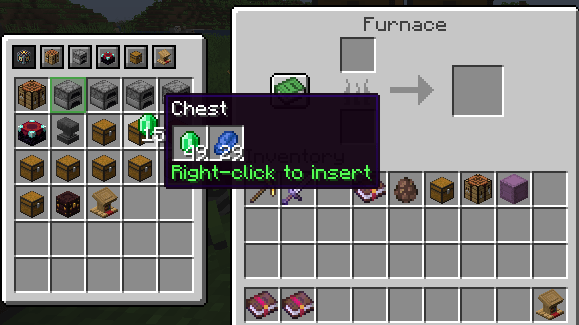
Use it by right-clicking any station inside the area as you normally would. The switcher appears beside the menu. Click an icon to switch to that station — it opens the real vanilla menu, and stats are awarded exactly as if you had walked over and used the block.
Toggle the panel with V by default (rebindable under Controls → Workshop Core). With it off, everything behaves like vanilla.
Configuration
config/workshopcore-server.toml — area limits, re-scan interval, station cap, block blacklist.
config/workshopcore-client.toml — which side the panel docks to (LEFT / RIGHT / AUTO), column count, tooltips, outline duration.
If the panel overlaps JEI's bookmark list, set
overlay.sidetoRIGHTorAUTO.
Adding modded workbenches
Most modded blocks need nothing — anything that offers a menu is detected automatically and lands in the "Other" category. Write a definition only to set its category, its sort order, or to group a whole family of blocks under one filter switch.
Definitions load from data/<namespace>/workshop_stations/*.json in any data pack, and from config/workshopcore/stations/*.json (applied afterwards, so it wins). One file is one filter entry:
{
  "category": "crafting",
  "category_priority": 10,
  "priority": 20,
  "match": [ "somemod:alloy_bench", "#c:chests" ]
}
match takes block ids or #namespace:tag. Because one file is one entry, matching a tag groups the whole family under a single switch while each block still shows its own icon. Optional fields: id, name (a lang key), enabled_by_default, open, and "disabled": true to remove a built-in entry.
Project description from CurseForge.
Pick your setup
Workshop core block by Minecraft version and loader
Choose the version and loader you play, then open the matching release.
Check the dependencies, then try the file in a copied instance before changing a world you care about.
Recent files
Workshop core block versions and loaders
workshopcore-1.0.2.jar
17 Aug 2026
Client Source doesn’t say Server Source doesn’t say Dependencies No extras listed Listed on Release listing
Check the 1.21 · NeoForge setup 1.21NeoForge release
workshopcore-1.0.1.jar
6 Aug 2026
Client Source doesn’t say Server Source doesn’t say Dependencies No extras listed Listed on Release listing
Check the 1.21 · NeoForge setup 1.21NeoForge release
workshopcore-1.0.1.jar
6 Aug 2026
Client Source doesn’t say Server Source doesn’t say Dependencies No extras listed Listed on Release listing
Check the 1.21 · NeoForge setup 1.21NeoForge release
workshopcore-1.0.0.jar
2 Aug 2026
Client Source doesn’t say Server Source doesn’t say Dependencies No extras listed Listed on Release listing
Check the 1.21 · NeoForge setup 1.21NeoForge release
Looking for an older file? The official CurseForge project page is in Resources.
 mod
Modrinth · Minecraft
SimplesorterR
A lightweight client-side mod for effortless inventory management in Minecraft.
 mod
CurseForge + Modrinth · Minecraft
LDLib
LDLib is a libarary mod for custom rendering, modular gui.
 mod
Modrinth · Minecraft
Kaleidoscope Cookery
Cook all kinds of delicious food!