Best match for your filtersSignBuilder-1.20.1-fabric-1.1.3.jar
Game version1.20.1
LoaderFabric
Sign Builder SignBuilder-1.20.1-fabric-1.1.3.jar targets 1.20.1 with Fabric. The project page does not say whether this file belongs on the client, dedicated server, or both. All 2 required mods have matching files.
Where it goes
Is Sign Builder required on the client, server, or both?
The project page does not say whether this file belongs on the client, dedicated server, or both.
ClientSource doesn’t say
Dedicated serverSource doesn’t say
Loader for this releaseFabric
Required install it hereOptional supported, not mandatoryNot supported do not install hereSource doesn’t say do not assume
The source does not explicitly classify this release as client-only or server-only.
What else does Sign Builder SignBuilder-1.20.1-fabric-1.1.3.jar need?
SignBuilder-1.20.1-fabric-1.1.3.jar on Fabric. Every mod below is checked against that same setup.
All 2 required mods have matching files
Install Architectury API, Fabric API first. We found matching files for this game-version and loader setup.
Architectury API Needed by Sign Builder SignBuilder-1.20.1-fabric-1.1.3.jar
required
Matching file found Matched file: [Fabric 1.20(.1)] v9.2.14
Fabric API Needed by Sign Builder SignBuilder-1.20.1-fabric-1.1.3.jar
required
Matching file found Matched file: [1.20.1] Fabric API 0.92.12+1.20.1
We only count dependency files that match this setup. A file for another loader does not fill the gap.
Before you install it
Add Sign Builder without breaking your instance.
Built for Sign Builder SignBuilder-1.20.1-fabric-1.1.3.jar on Fabric. Pick another file and the loader, install side or required mods may change.
01
Stick to this file
Use SignBuilder-1.20.1-fabric-1.1.3.jar. It targets 1.20.1 with Fabric; another release may have different loader, side or dependency requirements.
02
Bring the mods it needs
Install Architectury API, Fabric API first. We found matching files for this game-version and loader setup.
03
Put it on the correct side
The project page does not say whether this file belongs on the client, dedicated server, or both.
04
Pick the file you checked
Use the “Get this file” button beside SignBuilder-1.20.1-fabric-1.1.3.jar. It opens that exact file at the source.
About this project
What does Sign Builder add?
Sign Builder Mod 🎨
Sign Builder is a cross-platform Minecraft mod (Forge & Fabric) that allows players to seamlessly build, color, animate, and now materialize custom 3D signs. Fully balanced for Survival mode, this mod provides highly detailed characters, automated building tools, a dynamic painting system, advanced glowing neon mechanics, a dedicated Sign Press machine, and an expansive Dynamic Material System!
⚠️ IMPORTANT: Architectury API is now a required dependency to run this mod on both Forge and Fabric! (Fabric users also need the Fabric API).
✨ Features
Dynamic Material System (NEW!): Signs are no longer just concrete! Seamlessly integrate different base materials (currently supporting all wood types, Iron Block, and Polished Andesite).
3D Letters, Numbers & Symbols: Highly detailed, custom-modeled letters (A-Z), numbers (0-9), and an extensive set of symbols. All blocks feature refined hitboxes that adjust perfectly on floors or walls.
The Sign Press: Your dedicated workstation for crafting all sign blocks. It is fully compatible with hoppers, allowing you to easily automate the input of raw materials and the output of crafted signs!
The Blueprint & Undo: Say goodbye to placing blocks one by one. Type your text in the custom GUI and watch the mod build it instantly. Made a typo? Use the red Undo button to safely remove your last placed text and refund your materials.
The Wrench & Neon Lights: Turn any sign into a living, flowing neon display! Apply 7 distinct light modes: Normal, Blink, Flicker, Wave, Breathing, Proximity, and Night Shift.
Paint Brush & Custom Palette: Go beyond the vanilla palette by mixing your own RGB/Hex codes. Save up to 14 custom colors or use the animated Rainbow Mode for a continuously cycling color effect.
Smart Fill & Eyedropper: Sneak (Shift) + Right-Click the air to toggle "Smart Fill", now featuring intuitive green and red circular visual indicators on your HUD. This allows you to paint or animate entire connected words with a single click instantly thanks to optimistic client-side rendering.
Advancements: A brand-new advancement system featuring unique challenges to guide and reward your sign-building journey.
Global Localization: Fully translated into 8 languages (EN, TR, RU, ES, ZH, DE, FR, IT).
🛠️ How to Use
🏗️ Crafting & Building:
Craft a Sign Press to manufacture your desired letters, numbers, and symbols.
Grab a Sign Blueprint, right-click in the air, and type your desired word in the menu.
Right-click on any surface to build the text block-by-block using materials from your inventory. Tip: Use the Undo button in the Blueprint menu to quickly revert mistakes!
🎨 Painting & Materializing:
Grab a Paint Brush and right-click in the air to open the Color Menu.
Choose a preset, mix a custom Hex color, or select Rainbow Mode.
Right-click on any SignBuilder block to apply the color.
💡 Illuminating:
Grab the Wrench and right-click in the air to select an animation mode.
Right-click on any SignBuilder block to apply the animation. Tip: Enable Smart Fill Mode to animate or paint entire words at once safely!
🎒 Survival Mode & Crafting Guide
Sign Builder is perfectly balanced for your Survival worlds with realistic loot logic!
Dynamic Loot Drops: Breaking a sign normally now dynamically drops its constituent parts: 3x White Concrete, 1x Base Material Item (e.g., Oak Planks, Iron Block), and 1x Glowstone Dust (if it was glowing).
Silk Touch Persistence: Mining a sign with a Silk Touch tool now flawlessly retains all custom NBT data (color, material, glowing state, and wrench configurations) directly on the dropped item, allowing exact redeployment!
Blueprint Economy: The Blueprint consumes exact letter blocks directly from your inventory. Tools consume durability upon use.
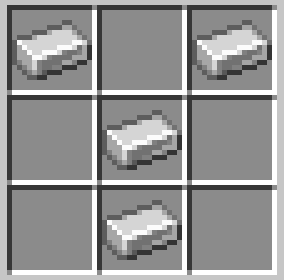
Crafting Recipes
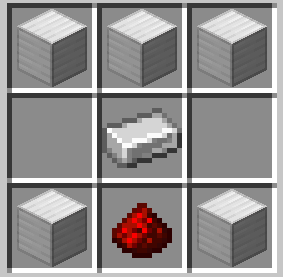
1. Sign Press
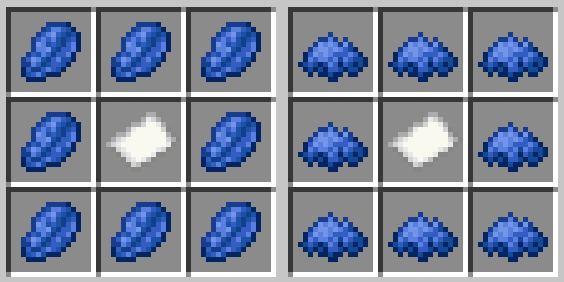
2. Sign Blueprint
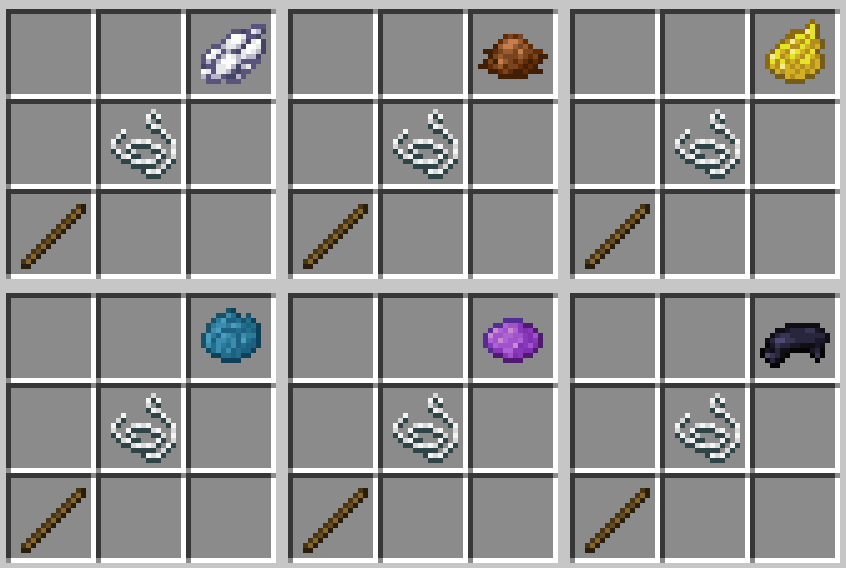
3. Paint Brush
4. Wrench
👨💻 Author
Boran Mandacı
Created with Java, Architectury API, Forge, Fabric, and Blockbench.
Project description from CurseForge.
Pick your setup
Sign Builder by Minecraft version and loader
Choose the version and loader you play, then open the matching release.