Minecraft version
Back to mods 
CurseForge · Minecraft mod
AXD Quick View Tooltip
Instantly quick-view shulkers and maps from your inventory, and seamlessly inspect placed chests, shulkers, and redstone components in the world.
Choose a version Pick your version below, then grab the matching file.
Quick answer
Which AXD Quick View Tooltip release should I use?
Latest stable file axd-quick-view-tooltip-1.0.0-fabric-26.3.jar
Game version 26.3
Loader Fabric
AXD Quick View Tooltip axd-quick-view-tooltip-1.0.0-fabric-26.3.jar targets 26.3 with Fabric. The project page does not say whether this file belongs on the client, dedicated server, or both. No extra mods listed for this file.
Where it goes
Is AXD Quick View Tooltip required on the client, server, or both?
The project page does not say whether this file belongs on the client, dedicated server, or both.
Client Source doesn’t say
Dedicated server Source doesn’t say
Loader for this release Fabric
Required install it here Optional supported, not mandatory Not supported do not install here Source doesn’t say do not assume
The source does not explicitly classify this release as client-only or server-only.
What else does AXD Quick View Tooltip axd-quick-view-tooltip-1.0.0-fabric-26.3.jar need?
axd-quick-view-tooltip-1.0.0-fabric-26.3.jar. Change the file and its required mods may change too.
This file does not list any required mods. Do not add a library just because a different file uses it.
This file does not list any required or optional mods.
Before you install it
Add AXD Quick View Tooltip without breaking your instance.
Built for AXD Quick View Tooltip axd-quick-view-tooltip-1.0.0-fabric-26.3.jar. Pick another file and the loader, install side or required mods may change.
- 01
Stick to this file
Use axd-quick-view-tooltip-1.0.0-fabric-26.3.jar. It targets 26.3 with Fabric; another release may have different loader, side or dependency requirements.
- 02
Bring the mods it needs
This file does not list any required mods. Do not add a library just because a different file uses it.
- 03
Put it on the correct side
The project page does not say whether this file belongs on the client, dedicated server, or both.
- 04
Pick the file you checked
Use the “Get this file” button beside axd-quick-view-tooltip-1.0.0-fabric-26.3.jar. It opens that exact file at the source.
About this project
What does AXD Quick View Tooltip add?
 AXD Quick View Tooltip is a highly useful quality-of-life mod that provides you with instant, crucial information about items and blocks without needing to open their UI. Designed to save you time and improve your overall gameplay experience. Why Use This Mod? Whether you're organizing massive storage systems, exploring the world, or working on complex redstone contraptions, this mod eliminates the tedious task of constantly opening and closing menus. Get all the information you need at a single glance!
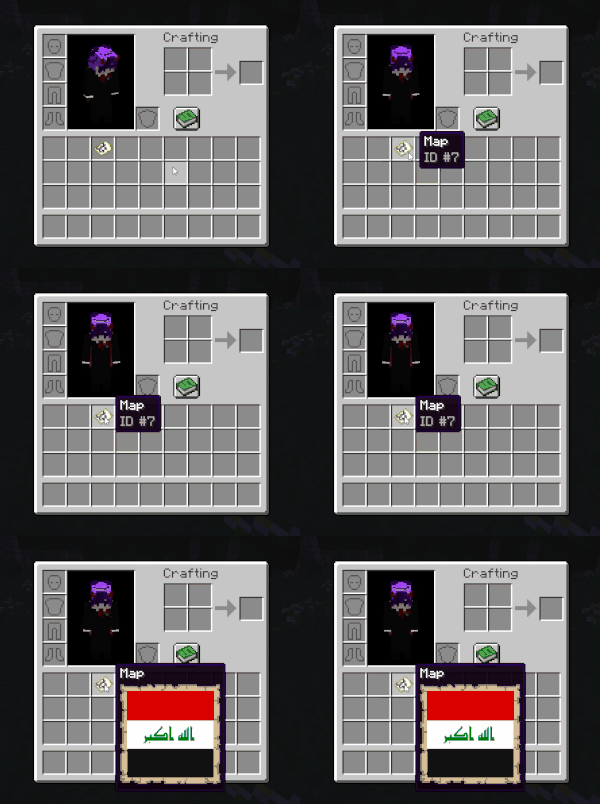
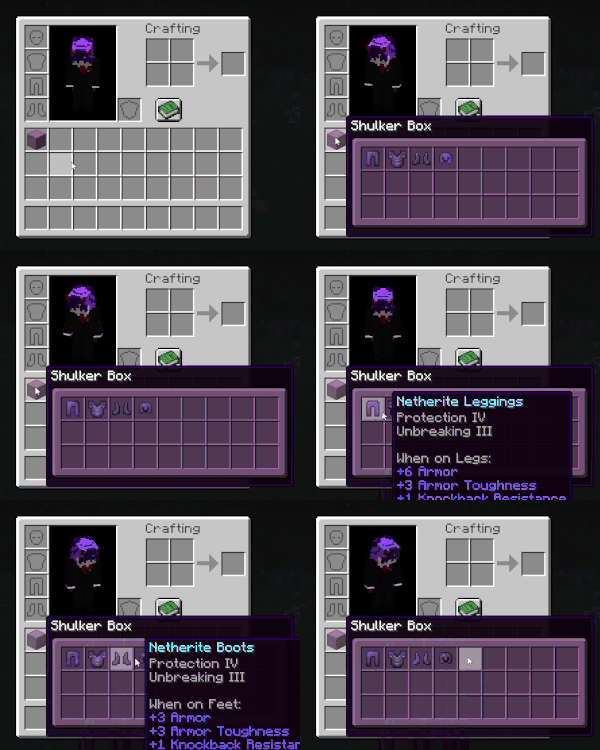
📦 Inventory Quick View Tooltip: Hover over Shulker Boxes and Filled Maps in your inventory to see their exact contents or terrain instantly.

🔍 World Quick View Tooltip: Look at placed Chests, Copper Chests , Ender Chest and other containers in the world to get a quick preview of what's inside, In single-player mode, the tooltip updates immediately. On multiplayer servers, you simply need to open the block's menu once to load the data, as this is a strictly client-side mod.
.gif?raw=true)
⚙️ Furnace Support: Effortlessly view the current state of smelting components and get real-time progress predictions and output results for Furnaces, Smokers, and Blast Furnaces. In single-player mode, the tooltip updates immediately. On multiplayer servers, you simply need to open the block's menu once to load the data, as this is a strictly client-side mod.
.gif?raw=true)
🔴 Redstone Support: Easily view the current power state, delay, and configuration of various Redstone components directly in the world without opening menus or guessing. In single-player mode, the tooltip updates immediately. On multiplayer servers, you simply need to open the block's menu once to load the data, as this is a strictly client-side mod.
Optional
- You can download and use ModMenu to get more settings on the AXD Quick View Tooltip mod.
Credits
- MisterPeModder: Creator of the ShulkerBoxTooltip mod. The ideas and design for the Shulker Box tooltips in this mod were inspired by their work.
Project description from CurseForge.
Pick your setup
AXD Quick View Tooltip by Minecraft version and loader
Choose the version and loader you play, then open the matching release.
Minecraft version
26.2
1 loader buildMinecraft version
26.1.2
1 loader buildMinecraft version
26.1.1
1 loader buildMinecraft version
26.1
1 loader buildMinecraft version
1.21.11
1 loader buildMinecraft version
1.21.10
1 loader buildMinecraft version
1.21.9
1 loader buildMinecraft version
1.21.8
1 loader buildMinecraft version
1.21.7
1 loader buildMinecraft version
1.21.6
1 loader buildMinecraft version
1.21.5
1 loader buildShowing the newest 12 of 17 game versions. Older files are in the list below.
Check the dependencies, then try the file in a copied instance before changing a world you care about.
Recent files
AXD Quick View Tooltip versions and loaders
axd-quick-view-tooltip-1.0.0-fabric-26.3.jar
25 Sept 2026
Client Source doesn’t say Server Source doesn’t say Dependencies No extras listed Listed on Release listing
Check the 26.3 · Fabric setup Fabric26.3 release
axd-quick-view-tooltip-1.0.0-fabric-26.(1)(1.1)(1.2)(2).jar
25 Sept 2026
Client Source doesn’t say Server Source doesn’t say Dependencies No extras listed Listed on Release listing
Check the 26.2 · Fabric setup Fabric26.126.1.126.1.2 release
axd-quick-view-tooltip-1.0.0-fabric-1.21.jar
30 Aug 2026
Client Source doesn’t say Server Source doesn’t say Dependencies No extras listed Listed on Release listing
Check the 1.21 · Fabric setup 1.21Fabric release
axd-quick-view-tooltip-1.0.0-fabric-1.21.1.jar
30 Aug 2026
Client Source doesn’t say Server Source doesn’t say Dependencies No extras listed Listed on Release listing
Check the 1.21.1 · Fabric setup Fabric1.21.1 release
axd-quick-view-tooltip-1.0.0-fabric-1.21.2.jar
30 Aug 2026
Client Source doesn’t say Server Source doesn’t say Dependencies No extras listed Listed on Release listing
Check the 1.21.2 · Fabric setup Fabric1.21.2 release
axd-quick-view-tooltip-1.0.0-fabric-1.21.3.jar
30 Aug 2026
Client Source doesn’t say Server Source doesn’t say Dependencies No extras listed Listed on Release listing
Check the 1.21.3 · Fabric setup Fabric1.21.3 release
axd-quick-view-tooltip-1.0.0-fabric-1.21.4.jar
30 Aug 2026
Client Source doesn’t say Server Source doesn’t say Dependencies No extras listed Listed on Release listing
Check the 1.21.4 · Fabric setup Fabric1.21.4 release
axd-quick-view-tooltip-1.0.0-fabric-1.21.5.jar
30 Aug 2026
Client Source doesn’t say Server Source doesn’t say Dependencies No extras listed Listed on Release listing
Check the 1.21.5 · Fabric setup Fabric1.21.5 release
axd-quick-view-tooltip-1.0.0-fabric-1.21.6.jar
30 Aug 2026
Client Source doesn’t say Server Source doesn’t say Dependencies No extras listed Listed on Release listing
Check the 1.21.6 · Fabric setup Fabric1.21.6 release
axd-quick-view-tooltip-1.0.0-fabric-1.21.7.jar
30 Aug 2026
Client Source doesn’t say Server Source doesn’t say Dependencies No extras listed Listed on Release listing
Check the 1.21.7 · Fabric setup Fabric1.21.7 release
axd-quick-view-tooltip-1.0.0-fabric-1.21.8.jar
30 Aug 2026
Client Source doesn’t say Server Source doesn’t say Dependencies No extras listed Listed on Release listing
Check the 1.21.8 · Fabric setup Fabric1.21.8 release
axd-quick-view-tooltip-1.0.0-fabric-1.21.9.jar
30 Aug 2026
Client Source doesn’t say Server Source doesn’t say Dependencies No extras listed Listed on Release listing
Check the 1.21.9 · Fabric setup Fabric1.21.9 release
Looking for an older file? The official CurseForge project page is in Resources.
 mod
mod CurseForge + Modrinth · Minecraft
Cobblemon Rustling Spots
Rustling Spots adds dynamic, world-driven “rustling spots” across the Overworld.
 mod
mod CurseForge · Minecraft
Gen's Recipes Plus
Common sense recipe additions
 mod
mod CurseForge · Minecraft
Realm Economy
Build a medieval economy with paid villager trades, enchanting, anvil repairs, brewing, beacons, customizable prices and kingdom taxes!