Minecraft version
Back to mods 
CurseForge · Minecraft mod
Custom Ambient
A great tool for map creators that allows you to customize background sound.
Choose a version Pick your version below, then grab the matching file.
Quick answer
Which Custom Ambient release matches 1.20.1 Forge?
Best match for your filters customambient-1.13.jar
Game version 1.20.1
Loader Forge
Custom Ambient customambient-1.13.jar targets 1.20.1 with Forge. The project page does not say whether this file belongs on the client, dedicated server, or both. No extra mods listed for this file.
Where it goes
Is Custom Ambient required on the client, server, or both?
The project page does not say whether this file belongs on the client, dedicated server, or both.
Client Source doesn’t say
Dedicated server Source doesn’t say
Loader for this release Forge
Required install it here Optional supported, not mandatory Not supported do not install here Source doesn’t say do not assume
The source does not explicitly classify this release as client-only or server-only.
What else does Custom Ambient customambient-1.13.jar need?
customambient-1.13.jar on 1.20.1 Forge. Every mod below is checked against that same setup.
This file does not list any required mods. Do not add a library just because a different file uses it.
This file does not list any required or optional mods.
Before you install it
Add Custom Ambient without breaking your instance.
Built for Custom Ambient customambient-1.13.jar on 1.20.1 Forge. Pick another file and the loader, install side or required mods may change.
- 01
Stick to this file
Use customambient-1.13.jar. It targets 1.20.1 with Forge; another release may have different loader, side or dependency requirements.
- 02
Bring the mods it needs
This file does not list any required mods. Do not add a library just because a different file uses it.
- 03
Put it on the correct side
The project page does not say whether this file belongs on the client, dedicated server, or both.
- 04
Pick the file you checked
Use the “Get this file” button beside customambient-1.13.jar. It opens that exact file at the source.
About this project
What does Custom Ambient add?
Custom Ambient
You know what's wrong with most adventure maps? They look great, but they lack atmosphere. You wander through beautiful, detailed locations, only to find it as quiet as a library. Custom Ambient fixes that.
What can this mod do?
You install a block, and it works like a player. You set up a zone, add your own sounds, and when a player enters, the music starts, and when they leave, it fades out. Everything is logical and works perfectly.
You can insert an entire playlist into the block's interface: tracks play one after another in a loop or in shuffle mode. The track volume can be adjusted, and there's a fader for a specific area — whether you want a realistic sound like a speaker (the farther away, the quieter it gets, plus the walls get in the way), or you just want it to play the same everywhere — no problem. There are settings for in-game events; for example, sounds can only be heard at night during a thunderstorm. If you get bored with a track, you can skip it. And most importantly: if a player leaves a zone and then returns, the music doesn't restart, but continues where it left off. Each player has their own! Only in WAV format
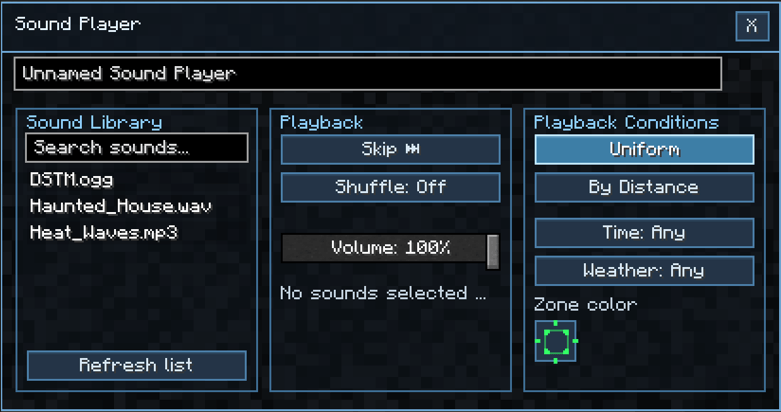
Block Interface
Zones are a whole other story.
There's a special wand for zones. You link it to the player (Shift + RMB on it), then click two blocks — and voila, the zone is ready. The coolest thing is that you can add and cut sections, creating zones of any unusual shape. Want sound only on a zigzag staircase? Okay, there you go. Hold the wand in your hand, and all zones are highlighted with a diagonally hatched frame, so you can see what you've already cut.
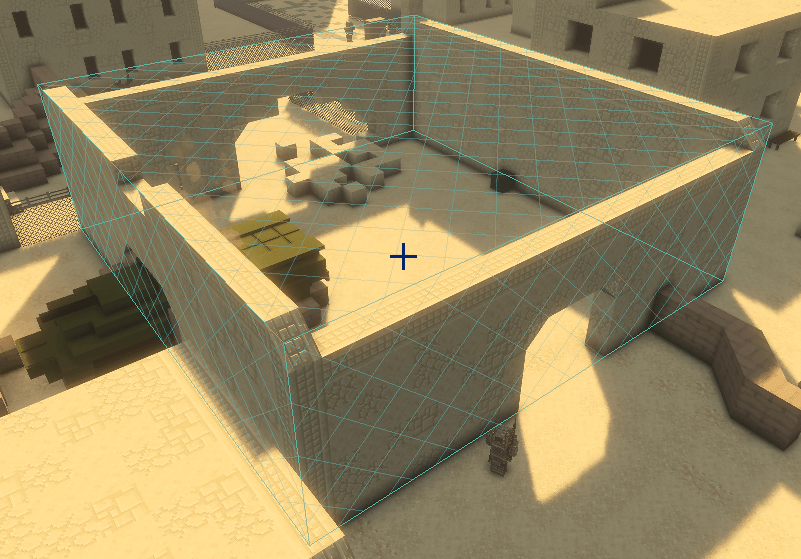
Dedicated zone
There are some nuances.
The sound here has spatial processing — if a sound is coming from somewhere to the right and you turn around, it will shift in the panorama. The range and attenuation speed can be adjusted in the config if you don't like the default.
And an important point: the mod doesn't come with sounds. You upload your WAV, OGG, MP3 files to the Screamixmods/sounds folder. If the file isn't there, you'll get a warning that the sound file wasn't found.
Basically, if you're making maps and want them to truly capture people's hearts, not just be pretty, this is the one for you. You can also create something for yourself, like a crackling fireplace in the house, the endless sound of rain, the sound of a waterfall — there's so much scope for your imagination! I've already thrown together a couple of zones for the map, and it's looking pretty cool. (No recipe in survival mode.)
Project description from CurseForge.
Pick your setup
Custom Ambient by Minecraft version and loader
Choose the version and loader you play, then open the matching release.
Check the dependencies, then try the file in a copied instance before changing a world you care about.
Recent files
Custom Ambient versions and loaders
customambient-1.13.jar
27 Sept 2026
Client Source doesn’t say Server Source doesn’t say Dependencies No extras listed Listed on Release listing
Check the 1.20.1 · Forge setup 1.20.1Forge release
customambient-1.12.1.jar
5 Sept 2026
Client Source doesn’t say Server Source doesn’t say Dependencies No extras listed Listed on Release listing
Check the 1.20.1 · Forge setup 1.20.1Forge release
customambient-1.11.1.jar
24 Aug 2026
Client Source doesn’t say Server Source doesn’t say Dependencies No extras listed Listed on Release listing
Check the 1.20.1 · Forge setup 1.20.1Forge release
CustomAmbient-1.1.0.jar
10 Aug 2026
Client Source doesn’t say Server Source doesn’t say Dependencies No extras listed Listed on Release listing
Check the 1.20.1 · Forge setup 1.20.1Forge release
CustomAmbient-1.0.2.jar
5 Aug 2026
Client Source doesn’t say Server Source doesn’t say Dependencies No extras listed Listed on Release listing
Check the 1.20.1 · Forge setup 1.20.1Forge release
CustomAmbient-1.0.1.jar
4 Aug 2026
Client Source doesn’t say Server Source doesn’t say Dependencies No extras listed Listed on Release listing
Check the 1.20.1 · Forge setup 1.20.1Forge release
CustomAmbient-1.0.0.jar
3 Aug 2026
Client Source doesn’t say Server Source doesn’t say Dependencies No extras listed Listed on Release listing
Check the 1.20.1 · Forge setup 1.20.1Forge beta
Looking for an older file? The official CurseForge project page is in Resources.
 mod
mod CurseForge · Minecraft
BuildMetric (Visual Block Counter)
No more counting by hand: drag across your structure and BuildMetric does it for you.
 mod
mod CurseForge · Minecraft
Simple Excavators [Fabric/Forge/NeoForge]
Mine faster and wider with excavators that break 3x3 areas of blocks at once.
 mod
mod CurseForge · Minecraft
Piggyback
Allow player riding each other and replace the default player sitting mechanic with a piggyback-style ride. Carry your friends on your back for fun, teamwork, or pure chaos!