Minecraft version
Back to mods 
CurseForge · Minecraft mod
Better Advanced Tooltips
Adds tag, component and other tooltips to items in F3+H mode
Choose a version Pick your version below, then grab the matching file.
Quick answer
Which Better Advanced Tooltips release should I use?
Latest stable file better-advanced-tooltips-2101.1.0-build.5.jar
Game version 1.21.1
Loader NeoForge
Better Advanced Tooltips better-advanced-tooltips-2101.1.0-build.5.jar targets 1.21.1 with NeoForge. The project page does not say whether this file belongs on the client, dedicated server, or both. No extra mods listed for this file.
Where it goes
Is Better Advanced Tooltips required on the client, server, or both?
The project page does not say whether this file belongs on the client, dedicated server, or both.
Client Source doesn’t say
Dedicated server Source doesn’t say
Loader for this release NeoForge
Required install it here Optional supported, not mandatory Not supported do not install here Source doesn’t say do not assume
The source does not explicitly classify this release as client-only or server-only.
What else does Better Advanced Tooltips better-advanced-tooltips-2101.1.0-build.5.jar need?
better-advanced-tooltips-2101.1.0-build.5.jar. Change the file and its required mods may change too.
This file does not list any required mods. Do not add a library just because a different file uses it.
This file does not list any required or optional mods.
Before you install it
Add Better Advanced Tooltips without breaking your instance.
Built for Better Advanced Tooltips better-advanced-tooltips-2101.1.0-build.5.jar. Pick another file and the loader, install side or required mods may change.
- 01
Stick to this file
Use better-advanced-tooltips-2101.1.0-build.5.jar. It targets 1.21.1 with NeoForge; another release may have different loader, side or dependency requirements.
- 02
Bring the mods it needs
This file does not list any required mods. Do not add a library just because a different file uses it.
- 03
Put it on the correct side
The project page does not say whether this file belongs on the client, dedicated server, or both.
- 04
Pick the file you checked
Use the “Get this file” button beside better-advanced-tooltips-2101.1.0-build.5.jar. It opens that exact file at the source.
About this project
What does Better Advanced Tooltips add?
Adds tag, component and other tooltips to items in F3+H mode.
Hold Shift key hovering an item to see its tags:
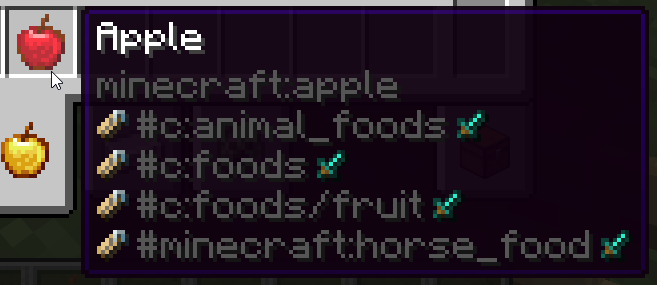
Hovering over some items have special extra tag handling:
- Sword icon: Item tags
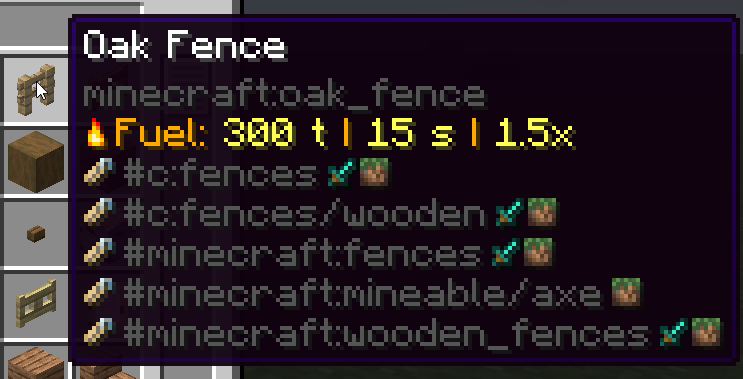
- Grass block icon: Block tags (Any block item)
- Pig icon: Entity tags (Spawn Eggs)
- Bucket icon: Fluid tags (Buckets/fluid containers)
- Painting icon: Painting tags (Paintings)
- Enchantment icon: Enchantment tags (Enchanted Books)
- Piano icon: Instrument tags (Goat Horns/other instrument items)
- Banner icon: Banner Pattern tags (Banner Patterns)
Example - enchanted book showing all enchantment tags:
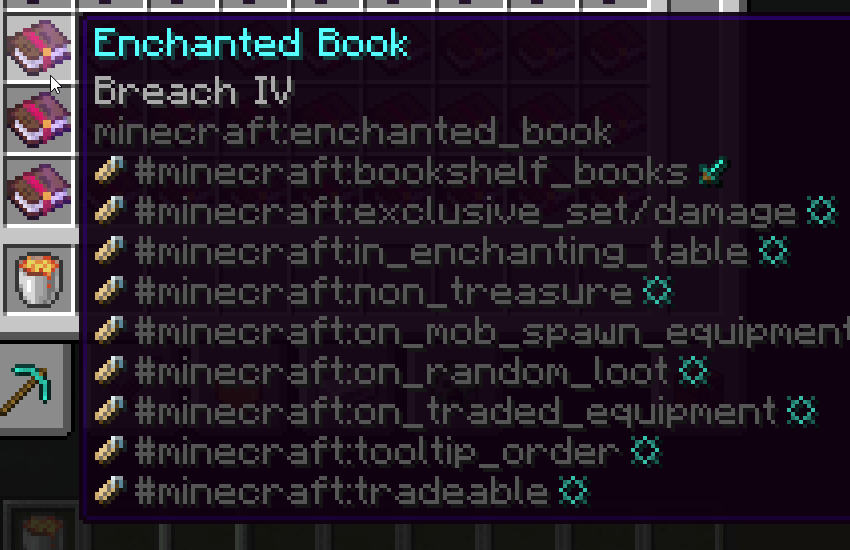
If multiple tag types have the same name, they will be merged into the same line, to not clutter screen.
Example - many blocks will have the same block and item tags:
Hold Alt key hovering an item to see its component patch (items that by default don't have this component set, previously called "Custom NBT"):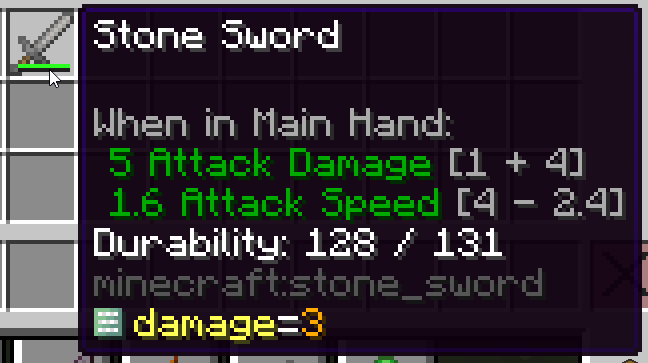
Hold Alt + Shift keys hovering an item to see its full component map (custom ones will be highlighted yellow):
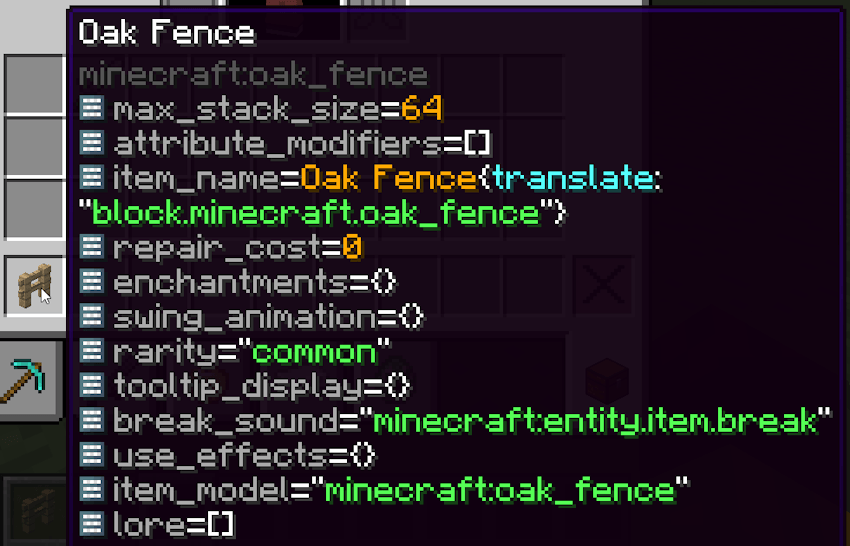
Hold Shift over fuel items to see their fuel values:
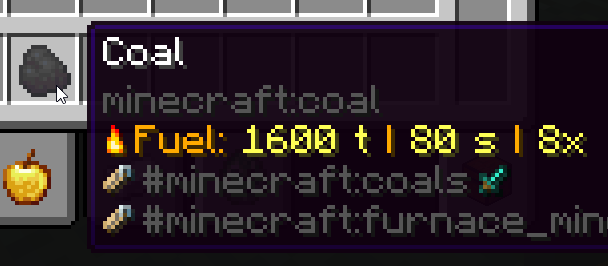
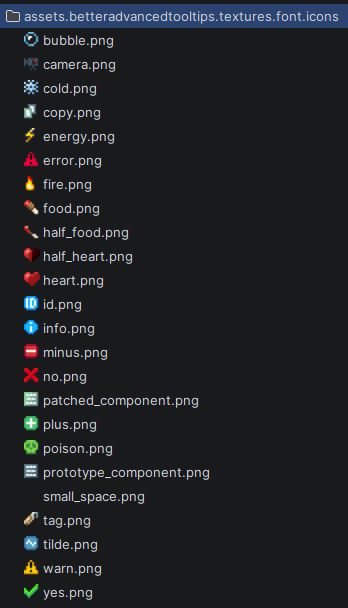
This mod also contains a bunch of chat component icons (see its font/icons.json file for more info):
This mod used to be bundled with KubeJS but now has been moved to being a dependency.


Project description from CurseForge.
Pick your setup
Better Advanced Tooltips by Minecraft version and loader
Choose the version and loader you play, then open the matching release.
Minecraft version
26.1.1
1 loader buildMinecraft version
26.1
1 loader buildMinecraft version
1.21.1
1 loader buildCheck the dependencies, then try the file in a copied instance before changing a world you care about.
Recent files
Better Advanced Tooltips versions and loaders
better-advanced-tooltips-2101.1.0-build.5.jar
4 Aug 2026
Client Source doesn’t say Server Source doesn’t say Dependencies No extras listed Listed on Release listing
Check the 1.21.1 · NeoForge setup 1.21.1NeoForge release
better-advanced-tooltips-2601.1.0-build.9.jar
3 Aug 2026
Client Source doesn’t say Server Source doesn’t say Dependencies No extras listed Listed on Release listing
Check the 26.1.2 · NeoForge setup NeoForge26.126.1.126.1.2 release
Looking for an older file? The official CurseForge project page is in Resources.
 mod
mod CurseForge + Modrinth · Minecraft
Underlay
Place any block (such as carpets) inside anything!
 mod
mod CurseForge + Modrinth · Minecraft
Enchanting Infuser
An all-new enchanting table for choosing your enchantments at fair prices without the randomness.
 mod
mod CurseForge · Minecraft
Tool Mod
a mod that adds Useful tools and new weapons