Minecraft version
Back to mods 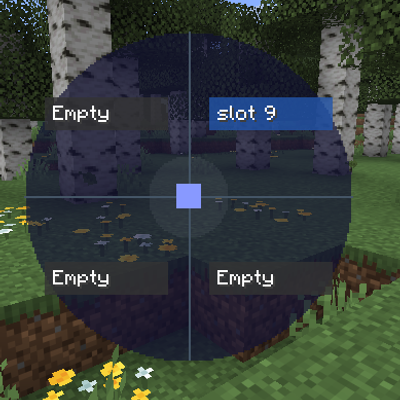
CurseForge · Minecraft mod
Simpler keybinds
Condense 12 keybinds to one key to save keyboard space through the use of a menu.
Choose a version Pick your version below, then grab the matching file.
Quick answer
Which Simpler keybinds release matches 1.21.9 Fabric?
Best match for your filters simplerkeybinds-1.0.0+1.21.9.jar
Game version 1.21.9, 1.21.10
Loader Fabric
Simpler keybinds simplerkeybinds-1.0.0+1.21.9.jar targets 1.21.9, 1.21.10 with Fabric. The project page does not say whether this file belongs on the client, dedicated server, or both. No extra mods listed for this file.
Where it goes
Is Simpler keybinds required on the client, server, or both?
The project page does not say whether this file belongs on the client, dedicated server, or both.
Client Source doesn’t say
Dedicated server Source doesn’t say
Loader for this release Fabric
Required install it here Optional supported, not mandatory Not supported do not install here Source doesn’t say do not assume
The source does not explicitly classify this release as client-only or server-only.
What else does Simpler keybinds simplerkeybinds-1.0.0+1.21.9.jar need?
simplerkeybinds-1.0.0+1.21.9.jar on 1.21.9 Fabric. Every mod below is checked against that same setup.
This file does not list any required mods. Do not add a library just because a different file uses it.
This file does not list any required or optional mods.
Before you install it
Add Simpler keybinds without breaking your instance.
Built for Simpler keybinds simplerkeybinds-1.0.0+1.21.9.jar on 1.21.9 Fabric. Pick another file and the loader, install side or required mods may change.
- 01
Stick to this file
Use simplerkeybinds-1.0.0+1.21.9.jar. It targets 1.21.9, 1.21.10 with Fabric; another release may have different loader, side or dependency requirements.
- 02
Bring the mods it needs
This file does not list any required mods. Do not add a library just because a different file uses it.
- 03
Put it on the correct side
The project page does not say whether this file belongs on the client, dedicated server, or both.
- 04
Pick the file you checked
Use the “Get this file” button beside simplerkeybinds-1.0.0+1.21.9.jar. It opens that exact file at the source.
About this project
What does Simpler keybinds add?
Simpler keybinds
A radial menu system for triggering keybinds without needing a free key for each one. Designed for heavily modded packs (e.g. Create, Botania, etc.) where you run out of keyboard space.
Works with any mod that registers standard keybinds, since actions are dispatched directly to the keybind rather than through simulated key input.
How it works
Press the open key (default: R) to bring up a radial wheel. Move your mouse into one of the four quadrants and release R (or left-click) to fire that slot's assigned action. The action is triggered directly — it does not simulate a keypress, so it works even if the underlying action has no key bound.
You can configure up to 3 wheels, each with 4 slots (top-right, bottom-right, bottom-left, top-left).
Controls
| Key | Action |
|---|---|
R |
Open / close the radial wheel |
| Move mouse | Highlight a quadrant |
Release R or left-click |
Fire the highlighted slot |
1 / 2 / 3 |
Switch between wheels while open |
C |
Open the config screen while the wheel is open |
ESC |
Close without firing |
Configuring your binds
- Press
Rto open the wheel, thenCto open the config screen (or bind a separate config key in Controls). - Click a slot (Top-Right, Bottom-Right, Bottom-Left, Top-Left) to select it.
- A list of all registered keybinds appears on the right — includes vanilla and all mod keybinds. Click one to assign it.
- Optionally type a custom display name in the text box that appears below the slot. If left blank the binding's own name is shown on the wheel.
- Press
Delto clear a slot's binding. - Press
ESCto go back to the wheel.
Changes save automatically to your config folder.
Compatibility
Fabric: 1.20.4, 1.21.5, 1.21.6, 1.21.8, 1.21.9, 1.21.11, 26.1–26.1.2, 26.2. Requires Java 21.
NeoForge: 1.21.1, 1.21.5, 1.21.8, 1.21.11, 26.1, 26.2. Requires Java 21 (1.21.x) or Java 25 (26.1+). The 26.2 build depends on a beta NeoForge release, since no stable NeoForge build exists for that version yet.
Forge: 1.8.9–1.20.6. Requires Java 8 (1.8.9–1.16.5) or Java 17 (1.17–1.20.6). Grab the file for your exact version — Modrinth's compatibility detection covers the full range even though each file targets one anchor version internally.
Not supported: versions before 1.8.9 on Forge, or 26.3+ on Fabric/NeoForge (Mojang replaced GLFW with SDL3 that version).
Grab the file matching your Minecraft version and mod loader from the versions list.
Project description from CurseForge.
Pick your setup
Simpler keybinds by Minecraft version and loader
Choose the version and loader you play, then open the matching release.
Minecraft version
26.1.2
2 loader buildsMinecraft version
26.1.1
2 loader buildsMinecraft version
26.1
2 loader buildsMinecraft version
1.21.11
2 loader buildsMinecraft version
1.21.10
2 loader buildsMinecraft version
1.21.9
2 loader buildsMinecraft version
1.21.8
2 loader buildsMinecraft version
1.21.7
2 loader buildsMinecraft version
1.21.6
2 loader buildsMinecraft version
1.21.5
2 loader buildsMinecraft version
1.21.4
2 loader buildsShowing the newest 12 of 65 game versions. Older files are in the list below.
Check the dependencies, then try the file in a copied instance before changing a world you care about.
Recent files
Simpler keybinds versions and loaders
simplerkeybinds-1.0.0+1.21.9.jar
radialkeybindmenu-1.0.0+1.21.9.jar
3 Aug 2026
Client Source doesn’t say Server Source doesn’t say Dependencies No extras listed Listed on Release listing
Check the 1.21.9 · Fabric setup Fabric1.21.91.21.10 release
Looking for an older file? The official CurseForge project page is in Resources.