Minecraft version
Back to mods 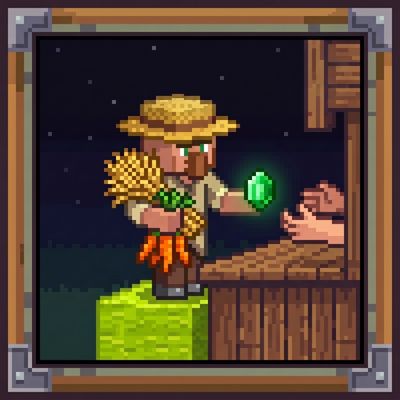
CurseForge · Minecraft mod
Customers NPC
Spawns dynamic NPC customers on lime wool that automatically buy items from players in exchange for emeralds.
Choose a version Pick your version below, then grab the matching file.
Quick answer
Which Customers NPC release should I use?
Latest stable file customers-npc-1.0.0.jar
Game version 26.2
Loader Fabric
Customers NPC customers-npc-1.0.0.jar targets 26.2 with Fabric. The project page does not say whether this file belongs on the client, dedicated server, or both. No extra mods listed for this file.
Where it goes
Is Customers NPC required on the client, server, or both?
The project page does not say whether this file belongs on the client, dedicated server, or both.
Client Source doesn’t say
Dedicated server Source doesn’t say
Loader for this release Fabric
Required install it here Optional supported, not mandatory Not supported do not install here Source doesn’t say do not assume
The source does not explicitly classify this release as client-only or server-only.
What else does Customers NPC customers-npc-1.0.0.jar need?
customers-npc-1.0.0.jar. Change the file and its required mods may change too.
This file does not list any required mods. Do not add a library just because a different file uses it.
This file does not list any required or optional mods.
Before you install it
Add Customers NPC without breaking your instance.
Built for Customers NPC customers-npc-1.0.0.jar. Pick another file and the loader, install side or required mods may change.
- 01
Stick to this file
Use customers-npc-1.0.0.jar. It targets 26.2 with Fabric; another release may have different loader, side or dependency requirements.
- 02
Bring the mods it needs
This file does not list any required mods. Do not add a library just because a different file uses it.
- 03
Put it on the correct side
The project page does not say whether this file belongs on the client, dedicated server, or both.
- 04
Pick the file you checked
Use the “Get this file” button beside customers-npc-1.0.0.jar. It opens that exact file at the source.
About this project
What does Customers NPC add?
🛒 CUSTOMERS NPC SYSTEM
CUSTOMERS NPC SYSTEM is a dynamic, fully automated NPC shop script for Minecraft built using Scarpet. Designed for survival worlds, farming setups, and multiplayer SMPs, it brings interactive customer NPCs that spawn on designated blocks, display floating holograms for requested items, and automatically trade goods for emeralds.
🔥 Key Features
- 👤 Dynamic NPC Spawning: Checks available Lime Wool blocks every 30 seconds with a 70% chance to spawn a unique customer NPC during daytime hours.
- 🏷️ Floating Hologram Displays: Displays clear, isolated text overlays above each NPC detailing the exact item, quantity requested, and offered emerald payout.
- 🤝 Automated Item & Emerald Trading:
- Fulfill Requests: Throw the requested items near the customer; the NPC automatically detects the items, consumes them, and drops emerald rewards.
- Decline Trades: Shift + Right-Click any active customer NPC to send them away if you don't wish to complete their trade.
- ☀️ Day/Night & Behavior Cycle: Customers arrive periodically during the day, look directly at nearby players, perform random animations (jumping/sneaking), and automatically leave at sunset.
- 🔊 Immersive Audio & Visuals: Custom villager sounds, level-up audio cues, and particle explosions upon trade completion or trade cancellation.
🛠️ How to Use
- Place Lime Wool blocks anywhere in your world to create shop counters.
- Wait for customer NPCs to arrive during daytime hours (spawns check every 30 seconds with a 70% chance).
- Drop Items: Throw the requested quantity of items near the NPC to sell them for emeralds.
- Shift + Right-Click: Sneak-interact with an NPC to reject the trade and despawn them.
- Use built-in commands:
/customers spawn,/customers despawn, or/customers info.
📌 Requirements
- Carpet Mod: Required to run the
.scScarpet script. - Player Command Permission: Requires
/carpet commandPlayer true(handled automatically on script load).
Project description from CurseForge.
Pick your setup
Customers NPC by Minecraft version and loader
Choose the version and loader you play, then open the matching release.
Minecraft version
26.1.2
1 loader buildCheck the dependencies, then try the file in a copied instance before changing a world you care about.
Recent files
Customers NPC versions and loaders
customers-npc-1.0.0.jar
5 Aug 2026
Client Source doesn’t say Server Source doesn’t say Dependencies No extras listed Listed on Release listing
Check the 26.2 · Fabric setup Fabric26.2 release
customers-npc-1.0.0.jar
5 Aug 2026
Client Source doesn’t say Server Source doesn’t say Dependencies 1 required · 1 unchecked Listed on Release listing
Check the 26.1.2 · Fabric setup Fabric26.1.2 release
Looking for an older file? The official CurseForge project page is in Resources.
 mod
mod CurseForge · Minecraft
SlotMind
SlotMind is a client-side Fabric mod for intent-based inventory management. Tag slots, lock layouts, refill hotbar stacks, replace tools, sort around reserved slots, and use chest roles for restock, junk, and dump workflows.
 mod
mod CurseForge · Minecraft
Copper Fast Oxidation
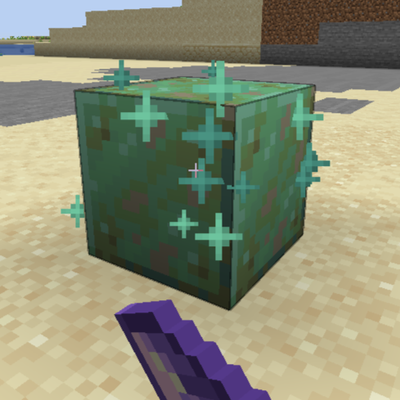
Right-click copper with an Amethyst Shard to make it oxidize one stage. Axe scraping now shows copper-colored particles.
 mod
mod CurseForge · Minecraft
JEI++(JEI Plus)
This mod adds an EMI-like recipe tree, collapsible item groups, mouse-wheel page navigation, and other quality-of-life improvements to JEI.