Minecraft version
Back to mods 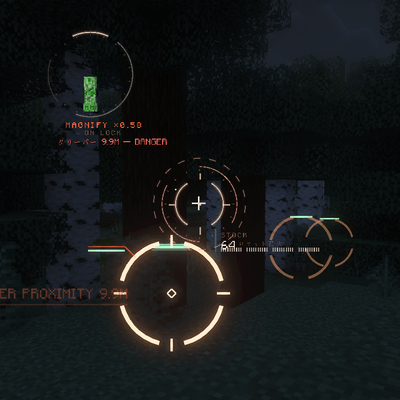
CurseForge · Minecraft mod
VECTOR HUD
A cinematic, fully vector-drawn HUD: holographic terrain map, flight instruments, threat alerts, and ten switchable themes. Every element is geometry, not a texture.
Choose a version Pick your version below, then grab the matching file.
Quick answer
Which VECTOR HUD release matches 26.2?
Best match for your filters 5. vector-hud-1.1.0+26.2-fabric.jar
Game version 26.2
Loader Fabric
VECTOR HUD 5. vector-hud-1.1.0+26.2-fabric.jar targets 26.2 with Fabric. The project page does not say whether this file belongs on the client, dedicated server, or both. No extra mods listed for this file.
Where it goes
Is VECTOR HUD required on the client, server, or both?
The project page does not say whether this file belongs on the client, dedicated server, or both.
Client Source doesn’t say
Dedicated server Source doesn’t say
Loader for this release Fabric
Required install it here Optional supported, not mandatory Not supported do not install here Source doesn’t say do not assume
The source does not explicitly classify this release as client-only or server-only.
What else does VECTOR HUD 5. vector-hud-1.1.0+26.2-fabric.jar need?
5. vector-hud-1.1.0+26.2-fabric.jar on 26.2. Every mod below is checked against that same setup.
This file does not list any required mods. Do not add a library just because a different file uses it.
This file does not list any required or optional mods.
Before you install it
Add VECTOR HUD without breaking your instance.
Built for VECTOR HUD 5. vector-hud-1.1.0+26.2-fabric.jar on 26.2. Pick another file and the loader, install side or required mods may change.
- 01
Stick to this file
Use 5. vector-hud-1.1.0+26.2-fabric.jar. It targets 26.2 with Fabric; another release may have different loader, side or dependency requirements.
- 02
Bring the mods it needs
This file does not list any required mods. Do not add a library just because a different file uses it.
- 03
Put it on the correct side
The project page does not say whether this file belongs on the client, dedicated server, or both.
- 04
Pick the file you checked
Use the “Get this file” button beside 5. vector-hud-1.1.0+26.2-fabric.jar. It opens that exact file at the source.
About this project
What does VECTOR HUD add?
VECTOR HUD
Press one key and a flight-instrument HUD draws itself around you — every ring, tape and glyph computed as vector geometry at runtime, not one of them a texture.
The boot
Press J. The HUD does not fade in — it is built, in five beats, in under two seconds.
Registration marks slide in from off-screen and spark as they seat, establishing the corners before anything else exists. Every ring and gauge is then drawn, the pen running from each arc's fixed end toward its live value, so a gauge can never overshoot its own track. Instruments flash brighter than full for three ticks at the moment they lock. The chromatic fringe starts wide and tightens as the optics focus. Text resolves last, each label scrambling through same-width glyphs so no line shifts by a single pixel while it settles.
Press J again and it strikes itself back down.
What it shows you
| Panel | Position | Reads |
|---|---|---|
| Info block | Top left | Coordinates, heading, ground speed, world time |
| Target panel | Top centre | Name, health and range of whatever you are looking at |
| Vitals cluster | Bottom left | Health, armour, hunger, oxygen and active effects on nested arcs |
| System column | Bottom right | Frame rate, ping, hostile count |
| Kill feed | Right | Rolling record of what you dropped |
| Holo-map | Bottom left | Volumetric terrain hologram |
Flight instruments
The HUD reads like a cockpit the moment you leave the ground.
| Instrument | Reads |
|---|---|
HORIZON |
Artificial horizon with pitch ladder and roll |
ALT · Y |
Altitude tape, ticking every block of climb |
HDG |
Heading tape |
SPD |
Ground speed |
GLIDE 1:x |
Live glide ratio on elytra |
VSI |
Vertical speed, signed |
Volumetric holo-map
A tilted holographic table of the terrain around you, sitting near-horizontal so it reads as a volume rather than a top-down minimap. It follows your vertical look — glance up and the table rises to show the air above, look down and it lays flat to show your footing. Indoors it cuts away everything between you and the table, so a wall at your back never blocks the view into the middle of it. Hostiles float as pins at their true height, each with a drop-line to the floor beneath them.
Awareness and alerts
| Alert | Behaviour |
|---|---|
| Terrain collision | GLIDE PATH narrows to IMPACT. Walls are picked by face normal, not raw distance, so ordinary gliding does not trip it — and the warning ring stands upright on the wall's own normal |
| Damage arcs | An arc lights on the edge of the screen in the direction the hit came from |
| Incoming fire | Chevrons track projectiles already in the air toward you |
| Creeper proximity | Fires before the hiss, not with it |
| Vitals critical | Red vignette at the frame edge |
| Battle mode | The whole palette slides from calm to hot. Auto-engages on a swarm of three or more, or on a single threat that is actually looking at you inside twelve metres, and stands down on its own once things are quiet |
Alerts are staged in four tiers — calm, caution, warning, imminent. A sound is only re-issued when the tier rises; while the tier holds, you get one quiet reminder per interval and nothing more. Nothing sounds while the game is paused. No audio is bundled: every cue is a vanilla note block, pitched and paced by tier.
Ten instrument suites
Themes change layout, not only colour — each one hides a different set of instruments, so the sparse suites are genuinely sparse rather than the same HUD in a new palette. Press H for the theme table.
| Theme | Character |
|---|---|
| APEX | The full suite — cyan and amber |
| DRAFT | Silver drafting lines and gold |
| GHOST | Stealth. Desaturated, no fringing, silent |
| MONOCLE | Pale, sparse, analog |
| SCAN | Scanning layer — corner brackets, vitals trace, range column |
| NANO | Pulsing width envelopes that taper to nothing at open ends |
| PLAIN | Just the numbers. No theatre |
| CLEAN | Modern flat — thin and quiet |
| MINIMAL | Hairlines only, appearing on demand |
| RAPTOR | Fighter-jet green — frameless, luminous, high-visibility |
Fair play by default
Six features ship disabled, and they are the six that a server admin would call cheating:
| Feature | Ships | Because |
|---|---|---|
| Ore scan | off |
X-ray under another name |
| Structure scan | off |
Reveals interiors before you enter |
| Entity radar | off |
Shows what you cannot see |
| Wall-piercing glow | off |
ESP |
| Nearby player list | off |
Player ESP |
| Ballistics prediction | off |
Reads as aim assist |
There is no separate "fair play edition" to hunt down — one jar, with the defaults set so it is safe to drop into a modpack as shipped. Turn any of them on in config/vectorhud.json, or with /vectorhud followed by the feature name, for your own singleplayer world. Check the rules where you play before you do.
Keys and configuration
| Key | Action |
|---|---|
J |
Bring the HUD up, or strike it down |
H |
Theme table |
C |
Scope |
B |
Battle mode |
All four are rebindable under Controls. Every panel has its own toggle in config/vectorhud.json and under /vectorhud, and /vectorhud scale resizes the whole assembly between 0.5 and 2.0.
Requirements
Every build is client-side. Nothing is installed on the server, and nothing needs to be.
| Build | Minecraft | Loader | Java | Also needs |
|---|---|---|---|---|
| Fabric | 26.2 |
Fabric Loader 0.19.0+ |
21 |
Fabric API |
| Fabric | 1.21.1 |
Fabric Loader 0.16.0+ |
21 |
Fabric API |
| NeoForge | 1.21.1 |
NeoForge 21.1.0+ |
21 |
Forgified Fabric API 0.104.0+ |
| Fabric | 1.20.1 |
Fabric Loader 0.15.0+ |
17 |
Fabric API |
| Forge | 1.20.1 |
Forge 47+ |
17 |
— |
What differs between builds
The 1.21.1 and 1.20.1 builds come from one codebase. The 26.2 build is a separate port against a different rendering API, and five things have not been carried across yet:
1.21.1 and 1.20.1 |
26.2 |
|
|---|---|---|
| Structure scan | Included | Not yet ported |
| Ore routing | Walkable path to the nearest vein, and an honest NO PATH when there isn't one |
Highlight only, no route |
| Holo-map canvas | Cylindrical projection field | Flat table |
| Scope | Stepped x2–x16, true picture-in-picture |
Hold C for a smooth x4 |
| Settings screen | Mod Menu | config/vectorhud.json and /vectorhud |
Everything else — boot, all ten themes, instruments, alerts, holo-map — is in every build.
Notes
- No textures. Every element of the HUD is geometry generated at runtime, so nothing gets blurry at any resolution and the jar stays under 200 KB. The only image in the build is the mod's own 128 px icon.
- No bundled audio. Alert cues are vanilla note blocks, pitched and paced by tier.
- Nothing phones home.
- Modpacks are welcome with credit. Reuploading the jar elsewhere is not.
- Not affiliated with, endorsed by, or containing assets from any film, studio or franchise.
Need a server? BisectHosting — 25% off your first month.
Project description from CurseForge.
Pick your setup
VECTOR HUD by Minecraft version and loader
Choose the version and loader you play, then open the matching release.
Minecraft version
1.21.1
2 loader buildsMinecraft version
1.20.1
2 loader buildsCheck the dependencies, then try the file in a copied instance before changing a world you care about.
Recent files
VECTOR HUD versions and loaders
5. vector-hud-1.1.0+26.2-fabric.jar
20 Aug 2026
Client Source doesn’t say Server Source doesn’t say Dependencies No extras listed Listed on Release listing
Check the 26.2 · Fabric setup Fabric26.2 release
vector-hud-1.0.2+26.2-fabric.jar
12 Aug 2026
Client Source doesn’t say Server Source doesn’t say Dependencies No extras listed Listed on Release listing
Check the 26.2 · Fabric setup Fabric26.2 release
vector-hud-1.0.1+26.2-fabric.jar
10 Aug 2026
Client Source doesn’t say Server Source doesn’t say Dependencies No extras listed Listed on Release listing
Check the 26.2 · Fabric setup Fabric26.2 release
Looking for an older file? The official CurseForge project page is in Resources.
 mod
mod CurseForge + Modrinth · Minecraft
Nickname Detector
This mod checks if a username is a real username or not, it won't detect all nicknames but it'll detect most.
 mod
mod CurseForge + Modrinth · Minecraft
InventoryTweak
Fast and easy inventory sorter
 mod
mod CurseForge · Minecraft
Better Selective Combat
Lets you choose which weapons should ignore Better Combat.