Minecraft version
Back to mods 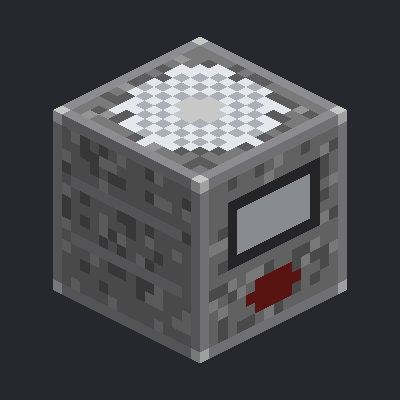
CurseForge · Minecraft mod
AutoCutter
Automatic Stonecutter block: pick a stonecutting recipe once, and the machine cuts one item per redstone pulse. Fully automatable with hoppers - insert from the top and sides, extract the result from the bottom.
Choose a version Pick your version below, then grab the matching file.
Quick answer
Which AutoCutter release should I use?
Latest stable file AutoCutter 1.0.0 for 1.21.1
Game version 1.21.1
Loader Forge, NeoForge
AutoCutter 1.0.0 for 1.21.1 targets 1.21.1 with Forge, NeoForge. The project page does not say whether this file belongs on the client, dedicated server, or both. No extra mods listed for this file.
Where it goes
Is AutoCutter required on the client, server, or both?
The project page does not say whether this file belongs on the client, dedicated server, or both.
Client Source doesn’t say
Dedicated server Source doesn’t say
Loader for this release Forge, NeoForge
Required install it here Optional supported, not mandatory Not supported do not install here Source doesn’t say do not assume
The source does not explicitly classify this release as client-only or server-only.
What else does AutoCutter 1.0.0 for 1.21.1 need?
AutoCutter 1.0.0 for 1.21.1. Change the file and its required mods may change too.
This file does not list any required mods. Do not add a library just because a different file uses it.
This file does not list any required or optional mods.
Before you install it
Add AutoCutter without breaking your instance.
Built for AutoCutter 1.0.0 for 1.21.1. Pick another file and the loader, install side or required mods may change.
- 01
Stick to this file
Use AutoCutter 1.0.0 for 1.21.1. It targets 1.21.1 with Forge, NeoForge; another release may have different loader, side or dependency requirements.
- 02
Bring the mods it needs
This file does not list any required mods. Do not add a library just because a different file uses it.
- 03
Put it on the correct side
The project page does not say whether this file belongs on the client, dedicated server, or both.
- 04
Pick the file you checked
Use the “Get this file” button beside AutoCutter 1.0.0 for 1.21.1. It opens that exact file at the source.
About this project
What does AutoCutter add?
AutoCutter
The vanilla stonecutter needs a player to pick the result and take the item out by hand. AutoCutter adds the Automatic Stonecutter — a block that remembers one stonecutting recipe and runs it on every redstone pulse.
How it works
- Craft and place the block, then right-click it to open the GUI.
- Put your material into the input slot (stone, for example).
- A list of every stonecutting recipe for that material appears — click the one you want. The choice is highlighted and saved inside the block.
- Feed it a redstone pulse. Each pulse consumes one input item and produces the selected result.
The selection survives world reloads and server restarts, because the block stores the recipe id, not a list index.
Automation
Slot access is side-dependent, so hoppers just work:
| Side | Behaviour |
|---|---|
| Top | hopper inserts into the input slot |
| Any horizontal side | hopper inserts into the input slot |
| Bottom | hopper extracts the finished result |
A hopper underneath can never steal the raw material, and a hopper on top can never push junk into the output.
Details
- Edge-triggered like a dispenser: a permanently powered block cuts exactly once.
- Emits a comparator signal based on how full it is.
- Drops its contents when broken.
- Server-authoritative: every operation is re-validated on the server.
- No custom network packets — uses vanilla container synchronisation only.
Recipe
I I I I - Iron Ingot R S R R - Redstone Dust C C C S - Stonecutter C - Cobblestone
Requirements
- Minecraft 1.21.1
- Minecraft Forge 52.x
- Java 21
- No other mods required.
Must be installed on both the client and the server.
❤️ Support Development
Enjoy my mods? You can support me and help fund future updates and new Minecraft projects:
Support GestSe → https://app.lava.top/gestse?tabId=donate
Every bit of support helps me spend more time developing, testing and creating new mods. Thank you! ❤️
Project description from CurseForge.
Pick your setup
AutoCutter by Minecraft version and loader
Choose the version and loader you play, then open the matching release.
Check the dependencies, then try the file in a copied instance before changing a world you care about.
Recent files
AutoCutter versions and loaders
AutoCutter 1.0.0 for 1.21.1
autocutter-1.0.0.jar
6 Aug 2026
Client Source doesn’t say Server Source doesn’t say Dependencies No extras listed Listed on Release listing
Check the 1.21.1 · Forge setup Forge1.21.1NeoForge release
Looking for an older file? The official CurseForge project page is in Resources.
 mod
mod CurseForge · Minecraft
Crystal Craft (CryCraft)
Mine nine crystal families, trade up at the Crystal Exchange, then forge gear or perform the mystery rituals.
 mod
mod CurseForge · Minecraft
EMI Autocrafting
Craft EMI recipe trees in batches, count connected storage, and see missing materials.
 mod
mod CurseForge · Minecraft
Care For Them
Bring Xoonglins to your world! Build homes, meet their needs, and watch their civilization grow. Fully customizable and perfect for modpacks!