Minecraft version
Back to mods 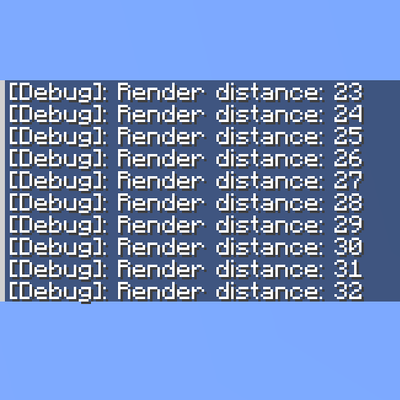
CurseForge · Minecraft mod
Render Distance Shortcut
F3+F Restorer back and enhance the classic F3 + F render distance shortcut in Minecraft!
Choose a version Pick your version below, then grab the matching file.
Quick answer
Which Render Distance Shortcut release should I use?
Latest stable file RenderDistanceShortcut-1.0.0.jar
Game version 26.2
Loader NeoForge
Render Distance Shortcut RenderDistanceShortcut-1.0.0.jar targets 26.2 with NeoForge. The project page does not say whether this file belongs on the client, dedicated server, or both. No extra mods listed for this file.
Where it goes
Is Render Distance Shortcut required on the client, server, or both?
The project page does not say whether this file belongs on the client, dedicated server, or both.
Client Source doesn’t say
Dedicated server Source doesn’t say
Loader for this release NeoForge
Required install it here Optional supported, not mandatory Not supported do not install here Source doesn’t say do not assume
The source does not explicitly classify this release as client-only or server-only.
What else does Render Distance Shortcut RenderDistanceShortcut-1.0.0.jar need?
RenderDistanceShortcut-1.0.0.jar. Change the file and its required mods may change too.
This file does not list any required mods. Do not add a library just because a different file uses it.
This file does not list any required or optional mods.
Before you install it
Add Render Distance Shortcut without breaking your instance.
Built for Render Distance Shortcut RenderDistanceShortcut-1.0.0.jar. Pick another file and the loader, install side or required mods may change.
- 01
Stick to this file
Use RenderDistanceShortcut-1.0.0.jar. It targets 26.2 with NeoForge; another release may have different loader, side or dependency requirements.
- 02
Bring the mods it needs
This file does not list any required mods. Do not add a library just because a different file uses it.
- 03
Put it on the correct side
The project page does not say whether this file belongs on the client, dedicated server, or both.
- 04
Pick the file you checked
Use the “Get this file” button beside RenderDistanceShortcut-1.0.0.jar. It opens that exact file at the source.
About this project
What does Render Distance Shortcut add?
F3+F Restorer Configurable
Bring back and enhance the classic F3 + F render distance shortcut in Minecraft! This mod allows you to quickly change your render distance on the fly using simple keyboard combinations, fully configurable to suit your performance and gameplay style.
Features
Quick Adjustments: Press F3 + F to increase your render distance instantly.
Inverted Control: Hold Shift (Left or Right Shift) along with F3 + F to decrease your render distance.
Fully Configurable: Customize your settings via the configuration file (
f3f-client.toml):Step Size: Choose how many chunks the render distance increases or decreases per press.
Max Render Distance: Set a strict limit to protect your frame rate.
Enable/Disable Toggle: Turn the mod on or off instantly without removing it.
Lightweight: Built specifically for NeoForge with zero bloat.
Project description from CurseForge.
Pick your setup
Render Distance Shortcut by Minecraft version and loader
Choose the version and loader you play, then open the matching release.
Check the dependencies, then try the file in a copied instance before changing a world you care about.
Recent files
Render Distance Shortcut versions and loaders
RenderDistanceShortcut-1.0.0.jar
7 Aug 2026
Client Source doesn’t say Server Source doesn’t say Dependencies No extras listed Listed on Release listing
Check the 26.2 · NeoForge setup NeoForge26.2 release
Looking for an older file? The official CurseForge project page is in Resources.
 mod
mod CurseForge + Modrinth · Minecraft
NeoOrigins
A modern port of the classic fabric Origins mod. Backwards compatible with most of your favorite origins expansions.
 mod
mod CurseForge · Minecraft
Scapecraft2
Scapecraft, massive MMORPG mod
 mod
mod CurseForge · Minecraft
Arcane Core
Weave spells from a source, a rune and a lens, and read the stars of your own sky.