Minecraft version
Back to mods 
CurseForge · Minecraft mod
Biome Tinter
Client side mod that allows for biome sky, fog, and lightmap tinting with smooth crossfades between biomes!
Choose a version Pick your version below, then grab the matching file.
Quick answer
Which Biome Tinter release should I use?
Latest stable file biometinter-1.20.1-1.3.0.jar
Game version 1.20.1
Loader Forge
Biome Tinter biometinter-1.20.1-1.3.0.jar targets 1.20.1 with Forge. The project page does not say whether this file belongs on the client, dedicated server, or both. No extra mods listed for this file.
Where it goes
Is Biome Tinter required on the client, server, or both?
The project page does not say whether this file belongs on the client, dedicated server, or both.
Client Source doesn’t say
Dedicated server Source doesn’t say
Loader for this release Forge
Required install it here Optional supported, not mandatory Not supported do not install here Source doesn’t say do not assume
The source does not explicitly classify this release as client-only or server-only.
What else does Biome Tinter biometinter-1.20.1-1.3.0.jar need?
biometinter-1.20.1-1.3.0.jar. Change the file and its required mods may change too.
This file does not list any required mods. Do not add a library just because a different file uses it.
This file does not list any required or optional mods.
Before you install it
Add Biome Tinter without breaking your instance.
Built for Biome Tinter biometinter-1.20.1-1.3.0.jar. Pick another file and the loader, install side or required mods may change.
- 01
Stick to this file
Use biometinter-1.20.1-1.3.0.jar. It targets 1.20.1 with Forge; another release may have different loader, side or dependency requirements.
- 02
Bring the mods it needs
This file does not list any required mods. Do not add a library just because a different file uses it.
- 03
Put it on the correct side
The project page does not say whether this file belongs on the client, dedicated server, or both.
- 04
Pick the file you checked
Use the “Get this file” button beside biometinter-1.20.1-1.3.0.jar. It opens that exact file at the source.
About this project
What does Biome Tinter add?
Biome Tinter is a client-side mod that lets you set the sky, fog, and lighting colours for every biome in your pack, with smooth fades as you cross the borders.
I made it because I wanted the biomes in my modpack to actually feel different from each other. Feel free to use it in yours too!
Every biome starts switched off, so installing it changes nothing until you decide what you want to tweak. As of 1.2.0, Biome Tinter ships with a built in atmosphere for 150 vanilla + modded biomes! Currently supported mods are: Biomes o Plenty, Incendium, Alex's Caves, Defiled Lands and Aether. You can add support yourself or you can suggest for it if you wish!
Features
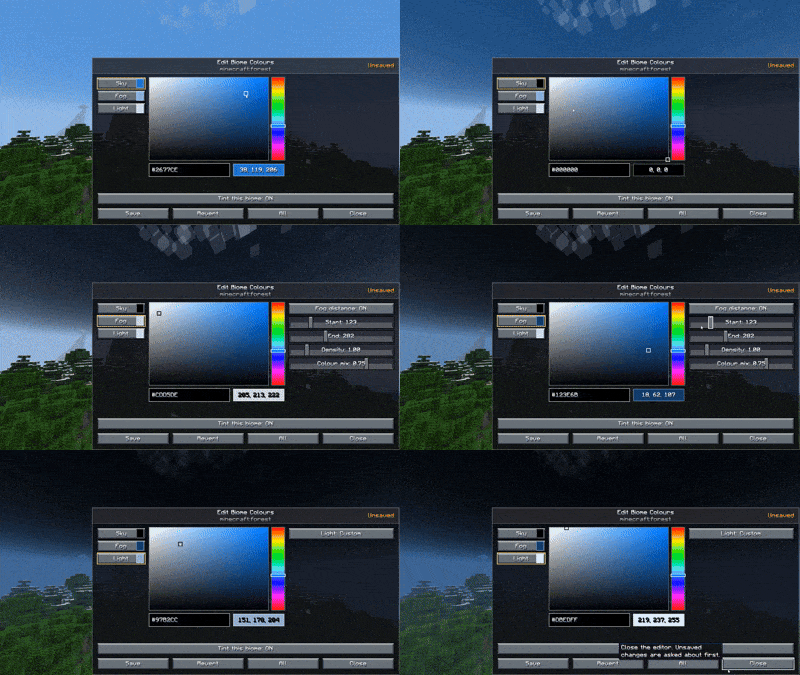
- Colour editor in-game
- Per-biome sky colour, fog colour, and lightmap tint
- Smooth crossfades between biomes instead of an instant swap, with a configurable fade length
- Colours release at night on vanilla’s own darkening curve, so your bright desert sky doesn’t glow through midnight
- Live config reload, edit a colour while the game is running and watch it fade in a second later
- Fully client-side, works on any server including vanilla ones
- Every biome in your pack gets an entry generated automatically, modded ones included
- Config is split into one file per mod, so your edits to modded biomes don’t sit in the same file as your vanilla ones
- Lightmap tint can follow the sky colour or be set on its own, for when you want a red sky without red ground
Configuration
Join a world once and the mod writes config/biometinter/, one .toml per mod that adds biomes, plus a shared settings.toml.
Each biome looks like this:
["minecraft:desert"]
    enabled = true
    skyColor = "#CEB97C"
    fogColor = "#E4CC97"
    lightmapTint = "#F3EDDD"
Set enabled = true and give it a hex colour. Leave a field blank and that channel keeps its vanilla colour. Leave lightmapTint blank and it follows whatever the sky is doing, which is usually what you want.
settings.toml holds the global knobs:
enabledis the master switch, false turns everything off without touching your per-biome worktransitionTicksis how long a fade takes (60 by default, which is 3 seconds). Drop it to 10 while you are picking colours so you aren’t waiting between editsliveReloadwatches the folder and applies your edits without a restart (on by default)
Editing colours while playing
/biometinter edit opens the picker for the biome you are standing in and the sky updates as you drag, this is the easy way.
If you’d rather work in the files, open the toml in any text editor with the game still running, change a hex, save, and about a second later the sky fades to it.
Two things worth knowing:
- Stand in the biome you are editing, since the fade applies to wherever you currently are
- Run
/time set noonfirst, because the override backs off as the sun goes down and you will be chasing a moving target at dusk
If your editor’s save doesn’t seem to land, run /biometinter reload. Some editors write through a temp file and rename it, which can slip past the watcher.
Commands
/biometinter editopens the colour editor for the biome you are standing in/biometinter reloadreloads the config from disk by hand (rarely needed, the configs update in real time as you save them)/biometinter statustells you what is actually loaded, entry count, fade length, and whether live reload is on
All three are client commands, so they need no permissions and work on servers that don’t have the mod.
Requirements
Nothing besides this mod!
Notes
Colours only apply to the biome you are standing in. This is a tinting mod and not a shader, so don’t expect it to change how a distant biome looks from a mountaintop.
Performance cost is effectively zero. There is no world generation, no entities, no packets, and nothing registered into the game’s registries.
Project description from CurseForge.
Pick your setup
Biome Tinter by Minecraft version and loader
Choose the version and loader you play, then open the matching release.
Check the dependencies, then try the file in a copied instance before changing a world you care about.
Recent files
Biome Tinter versions and loaders
biometinter-1.20.1-1.3.0.jar
6 Sept 2026
Client Source doesn’t say Server Source doesn’t say Dependencies No extras listed Listed on Release listing
Check the 1.20.1 · Forge setup 1.20.1Forge release
biometinter-1.20.1-1.2.0.jar
27 Aug 2026
Client Source doesn’t say Server Source doesn’t say Dependencies No extras listed Listed on Release listing
Check the 1.20.1 · Forge setup 1.20.1Forge release
biometinter-1.20.1-1.1.0.jar
11 Aug 2026
Client Source doesn’t say Server Source doesn’t say Dependencies No extras listed Listed on Release listing
Check the 1.20.1 · Forge setup 1.20.1Forge release
biometinter-1.20.1-1.0.0.jar
9 Aug 2026
Client Source doesn’t say Server Source doesn’t say Dependencies No extras listed Listed on Release listing
Check the 1.20.1 · Forge setup 1.20.1Forge release
Looking for an older file? The official CurseForge project page is in Resources.
 mod
CurseForge + Modrinth · Minecraft
Modern Morph
A modern port of iChun's iconic Morph mod
 mod
CurseForge · Minecraft
Arcane: Anime Magic & Morph
Fast-paced anime magic spells, 3D morphing (Bird flight, Giant, Tiny), and hide-and-seek camouflage with zero mana limits!
 mod
CurseForge · Minecraft
Writ - Villager Trading
Discover trade writs through exploration and use them to unlock new villager trades.