Mod Menu Optional for Wayfinder Trails+ wayfinder-plus-fabric-26.2-1.0.2.jar
optionalMatching file found Matched file: v20.0.1 for 26.2
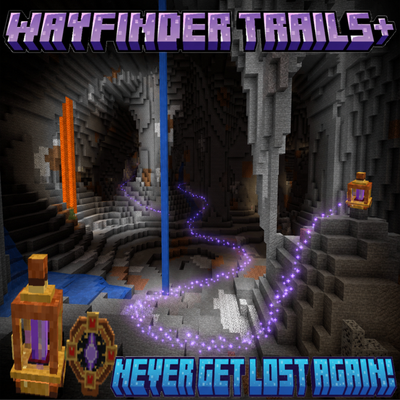
CurseForge · Minecraft mod
Wayfinder+ adds a placeable navigation beacon and linked locator that records the path you travel, then guides you back along that exact route with customizable trail markers.
Quick answer
Wayfinder Trails+ wayfinder-plus-fabric-26.2-1.0.2.jar targets 26.2 with Fabric. The project page does not say whether this file belongs on the client, dedicated server, or both. All 1 required mods have matching files.
Where it goes
The project page does not say whether this file belongs on the client, dedicated server, or both.
The source does not explicitly classify this release as client-only or server-only.
wayfinder-plus-fabric-26.2-1.0.2.jar. Change the file and its required mods may change too.
Install Fabric API first. We found matching files for this game-version and loader setup. 1 comes through another mod in the chain.
1 extra mod was pulled in by another dependency. Indented rows show who needs each one. We only count dependency files that match this setup. A file for another loader does not fill the gap.
Before you install it
Built for Wayfinder Trails+ wayfinder-plus-fabric-26.2-1.0.2.jar. Pick another file and the loader, install side or required mods may change.
Use wayfinder-plus-fabric-26.2-1.0.2.jar. It targets 26.2 with Fabric; another release may have different loader, side or dependency requirements.
Install Fabric API first. We found matching files for this game-version and loader setup. 1 comes through another mod in the chain.
The project page does not say whether this file belongs on the client, dedicated server, or both.
Use the “Get this file” button beside wayfinder-plus-fabric-26.2-1.0.2.jar. It opens that exact file at the source.
About this project
Wayfinder Trails+ is a lightweight Fabric navigation mod built around one simple idea: never lose the path you took.
Place a Wayfinder Beacon, link it with a Resonant Locator, and Wayfinder Trails+ begins recording your route as you travel. When you are ready to return, use the locator to display a trail leading back along the path you actually walked instead of simply pointing in a straight line toward your starting position.
This makes Wayfinder Trails+ especially useful for:
Although the mod originally began as a cave-navigation system, Wayfinder Trails+ works anywhere.
The basic gameplay loop is simple:
Unlike a normal compass, Wayfinder+ does not simply point toward a coordinate. It remembers how you actually traveled, making it much more useful when walls, cliffs, caves, tunnels, ravines, portals, or other obstacles make a straight-line direction useless.
The Resonant Locator is the primary tool used to interact with your active route.
It stores its linked beacon information and lets you control navigation without opening a complicated menu.
Current controls are designed around simple route management:
The linked locator identifies the beacon and route it belongs to, preventing route actions from targeting unrelated navigation data.
Wayfinder Trails+ is intentionally designed around one active journey at a time.
Players may own or place multiple beacons, but only one beacon route can be actively linked and recorded for a player at once.
This keeps navigation predictable and prevents several routes from recording the same movement simultaneously.
When you complete or deliberately clear a route, another beacon can then become your active Wayfinder.
Wayfinder Trails+ records your journey using a server-side route graph rather than simply saving hundreds of raw particle positions.
The system tracks the path you travel and uses that information to calculate a return route back toward your beacon.
The route system is designed to handle:
The trail itself is only the visual representation of this saved navigation data.
When return guidance is enabled, Wayfinder Trails+ calculates the route from your current location back through the recorded journey.
Rather than filling the world with the entire path at once, the mod renders nearby guidance markers according to your configured trail settings.
As you move toward the beacon, already-completed portions of the return trail are removed.
If you change your mind before reaching the beacon, you can disable return guidance and continue your journey instead of losing the route.
Route recording can be paused without starting the return journey.
This is useful when you want to temporarily leave the main route to:
Resume recording when you return to the route and continue your journey.
Wayfinder Trails+ includes original trail effects designed specifically for navigation rather than relying entirely on vanilla Minecraft particles.
Custom trail styles include effects such as:
The signature Wayfinder Trailis+ trail.
Small glowing purple/cyan-style resonant symbols pulse along the route to create a clear, low-clutter navigation path.
A minimal trail using small animated motes for players who want the least screen clutter possible.
Animated resonance rings expand and fade along the route.
Each ring cycles through its own animation before restarting, creating a pulsing waypoint effect rather than a cloud of particles.
Directional markers visually indicate which way along the recorded path leads back toward the beacon.
Glowing crystalline markers shimmer along the path.
Animated pulses travel along sections of the route, visually showing the direction toward the beacon.
Custom Wayfinder Trails+ particles use small clusters and staggered animation timing so individual motes remain visible without turning the trail into a wall of particle effects.
A small selection of useful vanilla-inspired effects may also remain available for players who prefer them.
Poorly visible or excessively noisy particle types have intentionally been removed or reduced.
Wayfinder Trails+ prioritizes:
rather than simply producing as many particles as possible.
Wayfinder Trails+ includes configurable trail rendering options.
Depending on the current version, settings can include things such as:
The route itself remains separate from the visual trail, so changing trail appearance does not alter the actual recorded journey.
Wayfinder Beacons can retain custom names, allowing routes to be organized around meaningful locations such as:
The linked locator can display the beacon name so it is always clear what location the current route belongs to.
Interacting with a beacon can provide information about its current navigation state.
This may include information such as:
Route information remains player-specific.
Breaking an active Wayfinder Beacon intentionally ends its associated navigation session.
When a beacon is destroyed:
Simply unloading the beacon's chunk or restarting the server does not count as destroying the beacon.
Route information is saved server-side.
This allows Wayfinder Trails+ to preserve navigation data through:
The client does not need to permanently store the route itself. The server remains authoritative and provides the necessary trail information when required.
Wayfinder Trails+ stores routes per player.
One player's recorded route does not automatically become another player's route.
This prevents private navigation information from being shown to unrelated players and allows different players to use Wayfinder Trails+ independently on the same server.
Expanded team/shared-route functionality may be added separately as the mod develops.
Wayfinder Trails+ is being designed to support routes that cross dimensions without attempting to draw impossible particle lines between the Overworld and Nether.
The intended route model treats dimension changes as transitions between separate route segments.
For example:
Overworld
Beacon
↓
Recorded route
↓
Nether Portal
Nether
Portal arrival
↓
Recorded Nether route
↓
Destination
When returning, the Nether trail guides the player back to the recorded portal. After crossing back into the Overworld, the Overworld portion of the route resumes and leads back to the beacon.
This keeps cross-dimensional navigation based on the actual journey rather than trying to convert Nether and Overworld coordinates into a fake straight-line route.
Wayfinder Trails+ is intended to remain useful beyond short cave trips.
The route system separates:
This allows long journeys to be recorded without requiring every stored route point to be rendered simultaneously.
Performance safeguards and route simplification help keep long trails manageable.
Navigation and route state are maintained server-side.
The server controls:
The client handles visual trail rendering and interaction feedback.
This separation helps keep multiplayer behavior predictable and prevents the client from inventing route state.
Wayfinder Trails+ is built separately for supported Fabric versions.
Make sure you install the file intended for your exact Minecraft version.
Required:
Any additional configuration-library requirements should be listed on the individual release file if applicable.
Wayfinder Trails+ is not:
It does not teleport you home or calculate a theoretical shortest route through terrain you never traveled.
Instead, it remembers your journey and helps you retrace it.
That is the core purpose of Wayfinder Trails+:
Go wherever you want. Wayfinder Trails+ remembers the way back.
Project description from CurseForge.
Pick your setup
Choose the version and loader you play, then open the matching release.
Check the dependencies, then try the file in a copied instance before changing a world you care about.
Recent files
13 Aug 2026
13 Aug 2026
13 Aug 2026
9 Aug 2026
9 Aug 2026
Looking for an older file? The official CurseForge project page is in Resources.
 mod
modFacet makes Minecraft block counting easier with material outlines, neon target highlights, out-of-range markers, a 3-axis count HUD, and Manhattan-distance path indicators.
 mod
modA Backrooms-Themed Extraction Looter Mod. Clip in, find random loot, and escape before the timer runs out.
 mod
modVoice-command addon for Talking Colonists + MineColonies: errands, jobs, promises citizens remember, per-player relationships, rank permissions, raid auto-defense.