
Minecraft version
Back to mods 
CurseForge · Minecraft mod
Kuruma
Realistic car physics and driving simulator — grip, weight transfer, suspension, drifting. Drive it, tune it mid-corner, race friends. Multiplayer racing, vehicle packs to add your own cars, wheel & gamepad support.
Choose a version Pick your version below, then grab the matching file.
Quick answer
Which Kuruma release should I use?
Latest stable file kurumamod-neoforge-1.21.1-1.8.0.jar
Game version 1.21.1
Loader NeoForge
kurumamod-neoforge-1.21.1-1.8.0.jar targets 1.21.1 with NeoForge. The project page does not say whether this file belongs on the client, dedicated server, or both. No extra mods listed for this file.
Where it goes
Is Kuruma required on the client, server, or both?
The project page does not say whether this file belongs on the client, dedicated server, or both.
Client Source doesn’t say
Dedicated server Source doesn’t say
Loader for this release NeoForge
Required install it here Optional supported, not mandatory Not supported do not install here Source doesn’t say do not assume
The source does not explicitly classify this release as client-only or server-only.
What else does kurumamod-neoforge-1.21.1-1.8.0.jar need?
kurumamod-neoforge-1.21.1-1.8.0.jar. Change the file and its required mods may change too.
This file does not list any required mods. Do not add a library just because a different file uses it.
This file does not list any required or optional mods.
Before you install it
Add Kuruma without breaking your instance.
Built for kurumamod-neoforge-1.21.1-1.8.0.jar. Pick another file and the loader, install side or required mods may change.
- 01
Stick to this file
Use kurumamod-neoforge-1.21.1-1.8.0.jar. It targets 1.21.1 with NeoForge; another release may have different loader, side or dependency requirements.
- 02
Bring the mods it needs
This file does not list any required mods. Do not add a library just because a different file uses it.
- 03
Put it on the correct side
The project page does not say whether this file belongs on the client, dedicated server, or both.
- 04
Pick the file you checked
Use the “Get this file” button beside kurumamod-neoforge-1.21.1-1.8.0.jar. It opens that exact file at the source.
About this project
What does Kuruma add?
KurumaMod
Gran Turismo, in Minecraft.
This isn't just something shaped like a car. The front dips when you brake, the rear squats when you accelerate, the body rolls through corners, and if you get greedy with the throttle the tyres squeal and it steps sideways. A real car, driving through your world.
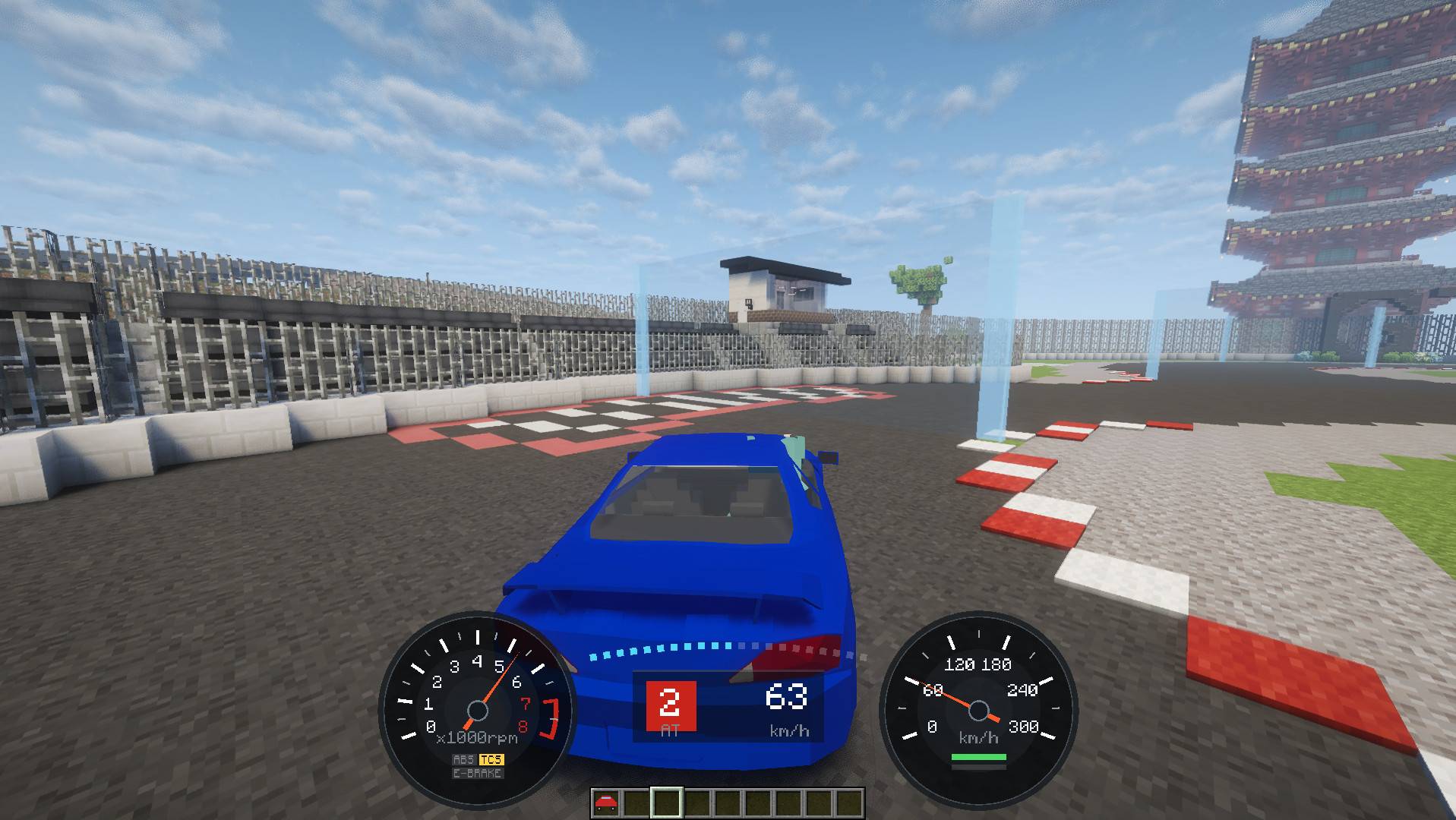
Forge 1.20.1 (47.4.22+) / NeoForge 1.21.1 (21.1+) · No dependencies · Multiplayer · Wheel & gamepad

🌐 Website · 💬 Discord · 𝕏 @kurumamod
📦 Car packs
Official
- Basic Car Pack — the Toyota Land Cruiser Prado, a heavy off-road 4x4, and the Porsche 911, a rear-engined sports car
- Example Car Pack — the template for making your own pack
Community
- Dream Drift Pack by LexusIS300 — the Mitsubishi Lancer Mk6, with swappable bumpers, spoilers, exhausts, tires and turbo
Made a car pack? Tell us on Discord and we'll add it here.
Why KurumaMod?
KurumaMod is about the driving itself — born from an obsession with how a car should drive.
- Real physics simulation — suspension, weight transfer, tyre grip, engine and gearbox, differential. You can feel the limit coming before you reach it
- A huge range of setup options — springs, anti-roll bars, tyres, the torque curve, gear ratios, the diff, brakes, downforce and more. Press G mid-drive, move a slider, and the car changes from the next corner on
- Race your friends — lap timing, split times and leaderboards, in multiplayer
- Just drop it in — no other mods required. Add cars with a single jar
🏎️ Drives like the real thing
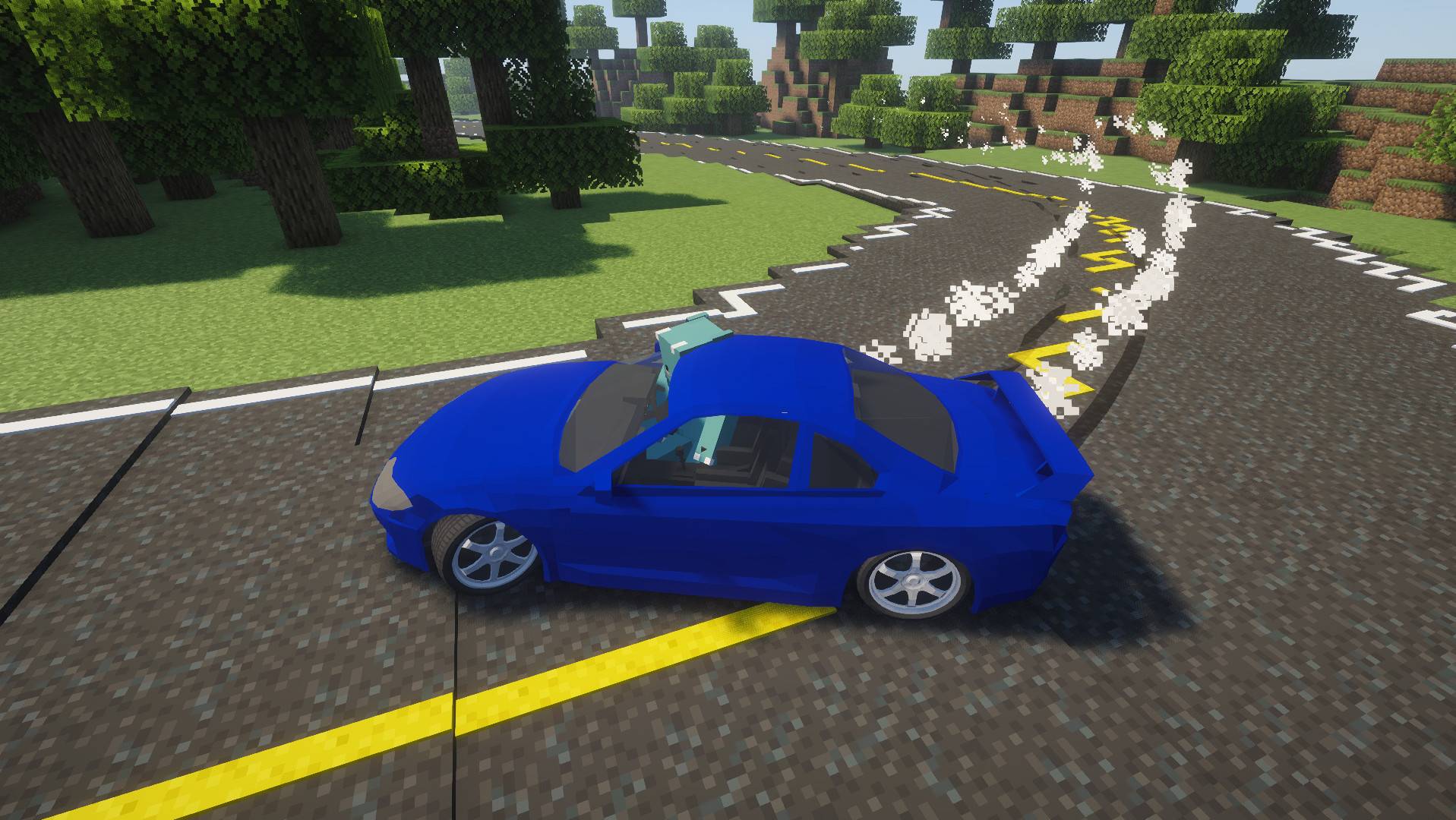
You can't throw it into a tight corner at full speed. Brake properly before the turn, scrub off the speed, and it goes round cleanly.
Grip fades gradually rather than vanishing at once, so you'll feel the front start to run wide, and when the rear steps out you can catch it with countersteer. Pull the handbrake and the clutch disengages for you — the rear locks, the car swings round, and you can hold it in a drift. Steering follows the slide, so there's always enough opposite lock to catch it.
Your first car is a Nissan Silvia S15 on TE37s. Automatic for a relaxed cruise, manual when you want to shift for yourself.
🔧 Tune as you drive
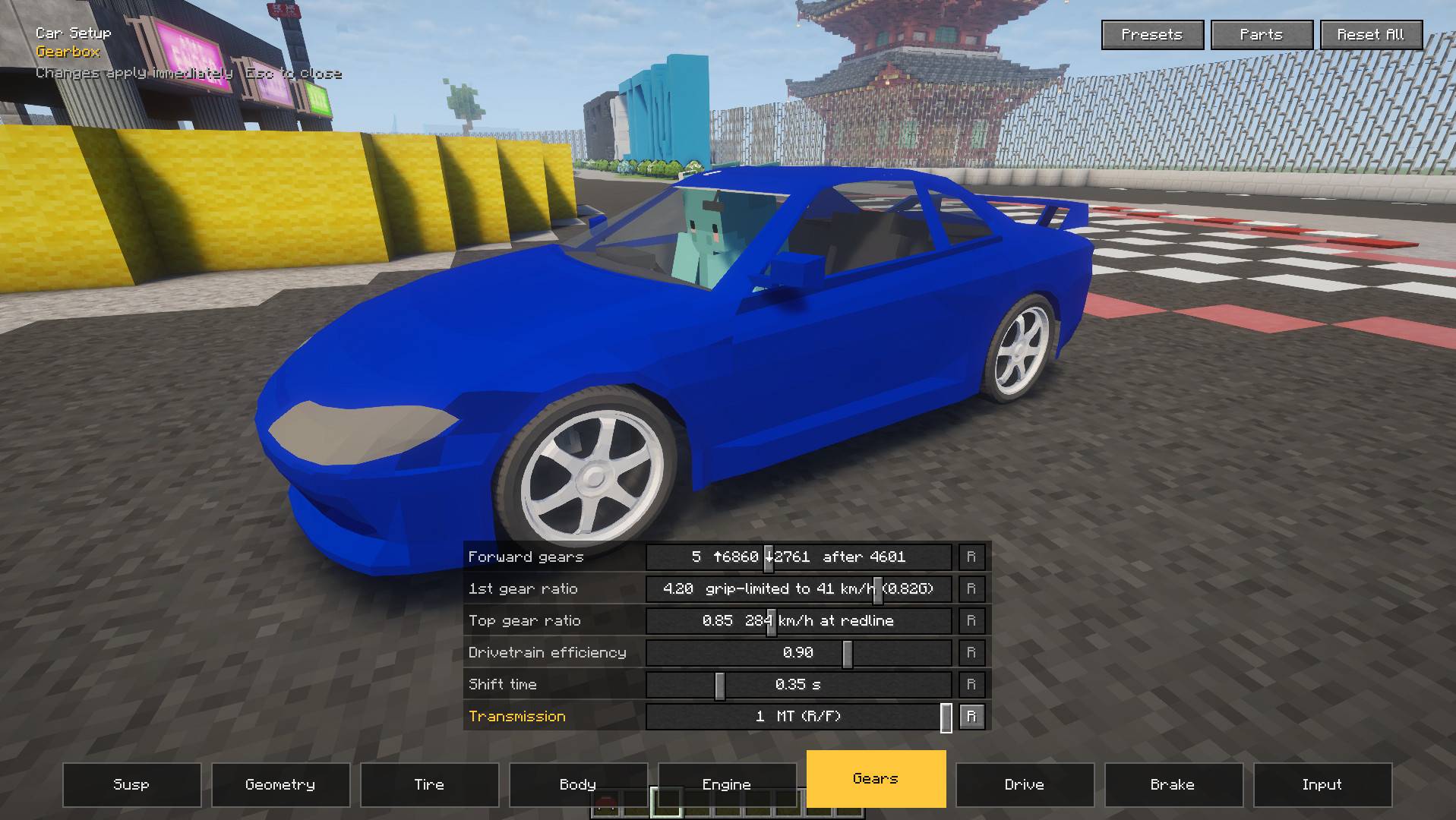
Press G and the setup screen opens without pausing the game. Springs, anti-roll bars, tyres, torque curve, gear ratios, LSD, brakes, weight distribution, front and rear downforce — move a slider and the car responds right away. Start from the built-in Drift or Off-road preset, and save your own setups to share with friends.
✨ Make it yours
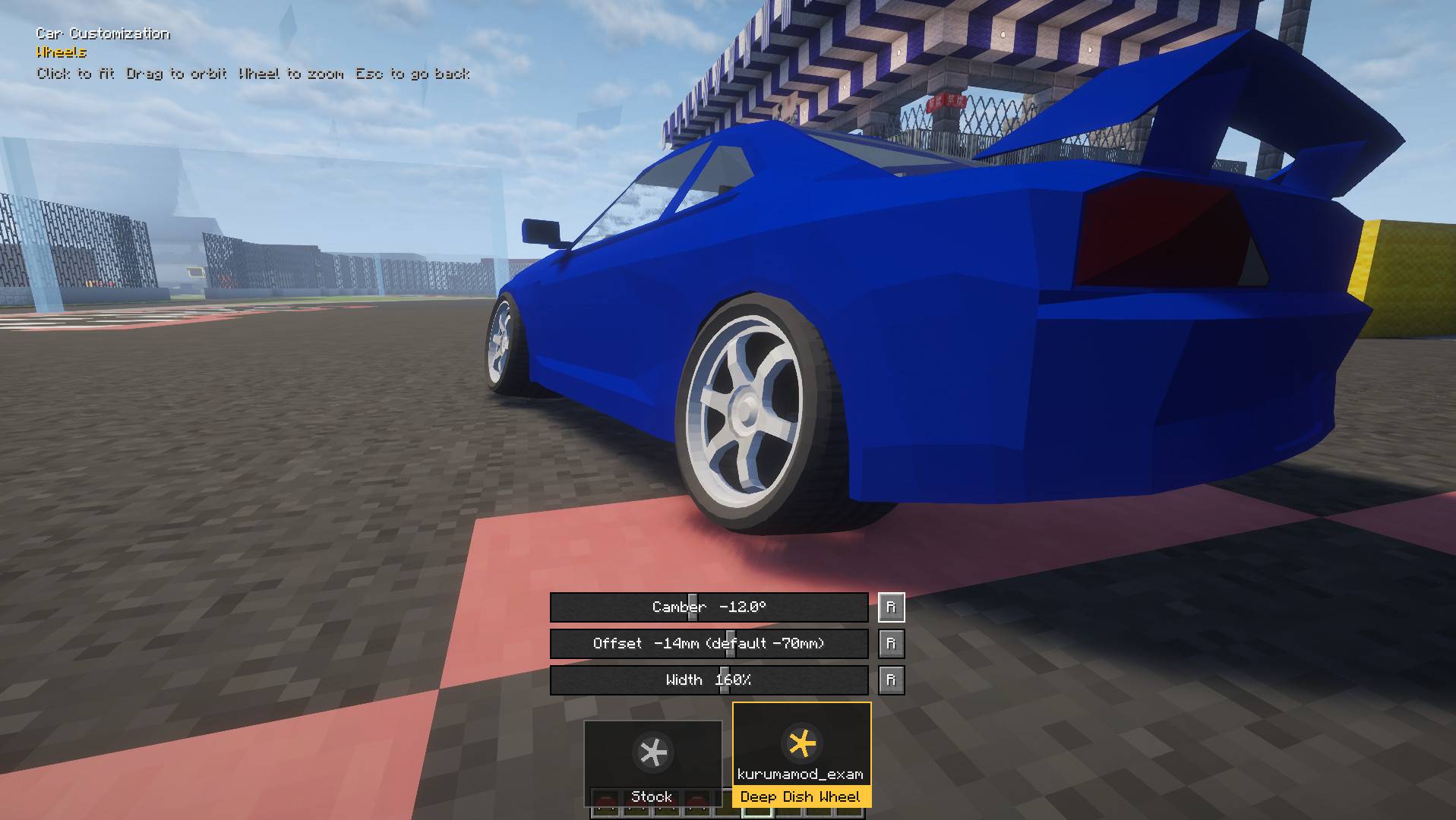
Set camber, offset and wheel width until it sits just right — flush, poke, or full oni-kyan. Fit wheels from car packs and check the look on your own car on the spot.
Bolt on aero parts — bumpers, side skirts, fenders, a rear wing, a diffuser. Wings and diffusers make real downforce, and you can set the wing angle yourself. Mufflers change the exhaust note, and everyone nearby hears it. The gauges come in two styles: 90s JDM factory or modern.
🌧️ Road and weather
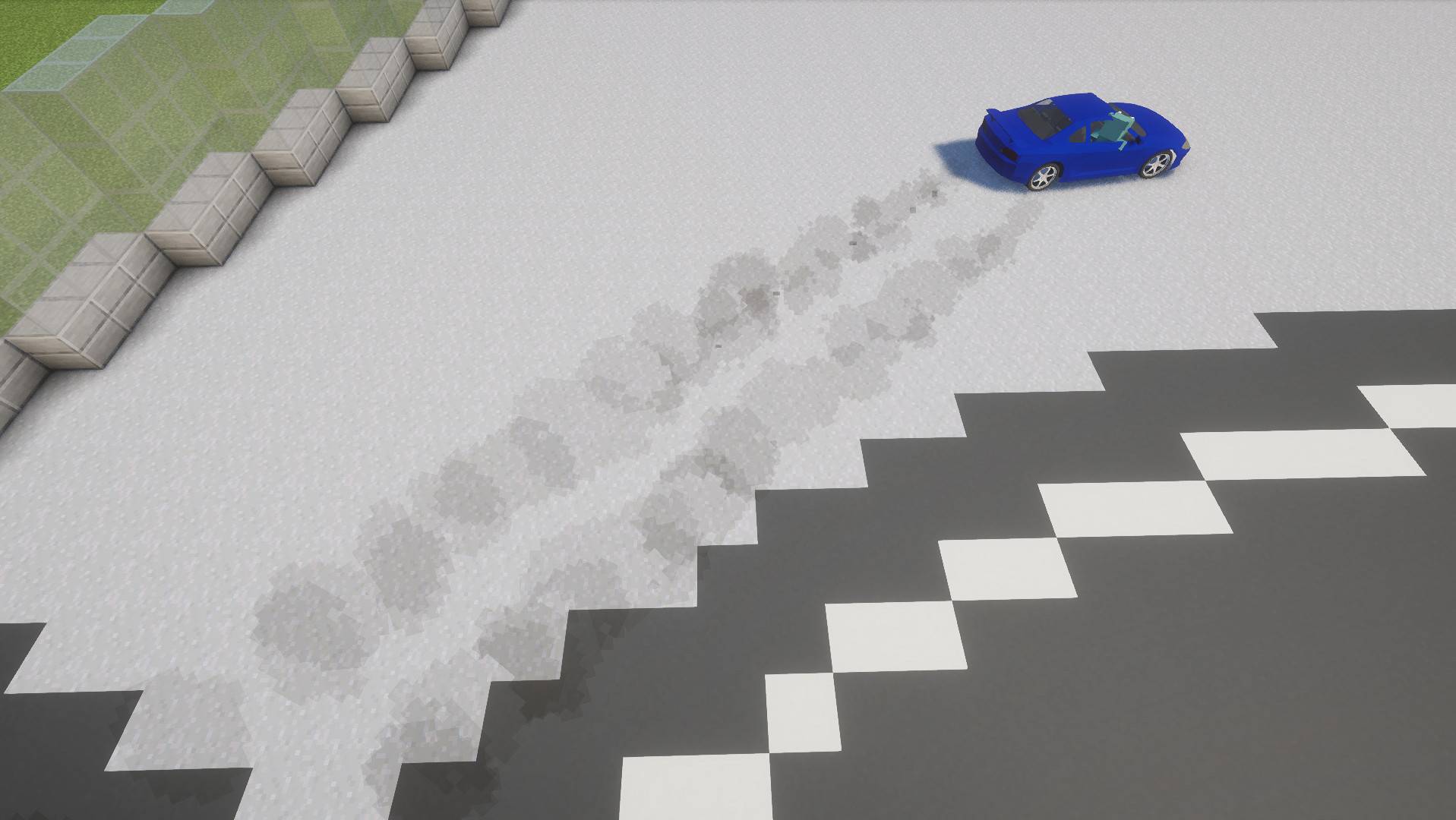
Tarmac, dirt, gravel, sand, snow, ice — change the surface and the car behaves completely differently. Rain makes the road slippery, while tunnels and bridges stay dry. Roads from other mods work as they are.
💡 Night driving
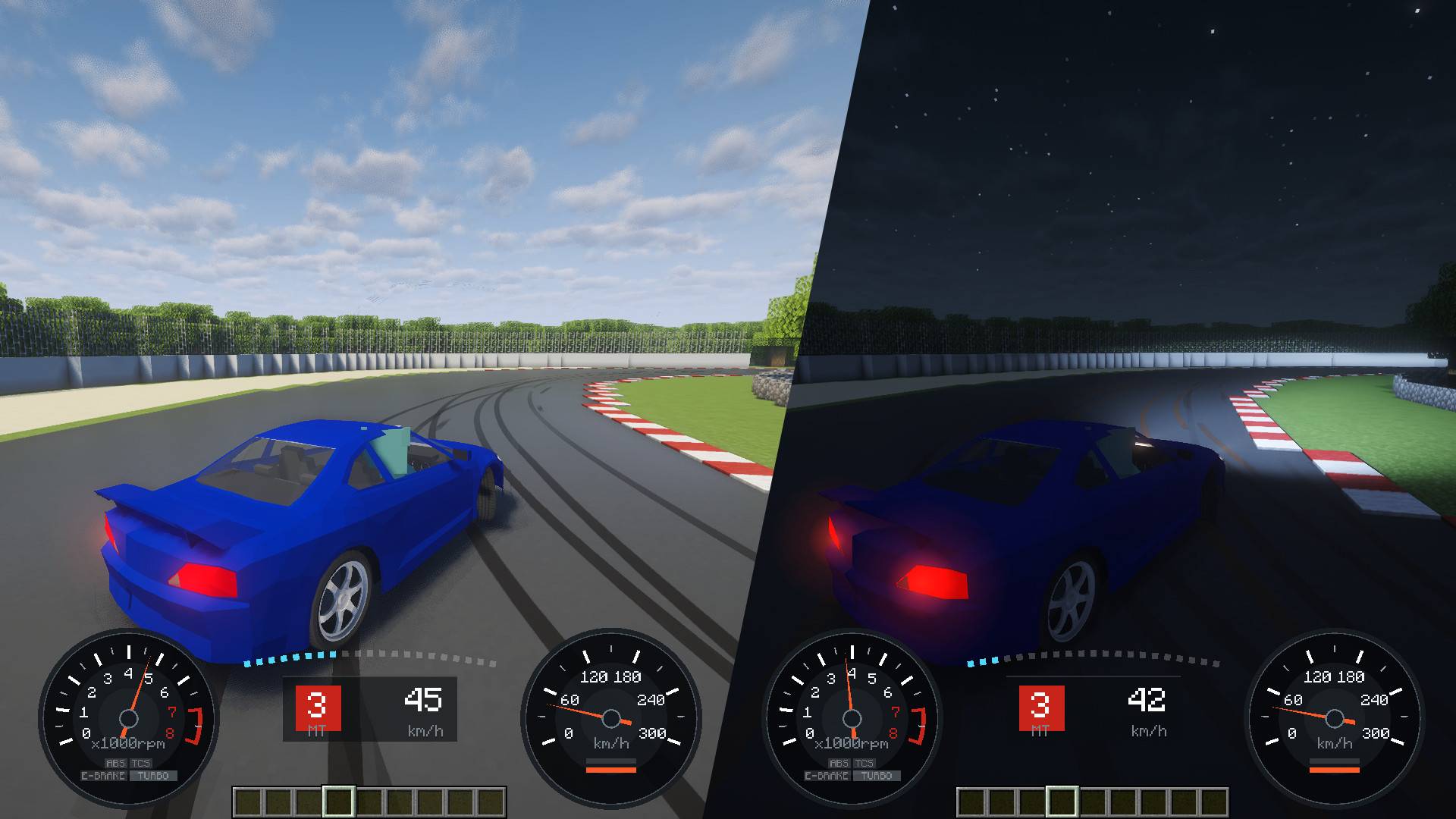
Switch the headlights on with L and they really light the road: a low beam with a proper cut-off, beams glowing in fog and rain, and shadows cast by trees and walls. Drift through your own tyre smoke and it lights up in the beam. Every car's lights work, however many are on the road, and they work with shader packs (Iris / Oculus) too. Tune the aim, brightness and reach with Ctrl+L.
🏁 Racing
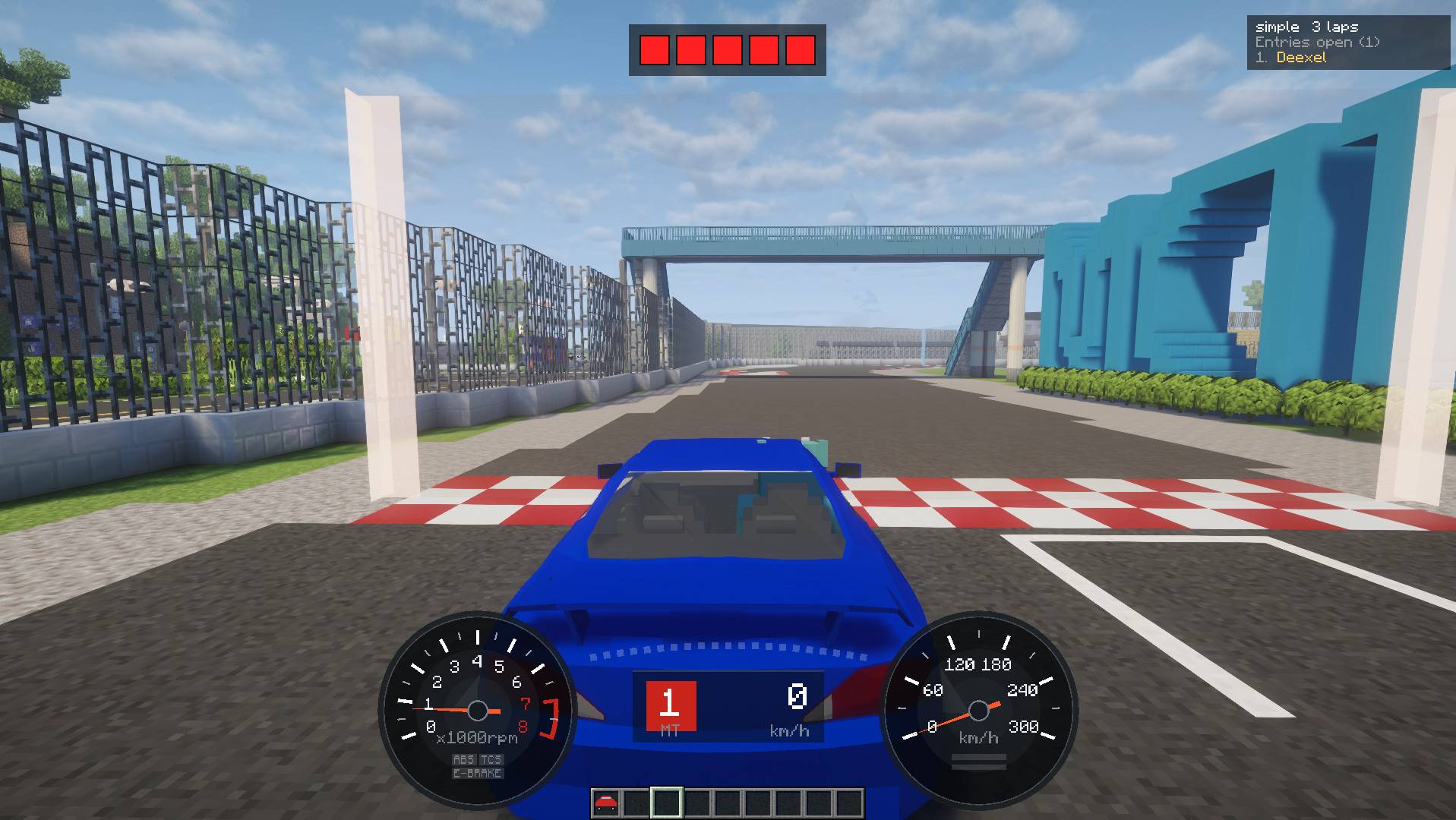
Place a start line and checkpoints anywhere in your world and hold a proper race — start lights, live standings, and your gap to your best lap at every checkpoint. Multiplayer, timed to the millisecond. Cars can collide with each other (servers can turn this off).
🏔️ Off-road
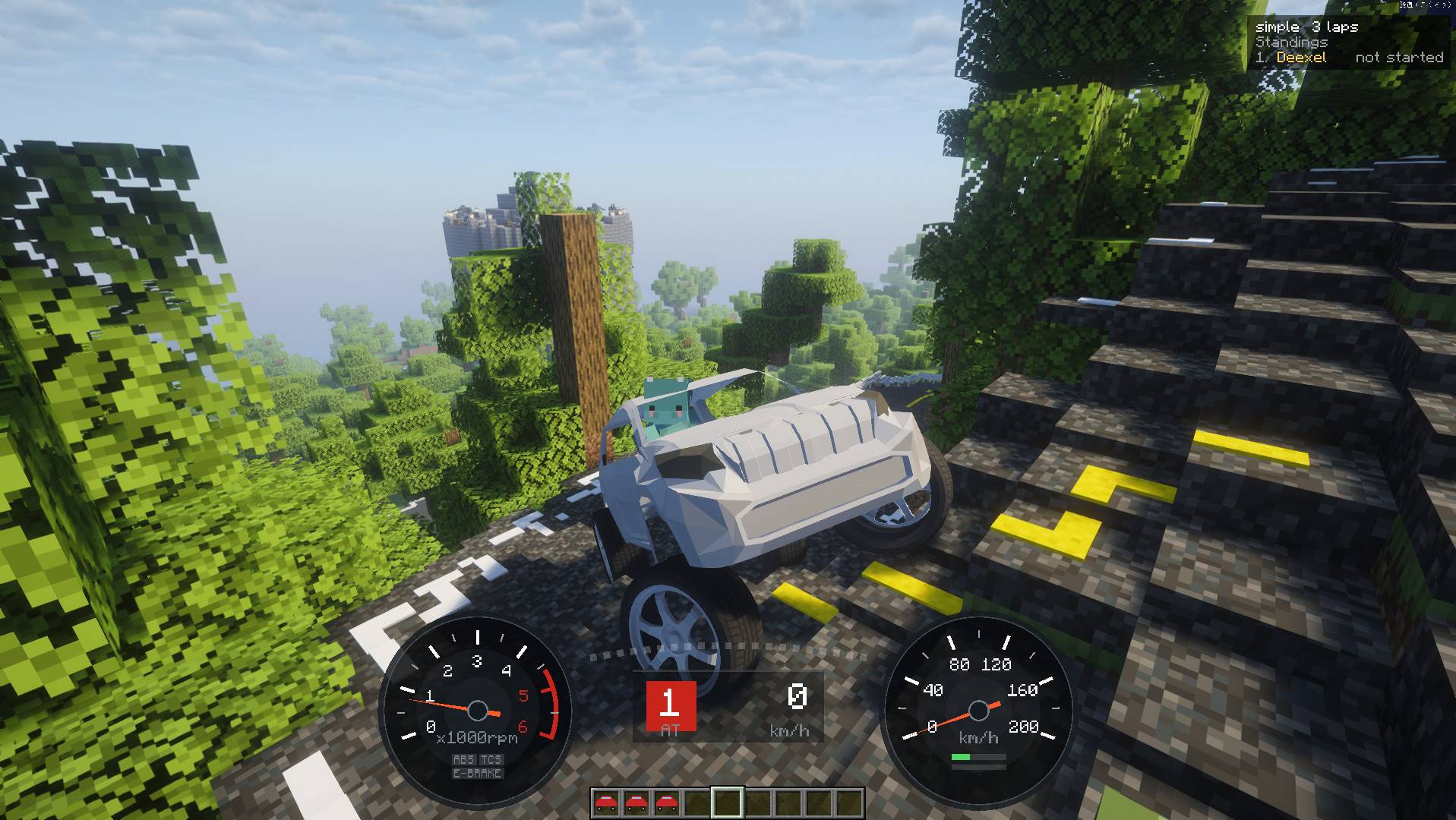
Load the Off-road preset for four-wheel drive, a locking diff, long suspension travel and big tyres. Climb one-block ledges, let the diff pull you out of a ditch with a wheel in the air, and head into the hills with dust trailing behind you.
🎮 Wheel and gamepad support
Fully analog throttle, brake and steering — and the handbrake too: map a wheel's handbrake lever and how far you pull sets how hard it bites. Plug it in, press J, and move the axis you want to assign.
🚗 Add more cars
A car pack is a single jar. Put it in mods/ and the cars are there.
- Make your own: follow the Car Pack Creation Guide (no Blender experience needed) and use the Example Car Pack as your template. No coding, and no credit required
Getting started
- Put KurumaMod in
mods/ - Take the car from the KurumaMod creative tab
- Right-click the ground to place it, then right-click the car to get in
- Drive!
Controls
| W / S | Throttle / brake |
| A / D | Steer |
| Space | Handbrake |
| R / F | Shift up / down (manual) |
| Shift | Get out |
| Shift + attack the car | Pick it up (the item keeps its setup and parts) |
| Attack the car | Remove it (drops nothing) |
| G | Setup, presets and parts |
| H | Mod menu (display and camera) |
| V / PageUp / PageDown | Camera mode / distance |
| L | Headlights |
| Ctrl+L | Headlight settings |
| J | Controller setup |
Seats two — whoever gets in first drives. All keys can be changed in Options → Controls.
Racing: the basics
- Build a course (OP): mark both ends of each line with
/kuruma-admin point. Face the racing direction and run/kuruma-admin course create <name>, then add checkpoints in order with/kuruma-admin course checkpoint <name> - Time attack: just drive across a start line
- Race:
/kuruma race open <course> [laps]→ others/kuruma race join→ line up behind the start line →/kuruma race start - Records:
/kuruma best,/kuruma best top <course>
Server settings are in config/kurumamod-common.toml (removing abandoned cars, car-to-car collisions).
Videos, modpacks and license
- Videos and streams: feel free. Just put a link to this page in the description — no need to ask
- Modpacks: welcome. Please add it as a CurseForge/Modrinth dependency instead of bundling the jar, so players always get the latest version
- License: free software under the GNU General Public License v3.0 only (
GPL-3.0-only). The full text is inLICENSE

KurumaMod(日本語)
Minecraft で、グランツーリスモ。
見た目だけの乗り物ではありません。ブレーキを踏めばフロントが沈み、アクセルを踏めばリアが沈み込み、コーナーでは車体が外へロールし、踏みすぎればタイヤを鳴らして横を向く。 そんな本物の車が、あなたのワールドを走ります。
Forge 1.20.1(47.4.22+)/NeoForge 1.21.1(21.1+) · 前提 MOD なし · マルチプレイ対応 · ハンコン・パッド対応
🌐 公式サイト · 💬 Discord · 𝕏 @kurumamod
📦 カーパック
公式
- ベーシックカーパック — トヨタ ランドクルーザー プラド(重量級のオフロード 4x4)と、ポルシェ 911(エンジンを後ろに積んだスポーツカー)
- エグザンプルカーパック — 自分でカーパックを作るときのひな型
コミュニティ
- Dream Drift Pack(作者: LexusIS300)— 三菱 ランサー Mk6。バンパー・スポイラー・マフラー・タイヤ・ターボを換装できる
カーパックを作ったら Discord で教えてください。ここに載せます。
なぜKurumaModなの?
KurumaMod が作り込んだのは、運転そのものです。走りへの徹底したこだわりから生まれました。
- 本格的な物理演算 — サスペンション、荷重移動、タイヤのグリップ、エンジンとギア、デフ。限界が近づいてくるのが手に取るように分かる
- 多種多様なセッティング — バネ、スタビ、タイヤ、トルクカーブ、ギア比、デフ、ブレーキ、ダウンフォースまで。走りながら G を押してスライダーを動かせば、次のコーナーから挙動が変わる
- 友達とレース — ラップ計測、区間タイム、ランキングをマルチプレイで
- 入れるだけ — 前提 MOD は不要。車は jar ひとつで追加できる
🏎️ 実車のような走り
スピードを出したまま急なカーブに飛び込んでも曲がりきれません。手前でしっかりブレーキを踏んで速度を落とせば、きれいに曲がれます。
グリップはいきなり消えず少しずつ抜けていくので、フロントが外へ逃げ始めればそれが分かり、リアが出てもカウンターで立て直せる。サイドブレーキを引けばクラッチが自動で切れてリアがロックし、車がくるりと向きを変えて、そのままドリフトに持ち込めます。ハンドルは滑りに合わせて切れるので、流れた分だけカウンターを当てられます。
最初の 1 台は TE37 を履いた 日産 シルビア S15。気楽に流すなら AT、自分で変速したいなら MT で。
🔧 走りながらセッティング
G を押すと、ゲームを止めずにセッティング画面が開きます。バネ、スタビ、タイヤ、トルクカーブ、ギア比、LSD、ブレーキ、重量配分、前後のダウンフォース——スライダーを動かせば、その場で挙動が変わります。組み込みの ドリフト / オフロード プリセットから始められ、自分のセッティングを保存して友達と共有することもできます。
✨ 見た目を自分好みに
キャンバー・オフセット・ホイールの太さを調整して、好きな姿に仕上げられます——ツライチも、ハミタイも、鬼キャンも。カーパックのホイールに履き替えて、その場で見た目を確かめられます。
バンパー、サイドスカート、フェンダー、リアウイング、ディフューザーといったエアロパーツも付けられます。ウイングとディフューザーは本当にダウンフォースを生み、ウイングの角度も自分で決められます。マフラーを替えれば排気音が変わり、周りの人にも同じ音で聞こえます。メーターは 90 年代の国産純正風とモダンの 2 種類から選べます。
🌧️ 路面と天候
舗装・土・砂利・砂・雪・氷。路面が変われば、車の挙動はまったく変わります。雨が降れば路面が滑りやすくなり、トンネルや橋の下は乾いたまま。他 MOD の道路ブロックの上でも、そのまま走れます。
💡 夜のドライブ
L でヘッドライトを点けると、本当に路面が照らされます。カットオフの付いたロービームの配光、霧や雨の中に浮かぶ光の筋、木や塀が落とす影。ドリフトの煙も光を受けて浮かび上がります。何台走っていても全車のライトが路面を照らし、シェーダーパック(Iris / Oculus)とも一緒に使えます。光軸・明るさ・届く距離は Ctrl+L で調整できます。
🏁 レース
ワールドのどこにでもスタートラインとチェックポイントを置いて、本格的なレースを開けます。スタートシグナル、リアルタイムの順位、チェックポイントごとのベストラップとの差。マルチプレイ対応、計測はミリ秒単位。 車同士の接触もあります(サーバー側で切ることもできます)。
🏔️ オフロード
オフロード プリセットを読み込めば、四駆・ロックするデフ・長いサスストローク・大径タイヤの仕様になります。1 ブロックの段差をよじ登り、片輪が浮いた溝もデフの力で抜け出して、土煙を上げながら山へ。
🎮 ハンコン・パッド対応
アクセル・ブレーキ・ステアリングはフルアナログ。サイドブレーキも、ハンコンのサイドレバーを割り当てれば引いた量だけ効きます。つないで J を押し、割り当てたい軸を動かすだけです。
🚗 車を追加する
カーパックは jar ひとつ。mods/ に入れるだけで車が増えます。
- 自分で作るなら: カーパック作成ガイド(Blender 未経験でも大丈夫)を見ながら、エグザンプルカーパック をひな型に。コードは不要、クレジット表記も不要です
はじめかた
- KurumaMod を
mods/に入れる - クリエイティブの KurumaMod タブから車を取り出す
- 地面を右クリックして置き、車を右クリックして乗る
- 走る!
操作
| W / S | アクセル / ブレーキ |
| A / D | ステアリング |
| スペース | サイドブレーキ |
| R / F | シフトアップ / ダウン(MT) |
| Shift | 降りる |
| Shift + 車を殴る | 回収(セッティングとパーツはアイテムに残る) |
| 車を殴る | 消す(何も落とさない) |
| G | セッティング・プリセット・パーツ |
| H | MOD メニュー(表示とカメラ) |
| V / PageUp / PageDown | カメラモード / 距離 |
| L | ヘッドライト |
| Ctrl+L | ヘッドライトの調整 |
| J | コントローラ設定 |
2 人乗りで、先に乗った方が運転します。キーはすべて「設定 → 操作設定」で変更できます。
レースの基本
- コースを作る(OP): 各ラインの両端を
/kuruma-admin pointで指定し、走る向きを向いて/kuruma-admin course create <名前>。続けてチェックポイントを通る順に/kuruma-admin course checkpoint <名前>で追加 - タイムアタック: スタートラインを通過するだけ
- レース:
/kuruma race open <コース> [周回数]→ 参加者は/kuruma race join→ ラインの手前に並んで/kuruma race start - 記録:
/kuruma best、/kuruma best top <コース>
サーバーの設定は config/kurumamod-common.toml にあります(放置車両の削除、車同士の当たり判定)。
動画・モッドパック・ライセンス
- 動画・配信: ご自由にどうぞ。概要欄にこのページのリンクを載せていただければ、許可は不要です
- モッドパック: 歓迎します。jar を同梱せず CurseForge/Modrinth の依存として追加していただけると、プレイヤーに常に最新版が届きます(ライセンス上の条件ではなく、お願いです)
- ライセンス: GNU General Public License v3.0 only(
GPL-3.0-only)のフリーソフトウェアです。全文はLICENSE(英語の原文が正本)

Project description from CurseForge.
Pick your setup
Kuruma by Minecraft version and loader
Choose the version and loader you play, then open the matching release.
Minecraft version
1.20.1
2 loader buildsCheck the dependencies, then try the file in a copied instance before changing a world you care about.
Recent files
Kuruma versions and loaders
kurumamod-neoforge-1.21.1-1.8.0.jar
18 Oct 2026
Client Source doesn’t say Server Source doesn’t say Dependencies No extras listed Listed on Release listing
Check the 1.21.1 · NeoForge setup 1.21.1NeoForge release
kurumamod-forge-1.20.1-1.8.0.jar
18 Oct 2026
Client Source doesn’t say Server Source doesn’t say Dependencies No extras listed Listed on Release listing
Check the 1.20.1 · Forge setup 1.20.1Forge release
kurumamod-neoforge-1.21.1-1.7.0.jar
10 Oct 2026
Client Source doesn’t say Server Source doesn’t say Dependencies No extras listed Listed on Release listing
Check the 1.21.1 · NeoForge setup 1.21.1NeoForge release
kurumamod-forge-1.20.1-1.7.0.jar
10 Oct 2026
Client Source doesn’t say Server Source doesn’t say Dependencies No extras listed Listed on Release listing
Check the 1.20.1 · Forge setup 1.20.1Forge release
kurumamod-neoforge-1.21.1-1.6.0.jar
3 Oct 2026
Client Source doesn’t say Server Source doesn’t say Dependencies No extras listed Listed on Release listing
Check the 1.21.1 · NeoForge setup 1.21.1NeoForge release
kurumamod-forge-1.20.1-1.6.0.jar
3 Oct 2026
Client Source doesn’t say Server Source doesn’t say Dependencies No extras listed Listed on Release listing
Check the 1.21.1 · Forge setup 1.20.1Forge1.21.1NeoForge release
kurumamod-1.5.0.jar
26 Sept 2026
Client Source doesn’t say Server Source doesn’t say Dependencies No extras listed Listed on Release listing
Check the 1.20.1 · Forge setup 1.20.1Forge release
kurumamod-1.4.0.jar
23 Sept 2026
Client Source doesn’t say Server Source doesn’t say Dependencies No extras listed Listed on Release listing
Check the 1.20.1 · Forge setup 1.20.1Forge release
kurumamod-1.3.0.jar
11 Sept 2026
Client Source doesn’t say Server Source doesn’t say Dependencies No extras listed Listed on Release listing
Check the 1.20.1 · Forge setup 1.20.1Forge release
kurumamod-1.2.0.jar
29 Aug 2026
Client Source doesn’t say Server Source doesn’t say Dependencies No extras listed Listed on Release listing
Check the 1.20.1 · Forge setup 1.20.1Forge release
kurumamod-1.1.0.jar
13 Aug 2026
Client Source doesn’t say Server Source doesn’t say Dependencies No extras listed Listed on Release listing
Check the 1.20.1 · Forge setup 1.20.1Forge release
kurumamod-1.0.0.jar
kurumamod-1.0.0-release.jar
10 Aug 2026
Client Source doesn’t say Server Source doesn’t say Dependencies 1 required · 1 unchecked Listed on Release listing
Check the 1.20.1 · Forge setup 1.20.1Forge release
Looking for an older file? The official CurseForge project page is in Resources.