Cloth Config API (Fabric/Forge/NeoForge) Needed by hsn-optimizations-3.8.3.jar
requiredMatching file found Matched file: [Fabric 26.2] v26.2.155

CurseForge · Minecraft mod
Mod designed especially for hardware which is pre-2016 by not rendering stuff and mechnaics that you dont see .
Quick answer
hsn-optimizations-3.8.3.jar targets 26.2 with Fabric. The project page does not say whether this file belongs on the client, dedicated server, or both. All 2 required mods have matching files.
Where it goes
The project page does not say whether this file belongs on the client, dedicated server, or both.
The source does not explicitly classify this release as client-only or server-only.
hsn-optimizations-3.8.3.jar on 26.2. Every mod below is checked against that same setup.
Install Cloth Config API (Fabric/Forge/NeoForge), Fabric API first. We found matching files for this game-version and loader setup.
We only count dependency files that match this setup. A file for another loader does not fill the gap.
Before you install it
Built for hsn-optimizations-3.8.3.jar on 26.2. Pick another file and the loader, install side or required mods may change.
Use hsn-optimizations-3.8.3.jar. It targets 26.2 with Fabric; another release may have different loader, side or dependency requirements.
Install Cloth Config API (Fabric/Forge/NeoForge), Fabric API first. We found matching files for this game-version and loader setup.
The project page does not say whether this file belongs on the client, dedicated server, or both.
Use the “Get this file” button beside hsn-optimizations-3.8.3.jar. It opens that exact file at the source.
About this project
HSN Optimizations is a list of features for Minecraft 26.2. This is a mod that you can use on your computer to make Minecraft work better. It is especially helpful if you have a computer from before 2015 with a weaker graphics card like the Intel HD Igpus.
It gets rid of a lot of things that you might not even notice while you are playing Minecraft.
It makes some changes to the game like reducing the number of particles and hiding things that are really far away like other players or monsters. It also turns down the shadows, name tags and distant sounds your game runs more smoothly.. It does all of this without changing the way Minecraft looks or feels too much.
HSN Optimizations comes with some settings, like Ultra Low, Safe, Balanced and Quality that you can choose from. It also has some easy hotkeys that you can use.
Core culling:
Particle distance + soft count budget + priority system (combat kept, decorative culled first)
Entity / item / XP / decoration render distance limits
Shadow + name-tag distance culling
Block-entity distance culling + LOD
Sound distance + weather thinning + optional burst limiter
Optional mild fog scaling
Adaptive FPS-based culling + Performance Mode (F6)
Item entity merge + optional distant item/XP tick throttling
Unique helpers:
Animated texture throttling – slows water/lava/portals/fire under load
Cloud distance & density
Beacon beam distance
Glow outline distance
Distant item spin throttle
Entity animation relief
Weak-GPU auto layer – extra aggression when FPS stays low
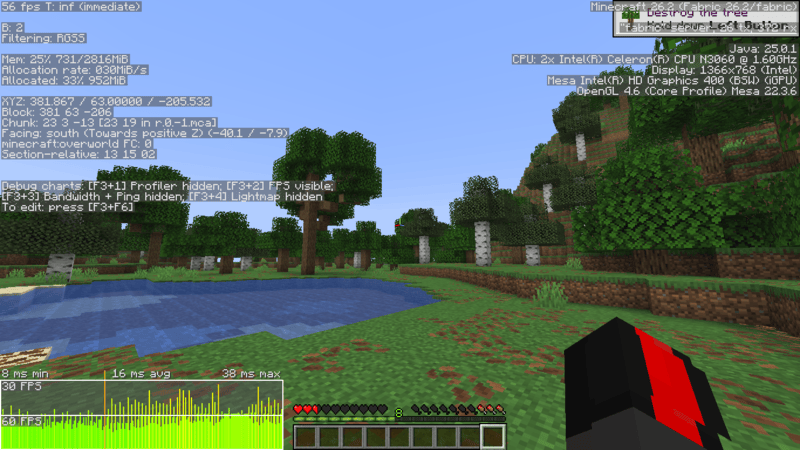
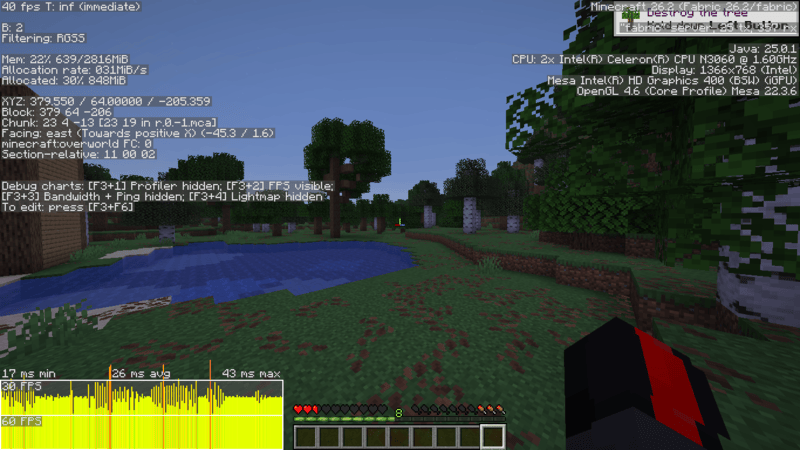
BENCHMARKS:
With HSN-Optimizations>
WITHOUT HSN-Optimizations:
Project description from CurseForge.
Pick your setup
Choose the version and loader you play, then open the matching release.
Check the dependencies, then try the file in a copied instance before changing a world you care about.
Recent files
13 Aug 2026
12 Aug 2026
11 Aug 2026
10 Aug 2026
Looking for an older file? The official CurseForge project page is in Resources.
 mod
modMake mobs always drop exp and loot, regardless of cause of death.
 mod
modSwords, Spears, Bows, Crossbows and Arrows for every kind of wood - A 'More Stick Variants' Add-On
 mod
modA multiloader fork of Connectible Chains: Connect your fences/walls with a decorative chain!