Back to mods
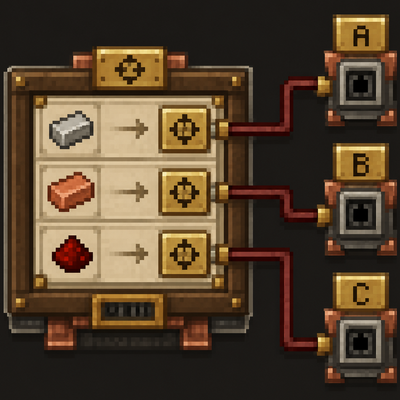
Create: Factory Routing project artwork

CurseForge · Minecraft mod

Create: Factory Routing

Route each ingredient in a Create Factory Gauge recipe to its own target address — with native Create behavior and optional Factory Controller compatibility.

Choose a version Pick your version below, then grab the matching file.

Quick answer

Which Create: Factory Routing release should I use?

Updated last month
Latest stable file create_factory_routing-1.21.1_0.1.0.jar
Game version 1.21.1
Loader NeoForge

Create: Factory Routing create_factory_routing-1.21.1_0.1.0.jar targets 1.21.1 with NeoForge. The project page does not say whether this file belongs on the client, dedicated server, or both. All 1 required mods have matching files.

Where it goes

Is Create: Factory Routing required on the client, server, or both?

The project page does not say whether this file belongs on the client, dedicated server, or both.

Client Source doesn’t say
Dedicated server Source doesn’t say
Loader for this release NeoForge
Required install it here Optional supported, not mandatory Not supported do not install here Source doesn’t say do not assume

The source does not explicitly classify this release as client-only or server-only.

What else does Create: Factory Routing create_factory_routing-1.21.1_0.1.0.jar need?

create_factory_routing-1.21.1_0.1.0.jar. Change the file and its required mods may change too.

All 1 required mods have matching files

Install Create first. We found matching files for this game-version and loader setup. 2 come through another mod in the chain.

2 listed on this file 2 pulled in by those mods
Create: Factory Controller Optional for Create: Factory Routing create_factory_routing-1.21.1_0.1.0.jar
optional
Matching file found Matched file: createfactorycontroller-1.1.1-neoforge-1.21.1.jar
Create Needed by Create: Factory Routing create_factory_routing-1.21.1_0.1.0.jar
required
Matching file found Matched file: Create 6.0.10 for mc1.21.1
Create: Deployer API Needed by Create: Factory Controller
pulled in
Matching file found Matched file: Deployer [0.1.3]
Create: Repackaged Needed by Create: Deployer API
pulled in
Matching file found Matched file: Create: Repackaged [0.0.7]

2 extra mods were pulled in by other dependencies. Indented rows show who needs each one. We only count dependency files that match this setup. A file for another loader does not fill the gap.

Before you install it

Add Create: Factory Routing without breaking your instance.

Built for Create: Factory Routing create_factory_routing-1.21.1_0.1.0.jar. Pick another file and the loader, install side or required mods may change.

  1. 01

    Stick to this file

    Use create_factory_routing-1.21.1_0.1.0.jar. It targets 1.21.1 with NeoForge; another release may have different loader, side or dependency requirements.

  2. 02

    Bring the mods it needs

    Install Create first. We found matching files for this game-version and loader setup. 2 come through another mod in the chain.

  3. 03

    Put it on the correct side

    The project page does not say whether this file belongs on the client, dedicated server, or both.

  4. 04

    Pick the file you checked

    Use the “Get this file” button beside create_factory_routing-1.21.1_0.1.0.jar. It opens that exact file at the source.

About this project

What does Create: Factory Routing add?

Create: Factory Routing

Create: Factory Routing adds optional delivery-address overrides to the ingredient connections of Create Factory Gauge recipes.

Normally, every requested ingredient uses the recipe gauge's default address. With this addon, each ingredient connection can keep that default or use its own custom address. This allows one recipe gauge to distribute ingredient deliveries across multiple destinations without splitting the setup across several gauges.

Features

  • A separate custom delivery address for each ingredient connection
  • Automatic inheritance from the recipe gauge's default address
  • Embedded ingredient list on the left and address editor on the right
  • Compact paged fallback when there is not enough screen space
  • Support for regular Create Factory Gauges
  • Optional support for Create: Factory Controller virtual gauges
  • Persistent, server-authoritative routing data
  • No new blocks or items

How to use

  1. Open a Factory Gauge in recipe mode.
  2. Select the routing icon to show the routing panels.
  3. Select an ingredient from the list on the left.
  4. Enter its target address and select Save.
  5. Select Use default to remove the override and use the recipe gauge's default address again.

Requirements

  • Minecraft 1.21.1
  • NeoForge 21.1.227 or newer
  • Create 6.0.10 — required
  • Java 21
  • Create: Factory Controller is not required, but it is recommended. Its virtual gauge screen makes larger recipe and routing setups much easier to organize and configure.

Credits and licensing

Create: Factory Routing is an independent addon for Create and is not affiliated with or endorsed by the Create Team.
Portions of the request-planning implementation are adapted from the MIT-licensed Create codebase:
Optional compatibility is provided for Create: Factory Controller:
No graphical, audio, or other binary assets from Create or Create: Factory Controller are bundled with this addon.
Create: Factory Routing is licensed under the MIT License.

Project description from CurseForge.

Pick your setup

Create: Factory Routing by Minecraft version and loader

Choose the version and loader you play, then open the matching release.

1 available setups

Check the dependencies, then try the file in a copied instance before changing a world you care about.

Recent files

Create: Factory Routing versions and loaders

1 of 1 releases match

Looking for an older file? The official CurseForge project page is in Resources.