Minecraft version
Back to mods 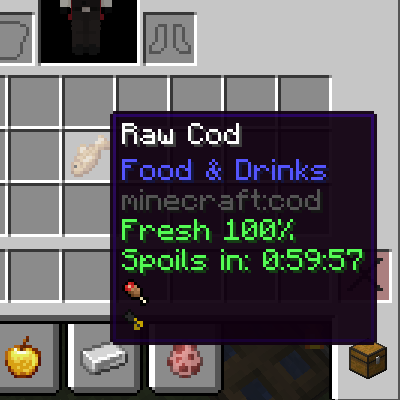
CurseForge · Minecraft mod
Karl's Freshness
A food spoilage mod adding freshness decay, environmental effects, and recovery through cooking.
Choose a version Pick your version below, then grab the matching file.
Quick answer
Which Karl's Freshness release should I use?
Latest stable file karlsfreshness-1.20.1-1.0.0.jar
Game version 1.20.1
Loader Forge
Karl's Freshness karlsfreshness-1.20.1-1.0.0.jar targets 1.20.1 with Forge. The project page does not say whether this file belongs on the client, dedicated server, or both. No extra mods listed for this file.
Where it goes
Is Karl's Freshness required on the client, server, or both?
The project page does not say whether this file belongs on the client, dedicated server, or both.
Client Source doesn’t say
Dedicated server Source doesn’t say
Loader for this release Forge
Required install it here Optional supported, not mandatory Not supported do not install here Source doesn’t say do not assume
The source does not explicitly classify this release as client-only or server-only.
What else does Karl's Freshness karlsfreshness-1.20.1-1.0.0.jar need?
karlsfreshness-1.20.1-1.0.0.jar. Change the file and its required mods may change too.
This file does not list any required mods. Do not add a library just because a different file uses it.
This file does not list any required or optional mods.
Before you install it
Add Karl's Freshness without breaking your instance.
Built for Karl's Freshness karlsfreshness-1.20.1-1.0.0.jar. Pick another file and the loader, install side or required mods may change.
- 01
Stick to this file
Use karlsfreshness-1.20.1-1.0.0.jar. It targets 1.20.1 with Forge; another release may have different loader, side or dependency requirements.
- 02
Bring the mods it needs
This file does not list any required mods. Do not add a library just because a different file uses it.
- 03
Put it on the correct side
The project page does not say whether this file belongs on the client, dedicated server, or both.
- 04
Pick the file you checked
Use the “Get this file” button beside karlsfreshness-1.20.1-1.0.0.jar. It opens that exact file at the source.
About this project
What does Karl's Freshness add?
You harvest your crops, cook your meals, and stockpile provisions for the journey ahead. Days later, deep underground, you pull out that beef stew and find it just as fresh as the day you made it. A little strange, isn't it? In reality, food spoils. Why shouldn't it in Minecraft?
Freshness addresses this by giving every food item a shelf life. Fresh foods provide full nutrition. Over time, they become stale, offering reduced hunger and saturation. Left longer, they spoil—minimal nutrition with a side of nausea. Eventually, they rot entirely, transforming into rotten flesh or bone meal.
Spoilage is not a simple timer. Environment plays a role. The Nether doubles decay speed. The End slows it. Rain and water accelerate spoilage. Items dropped on the ground decay faster than those kept in inventory. These factors are displayed directly in the tooltip so you always know what's affecting your food.
Cooking
Cooking serves a dual purpose: producing better meals and recovering freshness from aging ingredients. The formula takes the average freshness of all inputs, then restores half of what was lost.
Example: 50% cabbage + 100% carrot → average 75%. Half the 25% loss is 12.5%. Result: 87.5% freshness.
This mechanic applies across all supported cooking stations—Farmer's Delight cooking pot and skillet, campfires and furnaces, Kaleidoscope Cookery wok, steamer, stockpot, and shawarma spit. The cutting board transfers decay without recovery (chopping does not restore freshness).
Eating Effects
- Fresh (50%+): Full hunger and saturation. Green indicator.
- Stale (21%–50%): 2/3 hunger, 1/3 saturation. Yellow indicator.
- Spoiled (1%–21%): Half hunger, no saturation, 10 seconds of nausea. Red indicator.
- Rotten (0%): Converts to spoilage result—rotten flesh for meats, bone meal for vegetables. Bowl-based foods return the bowl.
Compatibility
Freshness integrates natively with Farmer's Delight and Kaleidoscope Cookery. All food items from these mods include pre-configured spoilage data. Every cooking station participates in the freshness system. Ingredients left in these stations also decay over time.
Features
- Durability bar indicator: green → yellow → red at a glance.
- Tooltip displays exact freshness percentage and estimated remaining time.
- Environmental multipliers shown in tooltip: dimension, water, rain, container effects.
- Stacking items with different freshness uses a weighted average.
- Container preservation multipliers configurable per block or item via
config/freshness/container_multipliers.json. - All configuration files located in
config/freshness/with sensible defaults.
Feedback
This mod was built out of a desire for more realistic food mechanics. Bug reports and suggestions are welcome.
Known IssuesMoving food items in Creative Mode resets their freshness
Project description from CurseForge.
Pick your setup
Karl's Freshness by Minecraft version and loader
Choose the version and loader you play, then open the matching release.
Check the dependencies, then try the file in a copied instance before changing a world you care about.
Recent files
Karl's Freshness versions and loaders
karlsfreshness-1.20.1-1.0.0.jar
11 Aug 2026
Client Source doesn’t say Server Source doesn’t say Dependencies No extras listed Listed on Release listing
Check the 1.20.1 · Forge setup 1.20.1Forge release
Looking for an older file? The official CurseForge project page is in Resources.
 mod
mod CurseForge · Minecraft
Little-Maid-Harvest-Helper
Little Maid Harvest Helper is an unofficial compatibility addon for Touhou Little Maid on Minecraft 1.20.1 Forge.
 mod
mod Modrinth · Minecraft
Provincial
A mod that adds a number of features, inspired initially by the mod Rustic.
 mod
mod Modrinth · Minecraft
Matcha Flavoured
Reworks minecraft's gameplay to benefit slower, less technical players