Melody Optional for World Evils worldevils-2.1.2.jar
optionalMatching file found Matched file: [Fabric] v1.0.10 MC 1.21
CurseForge · Minecraft mod
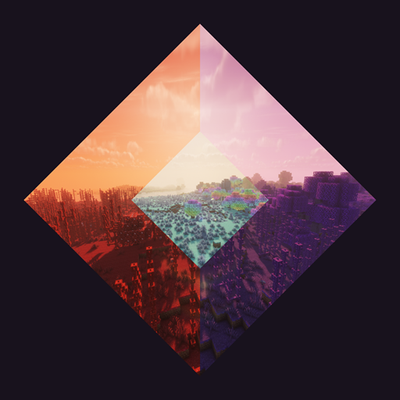
Adds the world evils and hallow from terraria into minecraft!
Quick answer
World Evils worldevils-2.1.2.jar targets 1.21.4 with Fabric. The project page does not say whether this file belongs on the client, dedicated server, or both. All 3 required mods have matching files.
Where it goes
The project page does not say whether this file belongs on the client, dedicated server, or both.
The source does not explicitly classify this release as client-only or server-only.
worldevils-2.1.2.jar. Change the file and its required mods may change too.
Install GeckoLib, Satin API, Fabric API first. We found matching files for this game-version and loader setup.
We only count dependency files that match this setup. A file for another loader does not fill the gap.
Before you install it
Built for World Evils worldevils-2.1.2.jar. Pick another file and the loader, install side or required mods may change.
Use worldevils-2.1.2.jar. It targets 1.21.4 with Fabric; another release may have different loader, side or dependency requirements.
Install GeckoLib, Satin API, Fabric API first. We found matching files for this game-version and loader setup.
The project page does not say whether this file belongs on the client, dedicated server, or both.
Use the “Get this file” button beside worldevils-2.1.2.jar. It opens that exact file at the source.
About this project
Terraria's Corruption, Crimson and Hallow in Minecraft! (It's not exactly the same)
Your world gets one of the two evils. Which one is decided by the seed and you don't get to choose. Every world is a Corruption world or a Crimson world, never both. You'll find out which the first time you open the right chest in a nether fortress.
Inside there are seeds. Plant one somewhere you don't mind losing, or in your friend's base to troll them :)
It spreads slowly. You'll plant it, nothing much will happen, and you'll forget about it. Then you come back from mining and your whole garden is purple and thorny.
It takes almost every block, including artificial ones.
It also keeps going while you're not looking. Walking away doesn't pause it. (There's a page in the options menu if you'd rather it went easier on your hardware. Cap it, let it throttle itself, or switch that off entirely. There's a speed slider too, if slowly isn't your idea of fun.)
Things that used to be something else, mostly. (Almost) anything standing on infected ground long enough transforms into whatever the infection has a use for.
There are altars in the caves, and they're the only place the Corruption's and the Crimson's gear can be made. You may also find other floating things — just be careful how many you break in a row.
Bring a fishing rod at some point, there's good fishies in infected waters ;)
Every world has it, and its seeds aren't in the Nether. Look in ominous trial chambers instead.
Plant it and you get the opposite of everything above. Light blue grass, trees that can't pick a colour, water that went completely magenta, and crystals in the caves doing your torch's job for you.
It's also where the mod stops being nice about it. What lives in the Hallow hits harder than anything in the Corruption or the Crimson, and it expects you to turn up in gear you took off them first. Wandering in wearing iron is a decision you get to make once.
It's got two big ones of its own. One of them you can set off completely by accident, so watch what you swing at.
By default all three keep to their own blocks and won't eat each other's. There's a switch in the options if you'd rather they fought about it.
Every light source in the mod ships labPBR specular maps, so torches, lanterns, campfires and the rest glow properly under any shaderpack that reads them. Turn on Advanced Materials in your shader options — most packs ship it off. There's also a dedicated Solas shaders version with extra compatibility (credits to Septonius for the original shaderpack)
If you use Xaero's minimap, every mob in here has an icon for it.
All music is a cover of its Terraria counterpart, on piano. Credits to Re-Logic and its peak music.
Requires Fabric API, GeckoLib and Satin. No Melody — the music runs on Minecraft's own sound engine. If you can't hear it, check your Music volume slider before your mods folder.
Project description from CurseForge.
Pick your setup
Choose the version and loader you play, then open the matching release.
Check the dependencies, then try the file in a copied instance before changing a world you care about.
Recent files
worldevils-2.0.0.jar
21 Aug 2026
worldevils-2.0.0.jar
20 Aug 2026
worldevils-2.0.0.jar
20 Aug 2026
worldevils-2.0.0.jar
11 Aug 2026
worldevils-2.0.0.jar
11 Aug 2026
11 Aug 2026
Looking for an older file? The official CurseForge project page is in Resources.
 mod
modChanges ore generation for all dimensions. Configure ore sizes, rarity, generation easily. Also adds large veins. All configurable!
 mod
modAdd a portable storage feature for players. Integrate a storage interface above the player's backpack UI, supporting functions such as search, upgrades, and automation.
 mod
modRemoves the red vignette tint when close to a world border.