Minecraft version
Back to mods 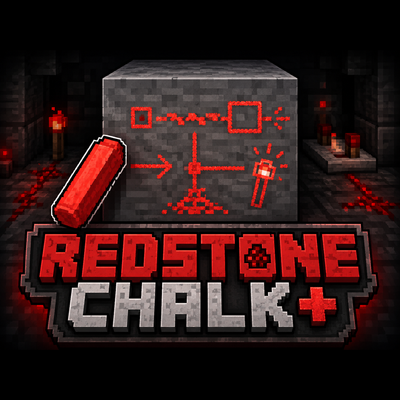
CurseForge · Minecraft mod
Redstone Chalk+
Redstone Chalk+ lets you draw custom red chalk markings directly onto block faces, making it easy to label redstone builds, mark directions, leave symbols, and annotate machines while keeping a simple vanilla-style feel.
Choose a version Pick your version below, then grab the matching file.
Quick answer
Which Redstone Chalk+ release should I use?
Latest stable file redstone-chalk-plus-fabric-1.21.1-1.0.1.jar
Game version 1.21.1
Loader Fabric
Redstone Chalk+ redstone-chalk-plus-fabric-1.21.1-1.0.1.jar targets 1.21.1 with Fabric. The project page does not say whether this file belongs on the client, dedicated server, or both. No extra mods listed for this file.
Where it goes
Is Redstone Chalk+ required on the client, server, or both?
The project page does not say whether this file belongs on the client, dedicated server, or both.
Client Source doesn’t say
Dedicated server Source doesn’t say
Loader for this release Fabric
Required install it here Optional supported, not mandatory Not supported do not install here Source doesn’t say do not assume
The source does not explicitly classify this release as client-only or server-only.
What else does Redstone Chalk+ redstone-chalk-plus-fabric-1.21.1-1.0.1.jar need?
redstone-chalk-plus-fabric-1.21.1-1.0.1.jar. Change the file and its required mods may change too.
This file does not list any required mods. Do not add a library just because a different file uses it.
This file does not list any required or optional mods.
Before you install it
Add Redstone Chalk+ without breaking your instance.
Built for Redstone Chalk+ redstone-chalk-plus-fabric-1.21.1-1.0.1.jar. Pick another file and the loader, install side or required mods may change.
- 01
Stick to this file
Use redstone-chalk-plus-fabric-1.21.1-1.0.1.jar. It targets 1.21.1 with Fabric; another release may have different loader, side or dependency requirements.
- 02
Bring the mods it needs
This file does not list any required mods. Do not add a library just because a different file uses it.
- 03
Put it on the correct side
The project page does not say whether this file belongs on the client, dedicated server, or both.
- 04
Pick the file you checked
Use the “Get this file” button beside redstone-chalk-plus-fabric-1.21.1-1.0.1.jar. It opens that exact file at the source.
About this project
What does Redstone Chalk+ add?
Redstone Chalk+
Redstone Chalk+ adds a simple, vanilla-style way to draw red markings directly onto blocks.
Use Redstone Chalk on a supported block face to open a compact 32×32 drawing editor, create your marking, and save it directly onto that side of the block.
You can use it for:
- Redstone input/output labels
- Arrows and directions
- Circuit markings
- Machine controls
- Warning symbols
- Build planning
- Mine and cave markers
- Multiplayer instructions
- General technical annotations
Features
- Draw directly onto individual block faces
- 32×32 custom drawing canvas
- Pencil, eraser, and straight-line tools
- Multiple brush sizes
- Undo and redo
- Edit existing chalk markings
- Remove markings with Sneak + Right Click
- Different sides of the same block can have different drawings
- Markings stay attached to the block surface
- Drawings persist after saving and reloading the world
- Multiplayer synchronization
- Owner/admin protection for editing markings
- Redstone Chalk has 128 durability
- Simple vanilla-style crafting and gameplay
Redstone Chalk+ intentionally focuses on red chalk only instead of becoming a full painting system, keeping the mod lightweight and close to vanilla Minecraft.
Crafting
Redstone Chalk is crafted using:
Calcite + Redstone Dust
The recipe unlocks in the recipe book after the player discovers Redstone Dust.
Requirements
Required:
- Fabric API
Supported Versions:
- Fabric 1.20.1
- Fabric 1.21.1
- Fabric 26.2
Project description from CurseForge.
Pick your setup
Redstone Chalk+ by Minecraft version and loader
Choose the version and loader you play, then open the matching release.
Minecraft version
1.21.1
1 loader buildMinecraft version
1.20.1
1 loader buildCheck the dependencies, then try the file in a copied instance before changing a world you care about.
Recent files
Redstone Chalk+ versions and loaders
redstone-chalk-plus-fabric-1.21.1-1.0.1.jar
13 Aug 2026
Client Source doesn’t say Server Source doesn’t say Dependencies No extras listed Listed on Release listing
Check the 1.21.1 · Fabric setup Fabric1.21.1 release
redstone-chalk-plus-fabric-1.20.1-1.0.0.jar
11 Aug 2026
Client Source doesn’t say Server Source doesn’t say Dependencies No extras listed Listed on Release listing
Check the 1.20.1 · Fabric setup Fabric1.20.1 release
redstone-chalk-plus-fabric-26.2-1.0.0.jar
11 Aug 2026
Client Source doesn’t say Server Source doesn’t say Dependencies 1 required · 1 unchecked Listed on Release listing
Check the 26.2 · Fabric setup Fabric26.2 release
Looking for an older file? The official CurseForge project page is in Resources.
 mod
CurseForge + Modrinth · Minecraft
Modern Morph
A modern port of iChun's iconic Morph mod
 mod
CurseForge + Modrinth · Minecraft
PolyCrosshair
An extremely customizable crosshair mod. By Polyfrost, best with OneClient.
 mod
CurseForge · Minecraft
Arcane: Anime Magic & Morph
Fast-paced anime magic spells, 3D morphing (Bird flight, Giant, Tiny), and hide-and-seek camouflage with zero mana limits!