Minecraft version
Back to mods 
CurseForge · Minecraft mod
AI_Admin_mod and chat box
An AI-powered server administration mod that allows operators to execute commands, build structures, and manage worlds using natural language.
Choose a version Pick your version below, then grab the matching file.
Quick answer
Which AI_Admin_mod and chat box release should I use?
Latest stable file AIAdminCompanion-1.20.1-forge-v2.0.0
Game version 1.20.1
Loader Forge
AI_Admin_mod and chat box AIAdminCompanion-1.20.1-forge-v2.0.0 targets 1.20.1 with Forge. The project page does not say whether this file belongs on the client, dedicated server, or both. No extra mods listed for this file.
Where it goes
Is AI_Admin_mod and chat box required on the client, server, or both?
The project page does not say whether this file belongs on the client, dedicated server, or both.
Client Source doesn’t say
Dedicated server Source doesn’t say
Loader for this release Forge
Required install it here Optional supported, not mandatory Not supported do not install here Source doesn’t say do not assume
The source does not explicitly classify this release as client-only or server-only.
What else does AI_Admin_mod and chat box AIAdminCompanion-1.20.1-forge-v2.0.0 need?
AIAdminCompanion-1.20.1-forge-v2.0.0. Change the file and its required mods may change too.
This file does not list any required mods. Do not add a library just because a different file uses it.
This file does not list any required or optional mods.
Before you install it
Add AI_Admin_mod and chat box without breaking your instance.
Built for AI_Admin_mod and chat box AIAdminCompanion-1.20.1-forge-v2.0.0. Pick another file and the loader, install side or required mods may change.
- 01
Stick to this file
Use AIAdminCompanion-1.20.1-forge-v2.0.0. It targets 1.20.1 with Forge; another release may have different loader, side or dependency requirements.
- 02
Bring the mods it needs
This file does not list any required mods. Do not add a library just because a different file uses it.
- 03
Put it on the correct side
The project page does not say whether this file belongs on the client, dedicated server, or both.
- 04
Pick the file you checked
Use the “Get this file” button beside AIAdminCompanion-1.20.1-forge-v2.0.0. It opens that exact file at the source.
About this project
What does AI_Admin_mod and chat box add?
AI Minecraft Administrator

🧠 AI-Powered Administration • ⚙️ Automation • 🌍 World Control • 🛡️ Server Management
AI Minecraft Administrator brings a powerful administration system directly into Minecraft.
Instead of memorizing dozens of commands, server operators can use a modern in-game interface to manage players, inspect the world, automate tasks, and interact with Minecraft using natural language.
Talk to your Minecraft server. Let the administrator handle the syntax.
✨ What Can It Do?
AI Minecraft Administrator combines traditional Minecraft administration with an optional AI-powered interaction layer.
🎮 In-Game Administration
Open the administrator with:
K
or:
/aiadmin interact
The interface provides:
💬 Natural-language administration
🎁 Item management
👤 Player management
📍 Teleportation
🎮 Gamemode control
👢 Player kicking
🌍 Biome information
🔎 World inspection
🧩 Installed mod information
📜 Command history
⚡ Quick actions
✅ Execution status
❌ Validation and error messages
⚙️ AI configuration
🧠 Optional AI Integration
AI integration is completely optional.
The built-in structured command system works without connecting an external AI provider.
When AI integration is enabled, you can connect the mod to your own provider, model, endpoint, and API credentials.
Supported AI Providers
Google Gemini
OpenAI / GPT
DeepSeek
Moonshot / Kimi
Anthropic / Claude
Mistral AI
MiniMax
Groq
xAI / Grok
Alibaba Qwen
Custom OpenAI-compatible endpoints
💬 Natural-Language Administration
You can communicate with the administrator using normal language.
Give Steve 64 diamonds.
Teleport me to the desert.
Teleport Alex to Steve.
What biome am I currently in?
Build a house here.
AI requests are converted into structured administrative actions rather than being treated as unrestricted server commands.
User Request
     ↓
AI Response
     ↓
Structured Action
     ↓
Command Parser
     ↓
Server Validation
     ↓
Minecraft Execution
🛡️ Server-Side Security
The client GUI is not trusted to perform administrative operations.
Requests are validated by the server before Minecraft state is modified.
The server remains authoritative over:
Permissions
Command execution
Player actions
World modification
Entity spawning
Administrative operations
AI suggests actions. The server decides what is allowed.
This means the AI layer is separated from the final execution layer.
⚡ Built-In Command System
You do not need AI to use the administrator.
👤 Player Management
give <player> <item_id> [count] [enchant:level,...]

gamemode <player> <survival|creative|adventure|spectator>

teleport <player> <x> <y> <z>

teleport <player> <target_player>

kick <player> [reason]
Example:
give Steve minecraft:diamond 64
🌍 World Management
setblock <x> <y> <z> <block_id>

fill <x1> <y1> <z1> <x2> <y2> <z2> <block_id>
🏗️ Building & Automation
Supported procedural building types include:
wall
floor
cube
tower
house
pyramid
Example:
build house 8
👾 Entity Management
spawn <entity_id> [count]
Example:
spawn zombie 10
🔎 World & Server Information
where
biome
modlist
help
📦 Resource Pack Utilities
The administrator can expose resource-pack management commands:
pack add <url>
pack list
pack remove <name>
pack clear
pack reload
🌈 Iris Shader Utilities
When Iris is installed, shader controls can be accessed through the administrator interface.
shader <pack>
Disable the active shader:
shader off
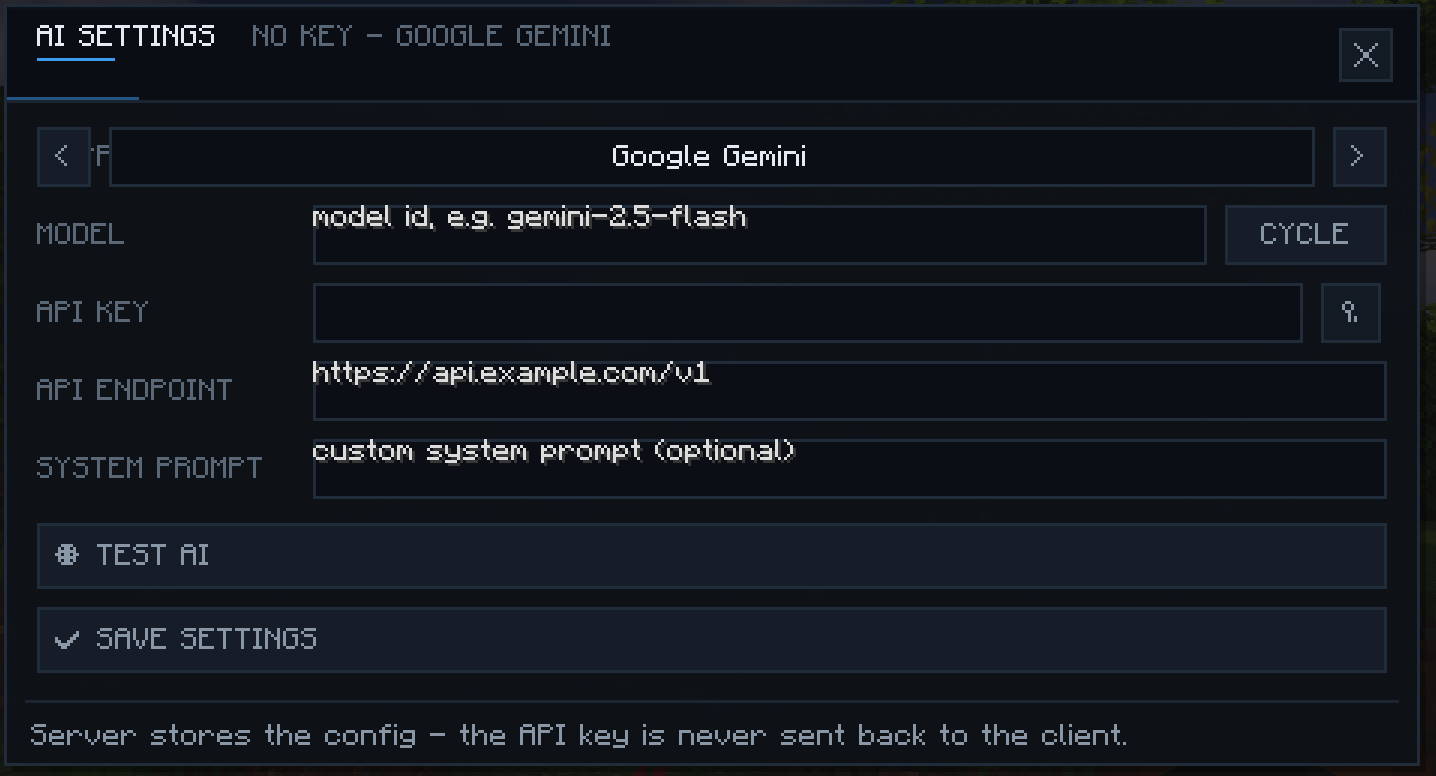
🔑 AI Configuration
AI settings are stored separately from the mod JAR:
config/ai_admin.json
The AI Settings interface allows you to configure:
AI provider
Model
Endpoint
API credentials
A built-in Test AI function allows you to verify the selected configuration before using AI requests in-game.
🧩 Fabric + Forge Support
Built using the Architectury toolchain for Minecraft 1.20.1.
| Platform | Supported Version |
|---|---|
| Fabric | Minecraft 1.20.1 • Fabric Loader 0.14.22+ |
| Forge | Minecraft 1.20.1 • Forge 47.2.0+ |
📋 Requirements
Minecraft 1.20.1
Java 17
Architectury API 9.x
Fabric Loader 0.14.22+ or Forge 47.2.0+
🚀 Getting Started
Install Minecraft 1.20.1.
Install Fabric or Forge.
Install the required Architectury API version.
Place the AI Minecraft Administrator JAR into your
modsfolder.Make sure you have operator permissions level 2 or higher.
Press
Kor run:
/aiadmin interact
Open AI Settings when you want external AI integration.
Select a provider and model.
Configure the endpoint and credentials.
Use Test AI to verify the connection.
No API Key?
No problem.
The built-in structured command system remains available without external AI.
⭐ Features at a Glance
✅ AI-powered Minecraft administration
✅ Optional external AI integration
✅ Multiple AI provider support
✅ Custom OpenAI-compatible endpoints
✅ Natural-language commands
✅ Built-in structured command parser
✅ Server-side permission validation
✅ Player management
✅ Teleportation
✅ Gamemode management
✅ Item management
✅ World manipulation
✅ Procedural building
✅ Entity spawning
✅ Biome inspection
✅ Mod list inspection
✅ Resource-pack utilities
✅ Iris shader controls
✅ Modern in-game administration UI
✅ Command history
✅ Quick actions
✅ AI connection testing
✅ Fabric support
✅ Forge support
✅ Minecraft 1.20.1
🔮 Future Development
The project is designed as a foundation for future AI-assisted Minecraft administration, including:
More advanced AI planning
Complex building operations
Automated server maintenance
More world-inspection tools
Expanded mod integrations
Additional AI providers
More structured actions
Richer administrator dashboards
Advanced automation workflows
📜 License
MIT License
See the project metadata and repository for the complete license information.
🤖 AI Minecraft Administrator
Control your server. Automate your world. Talk to your administrator.
AI + 🎮 Minecraft + 🛡️ Server Security + ⚙️ Automation + 🏗️ World Control
Project description from CurseForge.
Pick your setup
AI_Admin_mod and chat box by Minecraft version and loader
Choose the version and loader you play, then open the matching release.
Check the dependencies, then try the file in a copied instance before changing a world you care about.
Recent files
AI_Admin_mod and chat box versions and loaders
AIAdminCompanion-1.20.1-forge-v2.0.0
AIAdminCompanion-1.20.1-forge-v2.0.0.jar
18 Sept 2026
Client Source doesn’t say Server Source doesn’t say Dependencies No extras listed Listed on Release listing
Check the 1.20.1 · Forge setup 1.20.1Forge release
AIAdminCompanion-1.20.1-forge.jar
11 Aug 2026
Client Source doesn’t say Server Source doesn’t say Dependencies No extras listed Listed on Release listing
Check the 1.20.1 · Forge setup 1.20.1Forge release
Looking for an older file? The official CurseForge project page is in Resources.
 mod
mod CurseForge + Modrinth · Minecraft
Inf Chest
Add a chest which can hold nearly unlimited items of one kind of item
 mod
mod CurseForge + Modrinth · Minecraft
Marium's Soulslike Weaponry
A minecraft mod that adds new bosses and legendary weapons
 mod
mod CurseForge · Minecraft
Rot Client
Rot Client is a client-side Fabric mod for Minecraft 26.2, built for Hypixel SkyBlock players who want a highly customizable and cleaner interface, better information, useful HUDs, custom Profit Finder tools, and a wide range of quality-of-life features.