Minecraft version
Back to mods 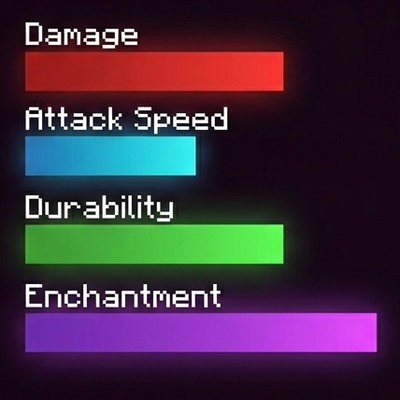
CurseForge · Minecraft mod
Tooltip Bars
Replaces vanilla text stats for weapons, armor, food, enchantments, and potions with colored bars.
Choose a version Pick your version below, then grab the matching file.
Quick answer
Which Tooltip Bars release matches 1.20.1 Forge?
Best match for your filters tooltip_bars-2.1.0.jar
Game version 1.20.1
Loader Forge
Tooltip Bars tooltip_bars-2.1.0.jar targets 1.20.1 with Forge. The project page does not say whether this file belongs on the client, dedicated server, or both. No extra mods listed for this file.
Where it goes
Is Tooltip Bars required on the client, server, or both?
The project page does not say whether this file belongs on the client, dedicated server, or both.
Client Source doesn’t say
Dedicated server Source doesn’t say
Loader for this release Forge
Required install it here Optional supported, not mandatory Not supported do not install here Source doesn’t say do not assume
The source does not explicitly classify this release as client-only or server-only.
What else does Tooltip Bars tooltip_bars-2.1.0.jar need?
tooltip_bars-2.1.0.jar on 1.20.1 Forge. Every mod below is checked against that same setup.
This file does not list any required mods. Do not add a library just because a different file uses it.
This file does not list any required or optional mods.
Before you install it
Add Tooltip Bars without breaking your instance.
Built for Tooltip Bars tooltip_bars-2.1.0.jar on 1.20.1 Forge. Pick another file and the loader, install side or required mods may change.
- 01
Stick to this file
Use tooltip_bars-2.1.0.jar. It targets 1.20.1 with Forge; another release may have different loader, side or dependency requirements.
- 02
Bring the mods it needs
This file does not list any required mods. Do not add a library just because a different file uses it.
- 03
Put it on the correct side
The project page does not say whether this file belongs on the client, dedicated server, or both.
- 04
Pick the file you checked
Use the “Get this file” button beside tooltip_bars-2.1.0.jar. It opens that exact file at the source.
About this project
What does Tooltip Bars add?
Tooltip Bars completely overhauls the standard Minecraft tooltips by replacing vanilla text stats—such as weapon damage, armor value, enchantment levels, durability, and status effects—with clean, vibrant progress bars. It also introduces dedicated bars for food stats, showing both Hunger and Saturation at a glance.
Each stat is assigned a unique, beautifully gradient-colored bar. Text values aren't gone, though—they are neatly placed right above their respective bars for maximum readability.
Customization:
To open the configuration menu, press Alt + .
- Custom Colors: Change the color of each individual bar.
- Layout Adjustments: Modify bar width and length, text size, and element offsets.
- Dynamic Bar Scaling: Set custom max values for fully filled bars (set to
0to hide a bar). - Vanilla Style: Toggle vanilla enchantment labels back on.
- Gradients: Easily enable or disable color gradients.
Project description from CurseForge.
Pick your setup
Tooltip Bars by Minecraft version and loader
Choose the version and loader you play, then open the matching release.
Check the dependencies, then try the file in a copied instance before changing a world you care about.
Recent files
Tooltip Bars versions and loaders
tooltip_bars-2.1.0.jar
14 Aug 2026
Client Source doesn’t say Server Source doesn’t say Dependencies No extras listed Listed on Release listing
Check the 1.20.1 · Forge setup 1.20.1Forge release
tooltip_bars-2.0.1.jar
13 Aug 2026
Client Source doesn’t say Server Source doesn’t say Dependencies No extras listed Listed on Release listing
Check the 1.20.1 · Forge setup 1.20.1Forge release
tooltip_bars-2.0.0.jar
13 Aug 2026
Client Source doesn’t say Server Source doesn’t say Dependencies No extras listed Listed on Release listing
Check the 1.20.1 · Forge setup 1.20.1Forge release
tooltip_bars-1.0.0.jar
12 Aug 2026
Client Source doesn’t say Server Source doesn’t say Dependencies No extras listed Listed on Release listing
Check the 1.20.1 · Forge setup 1.20.1Forge release
Looking for an older file? The official CurseForge project page is in Resources.