Minecraft version
Back to mods 
CurseForge · Minecraft mod
Loot Spots
Place any item in the world as a physical loot pickup that automatically respawns on a timer you set. Glowing pickup markers, a live in-game editor for position, rotation and scale, and full modded item support.
Choose a version Pick your version below, then grab the matching file.
Quick answer
Which Loot Spots release should I use?
Latest stable file LootSpots-1.3.0.jar
Game version 1.20.1
Loader Forge
Loot Spots LootSpots-1.3.0.jar targets 1.20.1 with Forge. The project page does not say whether this file belongs on the client, dedicated server, or both. No extra mods listed for this file.
Where it goes
Is Loot Spots required on the client, server, or both?
The project page does not say whether this file belongs on the client, dedicated server, or both.
Client Source doesn’t say
Dedicated server Source doesn’t say
Loader for this release Forge
Required install it here Optional supported, not mandatory Not supported do not install here Source doesn’t say do not assume
The source does not explicitly classify this release as client-only or server-only.
What else does Loot Spots LootSpots-1.3.0.jar need?
LootSpots-1.3.0.jar. Change the file and its required mods may change too.
This file does not list any required mods. Do not add a library just because a different file uses it.
This file does not list any required or optional mods.
Before you install it
Add Loot Spots without breaking your instance.
Built for Loot Spots LootSpots-1.3.0.jar. Pick another file and the loader, install side or required mods may change.
- 01
Stick to this file
Use LootSpots-1.3.0.jar. It targets 1.20.1 with Forge; another release may have different loader, side or dependency requirements.
- 02
Bring the mods it needs
This file does not list any required mods. Do not add a library just because a different file uses it.
- 03
Put it on the correct side
The project page does not say whether this file belongs on the client, dedicated server, or both.
- 04
Pick the file you checked
Use the “Get this file” button beside LootSpots-1.3.0.jar. It opens that exact file at the source.
About this project
What does Loot Spots add?
Loot Spots
Turn any item into a persistent, self-refilling loot pickup.
Drop an item anywhere in the world and it becomes a loot spot. Players take it, and it quietly comes back on a timer you set, ready for the next person. No chests, no spawners, no admin babysitting — just the item itself, lying exactly where you placed it.
Built for DayZ-style survival servers, RPG maps, dungeons, quest hubs and event arenas where the same loot needs to keep reappearing.
Features
Physical loot spots
Place a real 3D item model in the world, positioned and angled however you like. A rifle laid across a table, a medkit propped against a wall, a key card on a desk — it looks like it belongs there, because it's the actual item model, not a container.
Automatic respawn
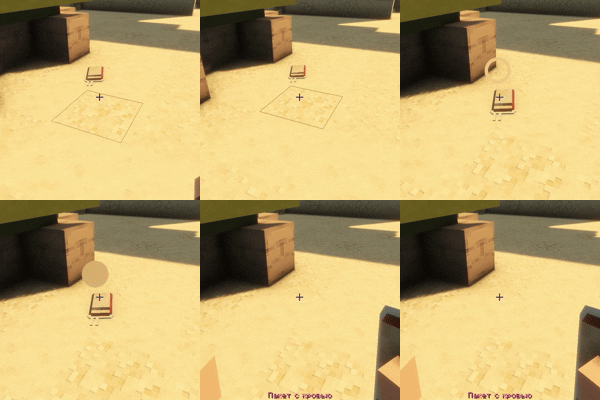
Every spot has its own timer, set in minutes and seconds. When a player takes the item, it disappears, waits out the timer, and comes back on its own.
Survives restarts
Timers and spot data are stored on the entities themselves. Restart the server mid-countdown and everything picks up exactly where it left off.
Full modded item support
Item NBT is preserved, so guns keep their ammo and attachments, tools keep their enchantments and durability, and custom items from other mods keep whatever data they carry.
Pulsing pickup marker
A glowing ring appears over nearby loot spots so players can spot them at a glance. Aim at one within reach and the ring smoothly fills in — a clear, readable "you can take this" cue that works at any angle and draws over the item so it's never hidden behind geometry.
Fully configurable marker
Set any color you want in hex, tune the pulse speed and brightness range, adjust the click area, or switch the marker off entirely.
Precise interaction
The ring itself is the click target rather than the item's whole bounding box, so tightly packed loot never steals clicks from its neighbours.
Live editing panel
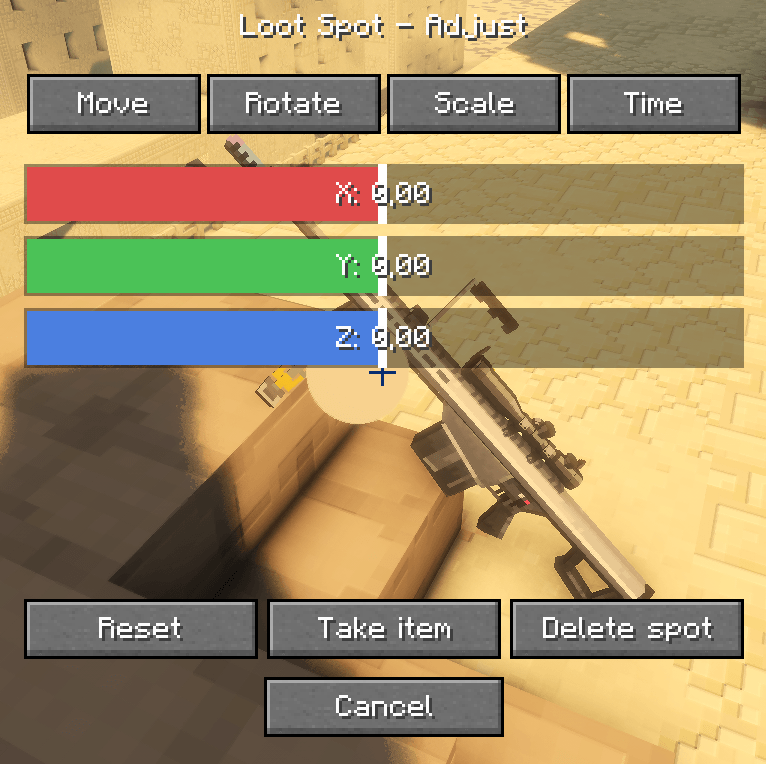
Right-click a spot in creative mode to open a Blender-inspired editor with Move, Rotate, Scale and Time tabs. Color-coded axis sliders (red / green / blue for X / Y / Z) update the item in the world in real time as you drag — the world stays visible behind the panel, so you're always looking at the result, not a preview.
Buttons for Reset, Take item and Delete spot are always one click away.
True 3-axis rotation
Yaw, pitch and roll, so items can be laid flat, tilted, leaned or mounted at any angle — not just spun around one axis.
Unique spot registry
Every loot spot is individually tracked by its own ID. Editing one never affects another, even when two spots physically overlap.
Commands for everything
Anything the GUI does is also available as a command, for quick edits, macros and command blocks.
Admin-only tools
Editing is creative-only. Survival players simply walk up and take the item — they never see the admin interface.
Commands
| Command | Description |
|---|---|
/lootspots spawn [minutes] [seconds] |
Place the item you're holding as a loot spot with the given respawn time |
/lootspots move <dx> <dy> <dz> |
Nudge the spot you're looking at |
/lootspots rotate <yaw> <pitch> <roll> |
Set its orientation in degrees |
/lootspots scale <value> |
Resize the item model |
/lootspots settime <minutes> <seconds> |
Change the respawn timer |
/lootspots replace |
Swap in the item you're currently holding |
Configuration
config/lootspots-common.toml
| Option | Default | Description |
|---|---|---|
outlineEnabled |
true |
Show the pickup marker |
outlineColor |
#FFFFFF |
Marker color, hex |
pulseSpeed |
2.0 |
Pulse animation speed |
minPulseBrightness |
0.5 |
Dimmest point of the pulse |
maxPulseBrightness |
1.15 |
Brightest point of the pulse |
hitboxPadding |
0.05 |
Extra click area around the marker |
Requirements
- Minecraft 1.20.1
- Forge 47.4.18 or newer
Install on both the server and the client. The server manages the loot spots and their timers; the client draws the pickup marker and the editing panel.
Languages
English and Russian included.
I accept requests to port the mod to other versions (except old ones, only forward!)
Project description from CurseForge.
Pick your setup
Loot Spots by Minecraft version and loader
Choose the version and loader you play, then open the matching release.
Check the dependencies, then try the file in a copied instance before changing a world you care about.
Recent files
Loot Spots versions and loaders
LootSpots-1.3.0.jar
21 Aug 2026
Client Source doesn’t say Server Source doesn’t say Dependencies No extras listed Listed on Release listing
Check the 1.20.1 · Forge setup 1.20.1Forge release
LootSpots-1.1.0.jar
13 Aug 2026
Client Source doesn’t say Server Source doesn’t say Dependencies No extras listed Listed on Release listing
Check the 1.20.1 · Forge setup 1.20.1Forge release
Looking for an older file? The official CurseForge project page is in Resources.
 mod
mod CurseForge + Modrinth · Minecraft
Easy NPC
Create easily NPCs with dialogs for your world or for your mods.
 mod
mod CurseForge + Modrinth · Minecraft
Spellbooks: Unraveling the Spells
Adds the mechanics of learning magic schools and spells from Iron's Spells 'n Spellbooks
 mod
mod CurseForge + Modrinth · Minecraft
Easy NPC: Core
Provides the core functionallity for the Easy NPC mod.