Minecraft version
Back to mods 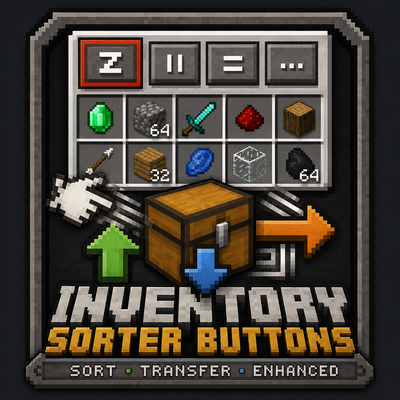
CurseForge · Minecraft mod
Inventory Sorter Buttons
a lightweight Forge mod that adds one-click sort buttons to your inventory and container screens, instantly stacking and organizing their contents, available for every Minecraft version from 1.7.10 through 26.2.
Choose a version Pick your version below, then grab the matching file.
Quick answer
Which Inventory Sorter Buttons release should I use?
Latest stable file Inventory Sorter Buttons 1.1.1 (MC 26.2)
Game version 26.2
Loader Forge
Inventory Sorter Buttons 1.1.1 (MC 26.2) targets 26.2 with Forge. The project page does not say whether this file belongs on the client, dedicated server, or both. No extra mods listed for this file.
Where it goes
Is Inventory Sorter Buttons required on the client, server, or both?
The project page does not say whether this file belongs on the client, dedicated server, or both.
Client Source doesn’t say
Dedicated server Source doesn’t say
Loader for this release Forge
Required install it here Optional supported, not mandatory Not supported do not install here Source doesn’t say do not assume
The source does not explicitly classify this release as client-only or server-only.
What else does Inventory Sorter Buttons 1.1.1 (MC 26.2) need?
Inventory Sorter Buttons 1.1.1 (MC 26.2). Change the file and its required mods may change too.
This file does not list any required mods. Do not add a library just because a different file uses it.
This file does not list any required or optional mods.
Before you install it
Add Inventory Sorter Buttons without breaking your instance.
Built for Inventory Sorter Buttons 1.1.1 (MC 26.2). Pick another file and the loader, install side or required mods may change.
- 01
Stick to this file
Use Inventory Sorter Buttons 1.1.1 (MC 26.2). It targets 26.2 with Forge; another release may have different loader, side or dependency requirements.
- 02
Bring the mods it needs
This file does not list any required mods. Do not add a library just because a different file uses it.
- 03
Put it on the correct side
The project page does not say whether this file belongs on the client, dedicated server, or both.
- 04
Pick the file you checked
Use the “Get this file” button beside Inventory Sorter Buttons 1.1.1 (MC 26.2). It opens that exact file at the source.
About this project
What does Inventory Sorter Buttons add?
Inventory Sorter Buttons - Inventory Tweaks, Revived
The classic chest sorting buttons are back on every GUI, for every mod.
Inventory Sorter Buttons is a faithful revival of Inventory Tweaks (the Tekkit Classic era, 1.41b) for modern Forge 1.19.2. The same 10×10 buttons with the same pixel-drawn glyphs, the same settings screens, the same rules and item tree files, rebuilt from the ground up with server-authoritative sorting that works on any mod's containers.
The Buttons
Four little buttons on every chest-like GUI, exactly where you remember them:
- z — sort (merge stacks, order by category)
- || — sort in columns (each item type gets its own column)
- = — sort in rows (each item type gets its own row)
- ... — open the settings screen
Vanilla GUIs get the classic horizontal row in the top-right corner. Modded GUIs, Iron Chests, storage mods, machine buffers, anything. Get the classic vertical column off the left edge. Any menu with 9+ freely-usable container slots qualifies automatically, no per-mod support needed.
Sorting Everywhere
- Middle-click any container to sort it, hover your own inventory to sort that instead
- R sorts your main inventory (rebindable in Controls), in and out of GUIs
- Your hotbar is never touched, just like the original's
D LOCKEDrule - Sorting runs on the server through each menu's own slots, so it's safe with any mod's containers and on dedicated servers. No client-side click simulation
The Classic Extras
- Auto-refill: when a hotbar stack runs out or a tool breaks, it refills from your inventory
- Shortcuts: the original mappings: Ctrl+Click moves one item, Ctrl+Shift+Click moves all stacks of that item, Space+Click moves everything in that section, Alt+Click drops the whole stack
- Sort on pickup and auto-equip armor: the "More options..." page is all here, PvP warning included
- Every feature has its toggle in the recreated "Inventory and chests settings" screen
Rules & Item Tree Files
The heart of Inventory Tweaks, modernized:
InvSortButtonsRules.txt:the same grid rules you remember:A foodfills the top row with food,1 pickaxefills the first column,A1-C4 block,B FROZEN... plus modern keywords: registry names (A1 minecraft:cobblestone) and item tags (B #forge:ores).InvSortButtonsTree.txt:the same XML item tree, but leaves match by registry name, item tag, or item class (class="sword"matches every sword from every mod), so modded items categorize themselves.- Edit a file, press the sort key, and it reloads: exactly like the original. On multiplayer, every player gets their own rules, synced automatically.
- Broke a file? Delete it and the default regenerates.
For Modders
A small stable API (com.invsortbuttons.api) lets you put our buttons right inside your own GUI: implement ISortButtonHost on your screen to anchor the button strip wherever you want (or hide it), implement ISortableMenu on your menu to define exactly which slots are sortable (or opt out), and call InvSortButtonsApi.sortOpenContainer(mode) to trigger sorts yourself. Full documentation is on the wiki.
Requirements
- Minecraft 1.19.2
- Forge 43+
- Install on both client and server (needed for server-side sorting)
- No other dependencies
New in 1.1.0 — Move All buttons (Inventory Profiles Next style): a down-arrow Take All button next to the sort buttons empties the container into your main inventory (never your hotbar — overflow stays in the chest), and an up-arrow Put All button above your inventory slots moves your main inventory into the container (hold Shift to include the hotbar). Works entirely client-side, on vanilla and modded GUIs alike.
Credits
- Jimeo Wan (Marwane Kalam-Alami) — creator of Inventory Tweaks, one of the most beloved quality-of-life mods ever made. The buttons, glyphs, layouts, sorting algorithms, settings screens, and config file formats here are all recreated from Inventory Tweaks 1.41b. The original was released under the MIT license, which is what makes this faithful recreation possible — thank you.
Project description from CurseForge.
Pick your setup
Inventory Sorter Buttons by Minecraft version and loader
Choose the version and loader you play, then open the matching release.
Minecraft version
26.1.2
1 loader buildMinecraft version
1.21.11
1 loader buildMinecraft version
1.20.6
1 loader buildMinecraft version
1.19.2
1 loader buildMinecraft version
1.16.5
1 loader buildMinecraft version
1.12.2
1 loader buildMinecraft version
1.7.10
1 loader buildCheck the dependencies, then try the file in a copied instance before changing a world you care about.
Recent files
Inventory Sorter Buttons versions and loaders
Inventory Sorter Buttons 1.1.1 (MC 26.2)
invsortbuttons-26.2-1.1.1.jar
19 Aug 2026
Client Source doesn’t say Server Source doesn’t say Dependencies No extras listed Listed on Release listing
Check the 26.2 · Forge setup Forge26.2 release
Inventory Sorter Buttons 1.1.1 (MC 26.1.2)
invsortbuttons-26.1.2-1.1.1.jar
19 Aug 2026
Client Source doesn’t say Server Source doesn’t say Dependencies No extras listed Listed on Release listing
Check the 26.1.2 · Forge setup Forge26.1.2 release
Inventory Sorter Buttons 1.1.1 (MC 1.21.11)
invsortbuttons-1.21.11-1.1.1.jar
19 Aug 2026
Client Source doesn’t say Server Source doesn’t say Dependencies No extras listed Listed on Release listing
Check the 1.21.11 · Forge setup Forge1.21.11 release
Inventory Sorter Buttons 1.1.1 (MC 1.20.6)
invsortbuttons-1.20.6-1.1.1.jar
19 Aug 2026
Client Source doesn’t say Server Source doesn’t say Dependencies No extras listed Listed on Release listing
Check the 1.20.6 · Forge setup Forge1.20.6 release
Inventory Sorter Buttons 1.1.1 (MC 1.19.2)
invsortbuttons-1.19.2-1.1.1.jar
19 Aug 2026
Client Source doesn’t say Server Source doesn’t say Dependencies No extras listed Listed on Release listing
Check the 1.19.2 · Forge setup Forge1.19.2 release
Inventory Sorter Buttons 1.1.1 (MC 1.16.5)
invsortbuttons-1.16.5-1.1.1.jar
19 Aug 2026
Client Source doesn’t say Server Source doesn’t say Dependencies No extras listed Listed on Release listing
Check the 1.16.5 · Forge setup 1.16.5Forge release
Inventory Sorter Buttons 1.1.1 (MC 1.12.2)
invsortbuttons-1.12.2-1.1.1.jar
19 Aug 2026
Client Source doesn’t say Server Source doesn’t say Dependencies No extras listed Listed on Release listing
Check the 1.12.2 · Forge setup Forge1.12.2 release
Inventory Sorter Buttons 1.1.1 (MC 1.7.10)
invsortbuttons-1.7.10-1.1.1.jar
19 Aug 2026
Client Source doesn’t say Server Source doesn’t say Dependencies No extras listed Listed on Release listing
Check the 1.7.10 · Forge setup Forge1.7.10 release
Inventory Sorter Buttons 1.1.0 (MC 1.21.11)
invsortbuttons-1.21.11-1.1.0.jar
19 Aug 2026
Client Source doesn’t say Server Source doesn’t say Dependencies No extras listed Listed on Release listing
Check the 1.21.11 · Forge setup Forge1.21.11 release
Inventory Sorter Buttons 1.1.0 (MC 26.2)
invsortbuttons-26.2-1.1.0.jar
19 Aug 2026
Client Source doesn’t say Server Source doesn’t say Dependencies No extras listed Listed on Release listing
Check the 26.2 · Forge setup Forge26.2 release
Inventory Sorter Buttons 1.1.0 (MC 26.1.2)
invsortbuttons-26.1.2-1.1.0.jar
19 Aug 2026
Client Source doesn’t say Server Source doesn’t say Dependencies No extras listed Listed on Release listing
Check the 26.1.2 · Forge setup Forge26.1.2 release
Inventory Sorter Buttons 1.1.0 (MC 1.20.6)
invsortbuttons-1.20.6-1.1.0.jar
19 Aug 2026
Client Source doesn’t say Server Source doesn’t say Dependencies No extras listed Listed on Release listing
Check the 1.20.6 · Forge setup Forge1.20.6 release
Looking for an older file? The official CurseForge project page is in Resources.
 mod
mod CurseForge · Minecraft
AE2 Apotheotic Automation
Seamless AE2 autocrafting integration for Apotheosis enchanting tables and gem cases
 mod
mod CurseForge + Modrinth · Minecraft
Easy Elytra Takeoff
🛫 Allows easy takeoff by elytra/colytra with a firework from the ground without jumping.
 mod
mod CurseForge · Minecraft
BarrelsPlus
Enhance your storage management with upgraded, high-capacity barrels featuring advanced features.