Minecraft version
Back to mods 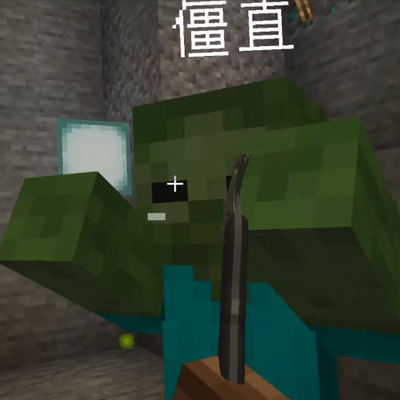
CurseForge · Minecraft mod
僵直(Stiff)
Creatures and players can stiff
Choose a version Pick your version below, then grab the matching file.
Quick answer
Which 僵直(Stiff) release should I use?
Latest stable file stiff_mod-1.0.0.0.jar
Game version 1.20.1
Loader Forge
僵直(Stiff) stiff_mod-1.0.0.0.jar targets 1.20.1 with Forge. The project page does not say whether this file belongs on the client, dedicated server, or both. No extra mods listed for this file.
Where it goes
Is 僵直(Stiff) required on the client, server, or both?
The project page does not say whether this file belongs on the client, dedicated server, or both.
Client Source doesn’t say
Dedicated server Source doesn’t say
Loader for this release Forge
Required install it here Optional supported, not mandatory Not supported do not install here Source doesn’t say do not assume
The source does not explicitly classify this release as client-only or server-only.
What else does 僵直(Stiff) stiff_mod-1.0.0.0.jar need?
stiff_mod-1.0.0.0.jar. Change the file and its required mods may change too.
This file does not list any required mods. Do not add a library just because a different file uses it.
This file does not list any required or optional mods.
Before you install it
Add 僵直(Stiff) without breaking your instance.
Built for 僵直(Stiff) stiff_mod-1.0.0.0.jar. Pick another file and the loader, install side or required mods may change.
- 01
Stick to this file
Use stiff_mod-1.0.0.0.jar. It targets 1.20.1 with Forge; another release may have different loader, side or dependency requirements.
- 02
Bring the mods it needs
This file does not list any required mods. Do not add a library just because a different file uses it.
- 03
Put it on the correct side
The project page does not say whether this file belongs on the client, dedicated server, or both.
- 04
Pick the file you checked
Use the “Get this file” button beside stiff_mod-1.0.0.0.jar. It opens that exact file at the source.
About this project
What does 僵直(Stiff) add?
Stiffness Player Guide
Mod Overview
This mod, "Stiffness," is a combat gameplay mod: when you or a mob get hit, there's a chance to enter **"Stiff"** status — your body loses control and actions are interrupted. While stiff, the word "Stiff" will float above the target. If you get affected, the whole screen will also turn gray. This mod adds no new items or blocks and relies entirely on the vanilla combat system. It’s ready to use right out of the box.Items/Blocks List
This mod doesn’t add any new items, blocks, crafting recipes, or mobs. It only adds one thing to the game:
"Stiff" status effect: a hidden combat state that doesn’t show in your status bar or change any attributes. Its sole purpose is to mark that "this target is stiff" and to make the screen gray if you’re affected.
Crafting Recipes
This mod has no crafting recipes and doesn’t require making anything — just install and play.How to Play
How is stiffness triggered?
Every attack you land (melee or ranged) has an independent chance to make the target stiff:
- Base chance: 15% per hit
- Critical hit: if you land a critical attack by falling from height, chance is 90% on mobs, 40% on players
- Health threshold stiff (only triggers once per target in their lifetime):
- Mob falls below 50% health: 30% chance; below 30% health: guaranteed
- Player falls below 30% health: 25% chance
- Gun headshots: if you also have the TACZ firearms mod installed, headshot triggers stiffness as a critical hit (mobs 90%, players 40%)
What happens when stiff?
- Duration: 3 seconds for players, 6 seconds for mobs
- Mob affected: stops moving, stops pathfinding, stops attacking (AI temporarily removed), resumes normal behavior after
- Player affected (PvP): pinned in place (can still fall vertically), can’t place or use blocks, can’t mine, attack, or right-click other players, screen turns gray. "Stiff" marker appears above the head.
- When triggered, a heavy landing sound plays, and the "Stiff" text floats above the target, disappearing when the effect ends.
What happens if you hit a target that’s already stiff?
- Within 3 blocks: damage is doubled, target is immediately released from stiffness, and knocked back 3–4 blocks
- Beyond 3 blocks: damage is 1.5×, with a 25% chance to release the target from stiffness
When does it end?
Stiffness ends naturally after its duration; it can also be forcibly interrupted by a close-range attack (see above). If you leave the world or the server restarts, all stiffness effects are automatically cleared.
- Tips and Tricks
Close-range finishing hits give the best rewards: when you see the target stagger, rush in for a close attack—damage is doubled up close and it can interrupt the stagger immediately.
Don’t try to farm stagger on low-health monsters: the stagger effect can only trigger once per target in its lifetime, so hitting them when they’re almost dead won’t trigger it again.
Getting staggered in PvP is dangerous: while staggered, you can't do anything (no moving, no digging, no counterattacking), so you just have to wait it out or take hits. Be careful of getting soloed and comboed up close.
All values are tweakable: trigger chance, duration, damage multiplier, knockback distance, and all other stats are controlled by the server config file (one copy per save, synced to clients). Server admins can adjust them for balance.
Runs solo: The mod doesn’t need any other mods, just install it. Only with the TACZ gun mod equipped do you get the extra 'headshot triggers stagger' feature.
僵硬(Stiffness)玩家指南
一、Mod 简介
本模组「僵硬」是一个战斗玩法模组:当你或怪物受到攻击时,有概率进入**「僵直」**状态——身体失去控制、动作被打断。僵直期间目标头顶会浮现「僵直」两个大字,如果是你自己中招,整个屏幕还会蒙上一层灰色。模组不添加任何新物品或方块,完全靠原版战斗系统驱动,开箱即用。
二、物品/方块列表
本模组不添加任何新的物品、方块、合成配方或怪物。它只往游戏里加了一样东西:
- 「僵直」状态效果:战斗中的隐藏状态,不会出现在你的状态栏里,也不会改变任何属性。它的作用只有一个——标记「这个目标正在僵直」,同时负责在你中招时把屏幕变成灰色。
三、合成配方
本模组没有任何合成配方,也不需要合成任何东西,装好就能玩。
四、玩法说明
僵直是怎么触发的?
只要你的攻击(近战或远程)命中目标,每一次都有独立概率让对方进入僵直:
- 基础概率:每次攻击命中,15% 概率触发。
- 暴击:你从高处下落时打出暴击,命中怪物 90% 概率、命中玩家 40% 概率触发。
- 血量线僵直(每个目标一生只会触发一次):
- 怪物的生命被打到剩余 50% 以下时,有 30% 概率触发;被打到 30% 以下时,必定触发。
- 玩家的生命被打到剩余 30% 以下时,有 25% 概率触发。
- 枪械爆头:如果你另外安装了 TACZ 枪械模组,枪械爆头按暴击概率触发僵直(怪物 90%、玩家 40%)。
僵直时会发生什么?
- 持续时间:玩家被僵直 3 秒,怪物被僵直 6 秒。
- 怪物中招:停止移动、停止寻路、停止攻击(AI 被暂时清除),结束后恢复原样。
- 玩家中招(PvP 时):被钉在原地无法移动(垂直方向仍会正常下落)、无法放置或使用方块、无法挖掘、无法攻击或右键其他玩家,并且屏幕变灰。头顶同样会出现「僵直」标记。
- 触发瞬间会响起一声沉重的坠落音效,头顶文字「僵直」会跟随目标飘浮显示,僵直结束后消失。
僵直中的目标再被打,会怎样?
- 距离 3 格以内:伤害翻倍,并且目标立刻解除僵直,同时被击退 3~4 格。
- 距离超过 3 格:伤害变为 1.5 倍,有 25% 概率让目标解除僵直。
什么时候恢复?
僵直时间自然走完就会恢复;也可以在僵直中再次被近身攻击强制打断(见上)。离开世界或服务器重启后,所有僵直状态会被自动清理,不会残留。
五、注意事项与技巧
- 贴脸补刀收益最高:看到目标进入僵直,立刻冲上去贴身攻击——近距离伤害翻倍,还能直接打断它的僵直状态。
- 别打残血怪物刷僵直:血量线僵直每个目标一生只触发一次,打残血并不会反复触发。
- PvP 中被僵直很危险:僵直期间你完全无法操作(不能移动、不能挖方块、不能反击),只能等时间结束或挨打。落单时要小心被贴脸连击。
- 所有数值均可调整:触发概率、持续时间、伤害倍率、击退距离等全部数值都由服务器配置文件控制(每个存档一份,会同步给客户端)。服主可以按需调节平衡性。
- 可独立运行:模组不依赖任何前置,单独安装即可。只有装上 TACZ 枪械模组时才会额外获得「爆头触发僵直」的联动玩法。
Project description from CurseForge.
Pick your setup
僵直(Stiff) by Minecraft version and loader
Choose the version and loader you play, then open the matching release.
Check the dependencies, then try the file in a copied instance before changing a world you care about.
Recent files
僵直(Stiff) versions and loaders
stiff_mod-1.0.0.0.jar
14 Aug 2026
Client Source doesn’t say Server Source doesn’t say Dependencies No extras listed Listed on Release listing
Check the 1.20.1 · Forge setup 1.20.1Forge release
Looking for an older file? The official CurseForge project page is in Resources.
 mod
mod CurseForge + Modrinth · Minecraft
Sodium Chinese Localization Mod
A project can translate you sodium mod into Chinese
 mod
mod CurseForge + Modrinth · Minecraft
Apprentice's Codex
An addon for Iron's Spells and Spellbooks that adds some apprentice's magic contents.
 mod
mod CurseForge · Minecraft
Legendary Armory
A Mashup of the Legend of Zelda Series and Minecraft!