Minecraft version
Back to mods 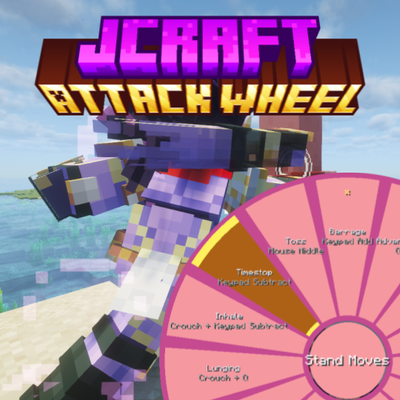
CurseForge · Minecraft mod
JCraft Attack Wheel (JCraft Addon)
This mod adds a client-sided Attack Wheel for JCraft stands and specs. (JOJO, JJBA)
Choose a version Pick your version below, then grab the matching file.
Quick answer
Which JCraft Attack Wheel (JCraft Addon) release should I use?
Latest stable file jcraft-attack-wheel-forge-1.0.1.jar
Game version 1.20.1
Loader Forge
JCraft Attack Wheel (JCraft Addon) jcraft-attack-wheel-forge-1.0.1.jar targets 1.20.1 with Forge. The project page does not say whether this file belongs on the client, dedicated server, or both. No extra mods listed for this file.
Where it goes
Is JCraft Attack Wheel (JCraft Addon) required on the client, server, or both?
The project page does not say whether this file belongs on the client, dedicated server, or both.
Client Source doesn’t say
Dedicated server Source doesn’t say
Loader for this release Forge
Required install it here Optional supported, not mandatory Not supported do not install here Source doesn’t say do not assume
The source does not explicitly classify this release as client-only or server-only.
What else does JCraft Attack Wheel (JCraft Addon) jcraft-attack-wheel-forge-1.0.1.jar need?
jcraft-attack-wheel-forge-1.0.1.jar. Change the file and its required mods may change too.
This file does not list any required mods. Do not add a library just because a different file uses it.
This file does not list any required or optional mods.
Before you install it
Add JCraft Attack Wheel (JCraft Addon) without breaking your instance.
Built for JCraft Attack Wheel (JCraft Addon) jcraft-attack-wheel-forge-1.0.1.jar. Pick another file and the loader, install side or required mods may change.
- 01
Stick to this file
Use jcraft-attack-wheel-forge-1.0.1.jar. It targets 1.20.1 with Forge; another release may have different loader, side or dependency requirements.
- 02
Bring the mods it needs
This file does not list any required mods. Do not add a library just because a different file uses it.
- 03
Put it on the correct side
The project page does not say whether this file belongs on the client, dedicated server, or both.
- 04
Pick the file you checked
Use the “Get this file” button beside jcraft-attack-wheel-forge-1.0.1.jar. It opens that exact file at the source.
About this project
What does JCraft Attack Wheel (JCraft Addon) add?
This mod adds a client-sided Attack Wheel for JCraft stands and specs.
This works for regular AND addon stands. Install Mod Menu (Fabric) or Configured (Forge) installed for the best experience
Holding (By default) "G" will open the JCraft Attack Wheel. This will show every move that your spec or stand has.
You can customize your Attack Wheel endlessly; theming it to a hero you like or anything you want!
Controls:
The Attack Wheel can be either held or toggled (changeable in the config) to be opened.
Right-Clicking the middle of the wheel will switch between Stand Moves and Spec Moves.
Right-Clicking a move will favorite it and pin it to the top.
Moves can be queued (input buffering) to be done one after another.
Middle-Clicking (Pick Block) with the Attack Wheel open will clear your queue
Color Picker
The Attack Wheel can be changed to any color you desire. Including a Primary, Secondary, Accent, and Outline color.
Each color combination comes with it's own specialized key. You can copy and paste this key and send it to your friends so that you all can be matching!
Opening the color picker will drop your FPS because of the complexity. Make sure you are safe before you use it!
Project description from CurseForge.
Pick your setup
JCraft Attack Wheel (JCraft Addon) by Minecraft version and loader
Choose the version and loader you play, then open the matching release.
Check the dependencies, then try the file in a copied instance before changing a world you care about.
Recent files
JCraft Attack Wheel (JCraft Addon) versions and loaders
jcraft-attack-wheel-forge-1.0.1.jar
22 Aug 2026
Client Source doesn’t say Server Source doesn’t say Dependencies No extras listed Listed on Release listing
Check the 1.20.1 · Forge setup 1.20.1Forge release
jcraft-attack-wheel-fabric-1.0.1.jar
20 Aug 2026
Client Source doesn’t say Server Source doesn’t say Dependencies No extras listed Listed on Release listing
Check the 1.20.1 · Fabric setup Fabric1.20.1 release
jcraft-attack-wheel-forge-1.0.0.jar
15 Aug 2026
Client Source doesn’t say Server Source doesn’t say Dependencies No extras listed Listed on Release listing
Check the 1.20.1 · Forge setup 1.20.1Forge release
jcraft-attack-wheel-fabric-1.0.0.jar
15 Aug 2026
Client Source doesn’t say Server Source doesn’t say Dependencies No extras listed Listed on Release listing
Check the 1.20.1 · Fabric setup Fabric1.20.1 release
Looking for an older file? The official CurseForge project page is in Resources.
 mod
mod CurseForge · Minecraft
Legendary Armory
A Mashup of the Legend of Zelda Series and Minecraft!
 mod
mod CurseForge + Modrinth · Minecraft
Spell Powered Weapons
Makes weapons found & crafted to have a chance to get an elemental damage instance!
 mod
mod CurseForge · Minecraft
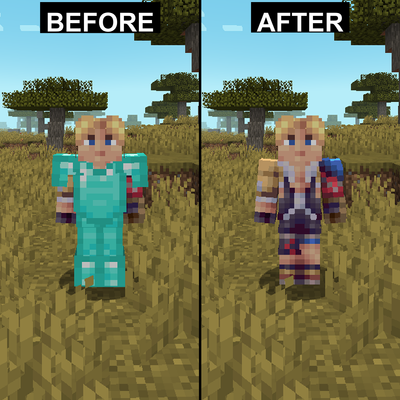
Wade's Armor Hider
Hides armor on yourself and other players with configuration options