Minecraft version
Back to mods 
CurseForge · Minecraft mod
Simple Trowel
A mod adds a simple trowel for your beautiful naturally textured buildings, with camouflage blocks support
Choose a version Pick your version below, then grab the matching file.
Quick answer
Which Simple Trowel release should I use?
Latest stable file simple_trowel-1.1.0.jar
Game version 1.21.1
Loader NeoForge
Simple Trowel simple_trowel-1.1.0.jar targets 1.21.1 with NeoForge. The project page does not say whether this file belongs on the client, dedicated server, or both. No extra mods listed for this file.
Where it goes
Is Simple Trowel required on the client, server, or both?
The project page does not say whether this file belongs on the client, dedicated server, or both.
Client Source doesn’t say
Dedicated server Source doesn’t say
Loader for this release NeoForge
Required install it here Optional supported, not mandatory Not supported do not install here Source doesn’t say do not assume
The source does not explicitly classify this release as client-only or server-only.
What else does Simple Trowel simple_trowel-1.1.0.jar need?
simple_trowel-1.1.0.jar. Change the file and its required mods may change too.
This file does not list any required mods. Do not add a library just because a different file uses it.
This file does not list any required or optional mods.
Before you install it
Add Simple Trowel without breaking your instance.
Built for Simple Trowel simple_trowel-1.1.0.jar. Pick another file and the loader, install side or required mods may change.
- 01
Stick to this file
Use simple_trowel-1.1.0.jar. It targets 1.21.1 with NeoForge; another release may have different loader, side or dependency requirements.
- 02
Bring the mods it needs
This file does not list any required mods. Do not add a library just because a different file uses it.
- 03
Put it on the correct side
The project page does not say whether this file belongs on the client, dedicated server, or both.
- 04
Pick the file you checked
Use the “Get this file” button beside simple_trowel-1.1.0.jar. It opens that exact file at the source.
About this project
What does Simple Trowel add?
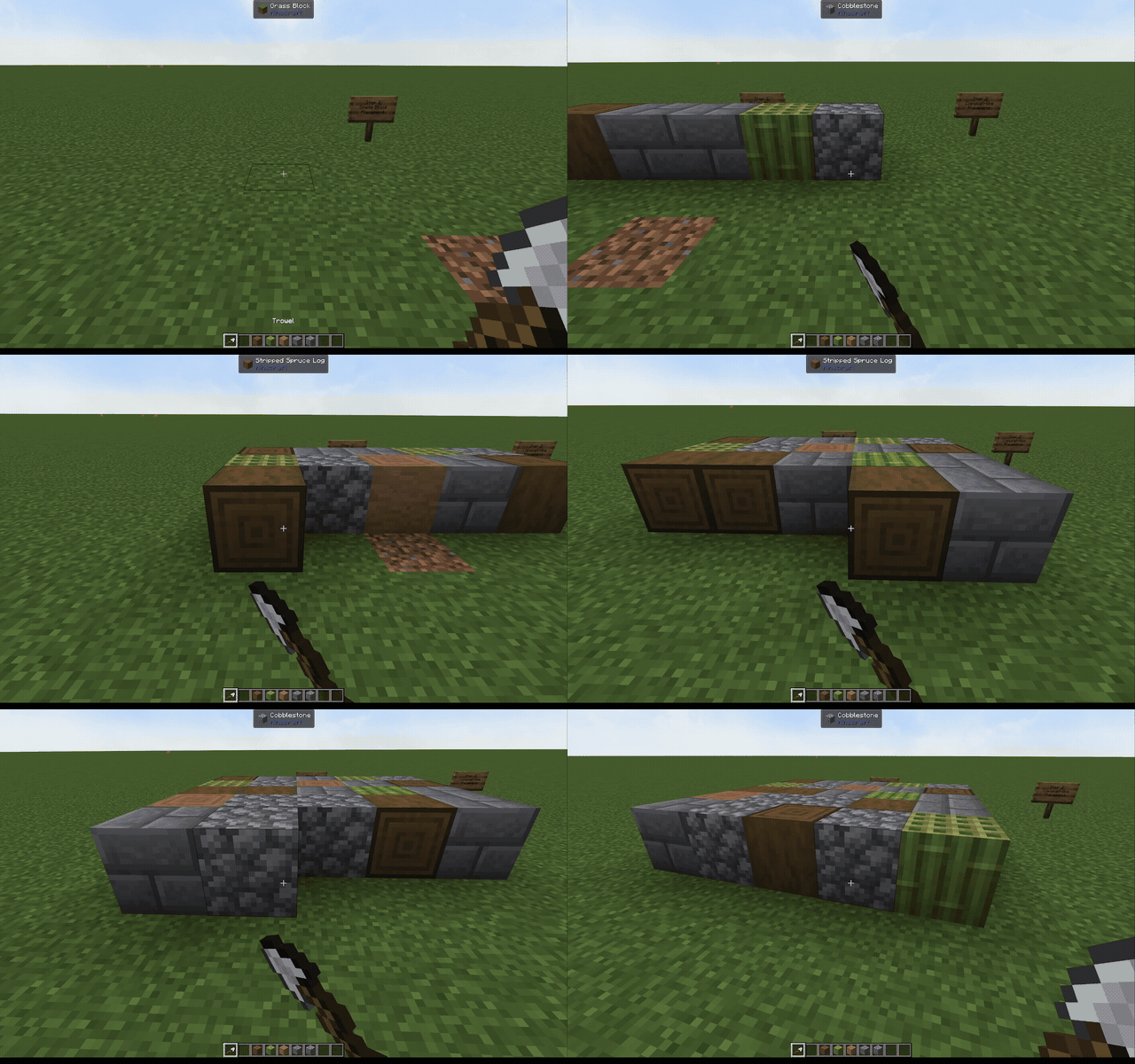

The tool for building naturally varied builds, just click with it!
About
Simple Trowel is a lightweight building tool that randomly places blocks from your chosen block pool. Fill your hotbar—or your whole inventory—with a block palette, hold the trowel, and start building without constantly switching slots.
Blocks follow their normal placement rules, so stairs, slabs, pillars, and modded blocks behave as expected.
The trowel has no durability, so it can be your best friend while building your SUPER BEAUTIFUL AND GRAND bases.
Copycat Materials
Simple Trowel supports copycat and camouflage blocks from:
- Create
- Copycats+
- Create: Connected
- Steam 'n' Rails
- Propulsion Simulated
(Simple Trowel works on its own. None of these mods are required for regular random block placement.)
Hold a copycat or camouflage block in your main hand and the trowel in your offhand. The trowel will act like another block from your selected block pool. When the copycat block is placed, it receives a random compatible material immediately.
Growing copycat shapes keep the material they started with(e.g. slope layer from create: copycats+). Multi-part shapes, such as Copycat Bytes, choose a material for each newly added part.
How To Use
Choose your mode
Hold a trowel and press Shift + left click to cycle between 3 modes. The selected mode appears above the hotbar and is saved separately for each player.
- Hotbar Only: Randomly selects blocks from the nine hotbar slots.
- Hotbar + Refill: Uses the same hotbar-only random weights, then refills an exhausted stack with matching blocks from the main inventory.
- Full Inventory: Lets all 36 main inventory slots participate in random block placement and copycat material selection.
Random block placement
- Put the building blocks you want to mix into the slots used by your selected mode.
- Hold the trowel in either hand.
- Use it against a block as you would place a normal block.
Each valid participating slot (containing a block that can be placed) has equal weight. Placing the same block in multiple slots boosts its chance to be selected.
Random copycat materials
- Put suitable material blocks into the slots used by your selected mode.
- Hold the copycat block in the main hand.
- Hold the trowel in the offhand.
- Place the copycat block normally.
Crafting
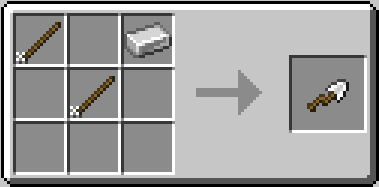
The trowel is crafted from two wooden sticks and one iron ingot in a V-shaped pattern.
Modpack Configuration
Modpacks can control the blocks available to ordinary random placement through these item tags:
simple_trowel:trowel_blacklistsimple_trowel:trowel_whitelist
Both tags are empty by default.
Installation
Simple Trowel requires to be installed on both the client and server(for multiplayer).
Support
Bug reports and compatibility reports are welcome❤️! When reporting a camouflage issue, please include the affected block, the mod that adds it, and the versions of Simple Trowel, NeoForge and other information related.
License
Simple Trowel is released under the MIT License.
Project description from CurseForge.
Pick your setup
Simple Trowel by Minecraft version and loader
Choose the version and loader you play, then open the matching release.
Check the dependencies, then try the file in a copied instance before changing a world you care about.
Recent files
Simple Trowel versions and loaders
simple_trowel-1.1.0.jar
17 Aug 2026
Client Source doesn’t say Server Source doesn’t say Dependencies No extras listed Listed on Release listing
Check the 1.21.1 · NeoForge setup 1.21.1NeoForge release
simple_trowel-1.0.0.jar
15 Aug 2026
Client Source doesn’t say Server Source doesn’t say Dependencies No extras listed Listed on Release listing
Check the 1.21.1 · NeoForge setup 1.21.1NeoForge release
Looking for an older file? The official CurseForge project page is in Resources.
 mod
mod CurseForge + Modrinth · Minecraft
[SBW] Drone Warfare
SBW Drone Warfare expands Superb Warfare with tactical FPV drones, LUCAS UAVs, fiber links, radar, etc...
 mod
mod CurseForge · Minecraft
Darkness and the Light
Mod adds craft to chainmail armor and spears, Many things will be added in the future.
 mod
mod CurseForge · Minecraft
Just Compatible
Safe server-side multiworld compatibility and recovery for popular Minecraft mods.