Minecraft version
Back to mods 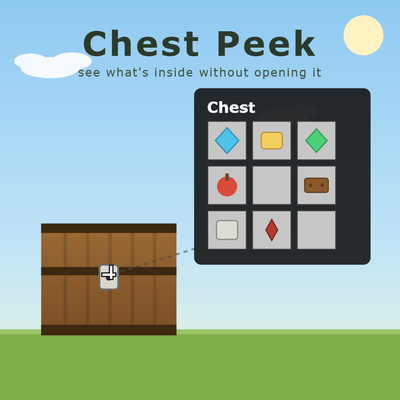
CurseForge · Minecraft mod
ChestPeek
See what's inside any chest, shulker box, or storage block just by looking at it — no need to open it.
Choose a version Pick your version below, then grab the matching file.
Quick answer
Which ChestPeek release should I use?
Latest stable file 1.21.11 ChestPeek-1.0.0
Game version 1.21.11
Loader Fabric
ChestPeek 1.21.11 ChestPeek-1.0.0 targets 1.21.11 with Fabric. The project page does not say whether this file belongs on the client, dedicated server, or both. No extra mods listed for this file.
Where it goes
Is ChestPeek required on the client, server, or both?
The project page does not say whether this file belongs on the client, dedicated server, or both.
Client Source doesn’t say
Dedicated server Source doesn’t say
Loader for this release Fabric
Required install it here Optional supported, not mandatory Not supported do not install here Source doesn’t say do not assume
The source does not explicitly classify this release as client-only or server-only.
What else does ChestPeek 1.21.11 ChestPeek-1.0.0 need?
1.21.11 ChestPeek-1.0.0. Change the file and its required mods may change too.
This file does not list any required mods. Do not add a library just because a different file uses it.
This file does not list any required or optional mods.
Before you install it
Add ChestPeek without breaking your instance.
Built for ChestPeek 1.21.11 ChestPeek-1.0.0. Pick another file and the loader, install side or required mods may change.
- 01
Stick to this file
Use 1.21.11 ChestPeek-1.0.0. It targets 1.21.11 with Fabric; another release may have different loader, side or dependency requirements.
- 02
Bring the mods it needs
This file does not list any required mods. Do not add a library just because a different file uses it.
- 03
Put it on the correct side
The project page does not say whether this file belongs on the client, dedicated server, or both.
- 04
Pick the file you checked
Use the “Get this file” button beside 1.21.11 ChestPeek-1.0.0. It opens that exact file at the source.
About this project
What does ChestPeek add?
Chest Peek
Chest Peek is a fully client-side mod that lets you preview the contents of storage blocks without opening them. Aim your crosshair at a chest and a small slot-grid overlay pops up near your crosshair showing exactly what's inside — items, stack counts, and all — just like a tooltip. Look away, and it's gone.
Features
**World peek**: Aim at any block that holds items — chest, trapped chest, shulker box (any color), barrel, hopper, dispenser, dropper, furnace/blast furnace/smoker, brewing stand, crafter, and more — and its contents render as a clean bordered slot grid near your crosshair, without opening a screen. Works on the Ender Chest too, showing your own personal Ender inventory.
**Shulker box tooltip preview**: Hover your mouse over a shulker box item in any inventory or container screen and its contents appear as the same slot grid, attached right to the item's tooltip — the same mechanism vanilla uses for Bundle previews.
Empty containers still show the panel, clearly labeled so you know at a glance there's nothing to grab.
No block is opened, no packets are sent to interact with it — this is a pure read-only, look-only preview.
Requirements
Minecraft 26.2
Fabric Loader >= 0.19.3
Fabric API 0.156.0+26.2
Java 25
Installation
Fully client-side — install it on your own client only. No server-side installation is needed, and it works fine on unmodified vanilla servers (or singleplayer).
Known limitations
- Double chests are shown as two independent 27-slot halves rather than one merged 54-slot view.
Project description from CurseForge.
Pick your setup
ChestPeek by Minecraft version and loader
Choose the version and loader you play, then open the matching release.
Minecraft version
1.21.11
1 loader buildCheck the dependencies, then try the file in a copied instance before changing a world you care about.
Recent files
ChestPeek versions and loaders
1.21.11 ChestPeek-1.0.0
chestpeek-1.0.0.jar
26 Aug 2026
Client Source doesn’t say Server Source doesn’t say Dependencies No extras listed Listed on Release listing
Check the 1.21.11 · Fabric setup Fabric1.21.11 release
26.2 ChestPeek-1.0.0
chestpeek-1.0.0.jar
16 Aug 2026
Client Source doesn’t say Server Source doesn’t say Dependencies No extras listed Listed on Release listing
Check the 26.2 · Fabric setup Fabric26.2 release
Looking for an older file? The official CurseForge project page is in Resources.
 mod
mod CurseForge · Minecraft
Screen Craft
Show YouTube videos, images and GIFs in your world on resizable screen blocks, synced for every player.
 mod
mod CurseForge · Minecraft
Guard Craft
Protect your base with reinforced blocks, padlocks and keypads for your doors and containers.
 mod
mod CurseForge · Minecraft
TFCPlus Bids
A plugin for Terrafirmacraft+ that aims to realize various fully featured enhancements for gameplay and testing.