Minecraft version
Back to mods 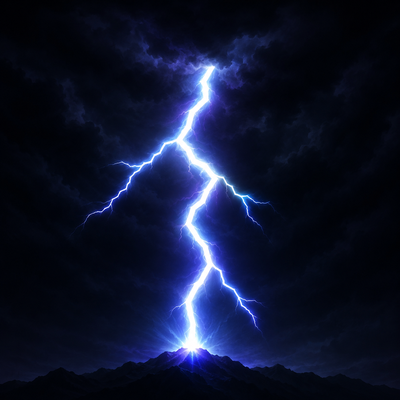
CurseForge · Minecraft mod
Thunderhead - Lightning & Thunder Overhaul
Cinematic lightning and thunder overhaul: procedural branching bolts, distant storm fronts, rolling thunder that lasts up to 15 seconds, shockwaves, ash scars and ball lightning.
Choose a version Pick your version below, then grab the matching file.
Quick answer
Which Thunderhead - Lightning & Thunder Overhaul release should I use?
Latest stable file [NeoForge] Thunderhead 1.2.0
Game version 1.21.1
Loader NeoForge
Thunderhead - Lightning & Thunder Overhaul [NeoForge] Thunderhead 1.2.0 targets 1.21.1 with NeoForge. The project page does not say whether this file belongs on the client, dedicated server, or both. No extra mods listed for this file.
Where it goes
Is Thunderhead - Lightning & Thunder Overhaul required on the client, server, or both?
The project page does not say whether this file belongs on the client, dedicated server, or both.
Client Source doesn’t say
Dedicated server Source doesn’t say
Loader for this release NeoForge
Required install it here Optional supported, not mandatory Not supported do not install here Source doesn’t say do not assume
The source does not explicitly classify this release as client-only or server-only.
What else does Thunderhead - Lightning & Thunder Overhaul [NeoForge] Thunderhead 1.2.0 need?
[NeoForge] Thunderhead 1.2.0. Change the file and its required mods may change too.
This file does not list any required mods. Do not add a library just because a different file uses it.
This file does not list any required or optional mods.
Before you install it
Add Thunderhead - Lightning & Thunder Overhaul without breaking your instance.
Built for Thunderhead - Lightning & Thunder Overhaul [NeoForge] Thunderhead 1.2.0. Pick another file and the loader, install side or required mods may change.
- 01
Stick to this file
Use [NeoForge] Thunderhead 1.2.0. It targets 1.21.1 with NeoForge; another release may have different loader, side or dependency requirements.
- 02
Bring the mods it needs
This file does not list any required mods. Do not add a library just because a different file uses it.
- 03
Put it on the correct side
The project page does not say whether this file belongs on the client, dedicated server, or both.
- 04
Pick the file you checked
Use the “Get this file” button beside [NeoForge] Thunderhead 1.2.0. It opens that exact file at the source.
About this project
What does Thunderhead - Lightning & Thunder Overhaul add?
⚡ Thunderhead
Turn every thunderstorm into a spectacle.
Thunderhead is a cinematic Minecraft lightning and thunderstorm mod for 1.21.1, available for Fabric and NeoForge.
It transforms ordinary thunderstorms into massive atmospheric events with huge procedural lightning bolts, realistic rolling thunder, storm fronts, shockwaves, impact particles, transient illumination, water effects and rare ball lightning.
No external shader pack is required — and the effect looks the same if you use one.
.gif?raw=true)
⚡ Features
- Huge procedural lightning bolts with unique branches, forks and tapering channels
- Rolling thunder lasting 4–15 seconds, dynamically assembled at runtime
- Active storm fronts with dense forked cloud-to-ground lightning on the horizon
- Shockwaves and impact VFX with sparks, debris, smoke, ash, steam and micro-arcs
- Ball lightning — a rare drifting plasma sphere that may remain after a strike
- Water impacts with spray, mist, steam and surface ripples
- Dynamic scene illumination, extended sky flashes and screen exposure effects
- Physical thunder delay based on the distance between you and the strike
- Camera pressure effects synchronized with individual thunder booms
- Works with any shader pack — and identically without one
- Client-side support — the full visual and audio overhaul works on normal servers
- Fabric + NeoForge support for Minecraft 1.21.1
- API for mod developers
🌩️ A complete lightning overhaul
Thunderhead turns a lightning strike into a complete event instead of a single flash.
A leader grows across the sky.
Branches split toward the ground.
The impact floods the landscape with cold light as sparks, debris and electrical effects erupt from the surface.
A shockwave expands from the strike point.
Then the thunder arrives from the correct distance.
Nearby strikes produce violent cracks and heavy booms, while distant lightning becomes long rolling thunder that can continue across the landscape for up to fifteen seconds.
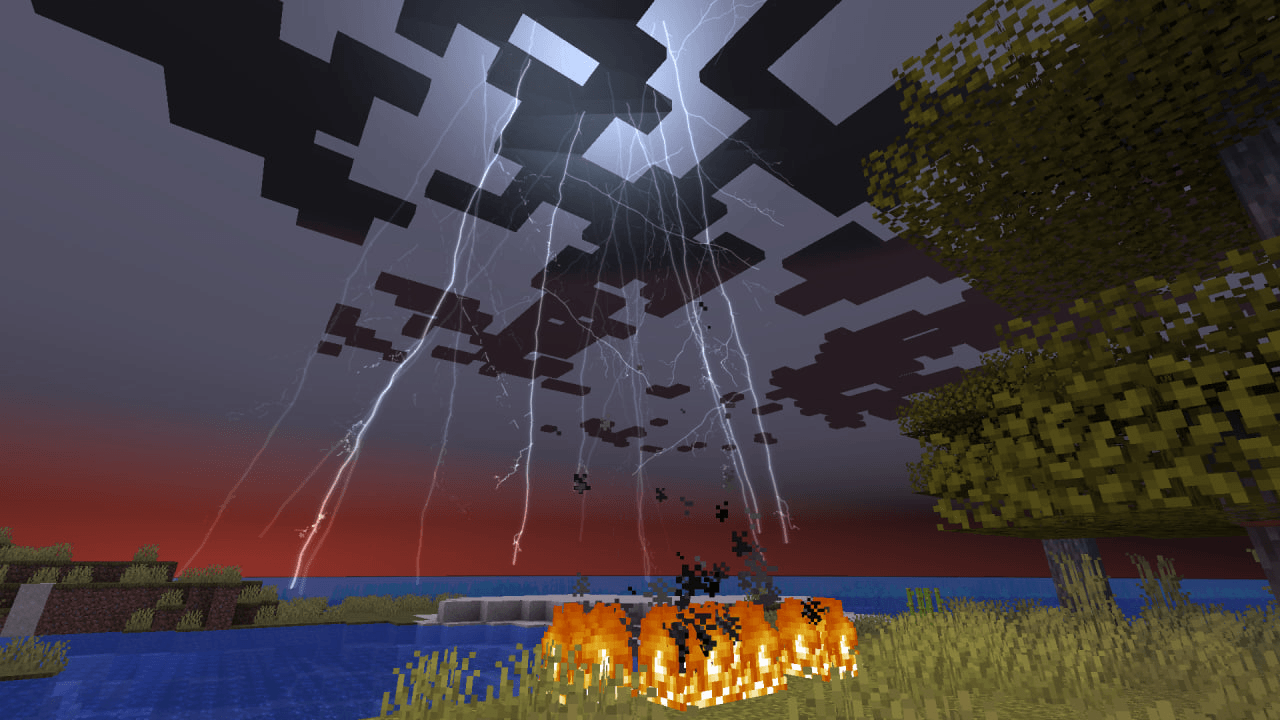
⚡ Procedural lightning
Thunderhead does not simply replace Minecraft's lightning texture.
Every strike is generated as procedural geometry.
Lightning features
- Seeded procedural generation
- Thick main channels
- Progressively thinner forks
- Secondary branches and micro-branches
- Multi-stroke flashes
- Visible cloud-to-ground leader
- Large cloud canopy structures
- Cold-white lightning cores
- Blue and violet emissive layers
The same strike seed produces the same geometry, allowing lightning to remain visually consistent while still creating enormous variation between different strikes.
🔊 Realistic rolling thunder
Thunderhead's thunder is not just one long sound file.
A rolling thunder event is assembled dynamically from multiple independent audio layers, including:
- Electrical cracks
- Heavy booms
- Low-frequency thunder walls
- Irregular overlapping rolls
- Distant grumbles
- Sub-bass impacts
- Long decays
- Arc crackle
Individual layers can have their own direction, delay, pitch and envelope.
That means two storms do not have to sound exactly the same.
Thunder also respects distance.
You see the lightning first. The thunder arrives later.
The camera reacts to individual pressure events as they reach the player instead of simply shaking on a fixed timer.
⛈️ Storm fronts on the horizon
Large thunder rolls can create an active storm front in the distance.
Instead of scattering random flashes across the entire sky, Thunderhead places a concentrated storm region relative to your render distance.
During a strong rolling event, the horizon can produce roughly 15–100 forked cloud-to-ground channels per second, creating the appearance of a huge electrical storm beyond the player.
💥 Lightning impact effects
Lightning impacts can trigger a complete set of custom visual effects:
- Ground shockwave
- Impact burst
- Sparks
- Micro-arcs
- Debris
- Smoke
- Steam
- Ash
- Embers
- Surface ripples
- Temporary illumination
- Screen flashes
- Camera pressure impulses
Nearby moving entities can briefly carry electrical arcs after a strike.
Direct ground impacts can also leave behind a branching Lichtenberg-style scar.
Thunderhead's primary lightning impact effects use its own custom effect system rather than vanilla lightning particles.
🌊 Water impacts
Lightning striking water receives dedicated effects.
Water strikes can generate:
- Spray
- Mist
- Steam
- Surface ripples
- Electrical effects above the water
This makes lightning over oceans, rivers and lakes look different from strikes hitting solid ground.
🔮 Ball lightning
Some lightning strikes can leave behind rare ball lightning.
These glowing plasma spheres drift through the environment after a strike, creating an unusual atmospheric event long after the main bolt disappears.
When Thunderhead is installed on both the client and server, rare ball lightning can also participate in configurable gameplay behavior.
💡 Dynamic lightning illumination
Lightning temporarily changes the appearance of the surrounding scene.
Thunderhead combines:
- Additive impact illumination
- Extended sky flashes
- Emissive lightning channels
- Screen exposure effects
- Distance-aware atmospheric flashes
The goal is to make lightning feel like it actually illuminates the world instead of only drawing a bright line in the sky.
✨ Shaders: not required, not a problem
Thunderhead does not require an external Minecraft shader pack, and it does not change how it looks when you use one.
The mod draws its lightning with its own rendering programs, into a render target of its own, and applies the result to the frame after Minecraft — and any shader pack — has finished producing the scene image. Nothing on that path depends on which rendering pipeline is installed, so the same strike looks the same in vanilla rendering and under a pack.
Occlusion still comes from the frame itself: the effect is depth-tested against the depth buffer the game is already using, so terrain, water, entities and particles hide lightning exactly as they should in either case.
If something unexpected prevents that — a rendering program that will not compile on your driver, or an unfamiliar pipeline — Thunderhead falls back to drawing the effect the older, simpler way instead of disappearing, and records the reason in the log.
Verified with Iris 1.8.12 under Complementary Unbound r5.8.1 and ARTShade V0.3.0FIX on Minecraft 1.21.1.
🖥️ Client-side or server-side?
Client only
Installing Thunderhead only on your client enables the complete visual and audio overhaul:
- Procedural lightning
- Rolling thunder
- Storm fronts
- Impact VFX
- Dynamic illumination
- Camera effects
- Atmospheric effects
You can use Thunderhead while connecting to servers that do not have the mod installed.
Client + server
Installing Thunderhead on both the client and server additionally enables configurable gameplay features such as:
- Near-miss damage
- Rare ball-lightning gameplay behavior
Thunderhead derives its storm visualization from information Minecraft already replicates, so players can see the same storm without requiring a custom packet for every visual effect.
Vanilla behavior including lightning rods, copper weathering, fire ignition and mob conversions remains unchanged.
⚙️ Performance
Thunderhead includes four quality presets:
Low · Medium · High · Ultra
You can also tune individual settings such as:
- Particle limits
- Effect range
- Level of detail
- Concurrent effects
This allows the mod to scale across different hardware while preserving the core lightning experience.
♿ Accessibility
Thunderhead includes reduced-flashing options.
Reduced-flashing mode can:
- Remove rapid re-strikes
- Reduce flickering
- Cap exposure intensity
- Respect Minecraft's Hide Lightning Flashes setting
Mods using the Thunderhead API cannot override these accessibility restrictions.
🧩 API for mod developers
Thunderhead provides a small client-side API for other Minecraft mods.
Other mods can:
- Create custom lightning strikes
- Control where lightning lands
- Control strike direction and angle
- Adjust bolt thickness
- Adjust branching
- Adjust reach
- Use arbitrary RGB lightning colors
- Select thunder behavior
- Configure debris behavior
- Listen for Thunderhead lightning events
The integration degrades to a no-op when Thunderhead is absent, allowing optional integrations without crashing the host mod.
📖 Full API reference, Gradle coordinates and examples
🐛 Bug reports and feature requests
🎨 Original assets
Thunderhead does not use the vanilla lightning renderer, vanilla thunder audio or vanilla lightning particle system for its primary effects.
Every bundled texture, GLSL program, sound and the mod icon is original work made for this project — synthesised from noise, filters and drawn primitives, with audio built from filtered noise and transients. Nothing is sampled from Minecraft, from another mod, from a shader pack or from the web.
No external asset pack is required.
📦 Requirements
Minecraft: 1.21.1 Java: 21
Fabric
- Fabric Loader 0.16.14+
- Fabric API
NeoForge
- NeoForge 21.1+
🔧 Compatibility
- Fabric: automated builds verified
- NeoForge: automated builds verified
- No external shader pack: supported by design
- Iris: verified with Iris 1.8.12 under Complementary Unbound r5.8.1 and ARTShade V0.3.0FIX; the effect is pack-agnostic by construction, so other packs are expected to work
- OptiFine: untested rather than unsupported — nothing in the mod targets it, and nothing requires it to cooperate
❓ FAQ
Does Thunderhead require shaders?
No.
Thunderhead is designed to provide cinematic lightning and thunder effects without requiring an external Minecraft shader pack.
Does Thunderhead work with shader packs?
Yes.
The effect is rendered by the mod itself and applied after the shader pack has finished the frame, so lightning looks the same with a pack as without one.
Is Thunderhead client-side?
Yes.
The complete visual and audio overhaul works with Thunderhead installed only on the client.
Installing it on both the client and server additionally enables configurable gameplay features such as near-miss damage and rare ball lightning.
Which Minecraft versions are supported?
Thunderhead 1.2.0 supports Minecraft 1.21.1 on Fabric and NeoForge.
Can other mods use Thunderhead?
Yes.
Thunderhead provides a client-side API for creating and styling custom lightning strikes and listening for lightning events.
See the Thunderhead API documentation.
❤️ Support development
Enjoy Thunderhead or my other Minecraft projects?
You can support development and help fund future updates, testing and new mods:
Every contribution helps me spend more time developing, testing and creating new Minecraft projects.
Thank you! ❤️
🔎 Search words / SEO
Minecraft lightning mod, Minecraft thunder mod, Minecraft thunderstorm mod, Minecraft weather mod, Minecraft storm mod, Minecraft 1.21.1 mod, Minecraft 1.21.1 lightning mod, Minecraft 1.21.1 weather mod, Fabric lightning mod, Fabric weather mod, Fabric 1.21.1 mod, NeoForge lightning mod, NeoForge weather mod, NeoForge 1.21.1 mod, realistic lightning Minecraft, realistic thunder Minecraft, realistic thunderstorm Minecraft, cinematic lightning Minecraft, cinematic thunder Minecraft, cinematic weather mod, procedural lightning Minecraft, procedural lightning mod, dynamic lightning Minecraft, dynamic weather Minecraft, rolling thunder Minecraft, thunder sound mod, lightning effects Minecraft, lightning VFX mod, storm effects Minecraft, weather effects Minecraft, Minecraft visual effects mod, Minecraft atmospheric mod, Minecraft immersion mod, Minecraft graphics mod, client side Minecraft mod, client-side weather mod, client-side lightning mod, Minecraft mod without shaders, Minecraft no shaders mod, shaderless Minecraft mod, no shader lightning mod, lightning mod with shaders, Iris compatible lightning mod, shader compatible weather mod, ball lightning Minecraft, Minecraft ball lightning mod, lightning shockwave Minecraft, lightning particles Minecraft, lightning impact effects, dynamic lighting Minecraft, thunderstorm overhaul Minecraft, lightning overhaul Minecraft, weather overhaul Minecraft, immersive weather Minecraft, storm ambience Minecraft, Minecraft lightning API, Minecraft weather API
Project description from CurseForge.
Pick your setup
Thunderhead - Lightning & Thunder Overhaul by Minecraft version and loader
Choose the version and loader you play, then open the matching release.
Check the dependencies, then try the file in a copied instance before changing a world you care about.
Recent files
Thunderhead - Lightning & Thunder Overhaul versions and loaders
[NeoForge] Thunderhead 1.2.0
thunderhead-neoforge-1.2.0.jar
22 Aug 2026
Client Source doesn’t say Server Source doesn’t say Dependencies No extras listed Listed on Release listing
Check the 1.21.1 · NeoForge setup 1.21.1NeoForge release
[Fabric] Thunderhead 1.2.0
thunderhead-fabric-1.2.0.jar
22 Aug 2026
Client Source doesn’t say Server Source doesn’t say Dependencies 1 required · 1 unchecked Listed on Release listing
Check the 1.21.1 · Fabric setup Fabric1.21.1 release
[Neoforge] Thunderhead 1.1.0
thunderhead-neoforge-1.1.0.jar
16 Aug 2026
Client Source doesn’t say Server Source doesn’t say Dependencies No extras listed Listed on Release listing
Check the 1.21.1 · NeoForge setup 1.21.1NeoForge release
[Fabric] Thunderhead 1.1.0
thunderhead-fabric-1.1.0.jar
16 Aug 2026
Client Source doesn’t say Server Source doesn’t say Dependencies 1 required · 1 unchecked Listed on Release listing
Check the 1.21.1 · Fabric setup Fabric1.21.1 release
[NeoForge] Thunderhead 1.0.0
thunderhead-neoforge-1.0.0.jar
16 Aug 2026
Client Source doesn’t say Server Source doesn’t say Dependencies No extras listed Listed on Release listing
Check the 1.21.1 · NeoForge setup 1.21.1NeoForge release
[Fabric] Thunderhead 1.0.0
thunderhead-fabric-1.0.0.jar
16 Aug 2026
Client Source doesn’t say Server Source doesn’t say Dependencies 1 required · 1 unchecked Listed on Release listing
Check the 1.21.1 · Fabric setup Fabric1.21.1 release
Looking for an older file? The official CurseForge project page is in Resources.
 mod
mod CurseForge · Minecraft
Item Altar
Sacrifice mobs near the Item Altar to earn points and exchange them for valuable resources.
 mod
mod CurseForge · Minecraft
Reflyky / Addon AOT
This mod will make your Attack on Titan mod experience much better!
 mod
mod CurseForge + Modrinth · Minecraft
Armored Arms
A small client mod that adds first-person rendering of armour on the hand